


Notification for Telegram
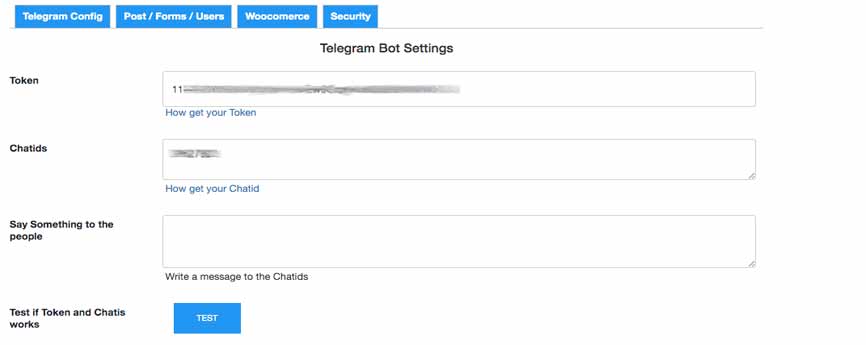
This is the Global option page in you Dashboard. Enter Token Chatid
The “Notification for Telegram” plugin for WordPress is a tool that allows you to send notifications and messages to a Telegram channel, group or user/s when specific events occur on your WordPress site.
This plugin is useful for monitoring critical events on your site, such as new comments, new user registrations, publishing activities, New forms sent,Woocommerce and Surecart orders, cart and lowstock, Mailchimp and more, by sending notifications directly to a Telegram channel or group or user/s of your choice. It also offers a shortcode to send Telegram notifications on every page of your website or in your code.
Receive Telegram messages notification when:
- When receive a new order in Woocommerce.
- When a Woocommerce order change status.
- When receive a new order in Surecart.
- Every event captured by WP Activity Log plugin
- You can also send messages directly from the shell using WP-CLI with ‘wp telegram send “Backup complete”‘
- New field in Woocommerce checkout page let customers add the own telegram nickname
- Low Stock Product notifications when a product is low stock conditions.
- Shows Telegram Nick link in admin order details page when present
- When receive new forms (supports Elementor Pro Form, WPForm , CF7 and Ninjaform)
- When new user subscribes or unsubscribes to mailchimp. MC4WP integration
- When new user registers. Helps identify unauthorized or suspicious registrations.
- When users login or fail login.
- When new comment is posted.
- When someone adds or remove a product in the Woocommerce cart.
- When a new Pending posts is received. (works with any post type)
- Say function to speak to make the bot say Something to the people
- Cron job detect and notify when Plugins & Core need to update.
- Send custom message with Shortcode anywhere in your WP.
- Should Work on Multisite
You can enable/disable every notification in the Plugin settings page.
To configure the plugin, you need a valid Telegram API token. Its easy to get starting a Telegram Bot.
You can learn about obtaining tokens and generating new ones in
Setup Guide
- Setup Wizard: a guided 3-step popup appears automatically on first install to help you configure your Telegram bot token and Chat ID
A complete step-by-step guide is available here:
View the full documentation
To get your Bot Token, you can refer to one of these resources:
To get your Chat ID, you need at least one recipient ID. You can retrieve it using one of these bots directly in Telegram:
- @get_id_bot — send /start and it will reply with your personal Chat ID
- @RawDataBot — send any message and it will return your full account info including your ID
For Channel and Group Chatid settings see the FAQ section.
Once You got the 2 fields save the configuration and try the “TEST” button .. you should receive a message in you telegram : “WOW IT WORKS” !! If not, check token and chatid fields again for the correct values.
this plugin is relying on a 3rd party service to geolocate the Ip address https://ip-api.com/
https://ip-api.com/docs/legal to see the services’ a terms of use and/or privacy policies
AI & MCP Compatible
This plugin supports the WordPress Abilities API and is compatible with
MCP (Model Context Protocol) — the standard that allows AI agents like
Claude, ChatGPT, and others to interact with WordPress autonomously.
If the Abilities API and MCP Adapter plugins are installed, any
authorized AI agent can automatically discover and use the
Send Telegram Message ability — no extra configuration needed.
What an AI can do with this plugin:
* Send a Telegram message with custom text
* Add an inline button with label and URL
* Override the default chat ID
Requirements for MCP
WordPress 7.0+ (Abilities API built-in)
Plugin: MCP Adapter
Enable “AI / MCP” in the plugin settings
WordPress 6.9 compatibility
WordPress 6.9+
Plugin: Abilities API
Plugin: MCP Adapter
WP-CLI support
Send Telegram messages directly from the shell using wp nftb send
wp telegram send “Hide WORLD”
MESSAGES TRANSLATION
To translate Telegram messages, use WPML or Loco Translate. All notification strings are now translatable.
Go to Loco Translate Plugins Notification for Telegram to add your translations.
For WPML, ensure String Translation is enabled to modify notification texts.
ACTION HOOK for third-party Plugin
Notification for Telegram (version > 3.5.1) exposes a dedicated action hook so any third-party plugin can send messages without calling internal functions directly.
Basic usage:
do_action( ‘nftb_send_message’, ‘Your message here’ );
Look FAQ Section for more esamples.
SHORTCODE EXAMPLE
[telegram_mess message="Im so happy" chatids="0000000," token="000000000:AAAAAAAAAAAAAAAAAAAAAAAAAAAAAAAAAAAAAAAAAAAA" showsitename="1" showip="1" showcity="1" ]
Look FAQ Section for more esamples.
Suggestions for new notifications, hooks, and plugin integrations are always welcome!