

NiroHelp – AI-Native Helpdesk for Knowledge Base, Tickets, AI Chatbot, AI Ticket Responder and more

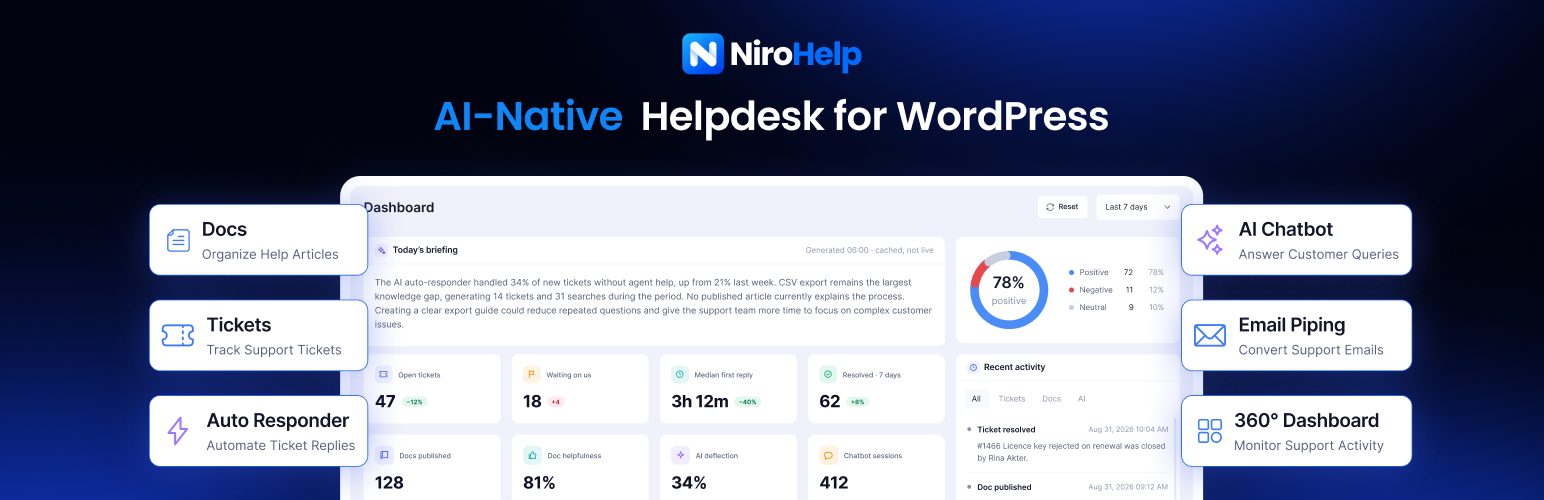
The support dashboard: a daily briefing written from the week's own tickets, customer sentiment, deflection and reply-time figures, work queues ranked by risk, and a live activity feed.
Home | Features | Integrations | Pricing | Documentation | FAQ | Migration | Roadmap | Blog
Let your documentation do the answering.
NiroHelp is a WordPress help desk with three things in one place: a knowledge base for your documentation, a support ticket system for your customers, and AI that answers tickets and chat questions from the docs you publish.
The AI replies only when it is confident enough. Otherwise it stays silent and the ticket waits for your team.
The help desk itself (docs, tickets, emails, dashboard and migration) works on its own, with no account and no external service. AI features are optional and run on NiroHelp Cloud; Slack and webhooks are optional too, and send only what you switch on. See External services below.
How the AI answers a ticket
- A customer writes in. A new ticket or client reply schedules one AI reply.
- The AI searches the docs you synced for a real answer.
- Above your threshold, it replies, after your response delay (5 minutes by default). Each new client message restarts the delay.
- Below it, a human takes over. Nothing is posted, the attempt is logged, and the ticket stays in your queue. An agent reply cancels the pending one.
Raise the threshold and the AI speaks only when sure; lower it and it handles more. It runs from 0 to 100%, default 70%.
Why teams choose NiroHelp
An agent reply always wins. No OpenAI or other model key, and no second AI vendor. Unlimited agents and tickets on every plan, no seat pricing. One admin menu, one settings screen and one product list instead of three plugins.
Built for
- Product companies answering the same questions daily, whose docs can carry the load.
- Support teams needing real ticketing without per-agent pricing.
- Agencies running support for client sites, with a chatbot branded for each one.
Explore each feature
📚 Knowledge base · 🎫 Support ticket system · 💬 AI chatbot · 🤖 AI auto-responder · 📊 Dashboard and copilot · 🔌 Integrations · 🔄 Migration
Knowledge base
- Native WordPress docs: a standard post with a featured image, written in the editor. Drafts stay drafts, private docs stay private.
- Topics and products. Nested topics, plus product tags shared with tickets, and drag-and-drop ordering for both. See topics and products.
- Archive with search.
[nirohelp_docs]renders topic cards and a search box answering in place, without a reload; limit it to one product with theproductattribute. - Doc voting. “Was this doc helpful?” Yes and No, counts only: no IP address, no visitor identity. Totals appear in the admin list and dashboard. See doc voting.
- Nine URL structures from your docs page, topic and product, with or without the docs base, to keep your old plugin’s shape. See doc URLs.
- Reader navigation: sidebar, breadcrumbs, previous and next links, rating buttons and comments, each switchable on its own.
- Archive sizing: docs per page, and how many show under a topic before “View all”.
- Code and images. Highlighted code with
[nirohelp_code lang="php"](Prism.js) and click-to-zoom images (Fancybox). See code blocks and images. - Fast at scale. Doc lists cached in your object cache (Redis, Memcached) or transients for a lifetime you set, cleared when a doc changes.
- Content insights. Views, votes and failed searches feed the dashboard’s most-read, never-read, unhelpful, not-updated-in-a-year and missing-docs panels.
Support ticket system
- Front-end ticket form.
[nirohelp_new_ticket], so customers never touch wp-admin. - Form builder. Show, hide, reorder and require the built-in fields (subject, description, product, topic, urgency, order ID), and add custom text, number, email, textarea or select fields. See ticket form fields.
- File attachments. Images, PDFs and ZIPs (10 MB by default) on tickets and replies, kept outside the media library in a protected folder, served only to people allowed to see the ticket.
- Eight ticket statuses, changing automatically when the client or an agent replies (see below), each change noted in the thread with who made it.
- Urgency and reasons. Four urgency levels (Low, Medium, High, Severe) and a reasons taxonomy showing why customers contact you.
- Agent queue.
[nirohelp_all_tickets]: status tabs, search, filters (agent, product, reason, urgency, date), quick edit and a rich-text reply box. - Client portal.
[nirohelp_tickets]: each customer’s own tickets and conversations. - Automatic assignment: random, round-robin or least-loaded, with a per-agent ticket cap, or off to assign by hand. See auto-assigning agents.
- Agents page. Each agent’s open and total tickets, an “At capacity” badge and a link to their queue.
- Roles: NiroHelp Manager, NiroHelp Agent and a minimal NiroHelp User for customers, alongside Administrators. See roles and permissions.
- Embeddable ticket widget: a theme-free “Need Help?” button and form for other sites, served from
/nirohelp/tickets/embed/. See embedding the ticket UI.
Ticket statuses
Open, Waiting (your team’s turn), In Progress (the client’s turn), On Hold, Resolved, Reopened, Cancelled and Closed. Replies switch a ticket between Waiting and In Progress on their own, and leave Resolved, Cancelled and Closed alone; turn that off under Settings Tickets Behaviour. Each change fires an action hook and sends the matching email. More in ticket statuses.
Passwordless client login
Customers sign in without a password by default. Pick the method under Settings Tickets Submission:
- Verification code: a 6-digit code by email (default).
- Magic link: one-click sign-in, valid for 5 minutes.
- Password: a standard login, with email-verified sign-up.
Passwords run through WordPress’s own authentication, so login security plugins such as brute-force limiters keep working. Guest submission is optional: visitors file a ticket with their name and email and get a sign-in link. More in client login.
Email notifications
- Seven notifications: login code, magic link, new ticket (to the client and to the agent), agent reply, client reply, ticket resolved.
- Edit each one’s header, subject and body, with placeholders such as
##client_name##,##ticket_subject##and##ticket_link##(a one-click sign-in link to the ticket). - Shared branding (logo, footer text, brand colour, background and content width), set once for all of them.
- Sent through
wp_mail, so any SMTP plugin works. More in notification emails.
AI chatbot
- One snippet, any website: a single
<script>tag, or a mini plugin to download for WordPress sites. See embedding the chatbot. - Answers from your docs, once synced, following your AI instructions.
- Conversation memory. Follow-ups keep context, and the thread survives a page change.
- Your brand: agent name, avatar, accent colour, position, welcome message, suggested questions, input placeholder, launcher label, panel size (400 × 620 by default, capped to small screens) and the “Powered by NiroHelp” footer, on or off. See customizing the chatbot.
- Auto-open triggers: after a delay, at a scroll depth or on exit intent, at most once per visit.
- Page targeting. Show or hide it on URL paths such as
/docs/*or/checkout/*. Hide rules win. - Business hours like
mon-fri:9-17in the visitor’s local time; outside them, show an offline message or hide the widget. - Route to a human: a support email and ticket page it shares when a visitor needs one.
- Optional lead capture. Ask for a name and email early on, matching known addresses to their WordPress account. Off by default.
- Live preview before you copy the code.
- Private by design. Conversations live in the visitor’s browser session and clear when the tab closes. See chatbot conversation storage.
AI auto-responder
- Answers new tickets and client replies from your synced docs, after a delay set in minutes, hours or days.
- Withheld answers are logged with their score and the reason it held back.
- Cancels when an agent replies or the ticket is resolved, closed or cancelled, so it never answers stale context.
- One attempt per client message: it never replies to itself and never sends twice for the same message.
- Posts under an author name you choose (“Support Bot” by default), and can move the ticket to In Progress.
More in the auto-responder guide.
Ticket sentiment
- Every ticket is labelled positive, neutral or negative, with a note on what is blocking the customer.
- Classified about two minutes after a new ticket or client reply, with an hourly catch-up, so nobody waits on an AI call to file a ticket.
- Terminal tickets too: an angry message on a resolved ticket is the strongest reopen signal a desk gets.
- An agent can override the label or re-analyse on demand from the ticket screen, and a manual label is never overwritten.
- Feeds the dashboard’s mood split and the risk ranking behind Needs attention; a ticket it has not reached reads as undecided, not a guess.
AI tools for your team
- Generate response with AI. Agents draft a reply from your docs in one click, then edit before sending.
- AI instructions: standing guidance on tone and scope for the chatbot and auto-responder. See custom instructions.
- Ask NiroHelp. Administrators ask plain-language questions about tickets, agents, chatbot activity and doc gaps. Answers cite their basis, and say “not enough history yet” rather than inventing a number. It can propose creating a ticket, changing a status or adding an internal note, acting only once you confirm. See Ask NiroHelp.
- Logs: separate feeds for chatbot answers, auto-responder replies and Ask NiroHelp questions, with the relevance score behind each attempt; auto-responder entries link back to their ticket.
- Usage: chatbot responses, auto-responder replies and plan credits left, with the renewal date.
- Connect and disconnect from one screen. Register the site, sync docs, and disconnect whenever you like, clearing the stored credentials on this site only. See registering for AI and syncing docs.
Support dashboard
A 360° view of the desk, over the last 7, 30 or 90 days, this week or this month:
- Key numbers, each against the previous period: open tickets, waiting on your team, average first reply, resolved, AI deflection, AI replies sent, docs published and doc helpfulness.
- Work queues: Needs attention (ranked by risk: wait time, follow-up count, urgency and how the thread reads, reopened tickets first), Needs reply (oldest first) and New tickets.
- Daily briefing written each morning; plain figures when AI is off.
- Customer sentiment split across recent tickets.
- AI performance: replies sent, deflection, answers withheld below the threshold, and how often and how quickly a human took over.
- Chatbot outcomes: questions asked and most asked, sessions that ended in an answer, were handed to a ticket, or were abandoned.
- Agent workload: per-agent first reply and resolution times, the AI’s share of their tickets, and how work is spread across the team.
- Busiest hours heatmap for tickets, agent replies and chatbot questions.
- Doc insights: most read, never read, read only once, marked unhelpful, untouched for a year, searches that found nothing, and ticket subjects your docs do not cover.
- Activity feed across tickets, docs and AI, plus Rescan to re-classify sentiment and regenerate the briefing.
More in the dashboard guide.
Slack and webhooks
- Slack. New tickets, customer replies, assignments and alerts post to a channel, one thread per ticket, with the ticket’s card kept current. Route by product, and @mention or message the assignee. Runs on your own Slack app, created from a manifest NiroHelp writes. See Slack.
- Webhooks. Ticket events as signed HTTPS POSTs to a URL of your own, for Make, n8n or your own code, with retries, a delivery log and redeliver. An endpoint that fails five times in a row is switched off and flagged. See webhooks.
- Both deliver in the background, never replay a migration, and live under NiroHelp Integrations for administrators.
Migrate from other help desk and knowledge base plugins
Import in the background, in batches, from:
- BetterDocs: docs, categories and votes.
- weDocs: parent pages become topics, articles become docs, votes included.
- Echo Knowledge Base: articles and categories from every knowledge base.
- BasePress: articles, knowledge bases, sections and votes.
- Awesome Support: tickets, replies, attachments, assigned agents, products and departments.
- SupportCandy: tickets, threads, customers, agents, categories, priorities, tags, custom fields and attachments.
- JS Help Desk: tickets, replies, departments, products, priorities, custom fields and attachments.
Each button stays disabled until that plugin is detected, so keep the old one active while you import. Re-running skips what is already imported. Once you have checked the result, Clean permanently deletes the migrated data from the old plugin; it asks first, and there is no undo. Every migration guide lists what comes across and what stays behind.
Your data, your site
- Stored in WordPress. Docs and tickets are posts, replies are comments, attachments sit in your uploads folder. Three tables of the plugin’s own hold webhook endpoints, their delivery log and the queue Slack and webhook deliveries wait in.
- Modular. Turn the knowledge base or ticketing off at any time; that hides it and deletes nothing. See enabling modules.
- Nothing lost on uninstall. Deleting the plugin leaves your docs, tickets and settings in the database.
- Translation-ready. Every string uses the
nirohelptext domain, and a.potfile is included. See translating NiroHelp.
Shortcodes
[nirohelp_docs]: knowledge base archive with search.[nirohelp_new_ticket]: ticket submission form.[nirohelp_tickets]: the signed-in customer’s tickets.[nirohelp_all_tickets]: the agent ticket queue.[nirohelp_login_form]: customer sign-in form.[nirohelp_code lang="php"]: highlighted code block.
For developers
- REST API under
/wp-json/nirohelp/v1/for docs, tickets, comments, attachments, settings, migration, AI, integrations, webhooks and the dashboard. See the REST API reference. - Ticket lifecycle actions, including
nirohelp-tickets-ticket_created,nirohelp-tickets-client_commented,nirohelp-tickets-agent_commented,nirohelp-tickets-agent_changedandnirohelp-tickets-ticket_status_changed. See action hooks. - Filters, including
nirohelp_settings_menus,nirohelp_product_post_types,nirohelp_auto_status_transition_on_comment,nirohelp_can_register_users,nirohelp_attachment_typesandnirohelp_attachment_max_bytes. See filter hooks. - Named, versioned events (
ticket.created,ticket.replied,ticket.assigned,ticket.status_changedand more) through thenirohelp_eventaction and signed webhooks, and an integration registry on thenirohelp_integrationsfilter. See webhooks. - A theme-free ticket portal for an iframe on any site: embedding the ticket UI.
- Point the AI features at another NiroHelp Cloud server with the
NIROHELP_CLOUD_SITEconstant. - Full guide in the developer documentation, and every setting in the settings reference.
Plans, credits and pricing
The knowledge base, ticket system, emails, dashboard and migration tools are free, with no limits on agents, tickets or docs. AI features run on NiroHelp Cloud and need a paid NiroHelp plan: Starter (1 site), Growth (5 sites) and Agency (10 sites), all with unlimited agents and a 30-day money-back guarantee.
One credit is one AI answer, whatever its length, shared across your connected sites and renewed monthly. When it runs out the AI pauses and everything else keeps working. See NiroHelp pricing.