

Nexura Security — Malware Scanner, Firewall, 2FA & WordPress Security
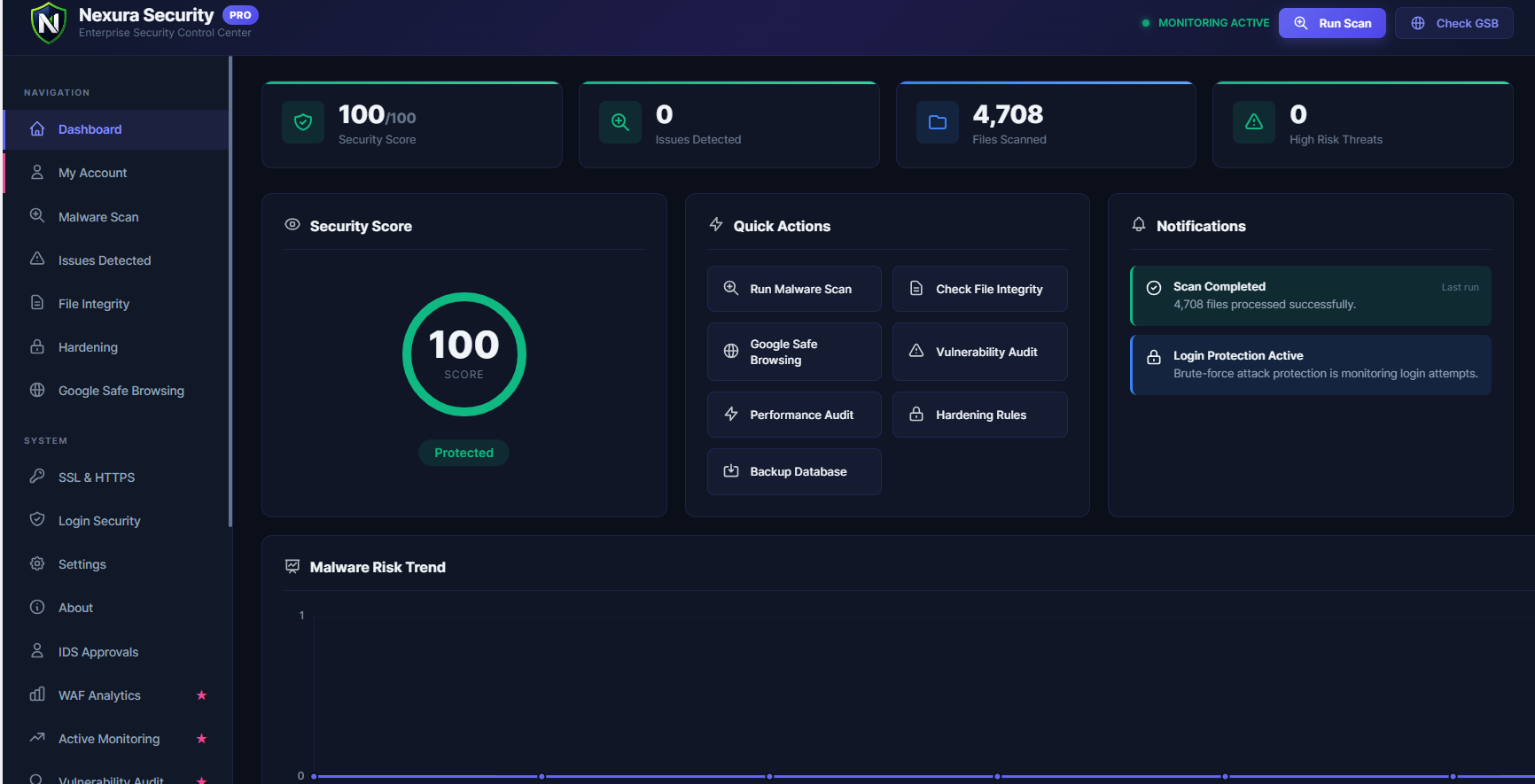
<strong>Security Dashboard</strong> — Your complete security overview at a glance: real-time security score, total issues detected, files scanned, and high-risk threats in a clean, modern interface.
Nexura Security is a complete, enterprise-grade WordPress security plugin that protects your website from hackers, malware, and brute-force attacks — completely free.
Whether you run a personal blog, a WooCommerce store, or a business website, Nexura Security gives you the same level of protection used by enterprise websites — without slowing your site down and without expensive subscriptions.
⚡ The Faster, Lighter Alternative to Wordfence & Sucuri
Tired of heavy security plugins that slow down your site, bloat your database, and charge a premium for basic features?
Nexura Security is built differently:
- Zero Database Bloat — Smart micro-batching runs scans quietly in the background without overloading your server.
- No Performance Hit — Your visitors will never experience slowdowns during or after a security scan.
- One-Click Setup — No technical knowledge required. Get protected in under 60 seconds.
- 100% Free Core — Every essential security feature is included at no cost, forever.
🛡️ Free Features (Everything You Need to Stay Secure)
🔍 Deep WordPress Malware Scanner
Automatically scans your entire WordPress installation — plugins, themes, uploads, and core files — for hidden backdoors, obfuscated PHP code, suspicious JavaScript injections, web shells, and known malware patterns. Detected threats are displayed with severity ratings and can be removed with a single click.
🔥 Web Application Firewall (WAF)
Blocks SQL injection (SQLi), Cross-Site Scripting (XSS), remote file inclusion (RFI), and other OWASP Top 10 attacks before they ever reach your WordPress database. The WAF loads via auto_prepend_file — before WordPress boots — for the earliest possible threat interception.
⚠️ Automated Security Alert Emails
When Nexura Security detects malware or threats during a scan, it automatically sends a beautifully formatted HTML security alert email to the site administrator with a full threat summary and a direct link to the dashboard. Alerts are rate-limited to once per 24 hours to prevent inbox spam.
📂 WordPress Core File Integrity Monitor
Compares every WordPress core file against clean, official checksums from WordPress.org to detect any unauthorized modifications. If a hacker modifies wp-login.php, wp-config.php, or any other core file, you will know immediately.
📁 Root Directory Integrity Checker
Detects suspicious and unknown files dropped directly into your WordPress root folder — a common technique used by attackers to plant backdoors and web shells.
🔐 Two-Factor Authentication (2FA)
Protect your WordPress admin login with TOTP-based two-factor authentication. Works with Google Authenticator, Authy, Microsoft Authenticator, and any standard TOTP app. Includes a full-screen QR code setup wizard.
🔗 Passwordless Magic Link Login
Allow trusted users to log in via a secure, time-limited link sent to their email — no password required. Eliminates password-based brute-force risks entirely.
🚫 Brute-Force Attack Protection
Automatically blocks IP addresses after repeated failed login attempts. Fully configurable lockout duration, attempt thresholds, and whitelisting.
🔑 Pwned Password Checker
When users set or change their passwords, Nexura Security silently checks against the HaveIBeenPwned database using the k-Anonymity model — your full password is never transmitted. If a compromised password is detected, the user is warned immediately.
🤖 Anti-Spam & Bot Protection (CAPTCHA)
Protect your login, registration, and comment forms from automated spam bots using Cloudflare Turnstile (privacy-respecting) or Google reCAPTCHA v2/v3 integration.
🌍 Real-Time Threat Intelligence
Syncs with the Nexura Threat Intel Cloud to receive up-to-date malicious IP blocklists and WAF attack signatures, keeping your firewall rules current against the latest threats.
🛠️ One-Click Security Hardening
Apply all WordPress security best practices in one click:
- Disable the built-in file editor
- Block PHP execution in the uploads folder
- Disable directory listing
- Block XML-RPC attacks
- Disable user enumeration via REST API
🚑 Fatal Error Auto-Heal (White Screen of Death Protection)
Uses the official WordPress Drop-in pattern (wp-content/fatal-error-handler.php) to catch PHP fatal errors before they crash your entire site. If a newly installed plugin or theme causes a “White Screen of Death,” Nexura automatically detects the faulty plugin, safely disables it, and reloads the page.
🗄️ Database Security Scanner
Scans your WordPress database for rogue administrator accounts, suspicious option values, and malicious content injected into posts and pages by attackers.
💾 Database Backup
Create a full database backup with one click before performing any cleanup operation — so you can always roll back safely.
📊 Real-Time Upload Scanning
Every file uploaded through WordPress (media, plugins, themes) is automatically scanned for malware signatures before it is saved to your server.
🔍 Google Safe Browsing Check
Instantly verify whether your website has been flagged by Google as containing malware or phishing content. Catch blacklisting before your visitors do.
📡 SSL & HTTPS Monitor
Monitors your SSL certificate health and enforces HTTPS redirects to prevent mixed-content warnings and insecure connections.
🌟 Pro Features — Advanced Protection & Automation
Nexura Security Pro extends the free version with powerful automation, advanced scanning, and enterprise-grade protection:
- Tokenizer-Based Smart Scanner — Uses PHP’s
token_get_all()AST engine to detect zero-day backdoors and polymorphic malware that regex-based scanners miss entirely. - Automated Malware Cleanup — One-click automated removal of detected malware without needing developer access.
- WordPress Core Auto-Restore — Downloads clean copies of modified core files from WordPress.org and replaces them using atomic, crash-safe file writes.
- File Quarantine System — Moves suspicious files to an isolated, execution-blocked quarantine zone where they cannot cause harm while you review them.
- Custom Login URL (Hide wp-admin) — Rename
wp-login.phpandwp-adminto a secret URL, blocking 99% of automated brute-force bots before they even reach your login page. - HTTP Security Headers — Add Content-Security-Policy (CSP), HSTS, X-Frame-Options, Permissions-Policy, Referrer-Policy, and more. Includes Recommended, Strict, and Custom presets.
- REST API Security — Block unauthenticated REST API access and prevent username enumeration via
/wp-json/wp/v2/users. - WooCommerce Security — Anti-card-testing protection on checkout pages and account takeover prevention for customer accounts.
- Vulnerability Audit — Automatically detects plugins, themes, and WordPress core versions with known CVEs (Common Vulnerabilities and Exposures).
- Database Optimizer — Removes post revisions, expired transients, orphaned metadata, and spam comments to improve database performance.
- Storage Cleanup Scanner — Safely identifies unused images, PDFs, and orphaned upload files to reclaim disk space.
- Plugin Conflict Cleaner — Detects and safely removes database leftovers from conflicting or previously deleted security plugins.
- Security Trust Badge — Display a dynamic “Protected by Nexura Security” seal on your website to build visitor confidence.
- 📡 Active Visitor Monitoring — Real-time visitor tracking dashboard with live stats, 4 interactive charts (Traffic Trend, Browser, Device, OS), auto-refreshing visitor table, and intelligent bot detection.
- 📌 Visitor Stats Shortcodes — 5 shortcodes (
[nexura_visitors],[nexura_stats],[nexura_live],[nexura_popular],[nexura_page_views]) to display live security and visitor stats anywhere on your site. - Scheduled Automatic Scans — Set malware scans to run every 2 hours, daily, weekly, or monthly — fully automatic, no manual action required.
- Advanced Audit Logs — A complete, tamper-evident log of every security event, user login, file change, settings modification, and admin action.
- Priority Support — Direct access to the Nexura Security expert team for fast, personalized help.
Upgrade to Nexura Security Pro
🔗 Third-Party Services & External API Connections
To provide comprehensive security, Nexura Security connects to several trusted third-party services. All connections are opt-in — nothing is sent automatically without your explicit action. Here is a complete and transparent list:
1. Cloudflare Turnstile
Used for: Privacy-friendly CAPTCHA on login, registration, and comment forms to stop spam bots.
Data sent: Browser fingerprint and interaction data (processed by Cloudflare, never stored by us).
When: Only when you enable Turnstile in the Anti-Spam settings.
Links: Cloudflare Privacy Policy | Cloudflare Terms
2. Google reCAPTCHA
Used for: Alternative CAPTCHA option for login and registration pages.
Data sent: Browser data and interaction signals (processed by Google).
When: Only when you enable Google reCAPTCHA in the Anti-Spam settings.
Links: Google Privacy Policy | Google Terms
3. HaveIBeenPwned API (Pwned Passwords)
Used for: Checking whether a user’s password has appeared in known data breaches.
Data sent: Only the first 5 characters of a SHA-1 hash of the password (k-Anonymity model). Your actual password is NEVER sent.
When: Only when a user sets or changes their password and the feature is enabled.
Links: HaveIBeenPwned Privacy Policy | API Terms
4. Google Safe Browsing API
Used for: Checking whether your website has been flagged by Google as containing malware or phishing.
Data sent: Your website’s URL.
When: Only when you manually trigger a Safe Browsing check from the dashboard.
Links: Google Privacy Policy | Safe Browsing Terms
5. VirusTotal API
Used for: Scanning file hashes against 70+ antivirus engines to detect malware.
Data sent: Only the SHA-256 cryptographic hash of the file. The actual file is NEVER uploaded.
When: Only during a manual malware scan when unknown files are detected and the feature is enabled.
Links: VirusTotal Privacy Policy | VirusTotal Terms
6. Nexura Threat Intel Cloud
Used for: Syncing the latest WAF rules, malicious IP blocklists, and malware detection signatures.
Data sent: Blocked attacker IP addresses and blocked payload patterns (anonymized). No personal user data is ever collected.
When: Only when Global Threat Intelligence is enabled in settings.
Links: Nexura Privacy Policy | Nexura Terms
7. WordPress.org API
Used for: Downloading official WordPress core file checksums for integrity scanning and official WordPress ZIP files for the Core Auto-Restore feature.
Data sent: Your WordPress version number.
When: During core file integrity checks or when Core Auto-Restore is triggered.
Links: WordPress Privacy Policy
8. FlagCDN (flagpedia.net)
Used for: Displaying country flags next to IP addresses in the Blocked IPs table.
Data sent: Country code (derived from IP). No personal data is sent.
When: Only when viewing the Blocked IPs admin page.
Links: FlagCDN Privacy Policy | FlagCDN Terms
9. Freemius SDK
Used for: Plugin licensing, activation, opt-in analytics, and in-dashboard upgrade flow.
Data sent: Site URL, WordPress version, plugin version, admin email (only if you opt in during activation).
When: On plugin activation (opt-in dialog) and when checking license status.
Links: Freemius Privacy Policy | Freemius Terms
📜 Privacy Policy
What We Collect:
Nexura Security does NOT collect any personal data from your website visitors. We do not track users, sell data, or place tracking cookies.
What We May Report:
When the WAF blocks a malicious attack, the attacker’s IP and the blocked payload pattern may be anonymously reported to the Nexura Threat Intel Cloud to help protect other WordPress sites. You can disable this at any time in Settings Global Threat Intelligence.
Your Data, Your Control:
All scan results, logs, and settings are stored locally in your own WordPress database. Nothing is sent to any external server unless you explicitly enable a cloud feature.
Compliance:
Our practices comply with GDPR, CCPA, and other major international privacy regulations.
Full Policy: Privacy Policy | Terms & Conditions
Changelog (Full)
For a full structured changelog, see CHANGELOG.md on GitHub.