


Neutrope Flow
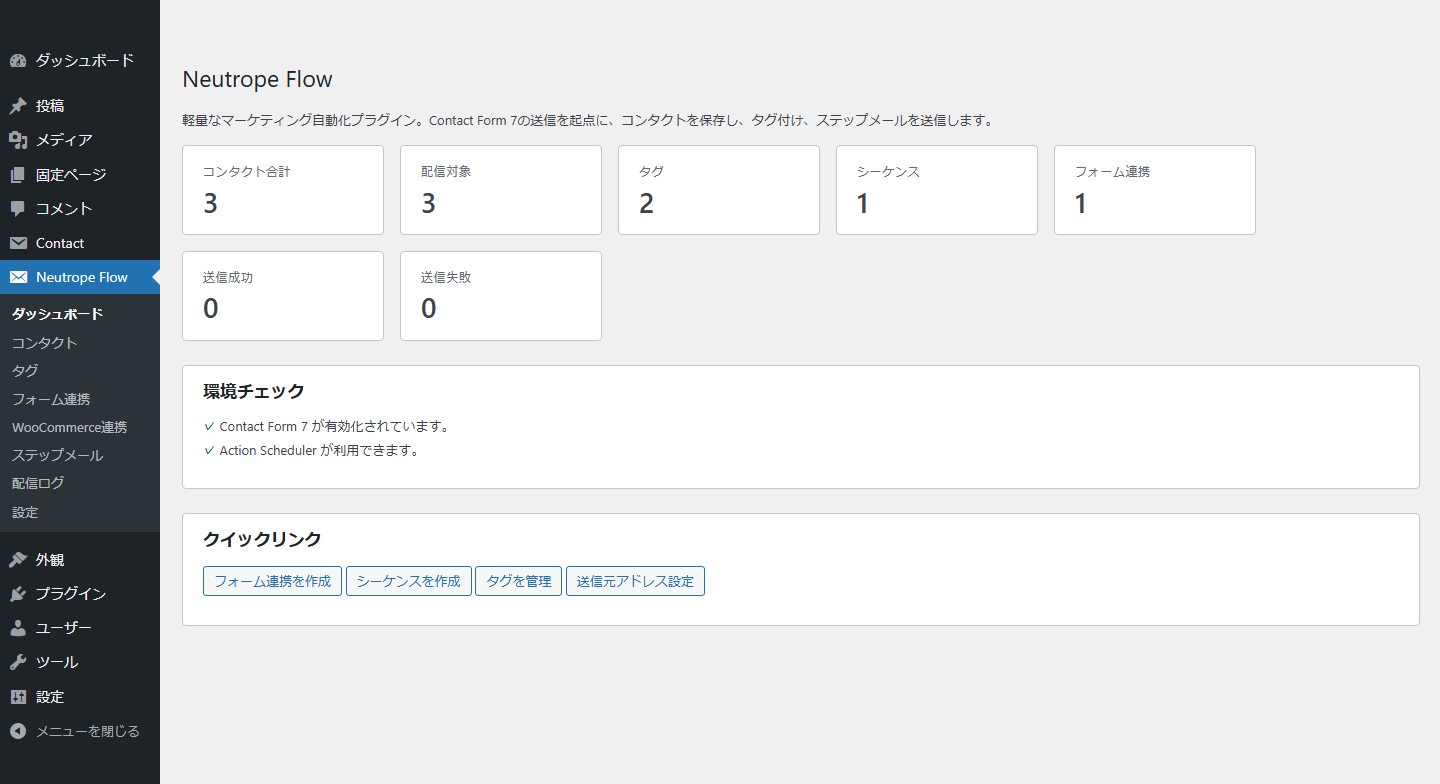
Dashboard with contact, sequence, and delivery totals plus local environment checks.
Neutrope Flow helps site owners manage contact records, send scheduled follow-up emails, collect newsletter subscribers with double opt-in, and send newsletters from their own WordPress installation.
The plugin can create or update a contact after a configured Contact Form 7 submission or WooCommerce order event. A mapping can add tags and enroll the contact in an email sequence. Each sequence contains one or more steps, such as an immediate message followed by messages several days later.
A built-in signup form (shortcode or block) collects subscribers with double opt-in: nothing is stored as a contact until the confirmation link in the email is opened. Newsletters are sent to tagged, confirmed contacts in small batches with a configurable hourly limit. A recurring digest can assemble an issue from recent posts on a schedule, and any newsletter can be published as a web page with an archive list.
Email is sent through WordPress wp_mail(). Neutrope Flow is not an SMTP service or an email delivery provider. Delivery depends on the mail configuration of the WordPress site. Scheduled timing also depends on Action Scheduler or WP-Cron and may not run at an exact time on low-traffic sites.
Main features
- Store contact names and email addresses in dedicated WordPress database tables.
- Organize contacts with tags.
- Create text or simple HTML follow-up email sequences.
- Start sequences from configured Contact Form 7 submissions.
- Start sequences from configured WooCommerce order events.
- Schedule later steps with Action Scheduler when available, with WP-Cron as a fallback.
- Add an unsubscribe link and List-Unsubscribe headers to sequence emails.
- Skip unsubscribed contacts and prevent duplicate delivery of the same step.
- Record delivery results in a local log when logging is enabled.
- Import contacts and tags from a UTF-8 CSV file without sending email or enrolling sequences.
- Optionally add UTM parameters to eligible CTA links. This option is disabled by default.
- Emit a recipient-free campaign-template content snapshot after a successful send for compatible local reporting extensions.
- Show a double opt-in signup form with the
[neutrope_flow_signup form="ID"]shortcode or the “Neutrope Flow Signup Form” block. The form works without JavaScript, uses labelled accessible fields, loads no external assets, and protects against spam with a honeypot, a minimum fill time, and per-address and site-wide submission limits. - Send a confirmation email with an expiring token. A contact is created only when the link is opened; a confirmed contact can then be enrolled in a welcome sequence.
- Never re-enable an unsubscribed or bounced contact without a new double opt-in.
- Create newsletters with a subject, preview text, and simple HTML body; choose the audience by tag; exclude unsubscribed, bounced, and (by default) unconfirmed contacts.
- Send a test copy, send now, or schedule a newsletter. Delivery runs in batches through Action Scheduler (or WP-Cron) with a configurable batch size and hourly limit, duplicate protection, and a per-recipient log.
- Add the unsubscribe link, List-Unsubscribe headers, the sender name, and the sender postal address to every newsletter. Newsletters cannot be sent until a postal address is entered.
- Add UTM parameters to newsletter links, with a per-newsletter campaign value and a per-link content value (the post slug for links to posts on the site).
- Create a recurring digest: on a schedule (for example the first Thursday of every month at 09:00 in a chosen timezone), the plugin collects posts published since the previous issue, picks a featured post plus a configurable number of new posts, fills the gap with older posts when you allow it, adds a rotating block (for example a tool spotlight), and creates the issue as a scheduled newsletter. The site owner is notified a configurable number of hours before the send and can edit the issue until it goes out.
- Publish any newsletter as a web page at
/newsletter/{slug}/(base configurable). The page shows the newsletter content only, withnoindex, followby default, a canonical URL, and no recipient data or unsubscribe token; emails then include a “View this email in your browser” link. List published issues with the[neutrope_flow_newsletter_archive]shortcode.
External services and tracking
Neutrope Flow does not make outbound API requests, require an API key, or send contact data to Neutrope or another external service.
The optional UTM feature only adds parameters to eligible links in outgoing email. It does not connect to Google Analytics or transmit analytics data.
Email delivery is handled by the site’s WordPress mail configuration. If the site uses an SMTP or transactional email plugin, that plugin may send data to its configured provider under its own terms and privacy policy.
Privacy
Neutrope Flow stores contact email addresses, names, source information, tags, sequence settings, delivery-log details, and random unsubscribe tokens in the site’s WordPress database. It does not store IP addresses and does not send this data to Neutrope.
After a successful send, the plugin can notify compatible local extensions with the canonical sequence-step subject, body, format, CTA, send time, and UTM metadata. This campaign-template snapshot excludes the contact ID, recipient email address, recipient name, recipient-rendered body, unsubscribe URL, and delivery-log recipient fields.
When the signup form is used, an unconfirmed request (email address, optional name, form reference, random confirmation token, and expiry time) is stored only until the confirmation link is opened or the link expires, after which it is deleted. The date of confirmation is recorded on the contact. Signup rate limiting uses short-lived, salted hashes of the email address; no IP address is read or stored. Newsletter sends record the recipient address and delivery result. The sender name and postal address entered in the settings are shown in every newsletter footer.
A newsletter web version is a public page generated from the newsletter content and the sender identity. It never contains a recipient name, email address, or unsubscribe token; the digest feature reads only published posts of the site. The owner notification for a generated digest issue is sent to the configured address (or the site administrator email) and contains the issue subject and admin links.
Site owners are responsible for obtaining any consent required for follow-up email and newsletters, setting an appropriate retention period, and describing this processing in their privacy policy. Deleting a contact also removes its pending confirmation, newsletter send records, and delivery logs. Deleting the plugin removes its settings and custom database tables.
Languages
Text that subscribers see (signup form, confirmation emails, unsubscribe pages, and email footers) uses English source strings and ships with a Japanese translation in the plugin’s languages folder, so English sites show English and Japanese sites keep their existing wording. Signup form labels left at their defaults follow the site language; labels you customise are shown exactly as typed. Administration screens are currently in Japanese.
Updating and recovery
- Before updating, save a matched backup of the database and site files, including the installed plugin ZIP, settings and scheduled jobs. Verify that the backup can be restored in an isolated environment with outgoing mail and external requests blocked. Arrange a maintenance window away from scheduled sends, and inspect pending/running jobs. A backup alone is not proof of recoverability.
- Use the WordPress plugin update, or Plugins > Add New > Upload Plugin and replace the installed plugin with the reviewed ZIP. Do not delete/uninstall the plugin: uninstall is not an update or a rollback. Check the version, contacts (including unsubscribed contacts), settings, sequences, logs, newsletters and schedules after updating. For older 0.4.x installations this update adds signup/newsletter/digest storage; retained counts need not equal monthly totals or distinct recipients.
- If the dashboard or Digests screen says automatic generation is held for review, review existing drafts, send history and future reservations. The hold concerns digest generation; it does NOT stop existing newsletter sends. The active/paused definition switch is not a substitute for clearing the migration hold. The reviewed-resume form appears only when its safety checks pass. Enter the review reason, explicitly confirm the displayed future reservations, then use the reviewed-resume button. It does not delete/recreate reservations or resend past campaigns.
- Do not force resume when reservations are expired, within five minutes of generation, duplicated, running, inconsistent, or being rebuilt. If the form is absent or the warning persists, keep generation held and ask the administrator/support to review the stored state. Do not delete locks, migration markers or scheduler records, repeatedly save, manually run cron, or resend to clear the warning. This release does not automatically replay missed campaigns.
- If an update fails, retain the error and job history. Prevent further sending through an operator-managed maintenance procedure before recovery. Restore the matched pre-update files AND database only after reconciling any sends, signups and unsubscribe changes that occurred since the backup. An old database can reintroduce sent jobs or reverse unsubscribe changes; never resume sending blindly after restoration. Rehearse the recovery in isolation first. Replacing only plugin files with an old version is not a supported database rollback.
If /newsletter/{slug}/ returns 404 after updating, save WordPress permalink settings once. Newsletter utm_campaign and utm_content values change for newsletters created after this update; sequence email UTM values are unaffected. Enter a sender postal address in Settings before sending newsletters.
更新と復旧の注意
更新前に、DBとサイトファイルを同時点でバックアップし、旧版ZIP・設定・予約状態も保存してください。メール送信と外部通信を遮断した隔離環境で復旧を確認し、配信予定と重ならない時間帯にWordPress標準更新またはZIP上書きを行ってください。削除・アンインストールは更新や復旧の手順ではありません。
更新後は連絡先(配信停止を含む)・設定・ステップメール・配信履歴・ニュースレター・予約を確認してください。「自動生成:保留(要確認)」はダイジェスト生成の保留であり、既存ニュースレターの送信停止ではありません。「定義:有効」と保留解除は別です。安全確認を通過した場合だけ、ダッシュボード/ダイジェスト画面の確認内容を入力し、将来予約と配信履歴を確認して「確認した予約で自動生成を再開」を使用してください。過去分の再送や予約の作り直しはしません。
期限経過・5分以内・重複・実行中・不整合・予約組み直し中などで再開できない場合は、保留のまま管理者へ確認を依頼してください。ロックや管理記録の削除、保存の連打、cronの手動実行、再送による解消は行わないでください。
障害時は記録を保全し、管理者の手順で送信を止めてから復旧します。バックアップ後の送信・申込・配信停止を照合し、同時点のファイルとDBを復元してください。古いDBへ戻すと送信済み予約の復活や配信停止の巻き戻りが起き得ます。旧版ファイルだけを戻すことや、照合せず送信を再開することは避けてください。