

NetoTraffic Content Suite
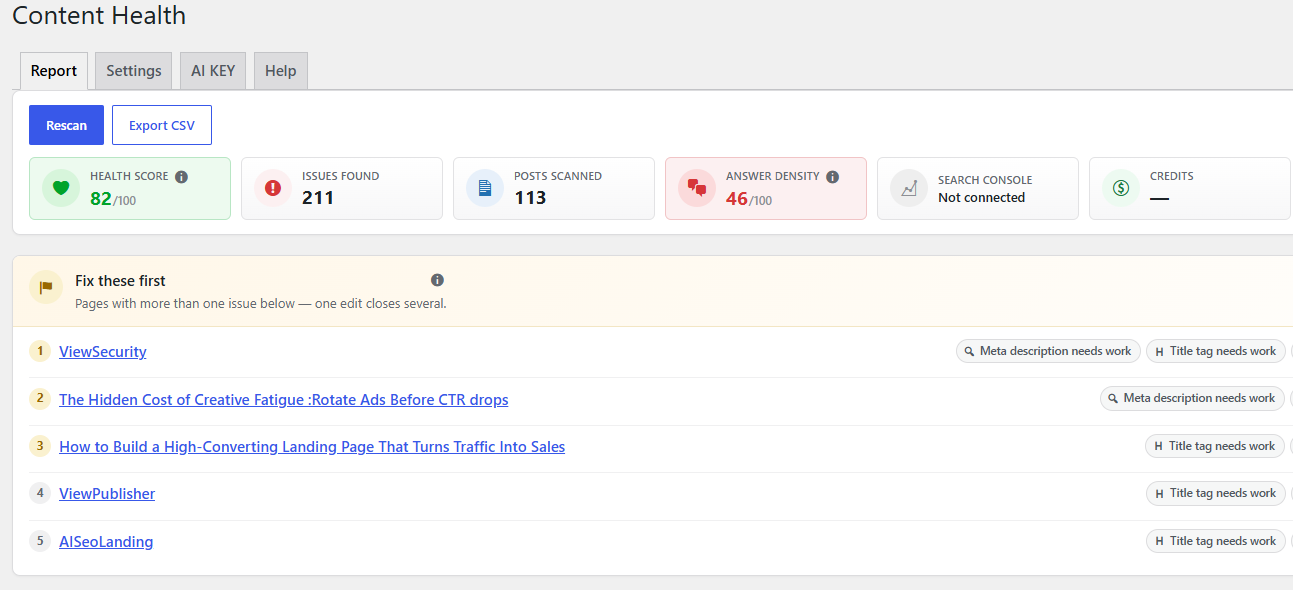
The report: nine counts and a Health score across your whole site after a scan, with a "Fix these first" shortlist.
Content Health reads your own posts and tells you what is holding them back.
Activate it, click Scan my site, and you get nine counts:
- how many posts have no meta description
- how many have a title tag that is too long to show in full, or too short to be worth the space
- how many are thin — under your word threshold
- how many have not been updated in years
- how many have no internal links
- how many contain images with no alt text
- how many have nothing linking to them — orphaned pages
- how many are hard to skim — missing subheads, a broken heading outline, or wall-of-text paragraphs
- how many were written by an author with no bio — a trust signal both readers and AI engines look for
Click any number to see exactly which posts, with a link straight to the editor. A “Fix these
first” shortlist ranks the posts with the most to gain, so a site with hundreds of flagged posts
has an obvious place to begin, and a single Health score next to the scan button gives
one number to track between scans instead of nine separate counts.
The corpus report
The Report tab also compares every post against every other post:
- Duplicate content — pages close enough to be the same article, with the strongest one
flagged to keep. - Covering the same ground — pages that overlap but are not duplicates: sharpen them onto
different angles or combine them. - Merge candidates — thin pages that only add up to something when read together.
- Missing pillar — related pages that nothing else on the site links to.
This runs during the scan from your own post content: no AI, no network call.
A Link health view sits alongside those: every active redirect, every orphan page, and
every broken link or image found by an optional checker (its own button, never part of Scan
my site).
The audit is the whole free plugin. No account, no sign-up, and no time limit.
Works with your SEO plugin
Meta descriptions and title tags belong to whichever SEO plugin you use, so this plugin reads
and writes that plugin’s own fields rather than inventing competing ones. Supported:
- Yoast SEO
- Rank Math
- SEOPress
- All in One SEO (read-only — see the FAQ)
- No SEO plugin at all — this plugin can store and output descriptions and titles itself
Built for big sites
The scan runs in batches with a progress bar and a handful of queries per batch. It never
renders your posts, so it does not run every other plugin on your site thousands of times.
There are no cron jobs and no background activity of any kind.
Optional extras
Paste an API key and the plugin can generate meta descriptions, title tags, image alt text,
internal-link suggestions, a thin-post draft (outline first), Content Blocks, or an llms.txt
site summary through netotraffic.com. You review every write before it is saved, and every
change can be undone. With no key, none of that runs and nothing is sent. What is sent, and
when, is listed in the FAQ.
A dedicated LLMs & crawlers page covers /llms.txt (built from your published pages,
never written to disk) and Allow/Block rules for named AI bots in robots.txt. Answer
Density scores how many question-shaped headings lead into a real answer. Content
Blocks add TL;DR, FAQ and Pros & Cons in the editor. Job title, credentials and social
links can be added on each author’s profile for an optional author card.