
Muslim Prayer Time BD – Prayer Reminder for Bangladesh
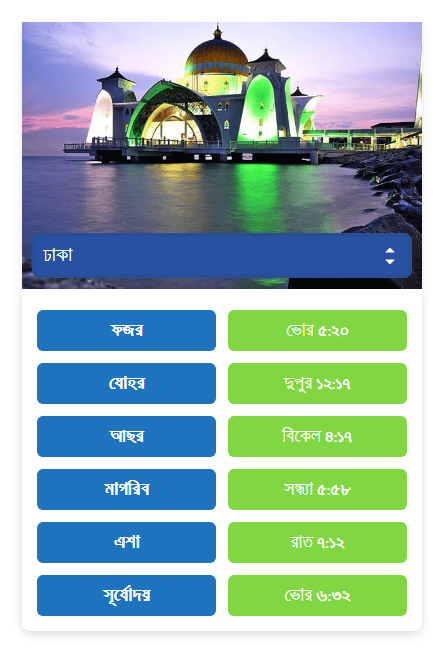
Prayer Timetable with Beautiful Mosque.
The Muslim Prayer Time BD plugin provides an accurate prayer schedule specifically tailored for Bangladesh, displayed in a beautiful and customizable widget. Designed with the needs of Bangladeshi Muslims in mind, this plugin offers precise prayer times, Sehri, and Iftar timings for daily use, along with additional features to enhance your website’s functionality during Ramadan.
With Muslim Prayer Time BD, you can effortlessly display the daily prayer timetable for your location. The plugin is built on the official perpetual prayer calendar for Bangladesh, ensuring that the times are always accurate and relevant. During Ramadan, you can activate the option to show Sehri and Iftar timings, allowing your visitors to stay informed about important meal times during the fasting period.
This plugin also allows you to display multiple widgets on your site, each with customizable settings. You can choose to display only prayer times, Sehri and Iftar times, or both. Additionally, you can adjust the Default City and display Islamic Quotes for each widget. Simply adjust these options according to your preference. For instance, if you only want to display Sehri and Iftar times, you can uncheck the Show Prayer Time option. The flexibility to customize each widget ensures a personalized experience for your site visitors.
Additionally, the plugin allows you to personalize the display according to your style. You can modify the prayer names, choose between 12-hour or 24-hour time formats, set custom names for the Sehri and Iftar cards, and adjust the widget’s background color, font color, font weight, and text alignment to suit your site’s theme.
Whether you are managing a blog, news site, or community page, Muslim Prayer Time BD ensures that your visitors always have access to timely prayer and fasting information, keeping them connected to their religious duties.
Instructions after upgrading to version 3.0
Please note that with version 3.0, there have been significant changes to the plugin’s settings structure. As a result, some previous settings may have been lost during the upgrade. We have made efforts to automatically transfer old settings to the new options, but there may still be instances where manual adjustments are required. After upgrading, we recommend reviewing and updating your settings to ensure everything is configured as per your preferences. Additionally, note that the Prayer Settings have been moved to the Prayer Time BD menu in the WordPress admin dashboard.
Usage
Using Classic Widget
- Go to Dashboard >> Appearance >> Widgets.
- Find the Muslim Prayer Time BD widget.
- Drag and drop it into your sidebar, set a title, and save.
- Visit your site to see the Prayer Timetable in your sidebar.
Using Block Widget
- Go to Dashboard >> Appearance >> Widgets.
- In the editor, click the + (Add Block) button and search for ‘Muslim Prayer Time BD’.
- Click to add the block to your desired area or page.
- Customize settings to display Prayer time, Sehri time, or both.
Using Shortcode
Use the shortcode [prayer_time] to display the Prayer Timetable anywhere. Customize it with optional attributes:
– ct (default city)
– qt (display quotes)
Add the shortcode to any post, page, or widget.
Features:
- Auto generated prayer timetable.
- Option to adjust prayer time and sehri time.
- Option to display prayer timetable for any district of Bangladesh.
- Option to display prayer timetable using shortcode in any post/page.
- Option to select the default city using the
ctshortcode attribute. - Option to display Islamic quotes using the
qtshortcode attribute. - Option to show various Islamic Quotes below the prayer timetable.
- Option to set font size, font weight, and font color for the Islamic Quotes.
- Option to set background color for the Islamic Quotes.
- Option to set time interval between Islamic Quotes.
- Option to display Sehri last time.
- Option to set Prayer names.
- Option to set time format (12/24 hours and AM/PM).
- Option to set Sehri and Iftar card name.
- Unlimited background color for Prayer name and time.
- Unlimited background color for Sehri and Iftar time.
- Unlimited font color for Prayer name and time.
- Unlimited font color for Sehri time.
- Option to set font weight.
- Option to set text align.
- Option to set prayer image.
- Option to remove plugin settings from the database on uninstallation.
- Option to set the maximum width for prayer time display.
- Modern and user-friendly admin interface.
- Help page with plugin features and usage instructions.
License
This plugin is open-source and licensed under the GPLv2 or later.