


MRN Forms
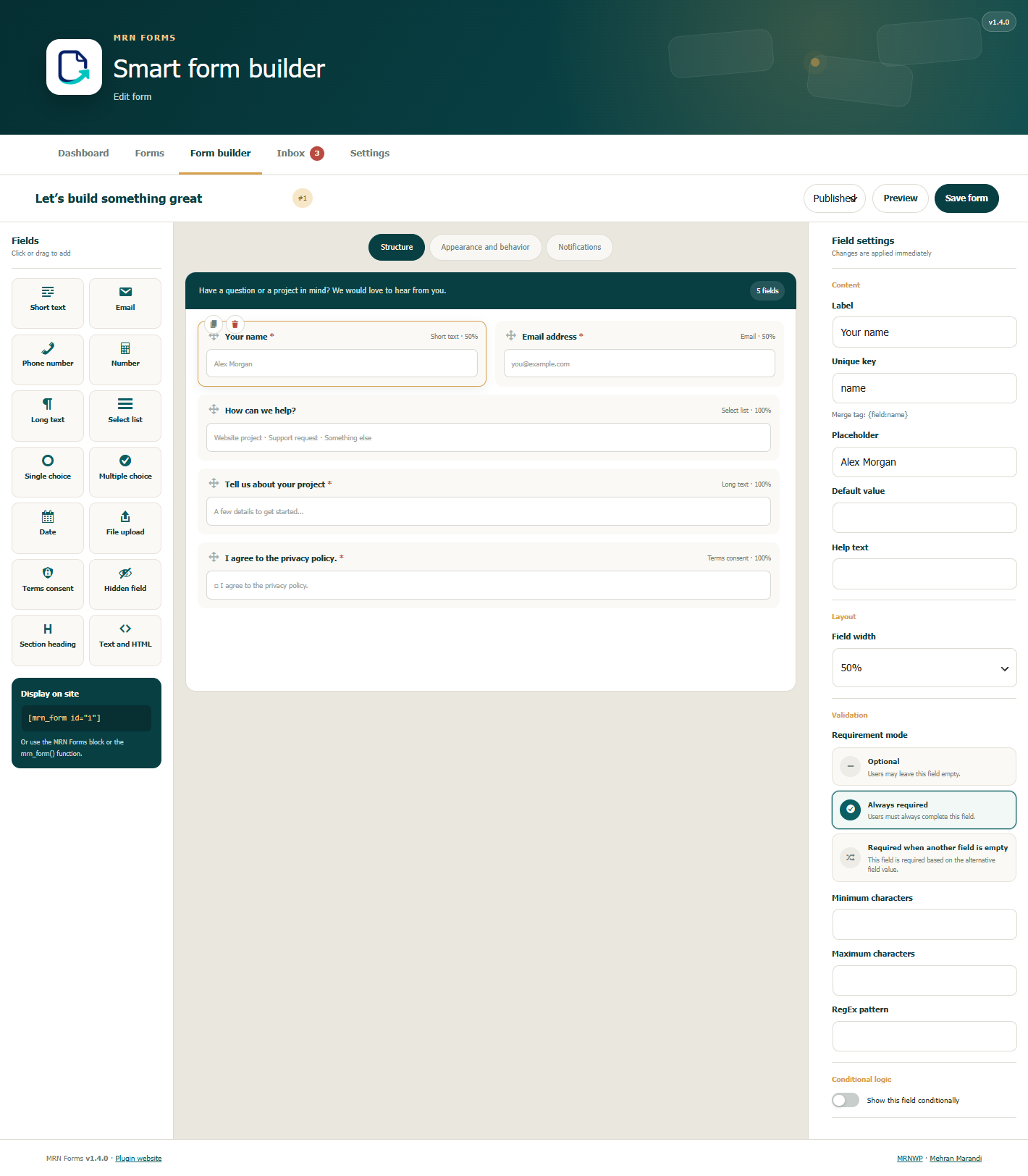
Visual form builder with live preview and configurable fields.
MRN Forms lets you build and style WordPress forms without a page builder. It includes a visual editor, an entry inbox, configurable email notifications, and Persian/English interfaces with automatic RTL/LTR layouts.
Product website | MRNWP | Source and issue tracker
Features
- Drag-and-drop form builder with live preview and fourteen field types.
- Field types include short text, email, phone, number, long text, select, radio, checkbox, date, file, consent, hidden, heading, and HTML.
- Conditional visibility and fields required when another field is empty.
- Client and server validation, honeypot protection, form nonces, and rate limits.
- Configurable field widths, labels, colors, spacing, and custom CSS classes.
- Entry inbox, read/spam statuses, and CSV exports.
- Administrator notifications and respondent receipts with responsive HTML templates, brand colors, logos, and merge tags.
- Conditional notification recipients.
- Shortcodes, a dynamic Gutenberg block, and a theme function.
- JavaScript submission with a standard POST fallback for regular forms.
- Optional custom registration and SMS verification with Anar Toolkit 1.5.0 or later.
- Optional traffic attribution and events for an existing Google Analytics installation. Both are off by default.
- Automatic RTL/LTR layouts and basic accessibility support.
- Uploads with configurable file type and size limits.
- No paid license, external account, or external runtime library is required for the form builder.
MRN Forms is developed by Mehran Marandi as a product of MRNWP.
Registration and SMS verification with Anar
In Appearance and behavior > Anar and MRN Forms, select a required phone field with no visibility condition. Choose SMS verification before submission for regular forms. For registration, select Anar registration, publish the form, and select it under Anar > Settings > General. Both modes use Anar’s verification service and require JavaScript.
Display without a page builder
Shortcode
[mrn_form id="1"]
Or use a form slug
[mrn_form slug="contact-us"]
Theme template
<?php mrn_form( 1 ); ?>
Or pass display options
<?php mrn_form( 'contact-us', array( 'showTitle' => false ) ); ?>
Gutenberg
Add the MRN Forms block and select a published form.
Merge Tags
{form_title}— Form title{form_id}— Form ID{entry_id}— Entry ID{site_name}— Site name{site_url}— Site URL{admin_email}— Default administrator email address{all_fields}— Table of all responses{field:email}— Value of the field with the keyemail
Separate multiple email recipients with a comma or a ;.
Theme customization
Each form has its own appearance settings. You can override these CSS variables on .mrnf-shell for finer control.
--mrnf-primary, `--mrnf-accent`, `--mrnf-bg`, `--mrnf-text`, `--mrnf-gap`, `--mrnf-radius`
For example
.my-form { --mrnf-primary: #222; --mrnf-radius: 4px; }
Add the my-form class under Appearance and behavior > Custom CSS class.
Developer API
The main filters and actions are listed below.
mrnf_submission_values— Filter validated values before savingmrnf_after_entry_created— Runs after an entry is savedmrnf_after_submission— Runs after notification delivery is attemptedmrnf_after_notification— Runs after each notification is sentmrnf_notification_results— Filter the results from notification channelsmrnf_rendered_form— Filter the final form HTML
Privacy
When Anar verification is enabled for a form, Anar sends the mobile number and verification message to the SMS provider configured by the site administrator. Custom field answers are stored according to the form settings and registration answers are saved in the form inbox.
Form definitions, submitted values, and delivery logs are stored in this site’s database. Entry metadata includes submission time, the logged-in user ID when present, browser user agent, referring URL, and a keyed one-way IP hash. Raw IP addresses are not saved with entries; the hash is used for abuse control. Notifications use WordPress wp_mail() and the site’s configured mail transport, and are sent to configured recipients. The plugin does not send entries or usage statistics to MRNWP or the developer.
Traffic attribution and analytics events are separate opt-in settings under Forms > Settings, and are off by default. Configure privacy notices and any required visitor consent before enabling them.
When attribution is enabled, source, medium, campaign, term, content, landing page, referrer, and capture time are saved in browser session storage and with submissions on this site. Attribution page URLs omit query strings and fragments. These are browser-supplied reporting values, not trusted identity information.
When analytics events are enabled and the site already provides a gtag function, phone-click, WhatsApp-click, and successful-submission events are passed to that function. Events include the interaction type, page URL without query parameters, form ID for a submission, and traffic source/medium when attribution is enabled. Form answers, phone numbers, email addresses, and clicked-link text are not included. MRN Forms does not install Google scripts. The site’s existing analytics configuration controls delivery and consent, and Google may collect additional information under that configuration.
Optional service: Google Analytics, Terms, Privacy policy.