

Modula Image Gallery – Photo Grid & Video Gallery
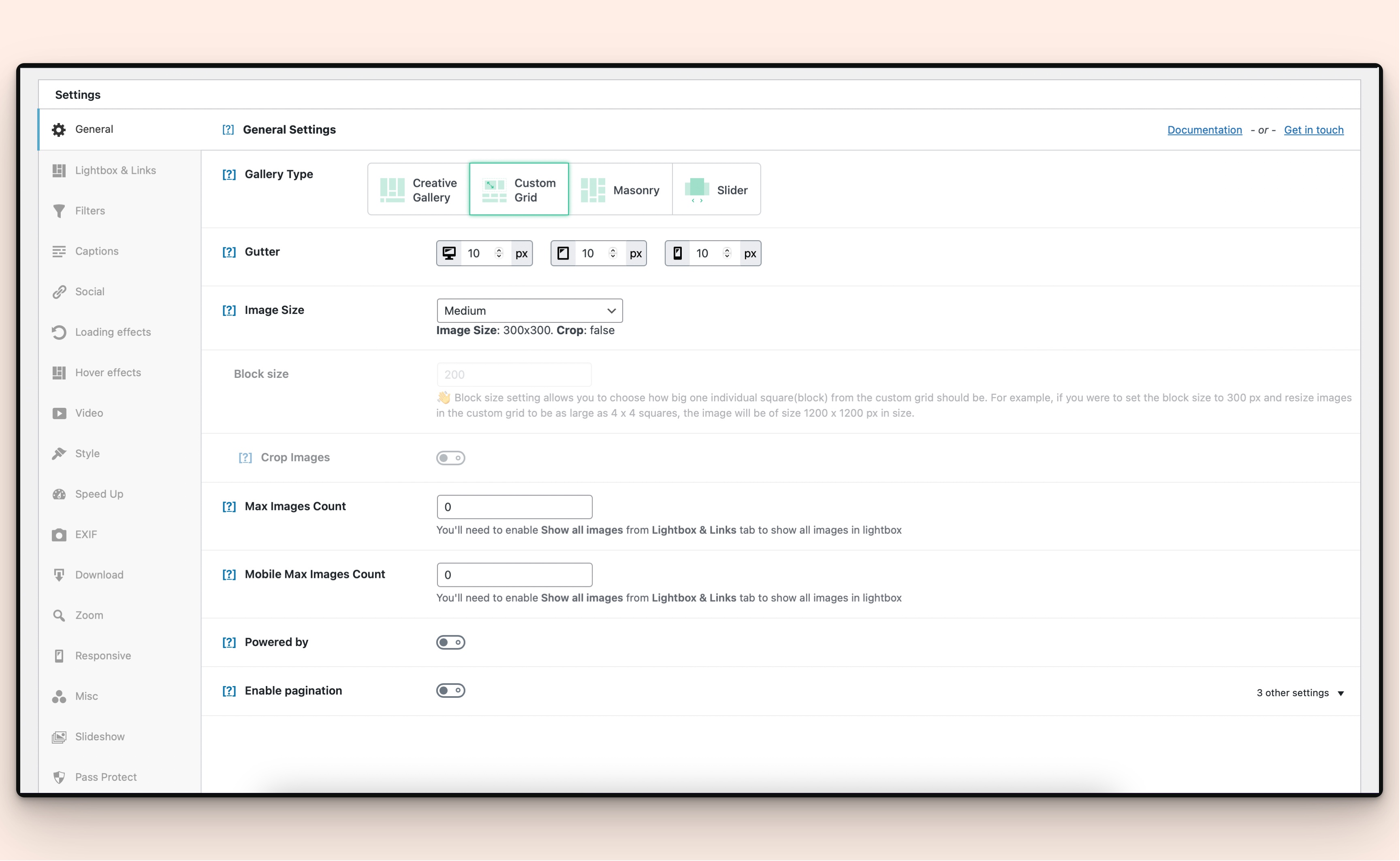
Custom Grid Gallery - Drag and drop interface for creating unique image gallery layouts with resizable photos
Create responsive image galleries with drag-and-drop grid builder. Custom layouts, video support, AI optimization. Works with any theme.
The Best WordPress Gallery Plugin for Custom Image & Video Galleries
Create stunning image galleries with Modula’s drag-and-drop grid builder. Build custom grid layouts, masonry galleries, and video galleries without any coding. Perfect for photographers, designers, and anyone who wants beautiful responsive galleries on their WordPress website.
Modula makes creating photo galleries effortless. Just add images, customize your layout, and publish. The drag-and-drop interface lets you create unique custom grid galleries by resizing and repositioning images exactly how you want them.
What you get extra in Modula Pro when making a purchase:
- Comments for images: Allow your site users to add comments for your gallery images, boosting your engagement and interaction with your audience.
- Image proofing: Make it easy for customers to choose the photos they want edited with proofing galleries on your website. They can pick their favorites and send their choices directly through the site. No more long email chains or back-and-forth—everything is handled in one place!
- Instagram: Easily link your Instagram account to your Modula Gallery. With this connection you will then be able to import Instagram images directly in your gallery, enriching your website with your Instagram content.
- Defaults: Are you tired of going through each gallery and setting up the same settings repeatedly? Use the Defaults extension to define a basic set of options for your galleries, then simply add this to each new gallery you create. It saves a lot of time!
- Content Galleries: Take your gallery creation to the next level, with this add-on you will be able to generate a new gallery from your current posts, pages or custom post types. Even more, each gallery is synched with the original source, changes to the original content will also be reflected in the gallery.
- Bulk Edit: Easily edit multiple images at once, saving up precious configuration time.
- Video gallery: Use the Video extension to combine videos with images in your galleries. It works with YouTube, Vimeo, and self-hosted videos.
- Lightbox slideshow: Improve the user experience with your galleries by presenting the images in a stunning slideshow.
- Slider gallery: This helps display your gallery images in a new format type: slider. It can be synced with a thumbnail strip below it. You can switch it up by adding different elements to the slider: dots, arrows, a fade effect, infinite loop, center mode, and more.
- Gallery Filters: Apply one or more filters to your images to allow your website’s visitors to easily sort through your gallery.
- Albums: Let’s say you are going on a holiday trip and wish to document each day in a separate gallery. The Albums extension will allow you to group up all your holiday galleries in a single listing, enabling easy access to your precious memories.
- Multiple dynamic effects: Loading Effects, Hover effects and Zoom effects
- Watermark images: Protect your photos by adding custom watermarks.
- Image Guardian: Keeps your images safer. It blocks right-click “Save,” hides the images URLs, and makes prints blurry.
- Speed UP: Using this extension, you can optimize your images by reducing their file sizes, resizing them through ShortPixel’s image optimization algorithms, and serving them from StackPath’s CDN (content delivery network). The result? A fast website without the high costs associated with it.
- Whitelabel: This extension helps you remove all mentions of Modula from the plugin and customize it with your own brand, logo, and text.
- Support and updates are included with each purchase for one year.
Modula AI helps you quickly optimize your gallery images by improving titles, captions, and ALT text in just a few clicks. Save time and let AI handle the tedious work of optimizing each image for SEO and accessibility.
How to Create a Gallery with Modula
It’s This Easy:
- Go to Modula & click Add New.
- Add your images & customize your layout.
- Copy the shortcode & paste it where you want the gallery to appear. Example shortcode:
[modula id="1192"].
Key Features of Modula Gallery Plugin
Drag-and-Drop Grid Builder
Create custom grid layouts by dragging and resizing images. No coding required. Build unique gallery layouts that match your brand and design vision perfectly.
Responsive Image Galleries
All galleries are automatically mobile responsive. Your photo galleries will look perfect on smartphones, tablets, and desktop computers. Images resize and reflow based on screen size.
Multiple Gallery Types
Choose from Custom Grid, Masonry, and Creative Gallery layouts. Each gallery type offers unique styling options and display formats to match your needs.
Video Gallery Support (Pro)
Combine videos with images in your galleries. Works with YouTube, Vimeo, and self-hosted videos for complete multimedia gallery experiences.
Lightbox Gallery Viewer
Built-in lightbox displays your images in a beautiful full-screen overlay. Visitors can navigate through gallery images without leaving the page.
AI-Powered Image Optimization
Modula AI automatically optimizes image titles, captions, and ALT text for better SEO. Manual editing for each image is a thing of the past.
Custom Hover Effects (Pro)
Add dynamic hover effects to engage visitors. Choose from dozens of hover animations and styling options to make your galleries interactive.
Gallery Filters (Pro)
Let visitors sort and filter your image galleries by category. Perfect for portfolio galleries and large photo collections.
Page Builder Integration
Works seamlessly with Elementor, Beaver Builder, and Divi. Add galleries to any page using your favorite page builder’s interface.
How to Create a Photo Gallery in WordPress
Creating a photo gallery with Modula is simple. Start by installing the plugin from your WordPress dashboard. Navigate to Modula in your admin menu and click “Add New.” Upload your images using the media uploader or drag and drop files directly into the gallery builder.
Once your images are uploaded, choose your gallery type. For a custom layout, select Custom Grid and drag images to resize them. For an automatic layout, choose Masonry which arranges images in a Pinterest-style layout.
Customize your gallery settings including spacing, borders, shadows, and hover effects. Configure your lightbox options to control how images display when clicked. Set up responsive breakpoints to ensure your gallery looks perfect on mobile devices.
Copy the shortcode provided and paste it into any post, page, or widget where you want your gallery to appear. Your responsive image gallery is now live on your website.
How to Add a Gallery to Your WordPress Sidebar
Adding an image gallery to your WordPress sidebar or widget area is straightforward. After creating your gallery in Modula, copy the shortcode. Navigate to Appearance > Widgets in your WordPress admin panel.
Add a “Shortcode” widget to your desired sidebar location. Paste your Modula gallery shortcode into the widget. The gallery will automatically resize to fit your sidebar width while maintaining responsive behavior.
For optimal sidebar display, consider using fewer images or adjusting the gallery’s column settings to ensure images don’t appear too small on desktop devices.
How to Create a Masonry Gallery Layout
Masonry galleries arrange images in a flowing, Pinterest-style layout that makes efficient use of space. Images of different sizes fit together like a puzzle without leaving gaps.
To create a masonry image gallery, select “Masonry” as your gallery type when creating a new gallery. Upload images of various dimensions for the most dynamic effect. The masonry layout automatically positions images to create a balanced, visually appealing grid.
Adjust the gutter spacing between images to control how tightly packed your masonry gallery appears. Configure the number of columns for different screen sizes to ensure your gallery remains responsive on mobile devices.
How to Add Videos to Your Image Gallery
With Modula Pro, you can create video galleries that combine videos with photos. This is perfect for event galleries, portfolio websites, and multimedia presentations.
To add videos to your gallery, click the “Add new” button when adding new items to your gallery. Paste YouTube or Vimeo URLs, or upload self-hosted video files. Videos appear inline with your images and open in the lightbox viewer when clicked.
Mix video content with photos to create engaging multimedia galleries that tell a complete story. Video thumbnails are generated automatically (for YouTube & Vimeo videos) for a seamless viewing experience.
Creating Portfolio Galleries for Photography Websites
Photographers need portfolio galleries that showcase their work professionally. Modula provides the tools to create stunning photography portfolios that impress potential clients.
Use the Custom Grid gallery type to create curated layouts that highlight your best work. Resize key images to draw attention to your strongest photographs. Add captions and titles to provide context for each image.
Enable the lightbox slideshow feature to let visitors browse your photography in full-screen mode. Disable right-click protection to prevent unauthorized downloading of your photos. Add watermarks to protect your intellectual property while still showcasing your portfolio.
Building Real Estate Photo Galleries
Real estate agents use photo galleries to showcase property listings. Modula makes it easy to create professional real estate galleries that help properties sell faster – especially with our dedicated BnB layout.
Upload photos of each room, exterior shots, and neighborhood amenities. Use gallery filters to let visitors sort by room type or property feature. Add detailed captions describing each space and highlighting key selling points.
Create separate galleries for each property listing and organize them into albums. This allows potential buyers to easily browse multiple properties on your website.
Using Modula with WooCommerce Product Galleries
Enhance your WooCommerce store with better product galleries. Replace default WooCommerce product images with custom Modula galleries that showcase products from multiple angles.
Create a gallery for each product with detailed product shots, lifestyle images, and close-up details. Use hover effects to make product galleries interactive. Enable the lightbox to let customers view high-resolution product images.
Product galleries with multiple images increase conversion rates by giving customers confidence in what they’re purchasing.
How to Optimize Gallery Images for SEO
Image SEO is crucial for getting your photos discovered in Google Image Search. Modula’s AI optimizer makes image SEO easy by automatically generating optimized titles, captions, and ALT text.
Use descriptive filenames before uploading images. Include relevant keywords in image ALT text to help search engines understand your photos. Write detailed captions that provide context and include keywords naturally.
Enable lazy loading to improve page speed, which is a ranking factor for SEO. Compress images before uploading to reduce file sizes without sacrificing quality. Well-optimized image galleries can drive significant organic traffic from image search results.
Troubleshooting Common Gallery Issues
Why is my gallery not displaying properly?
If your image gallery isn’t showing up on your page, first verify the shortcode is correctly placed. Check that the gallery ID in the shortcode matches your gallery. Clear your browser cache and any WordPress caching plugins.
Inspect your browser console for JavaScript errors that might prevent the gallery from loading. Ensure there are no theme conflicts by temporarily switching to a default WordPress theme to test.
How do I fix blurry images in my gallery?
Blurry images typically result from the “Gallery image size” setting being too low. Navigate to your gallery settings and increase the “Minimum Image Width” value in the General section.
Upload higher resolution source images to provide better quality at larger display sizes. The plugin resizes images based on your settings, so starting with high-quality originals ensures sharp results.
Gallery images not loading on mobile devices
Mobile loading issues are often caused by JavaScript conflicts or caching problems. Disable lazy loading temporarily to see if that resolves the issue. Check that your mobile theme doesn’t conflict with gallery scripts.
Ensure responsive breakpoints are properly configured in your gallery settings. Test on multiple mobile devices and browsers to identify if the issue is device-specific or universal.
How to speed up slow gallery loading times
Just use Modula SpeedUP and we’ll handle everything else. We’ll optimize your images through ShortPixel, and send them off to a super fast CDN. The process runs in the background seamlessly and you don’t have to do anything besides activate the Modula SpeedUP extension.
Reduce the number of images per gallery page or implement gallery pagination. Use a CDN to serve images faster to visitors worldwide. Optimize your WordPress hosting for better overall performance.
Images appearing in wrong order in gallery
Gallery image order is controlled in the gallery builder. Drag and drop images to reorder them in your desired sequence. The display order matches the order shown in the gallery editor.
If using Masonry layout, note that image positions adjust automatically based on available space and image dimensions. For precise control over image placement, use Custom Grid layout instead.
How-to Guides:
Here are a couple of quick tutorials on how to create your dream gallery using the free version:
- WordPress Image Gallery
- Custom grid Gallery
- Masonry Image Gallery
- Mobile responsive Gallery
- Beaver Builder Gallery
- Elementor Image Gallery
- Divi Builder Gallery
When using the Pro version, you can also create:
Help & Support
- Guides & Help Articles: Read documentation
- Ask a Question: Support forum
- Need Extra Help? Contact Us
Do you have galleries already created in NextGen, Envira, Final Tiles Grid Gallery or FooGallery and want to migrate them to Modula?
Use our dedicated migration tools:
- Migrate away from NextGEN Gallery
- Migrate away from FooGallery
- Migrate away from Envira Gallery
- Migrate away from Final Tiles
- Migrate away from Photoblocks Gallery
3rd party or external service disclaimer
The plugin connects to our website through an API call (https://wp-modula.com/wp-json/mt/v1/get-all-extensions) in order to request a list of available extensions.
IT DOES NOT SEND ANY DATA NOR DO WE COLLECT INFORMATION FROM THE REQUEST
Our privacy policy can be found at this URL https://wp-modula.com/privacy-policy/