


Moduify AI Connector
Moduify AI Connector brings the Moduify Elementor and WPBakery workflow into the WordPress admin area. Browse Moduify-published examples before connecting an account. When you are ready to generate, create a revocable connector key in the Moduify dashboard, paste it into WordPress, describe the add-on you need, and follow its generation progress. Every generated result stays in the same private Moduify library used by the web application.
What the plugin does
- Connects a WordPress site to a Moduify account with a revocable connector API key.
- Displays Moduify-published Elementor and WPBakery examples before an account is connected.
- Generates Elementor widgets and WPBakery add-ons from a component name and detailed prompt.
- Recovers long-running jobs after an admin-page refresh or temporary status failure.
- Displays a responsive static design preview after generation.
- Saves connector-generated items automatically to the connected account’s shared Moduify library.
- Shows whether an item passed validation or was saved with findings that need attention.
- Lets administrators browse account items and Moduify-published examples.
- Provides an in-plugin Tutorials page.
What the plugin does not do
This connector does not install, activate, update, or execute generated PHP on your WordPress site. It also does not add a frontend shortcode, block, widget, or tracking script. Generated add-ons are reviewed, edited, downloaded, and installed separately through the Moduify web application.
Supported builders
- Elementor
- WPBakery Page Builder
You can generate for either builder even if that page builder is not active on the connector site. To install and use a downloaded add-on later, the matching page builder must be installed and active on the destination site.
Recommended prompt details
For better results, include the layout, sample content, editable controls, responsive behavior, colors, spacing, typography, images or icons, and interactions. Always select the builder used by the destination site.
How to use the connector
1. Browse public examples (no connection required)
After activation, open Moduify > Library. The Public Examples collection loads explicitly published Elementor and WPBakery catalog items from Moduify. It does not expose another user’s private items, generation prompts, or installable source code.
2. Create the connection
- Sign in at https://moduify.com/.
- Open https://moduify.com/dashboard?tab=wordpress-connector or select WordPress Connector in the dashboard.
- Name the WordPress site, create a connector key, and copy it. The full key may be shown only once, so keep the page open until WordPress verifies it.
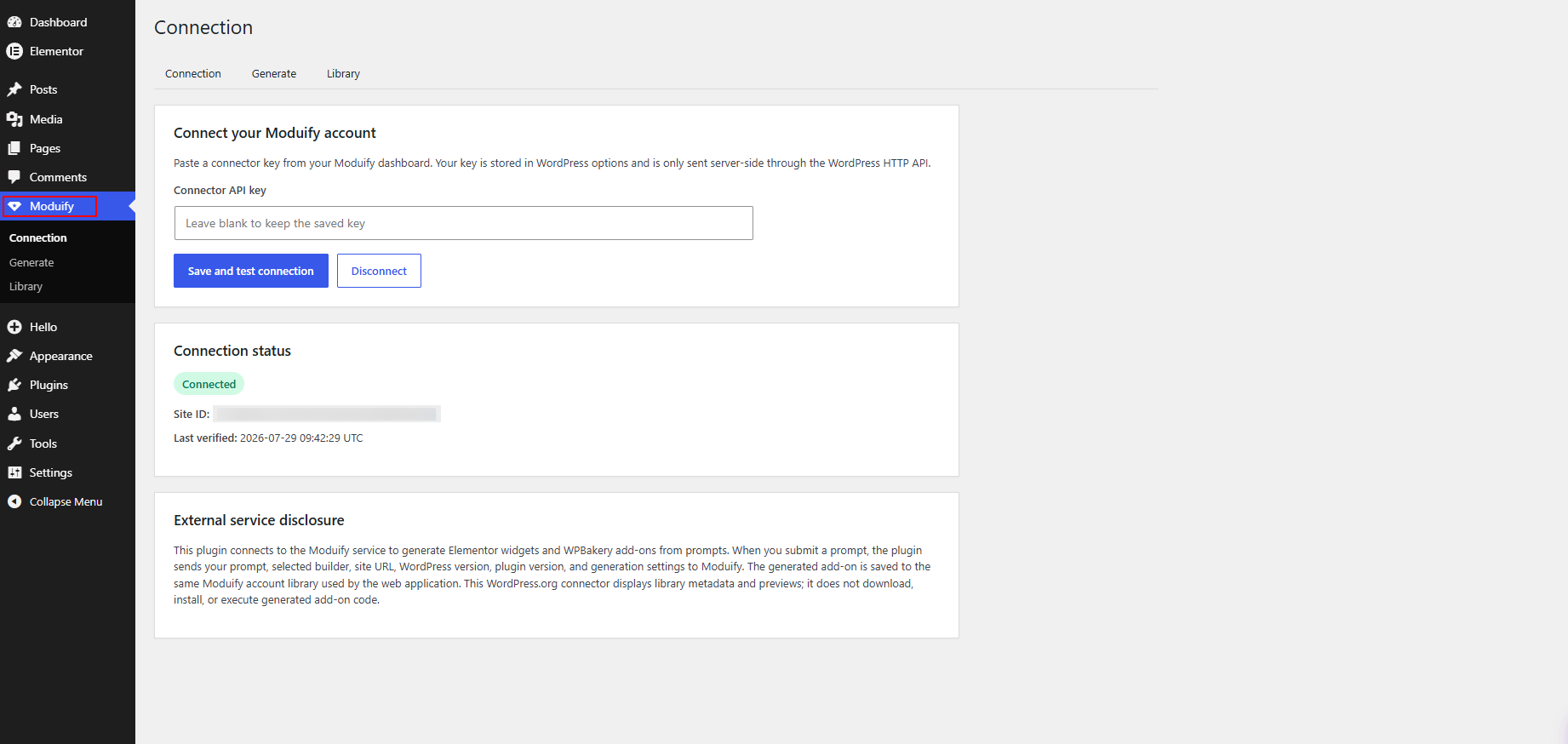
- In WordPress, open Moduify > Connection.
- Paste the key that begins with
mfy_live_and select “Save and test connection.” This is a connector key, not a WordPress password, Moduify password, or AI-provider key. - Confirm that the page shows Connected, a Site ID, and the correct Moduify account.
The Connection page also links directly to the connector-key dashboard and the public setup guide at https://moduify.com/wordpress-api.
3. Generate an add-on
- Open Moduify > Generate.
- Choose Elementor or WPBakery.
- Enter a clear add-on name.
- Describe the design, content, settings, responsive behavior, and interactions you need.
- Select Generate and keep the admin page open while the job starts.
The connector submits the job once, checks its status, and saves the result to the shared library. If the page reloads, status checks resume for the active job.
4. Review the result
The Generate page shows the static preview returned for the completed item. The Library page shows the item name, builder, source, preview, date, and validation state.
- “Passed” means the automated generation checks completed successfully.
- “Needs attention” means the item was saved, but one or more findings should be reviewed before installation.
- A missing preview does not delete the generated item; open the Moduify library to review its source and validation details.
5. Edit, download, and install
Open Moduify > Library and select “Open Moduify Library.” Sign in, review or edit the item, run the available checks, and download it. A site administrator then installs it manually on a site with the matching builder.
6. Disconnect a site
Open Moduify > Connection and select Disconnect. You can also revoke the connector key from the Moduify dashboard. Disconnecting removes the saved connection details from WordPress; it does not delete items already stored in the Moduify library.
External service
This plugin connects to Moduify because the public example catalog, generation, validation, private library storage, and downloads are provided by that service. A Moduify account and connector key are required for generation and private account items, but not for browsing public examples.
When an administrator opens Moduify > Library on a disconnected site, the plugin sends a server-side GET request to Moduify. No connector key, site URL, prompt, or private account identifier is included. Moduify returns only explicitly published catalog metadata and static preview URLs. The administrator’s browser requests those preview images with a no-referrer policy; Moduify or the image host can still receive ordinary request information such as an IP address and browser details.
When a connection is tested, the plugin sends the site URL, site name, WordPress version, PHP version, plugin version, and connector key to authenticate the key and register the site.
For generation, the plugin sends the prompt, builder, component name, site ID, and idempotency key. Moduify creates and validates the job and saves it to the connected account.
While a job is active, the plugin sends its ID to retrieve status. It renders only the supplied static preview in an isolated admin area, captures a 590 by 300 pixel JPEG, and sends the image and item ID to Moduify for the shared thumbnail.
For a connected account, the Library request includes the connector key and returns that account’s item metadata together with published Moduify examples. Public examples do not expose their original generation prompt or installable source. Generated PHP and preview JavaScript are not returned to or executed by this connector. Downloads require a separate signed-in action on Moduify.
The Tutorials page embeds YouTube through youtube-nocookie.com. YouTube may receive the visitor’s IP address, browser information, and request metadata when that page opens. Other connector pages make no YouTube request.
Moduify Terms of Service: https://moduify.com/terms
Moduify Privacy Policy: https://moduify.com/privacy
Moduify Pricing: https://moduify.com/pricing
Google Privacy Policy: https://policies.google.com/privacy