

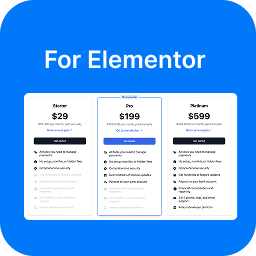
Modern Pricing Table for Elementor

Pricing table with monthly/yearly toggle
Modern Pricing Table for Elementor is the fastest way to publish professional, high-converting pricing sections on any WordPress site — no coding required.
Whether you’re selling a SaaS product, an online course, a membership plan, or a service package, this free Elementor widget gives you pixel-perfect pricing cards with a live monthly/yearly toggle switcher that updates prices instantly — just like the pricing pages of Stripe, Notion, and Linear.
⚡ What Makes It Different?
Most pricing table plugins produce generic layouts that look dated. Modern Pricing Table for Elementor is built on contemporary design principles — clean cards, crisp typography, bold price displays, and smooth interactions — so your pricing page looks like it was designed by a professional.
✅ Key Features
Monthly / Yearly Billing Toggle
Add a dedicated “Pricing Toggle” widget above your pricing cards. Visitors switch between monthly and yearly prices with a single click — no page reload, instant transition. Each pricing card stores both its monthly and yearly price independently.
Rich Feature Lists
Write feature descriptions using the full WordPress rich text (TinyMCE) editor. Bold keywords, add links, use any inline formatting — your features are no longer limited to plain text.
Highlighted / Featured Plan
Mark any plan as the recommended option with a single toggle. The card gets an accent border and elevated shadow to draw the eye.
Custom Ribbon / Badge
Add a floating label (“Most popular”, “Best value”, etc.) to any card with full color and typography control.
Sale Pricing with Strikethrough
Show the original price with a strikethrough alongside the discounted price — great for promotional periods.
Multiple Currency Symbols
Choose from 17 built-in currency symbols or define your own custom symbol. Position it before or after the amount.
Complete Visual Customization
Every element — title, subtitle, price, period, button, features, ribbon, card background, border, and shadow — is fully styleable via Elementor’s style panel. Use global typography and color tokens for brand consistency.
Fully Responsive
Pricing cards adapt beautifully to every screen size. Mobile visitors see a clean, readable layout without horizontal scrolling.
SEO-Friendly HTML
Outputs semantic, clean markup. Heading tags are configurable (H2–H6) so your pricing section fits naturally into your page’s heading hierarchy.
Accessible Toggle
The billing period toggle is keyboard-navigable and includes a proper aria-label for screen readers.
🛠 How to Use
- Install and activate the plugin
- Edit any page with Elementor
- In the widget panel, look for the “Pay Addons” category
- To add the section header + billing toggle, drag the “Pricing Toggle” widget into a full-width row above your pricing cards
- For each pricing plan, drag a “Modern Pricing Table” widget into its column
- Fill in your monthly price, and optionally a yearly price — the toggle automatically shows the right price
- Customize colors, typography, and content to match your brand
- Publish!
🎯 Perfect For
- SaaS and subscription businesses
- Digital agencies and freelancers
- Online course creators and coaches
- Membership sites
- Software companies
- Service-based businesses
- E-commerce stores with tiered product offerings
ABOUT US
We build professional Stripe payment solutions for WordPress. Our core products:
-
Elementor Stripe Payment — Seamlessly integrate customized Stripe-powered payment forms into your Elementor site. View plugin
-
Contact Form 7 Stripe Payment — Accept payments directly through Contact Form 7 with Stripe. View plugin
-
WooCommerce Stripe Payment — Unlock 30+ payment methods including Apple Pay, Google Pay, Klarna, Afterpay, ACH, and more. View plugin
-
Stripe Express Payment — Embed standalone Stripe payment widgets anywhere using shortcodes. View plugin