

Mevabi – Word Search Puzzle Builder
4.5/5 (2 ratings) 10 active installs Updated Sep 11, 2026
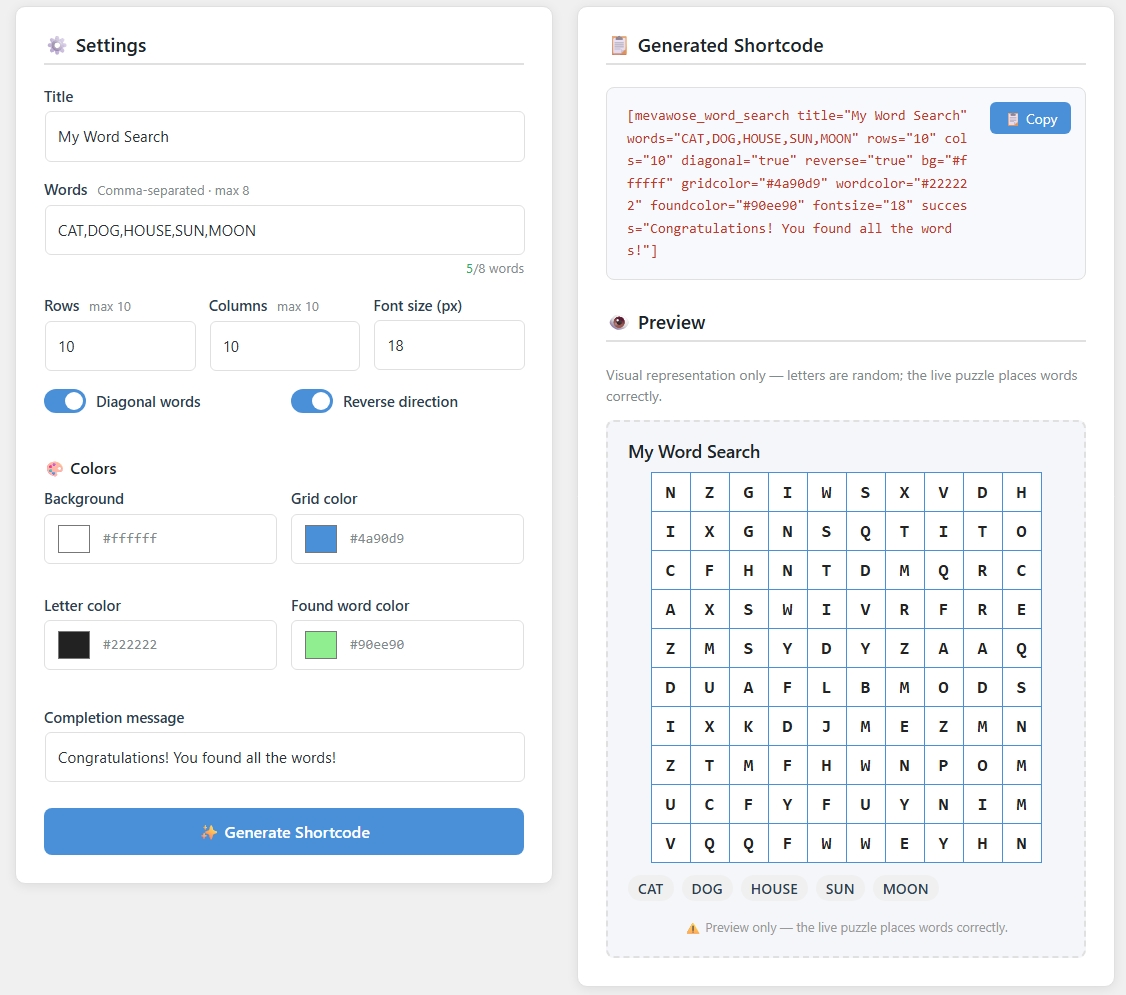
Admin Shortcode Builder with live preview.
Mevabi – Word Search Puzzle Builder lets you embed a fully interactive, touch-friendly word search puzzle on any post or page using a single shortcode.
Quick Start
- Install and activate the plugin.
- Add the shortcode to any post or page.
- Customize puzzle parameters as needed.
Features
- Drag (or tap on mobile) to select letters — page never scrolls during selection.
- Up to 8 words per puzzle, grid up to 10 × 10.
- Optional diagonal and reverse directions.
- Fully customizable: background, grid, letter and highlight colors, font size.
- Custom completion message when all words are found.
- Fullscreen button (native Fullscreen API + CSS fallback for all browsers).
- Admin Shortcode Builder — fill in a form, click Generate, copy the shortcode.
- Live visual preview of the puzzle layout in the admin.
- No external scripts or tracking — 100% self-contained.
- Translation-ready (
.potfile included).
Usage Example
Add the shortcode to any post or page where you want the puzzle to appear.
[mevawose_word_search title="Animals" words="CAT,DOG,BIRD,FISH" rows="10" cols="10" diagonal="true" reverse="true" bg="#ffffff" gridcolor="#4a90d9" wordcolor="#333333" foundcolor="#ffd700" fontsize="18" success="Great job!"]
Shortcode Options
The shortcode supports several parameters that allow you to customize the puzzle. All parameters are optional except for the word list.
- title – Sets the title displayed above the puzzle.
Default: Word Search - words – A comma-separated list of words that will appear in the puzzle.
Example:CAT,DOG,BIRD,FISH
Maximum recommended: 8 words. - rows – Number of rows in the puzzle grid.
Allowed values: 1–10
Default: 10 - cols – Number of columns in the puzzle grid.
Allowed values: 1–10
Default: 10 - diagonal – Allows words to appear diagonally in the puzzle.
Possible values:trueorfalse
Default: true - reverse – Allows words to appear backwards in the puzzle.
Possible values:trueorfalse
Default: true - bg – Background color of the puzzle grid in HEX format.
Example:#ffffff - gridcolor – Color of the puzzle grid borders.
Example:#cccccc - wordcolor – Color of the letters displayed in the puzzle grid.
Example:#222222 - foundcolor – Highlight color applied when a word is found.
Example:#90ee90 - fontsize – Font size of the letters inside the puzzle grid (in pixels).
Default: 18 - success – Custom message shown when the player finds all the words.
Example:Great job! You found all the words! - timer – Time limit in seconds.
0means no timer (default).
Example:timer="600"(10 minutes) - embed – Show an iframe embed code snippet below the puzzle.
Possible values:trueorfalse
Default: false - embedtext – The backlink text shown when the puzzle is embedded on another domain.
Default:View original puzzle - extendedsize – Unlocks up to 20 words and a 20×20 grid.
Possible values:trueorfalse
Default: false
Example Custom Puzzle
Here is another example showing how to create a themed puzzle:
[mevawose_word_search title="Fruits" words="APPLE,BANANA,PEAR,ORANGE,MANGO" rows="8" cols="8" diagonal="true" reverse="false"]
You can place the shortcode in posts, pages, or any widget that supports shortcodes.
Use Cases
The Mevabi Word Search Puzzle Builder plugin can be used in many different situations where interactive word puzzles are useful or entertaining.
- Classrooms and schools – Teachers can create simple word search puzzles for vocabulary practice, spelling exercises, or themed classroom activities.
- Educational websites – Add interactive word puzzles to learning platforms, homeschooling blogs, or language learning websites.
- Kids activities – Perfect for websites that provide games and activities for children. Word search puzzles help improve concentration and word recognition.
- Language learning – Create puzzles to help students practice vocabulary in a new language in a fun and engaging way.
- Blog engagement – Bloggers can add puzzles to posts to increase user interaction and time spent on the page.
- Seasonal activities – Create themed puzzles for holidays, events, or special topics (animals, food, geography, etc.).
- Printable puzzles – The generated puzzles can also be printed and used for offline activities in classrooms or at home.