


MetalflowAPI — Live Precious Metals Prices
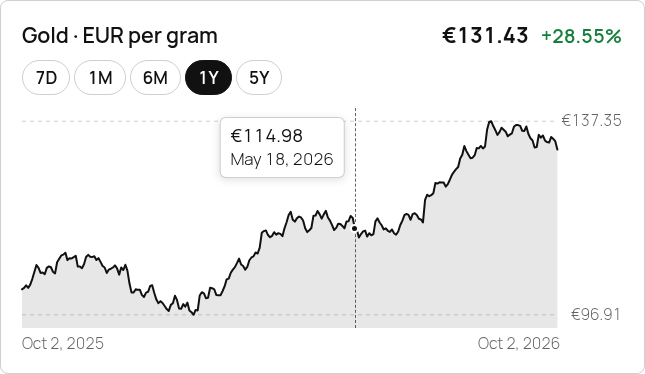
History chart with 7D–Max range buttons, axes and hover tooltip (Twenty Twenty-Five).
The official MetalflowAPI WordPress plugin makes it dead simple to embed live precious metals prices on any WordPress site — perfect for jewelers, publishers, trade-in calculators and bullion shops.
Features
- Spot prices for Gold (XAU), Silver (XAG), Platinum (XPT) and Palladium (XPD) — near real-time on paid plans, delayed on the Free plan
- Carat-aware pricing for 9k, 10k, 14k, 18k, 20k, 21k, 22k and 24k Gold
- 30+ currencies — EUR, USD, GBP, JPY, CHF, CAD, AUD, PLN, CZK, INR, BRL, CNY and many more (sourced daily from European Central Bank)
- Units: gram (g), kilogram (kg), troy ounce (ozt)
- 7 shortcodes — drop into any post, page or widget
- 5 Gutenberg blocks — Live Price, Carat Calculator, Ticker, Carat Table, Historical Chart
- Sidebar widget — classic widget for the metals ticker
- Server-side only — your API key stays on the server, never exposed to the browser
- Smart, plan-aware caching — one shared request per page, 6-hour cache on the Free plan, last known prices shown if the API is unreachable
- Plan & usage box — see your monthly request usage in Settings MetalflowAPI, with a warning at 80% and 100%
- Interactive history chart — 7D / 1M / 6M / 1Y / 5Y / Max range buttons, price and date axes, hover/keyboard tooltip, responsive, no external JavaScript libraries (paid plans; ranges follow your plan’s history depth)
- Theme-adaptive by default — widgets inherit your theme’s font, text and link colours (theme.json presets) and adapt to dark themes and dark backgrounds
- Easy customisation — global Appearance settings (style preset card / minimal / borderless, accent, text, background, border, up/down colours, corner radius, text size) with live preview; per-block colour, typography, spacing and border controls; shortcode attributes
- Optional “Powered by” bonus — off by default. If you choose to show a small “Prices by MetalflowAPI” link (once per page), Free-plan sites get 2,000 requests/month instead of 500 and fresher prices once the link is verified
- Translation-ready — all strings localized
Shortcodes
[metalflow_price metal="Gold" currency="EUR" unit="g"] — spot price for one metal
[metalflow_carat carat="14" currency="EUR" unit="g"] — carat-aware Gold price
[metalflow_ticker currency="EUR" unit="g" style="minimal"] — all 4 metals
[metalflow_table currency="EUR" unit="g"] — full carat table 9k–24k
[metalflow_change metal="Gold" days="30"] — % change over N days (Starter and above)
[metalflow_calc currency="EUR"] — interactive carat-weight calculator
[metalflow_chart metal="Gold" currency="EUR" range="1y" ranges="7d,1m,6m,1y,5y,max"] — interactive history chart with range buttons (paid plans)
Chart attributes
range— default range:7d,1m,6m,1y,5yormax(default from Settings, normally1y; older values such as30d,90d,2ystill work)ranges— which buttons to show, comma separated (default from Settings)metal,currency,unit(g,kg,ozt),height(80–600 px, default 220),fill="0"(no area fill),label="0"(hide title/price/change header)
Ranges longer than your plan’s history (Free 30 days, Starter 5 years, Pro 30 years) are hidden from visitors; administrators see them with a lock and a link to the plans. The default range is rendered with the page; other ranges load on click from your own site (/wp-json/metalflowapi/v1/chart, which only serves charts that appear on your site, from the server-side cache).
Styling attributes (all shortcodes)
style—card,minimalorborderlesscolor(oraccent) — accent / chart line colour, e.g.color="#b8860b"text,bg,border— text, background and border colours (hex)up,down— colours for rising / falling prices (hex)radius— corner radius in px (0–32)size— text size scale (0.75–1.5)
Example: [metalflow_ticker style="minimal" color="#b8860b"], [metalflow_chart range="1m" style="borderless" color="#2563eb" radius="12"]. Invalid values are ignored. Without attributes, widgets use Settings MetalflowAPI Appearance, and with that left empty they follow your theme.
Pricing
The plugin is 100% free. Prices come from the MetalflowAPI service, which has a free tier (no credit card required):
- Free — personal & non-commercial sites only. 500 requests/month, delayed prices, 10 currencies, 30-day history. The price change and chart widgets are not included (they stay hidden from visitors).
- Starter — €9/mo for commercial sites (shops, jewelers, dealers). 10,000 requests/month, fresher prices, 30 currencies, 5-year history, change endpoint.
- Pro — €29/mo, 100,000 requests, 30-year history, all currencies.
- Enterprise — custom, full 1968+ history.
Current plans: metalflowapi.com/pricing
EU & GDPR
Servers in Strasbourg (France). All data within EU. GDPR-compliant. EUR billing with VAT invoices.
External services
This plugin connects to the MetalflowAPI service (metalflowapi.com, operated by MetalflowAPI) to fetch precious metals prices. It is required for live data; without an API key the plugin makes no requests at all. Terms of Service: https://metalflowapi.com/legal/terms · Privacy Policy: https://metalflowapi.com/legal/privacy
Price data (only after you add or register an API key). Requests are made from your WordPress server — never from your visitors’ browsers — when a page with a MetalflowAPI shortcode, block or widget is rendered and the cached copy has expired, and when you click “Test connection”. Endpoints:
https://metalflowapi.com/api/v1/latest— spot prices (shortcodesmetalflow_price,metalflow_ticker, the Live Price/Ticker blocks and the ticker widget)https://metalflowapi.com/api/v1/carat— gold carat prices (metalflow_carat,metalflow_table,metalflow_calcand the carat blocks)https://metalflowapi.com/api/v1/change— % change (metalflow_change)https://metalflowapi.com/api/v1/timeframe— daily prices for the 7D, 1M, 6M and 1Y chart ranges (metalflow_chart, Historical Chart block)https://metalflowapi.com/api/v1/sparkline— long-range price curve for the 5Y and Max chart ranges (also used if your plan does not include/timeframe)https://metalflowapi.com/api/v1/symbols— key check and currency list on the settings page
Sent with each request: your API key (X-API-Key header), the query parameters needed for the widget (metal, currency, unit, date range, chart size/colour) and a User-Agent with the plugin and WordPress version numbers (it does not contain your site address). Your server’s IP address is visible to the service, as with any HTTP request. Nothing about your visitors (IP addresses, cookies, behaviour), posts, comments or users is sent.
Optional in-dashboard registration (Settings MetalflowAPI “Get your free API key”). Only when you type your email address and click “Send code”, the plugin sends that email address, this site’s URL and the plugin version to https://metalflowapi.com/api/plugin/request-code. When you enter the 6-digit code it sends your email address and the code to https://metalflowapi.com/api/plugin/verify-code. This creates your free MetalflowAPI account and returns your API key, which is saved in your site’s WordPress options.
Optional “Powered by MetalflowAPI” bonus (off by default). Only after you tick “Show a ‘Powered by MetalflowAPI’ link…” in Settings MetalflowAPI and save (or click “Register this site”), the plugin sends this site’s address (home URL), the address of one public page of your site that shows a MetalflowAPI widget (if known), the plugin version and your API key (X-API-Key header) to https://metalflowapi.com/api/plugin/poweredby (POST). MetalflowAPI then loads that homepage/page — right away and about once a day — only to check that the “Prices by MetalflowAPI” link is there; on the Free plan a verified link raises your monthly limit to 2,000 requests and gives fresher prices. The settings page asks the same endpoint for the verification status (GET, at most every 10 minutes while you view the page). When you untick the option, the plugin asks the endpoint to delete the registration (DELETE). Nothing is sent while the option is off.
Chart ranges in the browser. When a visitor clicks a chart range button, the browser asks your own site (/wp-json/metalflowapi/v1/chart), not metalflowapi.com. That endpoint only accepts the metal/currency/unit combinations of charts rendered on your site (signed) and the six fixed ranges, answers from the server-side cache (one API request per range per cache period: at least 30 minutes for 7D/1M, 1 hour for 6M/1Y, 6 hours for 5Y/Max) and never exposes your API key.
Caching. Responses are cached on your server with WordPress transients: on the Free plan (delayed prices) for 6 hours (1 hour with an active “Powered by” bonus), on paid plans for the configured time (default 5 minutes, never shorter than the plan’s own refresh interval). Errors are cached briefly (a quota error until the time given by the service), and the last successful response is kept so visitors see the last known price, with its date, while the service is unreachable.
Links. Links to metalflowapi.com in the WordPress admin (sign-up, pricing, dashboard) carry utm_* parameters and the plugin version so MetalflowAPI can see which plugin version a visit came from. Nothing is sent until you click such a link. The optional “Prices by MetalflowAPI” link on the public site is off by default; when you enable it, it is a plain link to metalflowapi.com (the gold price page of your default currency) without tracking parameters, shown once per page.