


Merchant Feed Booster Lite for WooCommerce
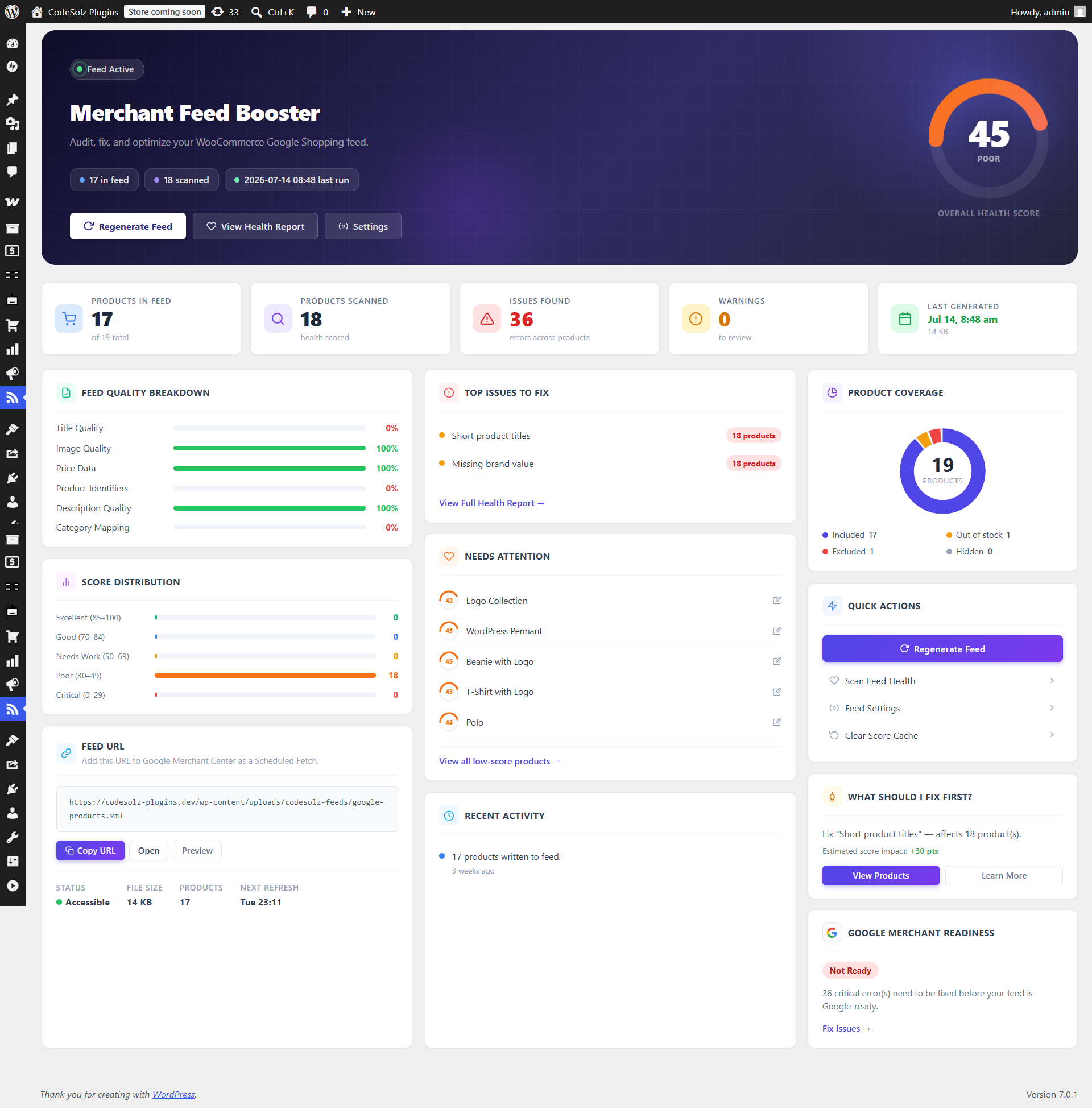
Dashboard — store-wide health score gauge, feed status, top issues, and lowest-scored products.
You submit your WooCommerce products to Google Shopping. A few days later, some are disapproved. The error messages are vague. You don’t know which product has which problem, or what to change.
Merchant Feed Booster Lite solves that.
It generates a reliable Google Merchant XML feed for your store and audits every product against 27 of Google Merchant Center’s content policy rules. Each product gets a health score from 0 to 100, and every failing rule tells you exactly what the problem is and how to fix it — all inside your WordPress admin, before a single product reaches Google.
How it works
- Set it up once — enter your feed title, default brand, and Google product category in Settings. The plugin adds Brand, GTIN, MPN, and Condition fields to each product edit screen.
- Generate your feed — click Regenerate Feed on the Dashboard. The plugin writes a properly formatted Google Merchant XML file to your server. Copy the URL and paste it into Google Merchant Center as a scheduled fetch.
- Run a health scan — go to Feed Health and scan your catalog. The plugin checks every product against 25 policy rules covering titles, images, prices, identifiers, and descriptions.
- Fix what’s flagged — each failing rule shows a severity level (Error, Warning, or Notice), a plain-English explanation, and a specific fix hint. Start with the lowest-scored products first.
- Let it run — the feed refreshes automatically on a schedule you choose. Products are rescored automatically whenever you edit them.
What it checks
Titles — Too short or too long, promotional words like FREE or SALE, ALL CAPS, HTML tags, price mentioned in the title, special characters, repeated words, duplicate title reused on another product.
Images — Missing image, too small for Google’s requirements, unsupported format, tracking parameters in the URL.
Prices — Missing or zero price, sale price set without a regular price, sale price higher than or equal to the regular price.
Identifiers — Invalid GTIN digit count, GTIN that fails the GS1 check digit test, brand set but no GTIN or MPN provided, missing brand, duplicate GTIN/MPN reused across products.
Descriptions — Missing description, too short, HTML tags, promotional language.
What you get
- A health score (0–100) and color-coded tier for every product in your store
- A full breakdown of every failing rule per product with fix hints
- A live feed preview showing your products exactly as they’ll appear in the XML
- Automatic feed refresh on a schedule — twice daily, daily, weekly, or a custom interval
- A real reachability check on your feed URL, and a warning if the scheduled refresh stops firing
- A Feed Health column (sortable, filterable) right in your WooCommerce Products list
- A Site Health test so feed problems surface alongside your other WordPress health checks
- CSV export of the full health report for spreadsheet analysis
- WP-CLI commands for server-side management
- Developer filters and actions to customise the feed and scoring rules
Privacy
This plugin does not collect or transmit any data to third parties, and there is no tracking or telemetry of any kind. All scoring and feed generation runs on your own server. The one network request the plugin makes is a same-origin check of your own feed URL, to confirm it’s reachable before Google tries to fetch it — no data is sent to any external service.