

MenuVerse – Mobile Menu & Bottom Navigation Bar
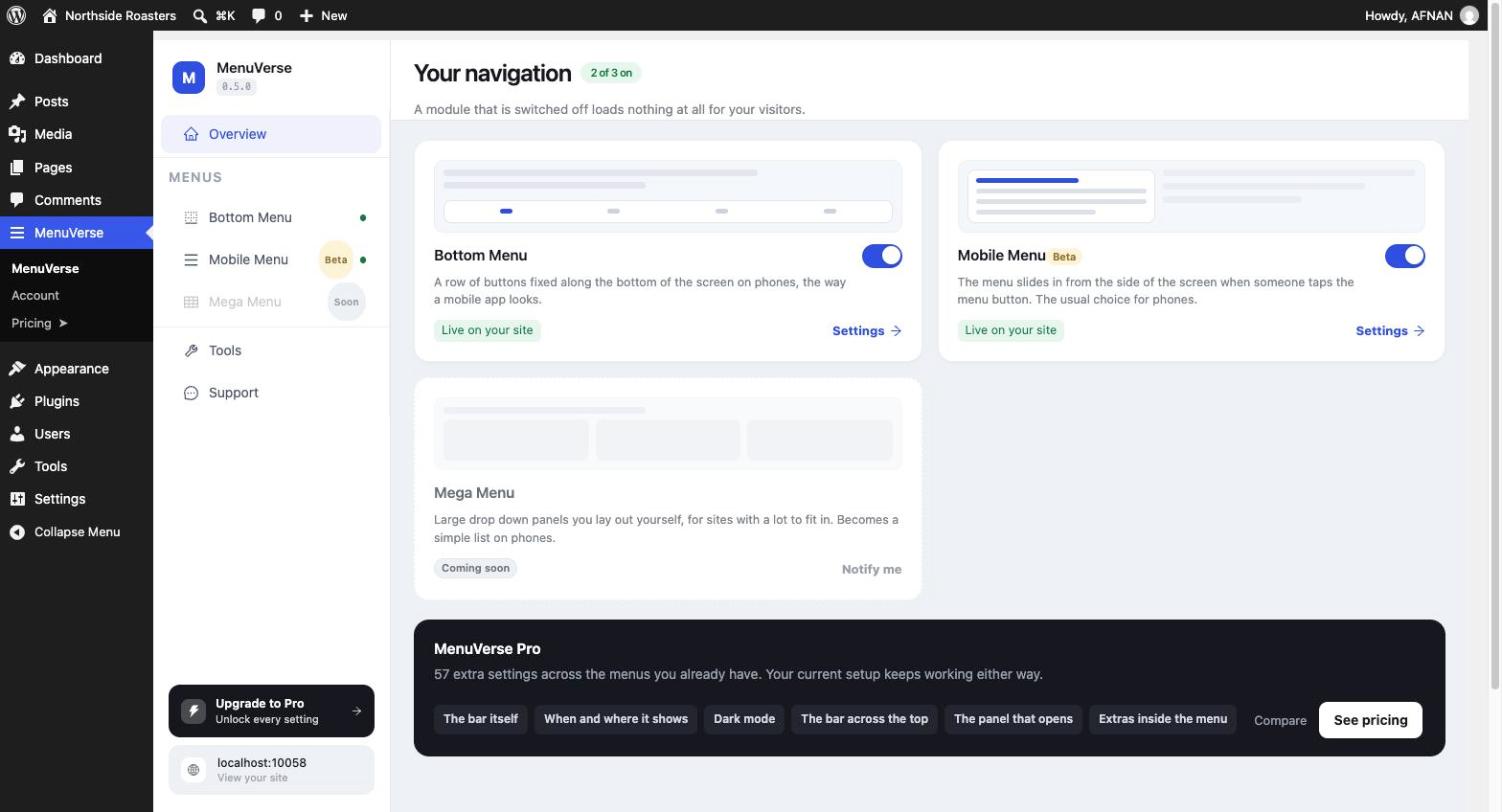
The MenuVerse dashboard: the mobile menu, bottom navigation bar and other modules as cards, each with its status and settings.
MenuVerse adds a mobile menu and an app-style bottom navigation bar to any WordPress site. Put your most important pages one thumb-tap away on phones, with a sticky bottom menu like the tab bar in every mobile app, an off-canvas hamburger menu, or both together. Set it up with a live phone preview, without code, using the menus you already have.
Most mobile visitors never open a hamburger menu. A bottom navigation bar keeps Shop, Cart, Search, Book and Call on screen the whole time they scroll, which is where people tap.
What you can build with MenuVerse
- A bottom navigation bar (also called a tab bar, mobile footer menu or sticky bottom menu) with icons and labels, fixed to the bottom of the screen on phones and tablets.
- A mobile menu: a responsive hamburger menu that slides in from the side, with accordion submenus.
- Both together, from one dashboard, each placed automatically, with a block, with a shortcode or in a theme template.
Who it is for
- WooCommerce stores: a cart button, product search and account one tap away.
- Restaurants, salons, clinics and services: Book, Call and Directions always in reach.
- Blogs and news sites: categories, search and saved posts on a phone.
- Membership, course and community sites: dashboard, messages and profile, the way an app feels.
Bottom navigation bar features (free)
- Up to four buttons, plus a More drawer for everything else.
- Buttons that open a page, a link, or a search box for the whole site, WooCommerce products or Easy Digital Downloads.
- 229 built-in icons, drawn for MenuVerse and delivered as inline SVG: no icon font and nothing loaded from a CDN.
- Wording above or below each icon, your own badge text (such as “New” or “Sale”), and room for the iPhone home bar.
- Three ways to mark the current page: colour, pill or underline.
- A dock shape, where the current button rises out of a slim base.
- Hide the bar while visitors scroll down and bring it back when they scroll up.
- 43 ready-made looks, 13 of them free, from clean white to dark, glass and gradient. Every look keeps its icons at a contrast of at least 3:1 against the bar, the level accessibility guidelines ask of icons.
- Buttons respond the moment they are touched, on the iPhone as well.
Mobile menu features (free)
- A responsive off-canvas hamburger menu that slides in from the left or the right.
- An animated menu button and an optional top bar with your logo or site title.
- Accordion submenus that open on the section the visitor is already in.
- An optional coloured edge where the panel meets the page.
- Keyboard friendly: focus stays inside the open menu and returns to the button when it closes.
- Your breakpoint, so the mobile menu takes over exactly where your theme’s desktop menu stops working.
Works with your theme and your menus
- No rebuilding. MenuVerse shows the menus you already manage under Appearance Menus, and the Navigation menus block themes use. Keep editing them where you always have.
- Block themes and classic themes. Block themes such as Twenty Twenty-Five hide Appearance Menus; MenuVerse brings it back only when your theme leaves it out.
- Page builders. Use the block, or the
[menuverse_bottom_menu]and[menuverse_mobile_menu]shortcodes in Elementor, Divi, Beaver Builder or any builder that accepts shortcodes. - Per-item extras such as an icon, a badge, or hide on mobile, edited right in the WordPress menu editor.
Fast, accessible and private
- Under 8 KB per module, JavaScript and CSS together, compressed. The bottom bar adds 7.4 KB.
- Loads only where it shows. Pages without a MenuVerse menu load no MenuVerse files at all.
- No jQuery, no icon font, no external requests.
- Accessible: screen reader labels, the current page announced, full keyboard support, and every animation stills for visitors who ask their device to reduce motion.
- Right-to-left ready: the layout mirrors itself on Arabic, Hebrew and other RTL sites, automatically.
A dashboard you can see
- A live phone preview beside every setting, so each change shows as you make it.
- A short guided setup the first time you open it.
- Import and export your settings to move them to another site.
- A Maintenance panel: a System Status report for support requests, a button that clears cached menus, and a settings repair.
- Delete-on-uninstall is optional and off by default, so your setup is never lost by accident.
MenuVerse Pro: more taps on what earns you money
The free plugin is complete on its own. MenuVerse Pro is an add-on for sites that want the bar to work harder.
Turn taps into calls, chats and sales
- WhatsApp and phone call buttons that open a chat or dial straight away.
- A standout button: one button, such as Book, Order or Shop, drawn bigger and rising out of the bar, with an optional wiggle that draws the eye.
- Live cart and wishlist counts for WooCommerce and YITH Wishlist, updated without reloading the page and safe with full-page caching.
- Popup Maker buttons, a slide-up panel of your own content or a contact form, and a button that opens one of your menus.
- A fifth button onwards, or a bar that scrolls sideways.
Show the right menu to the right visitor
- Page rules: show a menu everywhere, only on chosen pages, or everywhere except some.
- Audience rules: show it to signed-in visitors, signed-out visitors or chosen user roles, for the whole bar or one button at a time.
- Scheduling: a date range, chosen weekdays and a daily time window, for opening hours or a weekend sale.
Make it unmistakably yours
- 30 more ready-made looks: frosted glass, gradients, a smooth notch that slides under the current page, glowing dots and lifted buttons.
- Glass, gradient and picture backgrounds, shadows, a dark mode palette and per-button colours.
- Your own images as icons, with a different image for the current page.
- A livelier feel: buttons that press in deeply or pop, and a light vibration on tap on Android.
A fuller mobile menu
- Full-screen and push panels, and new ways for the menu to open, including one that grows out of the menu button.
- Search, social links, free text and big action buttons inside the menu.
- A sticky top bar that hides on scroll, swipe to close, and hiding your theme’s own mobile menu.
No lock-in. Pro installs beside the free plugin, so nothing is rebuilt. If your licence ever lapses, every setting stays saved and the bar simply falls back to the free options.
See MenuVerse Pro features and pricing
Coming soon
A mega menu is in development and shows as Coming soon in the dashboard. It is not usable yet.
For developers
Hooks, settings schemas, the render pipeline and the REST routes under menuverse/v1 are documented in docs/extension-points.md. Development happens on GitHub.