

Markup by Attribute for WooCommerce
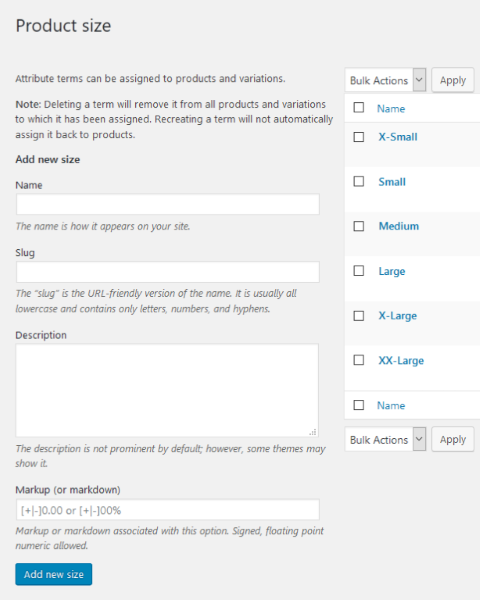
Note the addition of the “Markup (or markdown)” field on the bottom of the <code>Add new *attribute*</code> panel of the attribute editor.
Varying Prices on Product Variations is Tedious and Error-Prone
Want to add $5 to every blue product you sell? Maybe you sell jewelry with birthstones, and some stones cost more than others. If all “X-Large” products cost 7.5% more, you’d have to manually calculate and change every “X-Large” variation of every product.
Markup by Attribute Adds ‘Markup’ to Attribute Terms
Markup by Attribute solves this by letting you add a markup (or markdown) to global attribute terms. If the attribute is ‘Color,’ you can add “+5” to Blue while leaving Green and Yellow alone. When you set regular and sale prices, every blue product will automatically be $5.00 more.
This plugin does one thing – it adds pricing control to WooCommerce’s global product attributes. If your products vary in price based on options like size, color, or material, Markup by Attribute lets you set those price differences once at the attribute level rather than manually adjusting each product variation.
Key Features
- Fixed value markups (like $5) or percentage markups (like 5%)
- Positive markups for price increases, negative for decreases
- Integrates with WooCommerce’s existing ‘Set regular price’ and ‘Set sale price’ bulk actions
- Shows price differences in the dropdown options to help customers make informed decisions
- Provides itemized price breakdowns in variation descriptions
- Quick bulk update tools to reapply markups when values change
- Support for both regular and sale prices
- Option to show or hide markup details in various places
Use Cases
- Size-based pricing: Charge more for larger sizes, less for smaller sizes
- Material upgrades: Add costs for premium materials
- Add-on services: Pricing for monogramming, gift wrapping, etc.
- Attribute-driven costs: Any situation where product options consistently affect pricing
New in Version 4.8
- The product edit screen now warns when a global attribute set to “Any” on a variation carries markups — customers see the markup in the options drop-down, but the “Any” variation’s price never includes it
- Informational only: nothing is blocked, and a deliberate configuration is left exactly as you set it