

MangaFocus – Panel-by-Panel Manga Reader
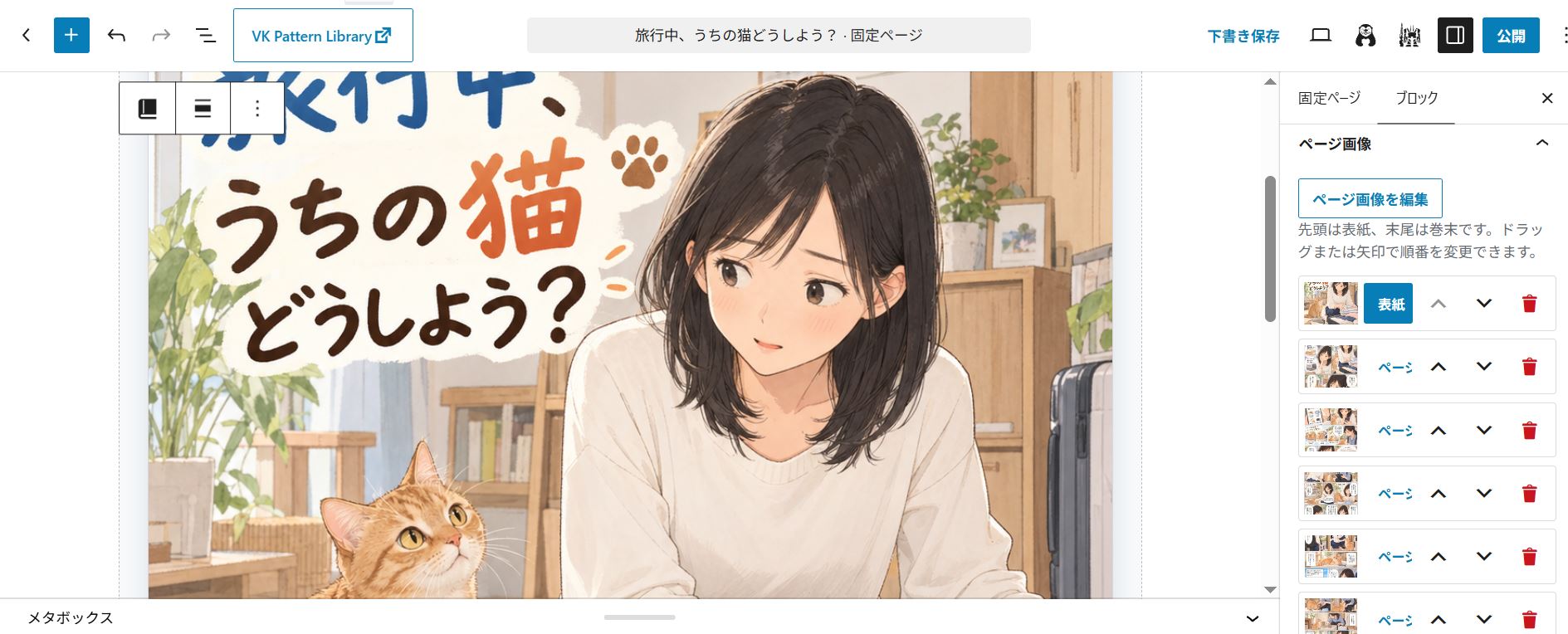
Configure comic pages in the block editor
Comics for your WordPress site
MangaFocus is a free plugin that adds a dedicated comic viewer to WordPress posts and pages. Select your comic images and let readers browse single pages, two-page spreads, fullscreen views or vertical scrolling.
Its distinctive feature is Focus Mode: readers move through the panel regions you define, enlarged in reading order. This helps readers follow panels on smaller screens.
Use hand-drawn or AI-assisted comics, service introductions, brochures and illustrated guides. MangaFocus displays existing images; it does not generate comic images or automatically send content to an AI API.
Free features
- Publish and reuse: place a MangaFocus block directly in a post or page, or register a comic in Manga Library and reuse it with the Registered Viewer block or a shortcode.
- Focus Mode: define panel regions and their reading order, with optional separate regions for smartphone screens.
- Reading layouts: single pages, two-page spreads and responsive automatic layouts; fullscreen page navigation, vertical scrolling and fullscreen viewing of one complete page at a time.
- Presentation: right-to-left or left-to-right binding; standalone cover and landscape pages; cover launch buttons. Enable inline, fullscreen and Focus Mode independently.
- Controls: zoom, pan, swipe, keyboard and page-edge navigation. Normal page transitions can be instant, page-turn, fade or slide, with reduced-motion support.
Start with a post or a reusable comic
For one location, add a MangaFocus block directly to a post or page. This Direct Viewer stores images and settings in that block.
For reuse, save the comic in Manga Library and select it with Registered Viewer blocks or shortcodes. Edit the library entry to update those placements. See Installation for both workflows.
You can also use “Register in Manga Library” on a Direct Viewer. This creates an independent copy of its current configuration; later edits to the original block and the library entry are not synchronized automatically.
Choose how readers view the comic
- Normal reading: move through whole pages, or a complete two-page spread at a time.
- Fullscreen: use the available screen area for page navigation or continuous vertical scrolling.
- Focus on one page at a time: within a fullscreen spread, enlarge each complete page in reading order.
- Focus Mode: enlarge the author-defined panel regions within each page, in the order you set. Pages without configured panels remain in sequence as full pages.
To configure Focus Mode, select a page in the MangaFocus block, turn on “Enable Focus Mode”, then choose “Add panel” and drag over the image. Repeat and use the panel list’s Previous and Next controls to set reading order. Preview before publishing. At least one panel is needed to use Focus Mode alone.
See the Japanese manual.
Optional Pro add-on
Free works independently: comic display, Focus Mode and Manga Library do not require Pro.
Pro adds calls to action (CTA), comic reading analytics, consultation documents and comic-production prompts for external AI services. The AI helpers prepare text locally for you to review and copy; they do not automatically send it to an AI API or generate images.
Without Pro, comics use the Free Viewer; saved Pro settings remain for later reuse.
Data and privacy
Free alone does not collect reader events on the public site or automatically send comic content to an external AI API. It does not send telemetry, use an external analytics service or depend on a CDN.
Pro Analytics is disabled by default and is designed to store its data in the WordPress site’s local database. Administrators can set a retention period and delete stored analytics data. Free includes the analytics table lifecycle, retention schedule and deletion settings to support Pro compatibility and manage retained data; without Pro, no new reader events are collected.
External image URLs connect readers’ browsers to the image host.
Development
The distributed plugin contains its human-readable PHP, JavaScript, and CSS source. It does not use minified, bundled, or transpiled runtime files.
The maintained development repository is available at https://github.com/cni-works/mangafocus.
The matching source revision contains the build script scripts/build-release.ps1. From the repository root, run powershell -File scripts/build-release.ps1 to build the plugin ZIP. The build script is excluded from the ZIP.