
Login as User: See the Site as Any User
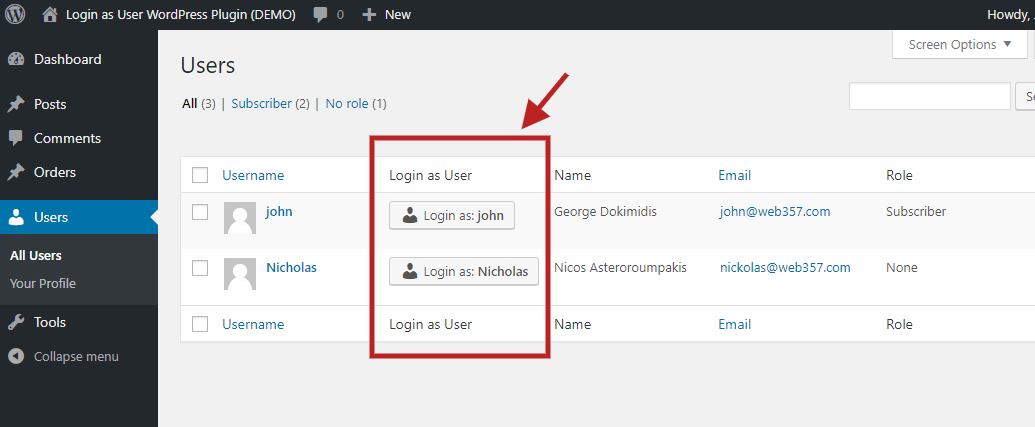
Users list: click <strong>Login as…</strong> next to any user to see the site as they see it.
The Login as a User WordPress plugin lets you see the site exactly as another user sees it.
A customer says “my order is missing”. A member cannot open a course. A subscriber sees the wrong menu. Instead of asking for their password, you click Login as… next to their name. You are now that user. When you are done, click Go back to admin. That is the whole plugin.
Full setup, settings, and integrations are in the official documentation.
👉 Try the live demo. Credentials are shown on the login screen.
How it works
- Go to Users All Users.
- Click Login as: username next to the person you want to help.
- You land on the frontend as that user. Use Go back to admin in the message bar (or the WordPress admin bar) to return to your own account.
No password is requested, stored, or exposed. You can also start from the user’s profile page. See Accessing the Settings.
Free features
- Login from the Users list: a “Login as…” button next to every user. How to use it »
- Login from the user profile: same button at the top of the Edit User screen.
- One-click switch back: frontend message bar plus an optional link in the WordPress admin bar. Frontend message settings »
- Redirect after login / logout: send yourself to
/my-account, an order page, or back to Users when the session ends. Configuration » - WooCommerce cart preservation: keep the customer’s cart intact while you troubleshoot checkout. Cart preservation »
- Custom login button label: show nickname, first name, last name, full name, or icon only, and optionally limit the number of characters. Login button »
- Message bar position: top, bottom, or hidden. Optional attention animation on the “Go back to admin” button.
- WordPress Multisite: log in as users across the network without Super Admin privileges.
- User Insights compatible: add a custom field named
loginasuserto show the button in User Insights. - Developer hooks: filter login/logout redirects and WooCommerce cart behaviour. Developer hooks »
PRO features
Upgrade to Login as User PRO for store, membership, and team-permission tools.
- WooCommerce: “Login as User” on the Orders list and inside the order details metabox. Help with refunds, checkout, and missing orders from the customer’s view.
- WooCommerce Subscriptions: same button on the subscriptions list and subscription details screen.
- MemberPress: log in as a member from Members, Subscriptions, and Transactions to verify access and protected content.
- SureCart: “Login as User” on Customers and Orders lists.
- Role management permissions: let Shop Managers log in as Customers only. Block them from impersonating Administrators or Editors.
- Shortcode: place a button anywhere:
[login_as_user user_id="357" redirect_to="/my-account" button_name="Login as $USER"]. - List appearance: show or hide the column, set its position, and choose Small / Medium / Large on Users, WooCommerce, and SureCart tables.
- Custom CSS: style the frontend bar and admin buttons without editing plugin files.