

KN Booking – Appointment Booking Calendar
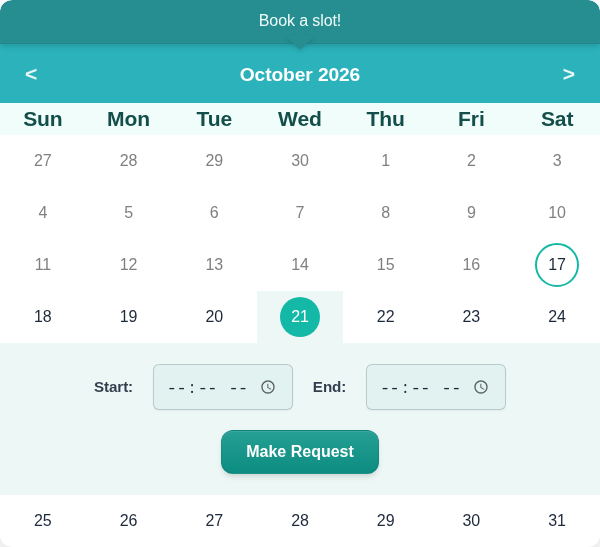
Booking calendar on the front end: clients pick a date and a time, then send a request.
KN Booking is a lightweight appointment booking plugin built for salons, barbershops and other small appointment-based businesses. Clients pick a date and time on a calendar, you approve or decline the request, and everyone gets an automatic email. No account with an external service, no bloat.
A built-in setup wizard (Settings > Setup) gets you running in about two minutes: enter your business details, choose your open days and hours, and set your booking rules. Then add the [kn_booking] shortcode to any page.
Free Features:
- Interactive calendar with availability management
- Booking request management (approve, cancel, delete)
- Automated email notifications (new request, approval, cancellation)
- Customizable booking form with dynamic fields
- Customer profile page for users to view and manage their bookings
- Booking Calendar and Booking Profile blocks for the block editor
- Configurable availability hours and blocked dates
- Color presets and calendar theming options
- CSV export of booking data
- Guest and logged-in user booking support
- Optional WooCommerce payments: take payment at booking (required, or pay now / pay later), with price based on booking length
- Optional AI booking assistant: summarize a request and draft a reply with your own OpenAI API key
- “Add to Google Calendar” link on the booking success message
Blocks and Shortcodes
Both are also available as blocks in the block editor: search for “Booking Calendar” and “Booking Profile”.
[kn_booking]
Place this shortcode on any page to display the booking calendar.
[kn_profile]
Place this shortcode on a page to allow logged-in users to view and manage their own bookings.
External Services
OpenAI API (optional)
Only if you enter an OpenAI API key under Settings > Integrations, an AI Analyze button appears on bookings. When an admin clicks it, the customer’s name, the requested date and time, and the booking notes are sent to the OpenAI API to generate a summary and a draft reply. Nothing is sent until you click the button, and nothing is sent if no API key is saved.
This service is provided by OpenAI, L.L.C.:
* OpenAI Terms of Use
* OpenAI Privacy Policy
Google Calendar link (optional)
If enabled, the booking success message shows a link to calendar.google.com with the booking details in the URL. No data is sent from your server; the request is only made if the customer clicks the link.