


KigoCloud for WooCommerce
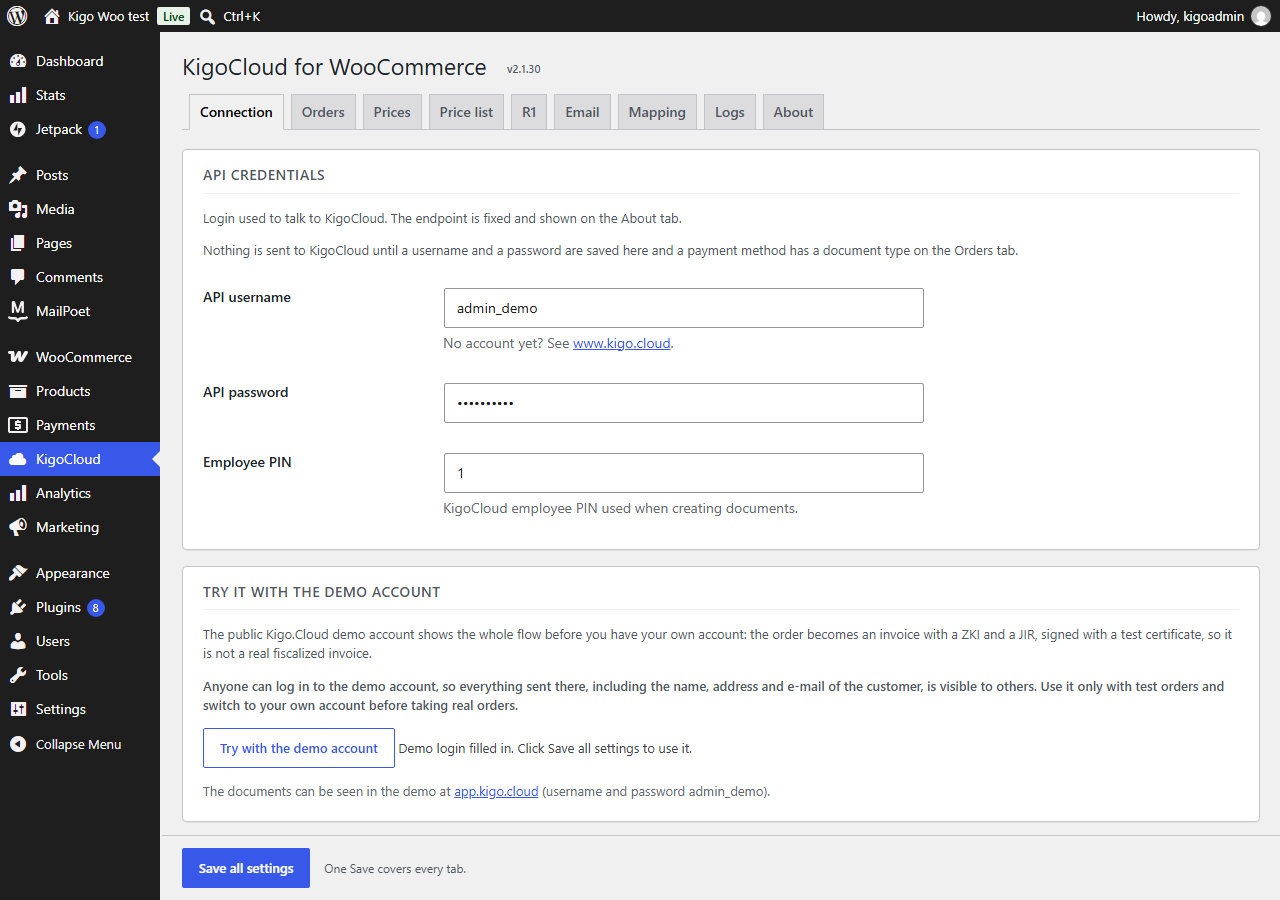
Connection tab: your Kigo.Cloud login, or the demo account in one click.
Fiskalizacija web trgovine bez prepisivanja. KigoCloud for WooCommerce connects your shop to Kigo.Cloud, the Croatian invoicing and fiscalization service by Symmetria d.o.o. When a customer orders and pays, the order is sent to Kigo.Cloud, which issues the invoice, fiscalizes it (ZKI and JIR from the Tax Administration) and the plugin e-mails the PDF to the customer.
Croatian law requires every sale paid by card, cash or a similar method to be fiscalized, web shops included. With this plugin there is nothing to retype: the items, prices, VAT, shipping and the customer come from the WooCommerce order.
What it does
- Fiscalized invoice for every order. Per payment method you choose the document (invoice or offer), the payment type on the invoice (card, transaction account, cash, other) and when it is created: when the order is placed or when it is completed.
- R1 invoices for companies. OIB (VAT number) and company fields on the checkout, with the OIB checksum validated. Works with the classic checkout and the block checkout (WooCommerce 8.6+).
- Invoice PDF to the customer by e-mail, straight after the document is created.
- Invoices in the customer’s language. A customer outside Croatia can get the invoice and the e-mail in English, or in German for Germany, Austria, Switzerland and Liechtenstein.
- Stock and price sync with Kigo.Cloud (Business plan): Kigo.Cloud finds your products by SKU and keeps the quantities and prices in step.
- Anchor price (sidrena cijena) under the product price, as the Croatian Government decision in force from 1 October 2026 requires, when Kigo.Cloud sends it.
- Daily price list on your own domain. The plugin downloads the price list from Kigo.Cloud once a day and serves the CSV and XML from your uploads folder; the
[kigo_cjenik]shortcode shows it as a table with the last 30 days. - Custom field mapping for shops that already collect R1 data with another plugin.
- Logs tab with the last 50 calls, and a test button that sends a test offer (never a real invoice).
- HPOS (custom order tables) compatible.
About Kigo.Cloud
Kigo.Cloud is an online program for issuing and fiscalizing invoices, eRačun (Fiscalization 2.0), stock and price lists, developed in Zagreb since 2013. Connecting a web shop and fiscalizing its orders is available from the Standard plan; two-way sync of items, stock and prices and the anchor price in the shop from the Business plan. Registration is free and needs no card. Plans and prices: www.kigocloud.com.
Try it without an account
On the Connection tab, the Try with the demo account button fills in the login of the public Kigo.Cloud demo. Orders then become invoices in the demo, signed with a test certificate, so you can see the whole flow before you register. Anyone can log in to the demo, so use it only with test orders.
External services
This plugin connects your shop to Kigo.Cloud (https://app.kigo.cloud), an invoicing and fiscalization service run by Symmetria d.o.o., Zagreb, Croatia. It is needed to issue and fiscalize the invoices; without it the plugin does nothing. Nothing is sent before you save a Kigo.Cloud API key, or a username and password (or the demo login), in the plugin settings.
What is sent, and when:
- Order to invoice (
https://app.kigo.cloud/hr/api/v1/invoice/create, or/en/or/de/for a foreign customer): when an order reaches the status you chose for its payment method (placed or completed), and only for payment methods that have a document type. Sent: the order number, the items (name, SKU, quantity, price, VAT rate, discount), shipping, the payment type, the customer note, the customer’s name or company name, OIB, address, city, postcode, country, shipping country, e-mail and phone, the number and amount of any Kigo.Cloud gift voucher used, the employee PIN, and your Kigo.Cloud login for authentication (the API key, or the username and the password as an MD5 hash). - Invoice PDF (
https://app.kigo.cloud/hr/api/v1/invoice/getAsPdf/...): right after the invoice is created, only for payment methods where sending the PDF to the customer is turned on. Sent: the document id and your Kigo.Cloud login. The PDF is e-mailed to the customer from your site. - Gift voucher check (
https://app.kigo.cloud/hr/api/v1/giftVoucher/check): when a buyer types something shaped like a voucher number (XXXX-XXXX) in the cart’s coupon field and no shop coupon has that code. Sent: the voucher number and your Kigo.Cloud login. No data about the buyer is sent. The answer (what is left on the voucher) is kept for two minutes. - Order cancelled (
https://app.kigo.cloud/hr/api/v1/invoice/cancelOrder): once, when an order that already has a Kigo.Cloud document is set to cancelled or refunded. Sent: the order number, the employee PIN and your Kigo.Cloud login. Kigo.Cloud cancels the invoice, or releases the gift voucher reserved for an offer. - Connection test (R1 tab button): when you click it. Sends a test offer with made-up buyer data and your Kigo.Cloud login.
- Licence (
https://app.kigo.cloud/hr/api/v1/licence/info): once a day and when the settings are saved. Sent: your Kigo.Cloud login. The answer is the package, its expiry and the price list address. - Anchor prices (
https://app.kigo.cloud/hr/api/v1/item/list): while “Anchor price” is set to show, once a day at 8:15 and when the settings are saved. Sent: your Kigo.Cloud login. The answer is your Kigo.Cloud item list with the anchor prices; the plugin keeps the item code, barcode and anchor price. No data about your shop or customers is sent. - Price list (the Kigo.Cloud address you enter on the Price list tab): once a day at 7:00, when you save the address, and when a page with the
[kigo_cjenik]shortcode finds that day’s copy missing. Only the CSV and XML files are downloaded; no data about your shop or customers is sent. - Demo account: if you use the demo login, the same order data goes into the public Kigo.Cloud demo, which anyone can open with that login.
In the other direction, Kigo.Cloud reads products from your shop through the WooCommerce REST API (and this plugin’s SKU lookup route, /wp-json/wc/v3/kigocloud/...) only if you create WooCommerce REST API keys and enter them in Kigo.Cloud.
Kigo.Cloud terms of use: https://www.kigocloud.com/uvjeti-koristenja
Kigo.Cloud privacy policy: https://www.kigocloud.com/zastita-osobnih-podataka