

Kayce Discount Rules – Dynamic & Tiered Pricing for WooCommerce
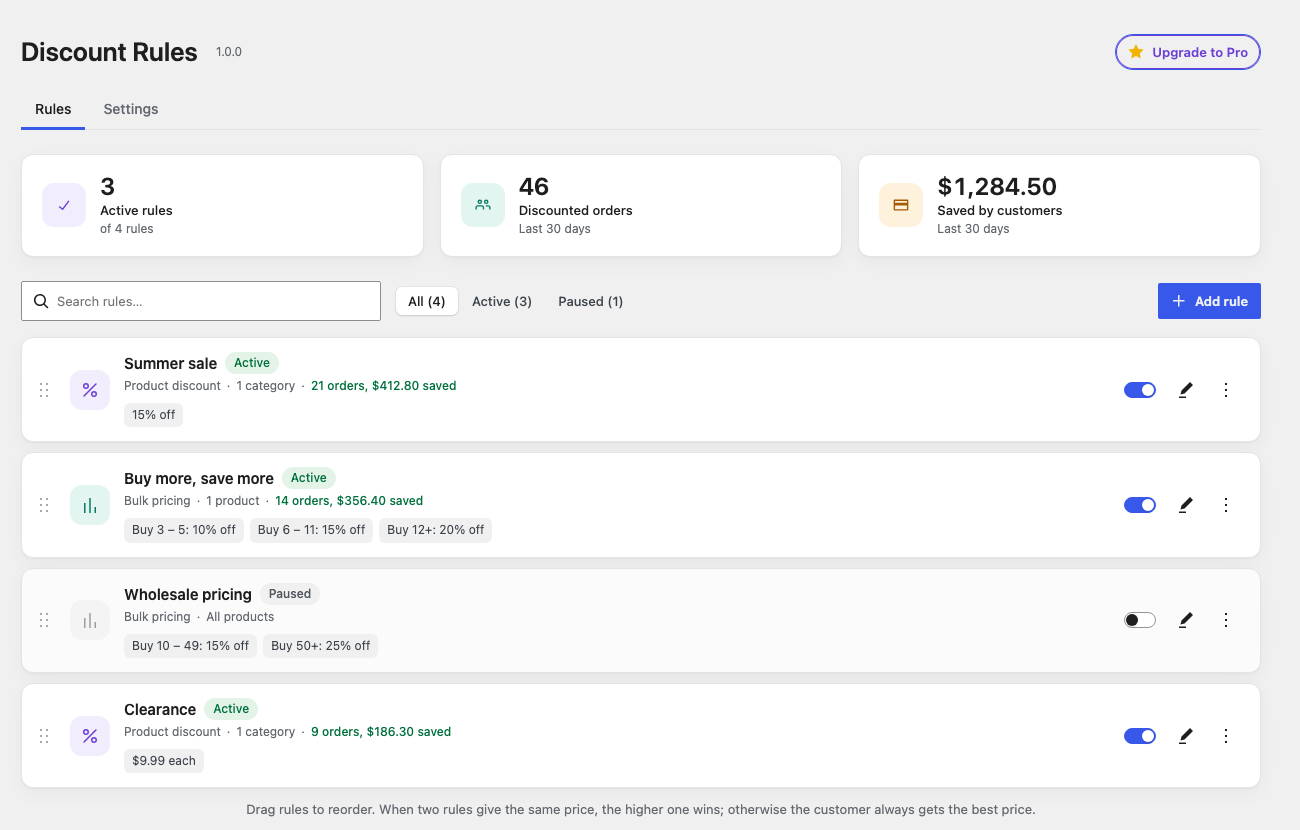
Rules list with 30-day usage stats.
Documentation | Plugin page | Guides | Black Friday sale guide | Support
Kayce Discount Rules lets you run sales, tiered pricing and order discounts in WooCommerce without coupon codes. Customers see the discounted price in the shop, on the product page, and in the cart.
Why store owners choose it
- A free version that’s genuinely useful – category discounts, fixed-amount discounts, tiered pricing, mix and match, scheduled sales and cart discounts are all free, with no limit on rules.
- Light on your store – when no rules are active, it skips discount checks entirely, and active rules are read once per page.
- No surprises – when two rules match, the shopper gets the better price. Discounts never stack unless you choose that in Pro.
- A quiet admin – no notices across your dashboard. Pro is only mentioned on the Discount Rules screen, and the one review request appears after 10 discounted orders and goes away for good once dismissed.
- See it before you save it – a live preview shows the price, saving and messages shoppers will see.
Coming from another discount plugin? See our side-by-side comparisons with Discount Rules for WooCommerce and Tiered Pricing Table.
Everything below is in the free plugin, with no limit on the number of rules.
Rule types
- Product discount – a percentage off, a fixed amount off, or a fixed price on every product you choose.
- Bulk pricing – quantity tiers such as “5–9 items: 10% off, 10 or more: 20% off”. Count quantity per product, per variation, or across every matching item so customers can mix and match (“any 6 bottles from the Wine category”).
- Cart discount – a percentage or fixed amount off the cart, with an optional minimum such as “10% off orders over $100”. It shows as its own line in the cart and checkout totals.
Schedule your sales
- Give any rule a start and end date and time, so a Black Friday sale starts and stops on its own
- A ready-made Black Friday template fills in the dates for you
Choose what each rule applies to
- All products, specific products, categories, tags or brands
- Exclude products or categories
- Skip products that are already on sale
On the storefront
- Struck-through original prices in the shop, on product pages and in the cart
- Sale badges with the percentage saved (badge text is configurable)
- A quantity pricing table on the product page that highlights the tier the shopper’s quantity falls into
- “Add 2 more to get 15% off” messages on the product page and in the cart, which update as the quantity changes
- A “You save” line in the cart and checkout totals
- A Quantity Pricing Table block for block themes and a
[kayce_discount_table]shortcode for everything else
Easy to set up
- Start from ready-made templates: Black Friday sale, spend and save, store-wide sale, category sale, buy more save more, mix and match, wholesale pricing, clearance price
- A live preview shows exactly what shoppers will see, with a quantity simulator, before you save
- Clear warnings for overlapping tiers, gaps and missing products
- See how many orders each rule discounted and how much customers saved in the last 30 days
- Drag and drop to reorder rules, pause or duplicate them in one click
Built for modern WooCommerce
- Works with the Cart and Checkout blocks and with the classic shortcodes
- Compatible with High-Performance Order Storage (HPOS)
- The rule each order line was priced by is saved on the order and shown in the admin
- When two rules match the same item, the customer gets the better price
- Fully translatable and RTL-ready, with an admin built from WordPress components
Pro
Kayce Discount Rules Pro adds Buy X Get Y, free gifts, conditions (cart subtotal, item count, user role, first order, weekday and time-of-day schedules), and control over how rules stack. Rules you create in the free plugin keep working when you add Pro.