

Kagivo – AI Content Automation
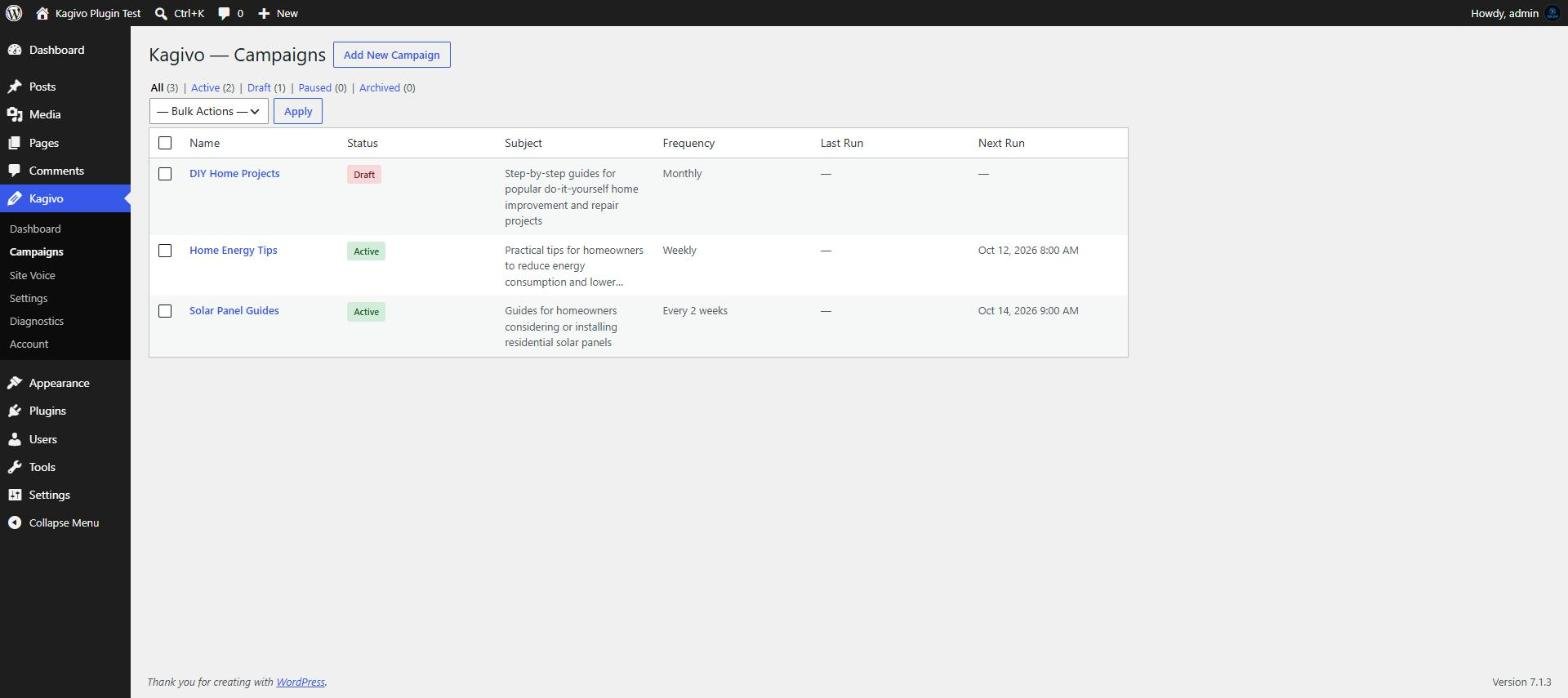
Manage recurring AI content campaigns from WordPress, including their status, publishing frequency, and next scheduled run.
Set it once. Keep publishing.
Kagivo turns AI-assisted content creation into an ongoing WordPress publishing workflow.
Instead of starting from a blank prompt every time you need an article, create a content campaign, tell Kagivo what you want to cover, choose a schedule and publishing mode, and let the campaign handle the recurring workflow.
Kagivo works directly inside WordPress, so your campaigns, generated articles, publishing controls, and site voice stay where you already manage your website.
From Content Idea to Ongoing Campaign
Create campaigns around the subjects you want to cover, provide focus keywords, choose how often each campaign should run, and configure the target article length.
Kagivo supports recurring daily, weekly, biweekly, and monthly schedules.
Each campaign can be configured independently, helping turn an ongoing content plan into a repeatable publishing workflow.
You Control What Gets Published
Kagivo doesn’t force you into a single publishing workflow.
Save generated articles as drafts for review or configure campaigns to publish automatically.
Either way, generated articles are delivered directly into WordPress, where you can review, edit, and manage them using the normal WordPress editor and publishing workflow.
Give Kagivo Direction With Site Voice
Configure your Site Voice to tell Kagivo about your site’s:
- Tone
- Writing style
- Target audience
These settings give generated articles a consistent direction instead of treating every article as an unrelated prompt.
Kagivo Pro adds Brand Voices for users who need multiple distinct content voices.
Built-In Content Intelligence
Kagivo does more than send a prompt to an AI provider.
Behind each campaign, Kagivo includes automatic tools designed to improve the content workflow without adding more settings for you to manage:
- Smart FAQ generation — qualifying articles can automatically receive a visible FAQ section plus FAQPage structured data.
- Relevant internal linking — Kagivo identifies related existing posts and gives the AI approved internal-link candidates to use when they genuinely help the reader.
- Duplicate-topic prevention — Kagivo tracks previous topics within each campaign and filters out topics that are too similar before another article is generated.
These features work automatically as part of the generation pipeline — no additional configuration is required.
More Than AI Text Generation
Kagivo includes tools designed to turn recurring content ideas into an ongoing WordPress publishing workflow:
- Focus keywords for campaign direction
- Configurable article length from 800 to 2,500 words
- Daily, weekly, biweekly, and monthly scheduling
- Draft or automatic publishing
- WordPress-native article creation and editing
The goal isn’t simply to generate another block of AI text. Kagivo manages the workflow that turns a content plan into WordPress articles.
Bring Your Own AI Provider
Kagivo uses a bring-your-own-key approach.
The Free version supports OpenAI using your own API credentials.
Your provider credentials are stored encrypted using AES-256-GCM, and your AI requests are sent directly to the configured provider.
Kagivo Pro expands provider choice with support for:
- Anthropic
- Google Gemini
- DeepSeek
- Kimi
- OpenRouter
Kagivo Free
Kagivo Free includes the core content campaign workflow:
- Unlimited campaigns
- Unlimited articles per month
- OpenAI provider support
- Site Voice
- Daily, weekly, biweekly, and monthly scheduling
- Draft or automatic publishing
- Configurable 800–2,500 word article length
- Focus keywords
- Automatic FAQ, internal-linking, and duplicate-topic safeguards
- WordPress-native article creation and editing
You provide your own OpenAI API key, so usage charges from your AI provider are separate from Kagivo.
Kagivo Pro
Kagivo Pro expands Kagivo for more advanced content workflows:
- Additional AI providers
- Up to 5 Brand Voices
- Topic approval and additional publishing controls
- AI-generated featured images (supported with OpenAI and Google Gemini providers)
- Everything included in Kagivo Free
AI image generation is supported when the campaign is configured to use the OpenAI or Google Gemini provider.
Built for WordPress
Kagivo runs inside the WordPress admin area rather than requiring you to manage your content workflow through a separate platform.
Create campaigns, manage schedules, configure publishing behavior, define your Site Voice, and work with generated articles from WordPress.
Who Is Kagivo For?
Kagivo is designed for WordPress users who publish content repeatedly, including:
- Website owners maintaining an ongoing publishing schedule
- Freelancers managing WordPress content
- Small agencies managing recurring client content
- Publishers working across defined topics
- WordPress users who want a repeatable workflow instead of one-off AI prompting
Your AI. Your Voice. Your Publishing Rules.
AI can help create content, but you should remain in control of the provider, direction, schedule, and publishing workflow.
Create your campaigns, define how you want them to work, and manage the resulting content directly from WordPress.
Set it once. Keep publishing.
External Services
Kagivo connects to external AI services using your own API keys. No requests are made unless you have configured an API key and a campaign is running (scheduled or manually triggered). Kagivo does not silently fall back to another provider if your configured provider is unavailable or unconfigured.
OpenAI (Free and Pro)
Kagivo uses the OpenAI API to generate article content. When a campaign runs, Kagivo sends a request to OpenAI that may include the campaign subject, article topic, campaign keywords, brand voice instructions (Pro), recent topic context, and generation settings such as model and word count. The generated content is returned from OpenAI to your server. Your API key is transmitted in each request to OpenAI for authentication.
Kagivo Pro also uses the OpenAI image generation API (gpt-image-1) to create featured images when a campaign has image generation enabled and the OpenAI provider is selected.
- Service: https://openai.com
- Terms of Use: https://openai.com/policies/row-terms-of-use/
- Privacy Policy: https://openai.com/policies/row-privacy-policy/
Freemius (Licensing)
Kagivo includes the Freemius SDK to provide licensing, account management, and the Free Pro upgrade path. When the plugin is first activated, Freemius presents an opt-in dialog asking whether you agree to share basic diagnostic information (site URL, WordPress version, plugin version, PHP version, and admin email address). Sharing this information is optional and you may decline. If you opt in, this information is sent to Freemius servers periodically. Regardless of your opt-in choice, Freemius communicates with its servers for license validation when a Pro license is activated.
- Service: https://freemius.com
- Terms of Service: https://freemius.com/terms/
- Privacy Policy: https://freemius.com/privacy/