

My Private Site – Make Your Whole Site Private, Force Login & Block Registration Spam
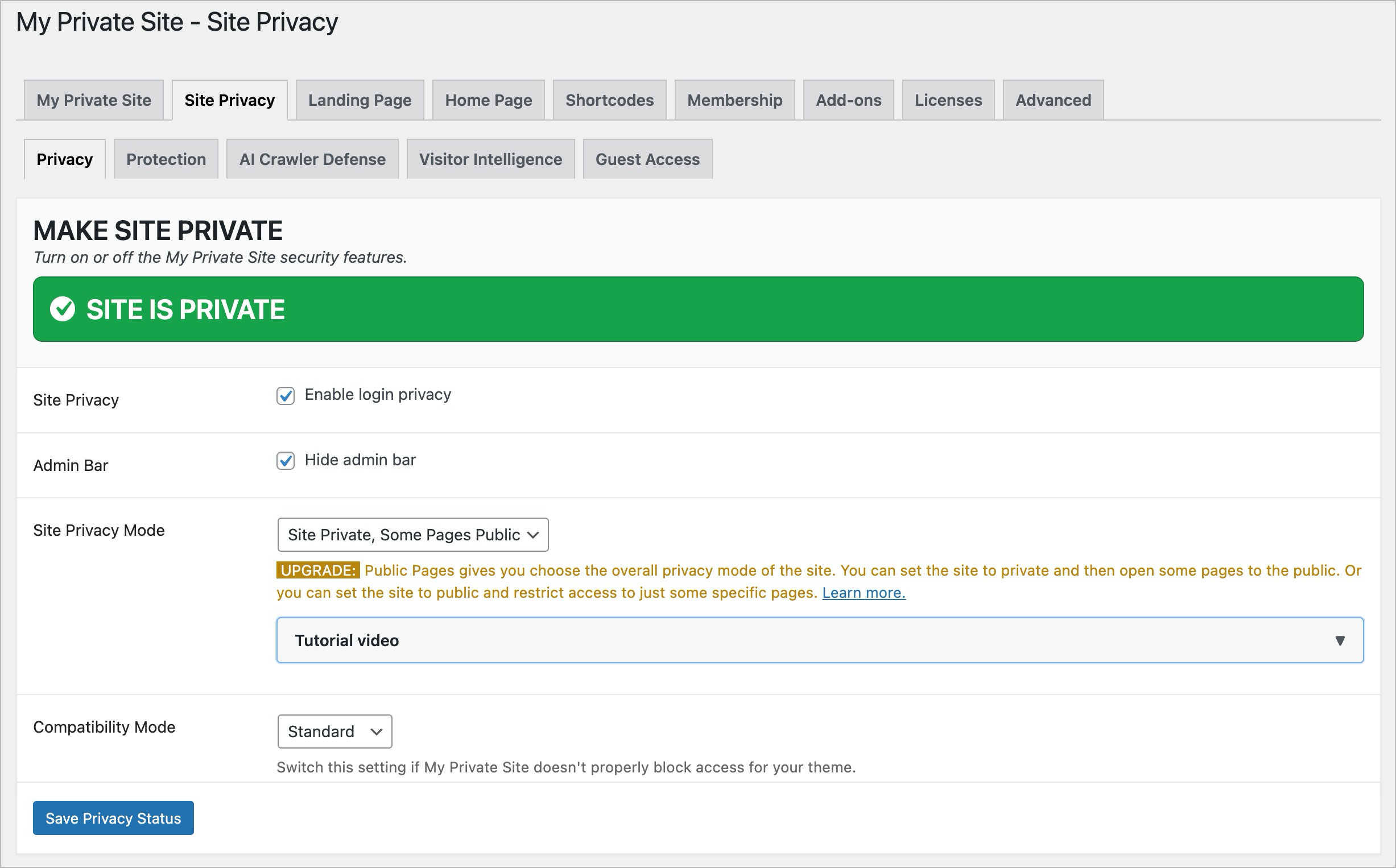
My Private Site makes your WordPress site private so only logged-in users can see your content. With one click, you can restrict access to all posts and pages, automatically redirect visitors to the login screen, and keep your site visible only to people you trust.
Unlike full membership or subscription systems, My Private Site focuses on strong privacy without unnecessary complexity. It is ideal for family sites, schools, clubs, client previews, or development environments where you want to share content with a trusted audience without managing payments, profiles, or custom roles.
Ideal Use Cases
- Family sites and school projects: Share personal updates, photos, or assignments only with family members, classmates, or teachers you choose.
- Development and staging sites: Safely show work-in-progress to clients or teammates without exposing unfinished content or letting it be indexed by search engines.
- Clubs, groups, and internal blogs: Create a private online space for members or staff without the overhead of a complex membership system.
Digital Fortress protection
My Private Site helps protect the “front door” of your private site with built-in safeguards for login and user registration, including registration spam protection and optional reCAPTCHA support. If spam accounts already exist, the Spam Account Cleanup tool helps preview, export, and batch-delete suspicious basic user accounts with protections for online store customers and confirmations. It also includes AI Crawler Defense to discourage automated collection of your site’s content.
Key Features
- Make your entire WordPress site private with a single setting
- Redirect logged-out visitors automatically to the login page
- Choose where users land after login (requested page, home, dashboard, or custom URL)
- Support user self-registration on private sites when enabled
- Protect registration with built-in spam controls and optional reCAPTCHA
- Safely preview, export, and batch-delete spam subscriber accounts with the Spam Account Cleanup tool, while protecting detected EDD and WooCommerce customers
- Optionally block unauthenticated access to the WordPress REST API
- Simple, no-code setup using standard WordPress settings
- Privacy shortcode lets you selectively show or hide content within a page or post.
Built-in Registration Spam Guard
Fake registrations can quickly fill your user list and trigger a flood of notification emails. My Private Site includes Registration Spam Guard controls that help block automated signups before they become user accounts:
* Registration reCAPTCHA: Adds an optional reCAPTCHA challenge to the WordPress registration form and rejects unsolved or unverifiable submissions.
* Honeypot field: Adds an invisible registration field that normal visitors do not fill in, but many bots do.
* Gibberish username detection: Blocks long, randomly mixed usernames often generated by registration bots.
* Reserved administrator usernames: Blocks self-registrations that impersonate common site identities such as admin or webmaster.
* URL-like username detection: Blocks usernames that look like domains or URLs, including phishing-style hosted page addresses.
* Crypto scam phrase detection: Blocks usernames that carry common bait phrases such as balance checks, transfer notices, or withdrawal prompts.
* Excessive email dots: Blocks email addresses with unusually dotted local parts commonly used in bulk fake accounts.
* Suspicious Gmail plus aliases: Blocks Gmail plus-address aliases with random-looking tracking codes often seen in automated spam bursts.
* Digit-dominant and gibberish email checks: Optional default-off checks for mostly numeric or random-looking email local parts.
* Missing MX records: Blocks registrations when the email domain is not configured to receive mail.
* Disposable email domains: Blocks common throwaway email services, including matching subdomains.
* StopForumSpam lookup: Checks registrants against the StopForumSpam database.
Each Registration Spam Guard option can be enabled separately, and registration reCAPTCHA can be enabled independently from login reCAPTCHA while sharing the same keys. When enabled, reCAPTCHA protects the standard WordPress registration form, and selected spam checks also block suspicious unauthenticated account-creation attempts from other public entry points, such as REST API, XML-RPC, admin-ajax, and custom registration forms. Blocked attempts are logged in the Spam Log area for quick review.
Spam Account Cleanup
If a site has already been hit by fake subscriber accounts, My Private Site includes a staged Spam Account Cleanup tool in Advanced settings. It previews basic users, applies hard protections for detected EDD and WooCommerce customers, store-order accounts, content authors, site managers, recently active users, and uploaded mailing lists, exports the exact dry-run queue to CSV, and only deletes after a backup acknowledgment and typed confirmation. Deletion runs in resumable browser-driven batches, reassigns any unexpectedly found WordPress content to the current admin instead of deleting it, and includes an optional orphaned usermeta sweep for metadata rows that no longer belong to any user.
Built-in AI Crawler Defense
The internet is rapidly changing, with AI crawlers and bots harvesting content without consent. My Private Site helps you defend your work with integrated AI Crawler Defense features:
* NoAI and NoImageAI tags: Automatically add meta tags and headers that signal compliant AI systems not to use your text or images for training.
* Block GPTBot: Add a robots.txt rule to prevent OpenAI’s crawler from accessing your site.
* Really Simple Licensing (RSL): Publish a machine-readable license that explicitly prohibits AI training on your content.
These protections are included free in the core plugin, easy to enable with a checkbox, and designed to safeguard your site without affecting normal visitors or search engines. You can use them even if you’re not using any other site privacy features.
Watch the Video Overview and Demo
Premium Add-ons
Premium add-ons turn My Private Site into a comprehensive privacy suite, giving you enterprise-style layered security defenses, smarter oversight, and flexible access, without the complexity or cost.
Advanced AI Crawler Defense, Visitor Intelligence, and Block IP provide protections regardless of whether you’re using any site privacy features.
- Public Pages 2.0: Allows site operators to designate certain specific pages, or pages with specified prefix, to be available to the public without login. Now also allows public site, private pages. Watch the video
- Advanced AI Crawler Defense: Protect WordPress content from AI crawlers using licensing, opt-out tags, selective bot blocking, and firewall defenses to control and safeguard your data. Watch the video
- Visitor Intelligence: Track logins, logouts, failed attempts, and bot activity with a unified log, anomaly detection, and export tools for stronger site oversight and security. Watch the video
- Guest Access: Grant temporary, secure access to private WordPress content using unique shareable links with expiration, one-time use, and full admin-controlled invite management. Watch the video
- Block IP: Block unwanted visitors by IP address or range with full IPv4/IPv6 support, configurable scope, and fast enforcement to secure your WordPress site. Watch the video
- Tags & Categories: Allows you to make pages public or (with Public Pages 2.0) private based on tags and categories. Watch the video
- Selective Content: Allows hiding, showing, and obscurifying page content through the use of shortcodes. Can also selectively hide widgets and sidebars. Watch the video
- Digital Fortress Bundle: All add-ons are available in bundle form. Watch the video
Limits
This plugin does not hide non-WordPress web pages, such as .html and .php files. It also won’t restrict images and other media and text files directly accessed by their URL. If your hosting provider’s filesystem protections haven’t been set up correctly, files may also be accessed by directory listing.
Support Note
Support has moved to the ZATZLabs site and is no longer provided on the WordPress.org forums. If you need a timely reply from the developer, please open a ticket.
Mailing List
If you’d like to keep up with the latest updates to this plugin, please visit David’s Lab Notes and add yourself to the mailing list.