

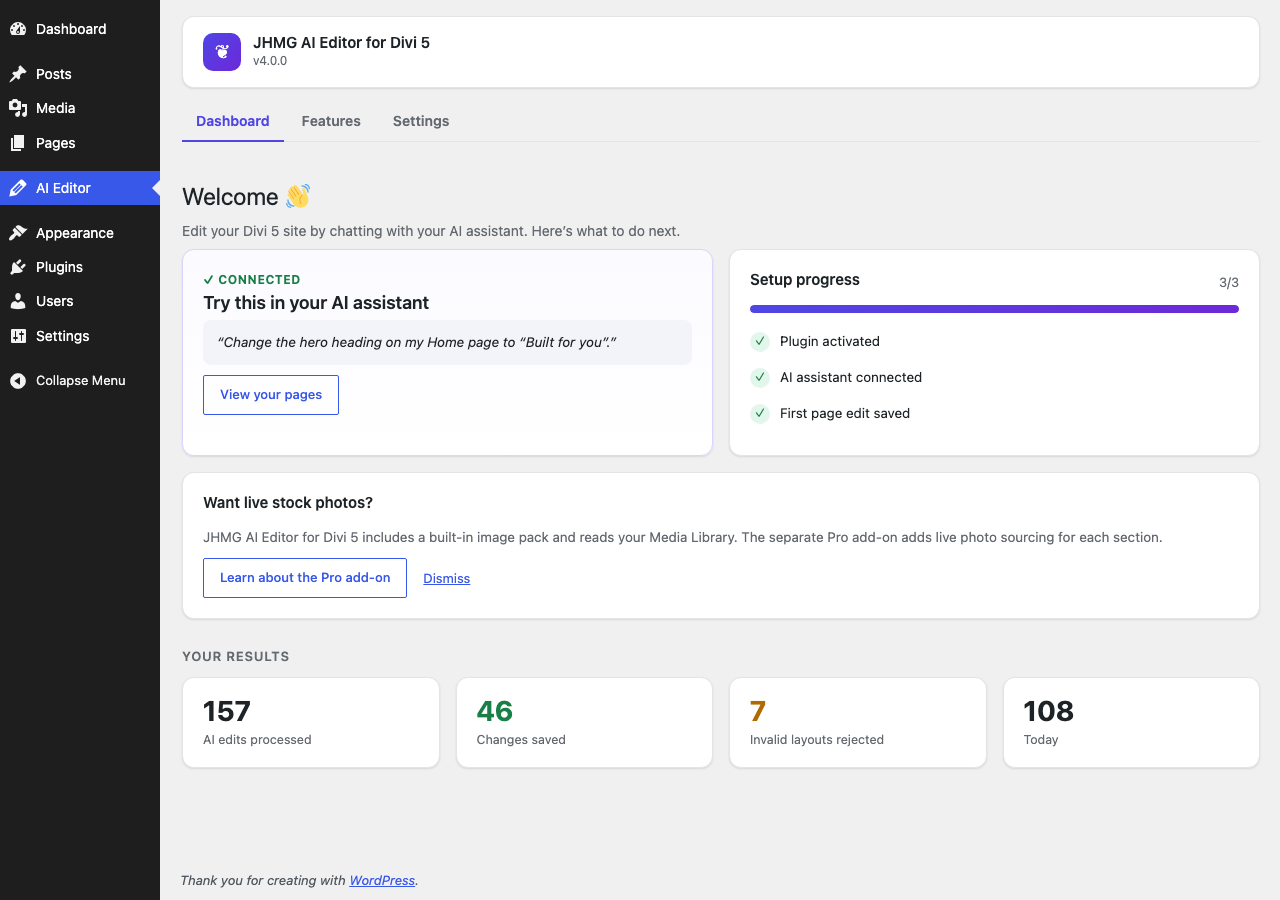
The Dashboard: your setup progress and your results.
An MCP server made for Divi 5. Connect Claude, ChatGPT, Cursor, VS Code Copilot, Windsurf or Gemini to your WordPress site, then tell it in your own words what to change on your Divi 5 pages, or to build a new one. Give your assistant a screenshot or the address of a page you like and ask it to rebuild that design in Divi 5. A built-in checker tests every change before it is saved, and every change can be undone.
The Model Context Protocol (MCP) server runs on your own site. Your assistant talks directly to your site: the plugin uses no cloud service and no account, and nothing is sent to us.
Why an MCP server built only for Divi 5?
Divi 5 stores a page as strict block data. A general-purpose assistant can save something that looks right in the code and still cannot be opened in the builder. This plugin gives your assistant Divi 5’s real rules, proven section patterns and a checker that refuses a broken layout with the exact reason, so the assistant can fix it and save a page that works.
Rebuild a page from a screenshot or a URL
- Give your assistant a screenshot, the address of a page, or the page’s HTML.
- Ask it to build that page in Divi 5. It is always saved as a draft.
- It reads this plugin’s guides, picks matching section patterns, a design language and a style kit, writes the layout, and the checker tests it before it is saved.
- Review the draft, swap in your own text and images, and publish.
What to expect: your assistant, not the plugin, looks at the picture or reads the page, so the result follows the design closely but is not pixel-for-pixel. Photos from the original are never copied: the draft uses your Media Library images, or the plugin’s built-in pictures as placeholders. If you already have the page’s HTML, the html_to_divi tool turns it into a Divi 5 layout and reports anything it left out.
How it works (in plain words)
- Connect your own AI assistant (Claude, ChatGPT, Cursor or Copilot) to your site with one key. It is copy and paste, and takes about two minutes.
- Tell it what you want in plain English, for example “change the phone number on the Contact page” or “build me a landing page for my dental clinic”.
- The plugin’s built-in guides and proven section patterns steer the AI, so it builds real, good-looking Divi 5 pages instead of guessing. It uses your own Media Library images when it can.
- Before anything is saved, a built-in checker tests the page against fixed rules. If something is wrong, the change is refused with the exact reason and the AI fixes it. If it is fine, it is saved, and the previous version is kept so you can undo.
What makes it smart
- The checker is not AI. It follows fixed rules: same page in, same verdict out. The AI can be creative, but every save it makes is checked first, so a broken page is never saved by an AI edit.
- It knows Divi 5 well. The checker knows more than 80 Divi 5 block types (modules, sections, rows and columns) and which ones are allowed inside which.
- Rules come from real Divi 5, not guesses. The rules come from real Divi 5 page exports and, for 24 newer modules (and their child items), from Divi’s own module definitions, verified by rendering them in real Divi 5.15.
- Understands Divi 5.15 components. Pages that use shared components (reusable sections, rows and modules, including ones with Slots) can be read and edited. Your AI can see which components your site has and is told when a change would do nothing because the component owns that part.
- Warns before a page is hollowed out. If a save would remove more than half of a page’s text, images or modules, your AI is told and can put it back. Nothing is stopped: a deliberate rewrite is still yours to make.
- Small changes stay small. Changing one phone number replaces just that text. The rest of the page is not rebuilt or touched.
- Preview before saving. Your AI can ask what a change would do before it saves anything. It gets a list of the blocks and settings that would change, and the checker’s verdict. Nothing is saved until it repeats the request for real.
- Matches your site. Your AI can look up your site’s own Divi colors and presets and reuse them, and it is told when a page uses one your site does not have. It cannot create or change presets or colors: that stays in Divi’s Visual Builder.
- Proven building blocks. 71 ready-made section patterns (heroes, feature grids, testimonials, contact forms and more), each one tested against the checker, plus landing-page guidance on the order of sections, headlines and calls to action.
- Consistent looks. Ten design languages (editorial, glass dark, organic warm, tech mono and more) and 40 style kits set the exact look of buttons, cards, accordions, toggles, contact forms and image corners, so a whole page matches.
- Sensible images. The AI looks in your Media Library first. When nothing there fits, it uses a built-in pack of 44 original images that ships with the plugin.
- One-click undo. The previous version of each page or Divi Project the AI changes is kept (up to the last 10). Restore it from the plugin’s Dashboard with one click, or just ask your AI to undo.
- Works with the AI assistant you already use. Claude, ChatGPT, Gemini, Cursor, VS Code Copilot, or any assistant that supports MCP.
- Nothing leaves your site through the plugin. It uses no third-party services. Your AI assistant talks directly to your own site.
Examples to try
- “Change the phone number on the Contact page to 555-0142.”
- “Make the main heading on the Home page say ‘Fresh bread every morning’.”
- “Build me a landing page for my dental clinic, with a booking button and three patient reviews.”
- “Add a section with our opening hours under the hero on the About page.”
- “Undo the last change you made to the Services page.”
What your AI assistant can do (21 tools)
Read and check:
list_divi_pages: list the pages built with Divi 5 that you can edit (pass post_type project to list Divi Projects).get_page_layout: read the current layout of a page or Divi Project. For a big page your assistant can read just an outline (every block with its place, size and the start of its text) or one block, which costs a fraction of reading the whole page.list_global_styles: list your site’s own Divi colors and presets so the AI can reuse them (read-only).get_site_structure: list your site’s custom post types, taxonomies, image sizes, Divi 5.15 components (name, kind, Slots, how many pages use each) and Advanced Custom Fields field groups so pages fit your site (read-only: field names and the keys your posts use, never values here or theme files; available over MCP and the REST API, not in the ChatGPT Action).get_custom_fields: read the custom fields of one page or Divi Project you can edit, with their values, so your assistant can write copy that fits and use the right field names (read-only: keys WordPress protects, or that look like passwords, API keys or other secrets, are never shown; available over MCP and the REST API, not in the ChatGPT Action).list_products: list and count your WooCommerce products with their prices, stock status and categories (read-only; needs the permission to edit products; available over MCP and the REST API, not in the ChatGPT Action).get_product: read one WooCommerce product in full, including its variations (read-only; never downloadable files, purchase notes or custom fields).validate_layout: check a layout without saving anything.
Edit and create:
edit_page_content: change one piece of text (an email, phone number, price or sentence) without rebuilding the page or Divi Project. Adddry_runto preview the change without saving it.update_page_layout: save a new layout for a page or Divi Project, after the checker approves it. Adddry_runto preview what would change without saving it.create_page: create a new page. It is always saved as a draft for you to review and publish.html_to_divi: turn HTML you already have (a page your assistant or another tool wrote) into a Divi 5 layout: the structure, all the copy, the links and the images, plus the basic colors, fonts and spacing where Divi can show them and the text stays readable. It previews by default and saves a new draft only when asked. Scripts, forms, embeds and site navigation are never converted and are listed in a report (available over MCP and the REST API, not in the ChatGPT Action).
Undo:
list_page_history,get_page_history_entry,restore_page_version: see the saved earlier versions of a page or Divi Project and bring one back.
Guides that help the AI build good pages:
get_style_guide: how to build styled Divi 5 layouts, using real Divi 5 settings.get_landing_guide: how to build a landing page that turns visitors into customers.get_site_guide: how to plan a site with several pages that link to each other.get_section_recipes: the 71 ready-made section patterns.get_image_guide: how to pick the right image for each section, including the built-in image pack.
Images:
list_media_images: look through the images already in your Media Library (read-only; nothing is uploaded, changed or deleted).
Images
The plugin includes a pack of 44 original images (hero backgrounds, card and section images, people placeholders and logo placeholders) made for this plugin and bundled inside it. Your AI uses your own Media Library images first and the built-in pack when nothing fits. Nothing is downloaded from other websites.
Add-on
A separate, optional Pro add-on is available (details at https://divi5lab.com/plugins/divi-5-ai-editor). This plugin is complete on its own and works the same without it.
Compatible AI assistants
- Claude on the web (claude.ai custom connector), by signing in to your own site (turn it on in Settings; needs a public https address)
- Claude (Desktop and Claude Code), through MCP (Claude Desktop needs Node.js installed)
- Gemini CLI, through MCP
- Cursor and Windsurf, through MCP
- VS Code with GitHub Copilot, through MCP
- ChatGPT, through a custom GPT Action (OpenAPI)
- Any other MCP client, or any HTTP client through the REST API
Works with Divi 5. Divi is a trademark of Elegant Themes. This plugin is not affiliated with, endorsed by, or sponsored by Elegant Themes.
Privacy
The plugin stores these things in your own WordPress database:
- The API key (and which user it belongs to).
- Only if you turn on sign-in for Claude on the web: the apps that registered, and their access and refresh tokens, in a table in your own database. The tokens are stored only as one-way hashes and you can disconnect any app, or turn the feature off and remove everything, from the Settings screen.
- An activity log of AI actions: the action, the page ID, the result, the assistant’s name (or, when it is not recognised, the first 80 characters of its user-agent string) and a hashed IP address (hashed with your site’s own secret key, so the IP itself is not stored). You can clear it from the Settings screen.
- Whether you chose “Maybe later” or “Don’t ask again” on the review reminder (one value per user, shown only on the plugin’s Dashboard after the plugin has saved at least 5 changes). Nothing is sent when you choose, and the reminder’s link only opens this plugin’s own page on WordPress.org if you click it.
- Page history for undo: up to the last 10 previous versions of each page the AI changes (fewer for very large pages, about 768 KB per page at most). It is kept in a table in your own database.
Nothing is sent anywhere by the plugin. All of this is removed when you delete the plugin.
External services
This plugin does not connect to any external service. Your AI assistant connects to your own site using the API key you generate (or, if you turn it on, by signing in to your own site from Claude on the web); no data passes through the plugin author’s servers.