

Module Control for Jetpack
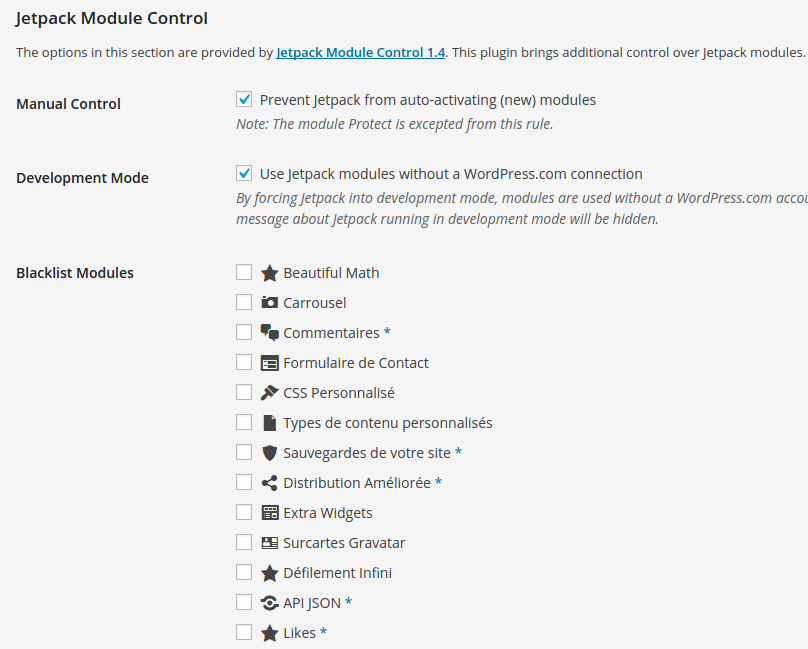
Options section with Blacklist.
Jetpack adds powerful features, but sometimes we don’t want them all… This light-weigth but effective plugin brings additional control over Jetpack.
Features
- Blacklist / disable Jetpack AI or any other Jetpack module.
- Optionally prevent module auto-activation on connection or after an upgrade.
- Optionally run Jetpack “unplugged”, in offline mode without a WordPress.com connection.
- Single site and Multisite compatible.
In most use cases, a carefully considered combination of Jetpack modules can be a really good thing. But not always is much consideration being done beforehand, impacting page speed or cause other issues.
Any one of Jetpack’s modules can bring overlapping or even conflicting functionality. In such cases, being able to prevent (accidental) activation is a good thing.
Examples
- Using Jetpack on a network? Then network incompatible WAF (Web Application Firewall) module should be blacklisted to prevent accidental activation!
- Do you already use a light box provided by your theme or another plugin? Then blacklist the Carousel module to prevent accidental activation.
- Or you’re running a Multisite and do not want any admins monitoring uptime with the Monitor module just to call you every time their site is briefly inaccessible?
- Offer your own backup service? Backlist VaultPress if you do not care for VaultPress competition.
- You’re running a school network and sites are managed by minors who are not allowed to sign up for an account at WordPress.com? Then use the Jetpack Offline Mode option to allow usage of modules that do not require a connection.
Single site and Multisite
Although the original idea arose on a multisite installation, Module Control for Jetpack is developed for both single and multisite installations.
On multisite, when network activated or activated on the main site, it allows global rules for Jetpack on all sites. You can also set it to allow per-site changes by site admins.
For single site installations, plugin settings can be locked down by adding define('JETPACK_MC_LOCKDOWN', true) to wp-config.php for complete security. This can be useful to prevent other admins being able to reactivate blacklisted modules.
Development
The project can be forked and or contributed to on Github.
All contributions — be it in the form of feature requests, bug reports, translations or code — are welcome!