


JDR Category Post Order & Pinned Posts
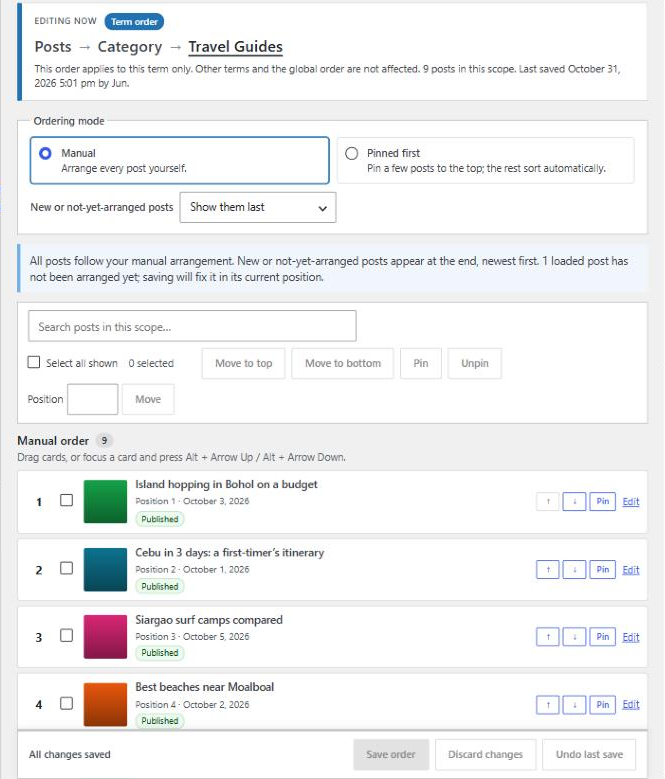
The Arrange screen: a separate order for each category, shown as cards you can drag, move with buttons or the keyboard, with an ordering preview.
This plugin gives editors one focused screen (Tools Category Post Order) to:
- Choose a content type (posts or any custom post type) and either its global order or one category, tag or custom taxonomy term.
- Arrange posts as visual cards, or pin a few to the top and let the rest sort automatically (newest, oldest, title A–Z or Z–A).
- Preview the numbered order, then Save. Discard, Undo and conflict detection keep edits safe.
- See where the order applies and check the integration when a listing does not follow it.
Each term keeps its own order per content type. The same post can be 2nd in “Residential” and 9th in “Commercial”. The global order is stored separately and never mixed with term orders.
What it changes, and what it never changes
- It only replaces the ORDER BY of queries that are meant to use it. It never changes which posts a query returns, so visibility rules, drafts, private posts, pagination and post counts are untouched.
- Nothing changes on your site until you save an order and a listing uses it, through native archive integration (opt-in), a Query Loop block set to a curated order, or a custom query that passes the
jdcpoargument. - Search results, feeds, REST API responses, admin lists and other secondary queries are never reordered unless they opt in explicitly.
- When a listing selects several terms, the plugin does not guess. It keeps the normal order unless the developer names the ordering term.
No external services, tracking, accounts or page builder required.
Using a saved order
1. Native archives
Enable them in Settings. The main query of an enabled archive uses the saved order unless:
- the request asks for another sort (for example
?orderby=title, or a theme’spre_get_postssetsorderby) - the archive mixes several content types
- several terms are selected
2. Query Loop block
Select a Query Loop block and open Curated post order in the block sidebar. Choose Global order or A term’s order… and pick the term. The editor preview and the published page use the same order. (Query Loops set to “Use default query / inherit” follow the archive integration instead.)
3. Custom PHP queries
Pass the jdcpo argument to WP_Query, or use the helper jdcpo_query_args(), which also sets suppress_filters => false (required for get_posts()).
Global order of a custom post type:
$q = new WP_Query( jdcpo_query_args( array( 'post_type' => 'project', 'posts_per_page' => 12 ), 'global' ) );
One term’s order (the query still decides which posts appear):
$q = new WP_Query( jdcpo_query_args( array(
    'post_type' => 'project',
    'tax_query' => array( array( 'taxonomy' => 'project_category', 'terms' => 12 ) ),
), array( 'term' => 12 ) ) );
Automatic: the single selected term’s order, or the global order when no term is selected:
$q = new WP_Query( array( 'post_type' => 'project', 'project_category' => 'residential', 'jdcpo' => true ) );
Pinned first: nothing extra in code. Pinned-first vs manual is part of the saved order, so the same query follows whichever mode the editor chose.
Multi-term listing with a chosen ordering term, and a fallback to the global order when that term has no saved order:
'jdcpo' => array( 'term' => 'residential', 'taxonomy' => 'project_category', 'fallback' => 'global' )
Accepted values: true / 'auto', 'global', 'term:123', or an array with term (ID or slug), taxonomy (required for slugs), post_type, fallback ('global' or 'none').
4. AJAX “load more”
Use the same arguments on every page request. Pagination stays correct because only the ORDER BY changes.
add_action( 'wp_ajax_nopriv_projects_more', 'mytheme_projects_more' );
add_action( 'wp_ajax_projects_more', 'mytheme_projects_more' );
function mytheme_projects_more() {
    $page  = max( 1, absint( $_POST['page'] ?? 1 ) );
    $term  = absint( $_POST['term'] ?? 0 );
    $query = new WP_Query( jdcpo_query_args( array(
        'post_type'      => 'project',
        'post_status'    => 'publish', // admin-ajax runs as "admin": always set the status.
        'posts_per_page' => 9,
        'paged'          => $page,
        'tax_query'      => $term ? array( array( 'taxonomy' => 'project_category', 'terms' => $term ) ) : array(),
    ), $term ? array( 'term' => $term ) : 'global' ) );
    ob_start();
    while ( $query->have_posts() ) { $query->the_post(); get_template_part( 'parts/project-card' ); }
    wp_reset_postdata();
    wp_send_json_success( array( 'html' => ob_get_clean(), 'more' => $page < $query->max_num_pages ) );
}
Important: requests to admin-ajax.php run with is_admin() === true, where WordPress includes drafts in queries without an explicit status. Always set post_status => 'publish' in public AJAX handlers. That is standard WordPress practice, not something this plugin changes.
Debugging
- Check integration (on the Arrange screen) lists what is configured for the selected scope and common reasons an order may not apply.
- While logged in as an Editor or Administrator, open any listing on your site. The Post order toolbar menu reports each relevant query on that page and why it did or did not use a curated order, for example “This listing sorts by title and has not opted into curated ordering.”
- In code:
jdcpo_explain_query( $query )returns the same plain-language reason.
Hooks for developers
jdcpo_loaded(action): fires after the plugin has loaded. Add-ons hook in here.jdcpo_order_config(filter):( array $config, Scope $scope, WP_Query $query ). Adjust pins or positions for one query just before ORDER BY is built. It cannot change which posts are returned.jdcpo_order_saved(action):( Scope $scope, array $config ). Fires after an order is saved or undone on the Arrange screen.jdcpo_available_post_types(filter):( WP_Post_Type[] $types ). The content types that can be enabled in Settings.jdcpo_scope_capability(filter):( string $cap, Scope $scope ). Who can arrange a scope.
Known limitations
- One order per term per content type: up to 5,000 arranged and 200 pinned posts per scope. The admin screen loads 50 cards at a time and can load up to 2,000 for “Move to bottom”. Positions beyond the loaded range keep their saved order.
- Ordering is applied with a CASE expression on post IDs. That is fast for typical collections (hundreds to a few thousand arranged posts). Very large catalogues have not been benchmarked.
- Listings that mix several content types, or several terms without a named ordering term, keep their normal order by design.
- WordPress sticky posts are ignored on a curated blog index (pins replace them).
get_posts()skips query filters by default. Passsuppress_filters => false, or usejdcpo_query_args().- Page caches may serve an older copy of a listing after you save. Clear your cache.
- Theme template files that contain a Query Loop are not scanned by “Where this applies”; only content saved in the database is.
- Multilingual plugins (WPML, Polylang), WooCommerce product sorting and third-party page builders (Elementor, Divi, etc.) need separate compatibility verification. Translated terms are separate terms, so each language’s term has its own order. Builder widgets that run their own queries need the
jdcpoargument.