

Изпрати.БГ Shipping for WooCommerce
Изпрати.БГ Shipping for WooCommerce connects a WooCommerce store to the Изпрати.БГ shipping platform.
Supported carriers include:
- Bulgaria: Speedy (DPD Bulgaria), Econt, BoxNow, Sameday, Pigeon Express, Europat (Европът), and Bulgarian Posts (Български пощи);
- Romania: Sameday Romania and DPD Romania;
- Greece: ELTA Courier, ACS Courier, Geniki Taxydromiki, BoxNow Greece, and Speedex;
- international and cross-border deliveries: FedEx, UPS, and DHL.
Exact carrier and service availability depends on your Изпрати.БГ account, carrier agreements, origin, destination, and enabled configuration.
Merchants can:
- connect their store securely to an existing or new Изпрати.БГ account;
- synchronize WooCommerce orders with Изпрати.БГ;
- calculate carrier delivery options during checkout;
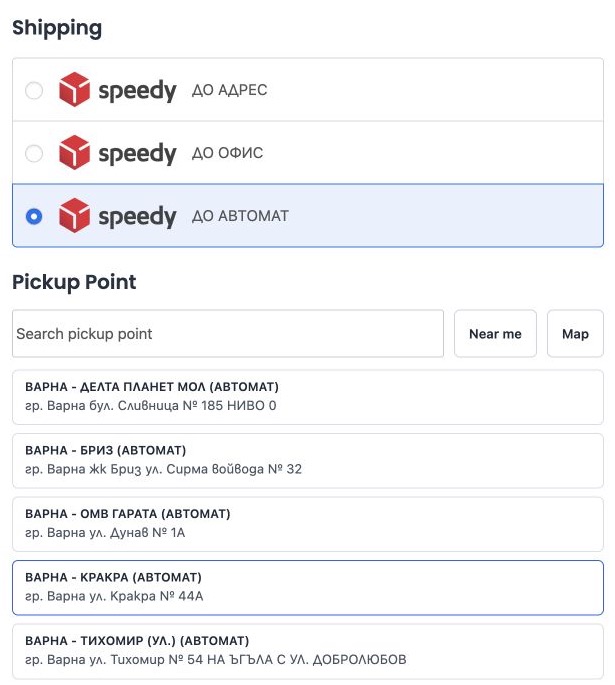
- let customers choose supported offices and lockers;
- create and download shipping labels from WooCommerce order screens;
- use both classic order storage and WooCommerce High-Performance Order Storage (HPOS);
- use the classic checkout and WooCommerce Cart and Checkout blocks.
An active Изпрати.БГ account and applicable carrier agreements are required. Service plans and carrier charges are managed separately through Изпрати.БГ.
Documentation: https://izprati.bg/docs/
Privacy: https://izprati.bg/privacy-policy/
Terms: https://izprati.bg/terms-conditions/
External service and data disclosure
This plugin relies on the hosted Изпрати.БГ shipping service. The service website is https://izprati.bg/ and its API is hosted at https://api.izprati.bg/. The plugin cannot calculate connected carrier options, synchronize orders, manage shipments, or create labels without communicating with this service.
The following data is transmitted or made available to Изпрати.БГ when the corresponding feature is used:
- When a store administrator connects the plugin or refreshes its connection, the store URL, store name, and WordPress administrator email address are sent. If an existing WooCommerce REST connection is available, a public key suffix and cryptographic signature may be sent to match that connection; the WooCommerce consumer secret is not transmitted.
- When the connected store calculates delivery options, destination locality information such as country, city, and postcode is sent together with package weight, order-value estimate, selected sender, and configured carrier identifiers.
- When automatic synchronization is enabled, or an administrator manually synchronizes an order, the connected service retrieves the WooCommerce order through the authorized WooCommerce REST connection. This can include order identifiers and status, products, quantities, prices and totals, billing and shipping names, addresses, email address, phone number, and the selected carrier office or locker.
- When an administrator manages a shipment or creates a label, shipment identifiers, parcel dimensions and weight, sender, carrier, service point, and related fulfillment instructions are sent. Generated shipping labels are returned by the service.
Communication occurs after a store administrator connects the plugin and then when storefront delivery calculation, enabled order synchronization, or an administrator-requested shipment action requires it.
Use of the service is subject to the Изпрати.БГ Terms and Conditions and Privacy Policy.
The optional pickup-point map uses OpenStreetMap tiles from https://tile.openstreetmap.org/. Tiles are requested only when the customer opens the map. The tile server receives the customer’s IP address, browser request information, and requested map area. See the OpenStreetMap Foundation Privacy Policy and Tile Usage Policy. Leaflet JavaScript, styles, and marker images are bundled locally with the plugin.
The “Near me” action requests browser location permission. If granted, latitude and longitude are sent to the connected shipping service to find nearby pickup points. The map may also show that location.
Optional installation reporting
Settings > Izprati reporting provides an optional, unchecked installation-reporting choice. No report is sent before an administrator opts in. All local features remain available without reporting.
On the first Plugins/setup-screen visit, administrators can register and share store details or continue without reporting. No contact email is preselected. This choice is remembered per site, and a copied site must make a fresh choice. The Connect to OctavaWMS action also discloses service registration: a successful authenticated connection durably queues registration even if optional reporting was previously declined. Failed connections and manually copied API keys do not enroll the store. Service registration delivery retries automatically through WordPress cron. When enabled, the plugin sends the site URL, store name, an optional administrator-supplied contact email, software versions (plugin, WordPress, WooCommerce and PHP), locale, store country/currency, connection state, consent version/time, and event identifiers/times to https://account.tagontrack.app/api/v1/wordpress-installations. It reports after opt-in, on connection/version changes, and approximately daily when WordPress cron runs. No orders, products, credentials for shipping, passwords or customer records are included.
AccountPortal records an unverified site observation and may notify internal staff through n8n. Reporting does not create a login, subscription, marketing consent, or access to an existing customer account. Account creation is a separate explicit flow. Disabling stops observations, removes queued reports and the local contact email, and attempts a minimal withdrawal notice. A silent site cannot be confirmed as uninstalled. Existing observations are subject to the service privacy policy.
Service: https://account.tagontrack.app/
Privacy: https://izprati.bg/privacy-policy/
Terms: https://tagontrack.app/terms