

OBULKiT – Bulk Edit Orders for WooCommerce
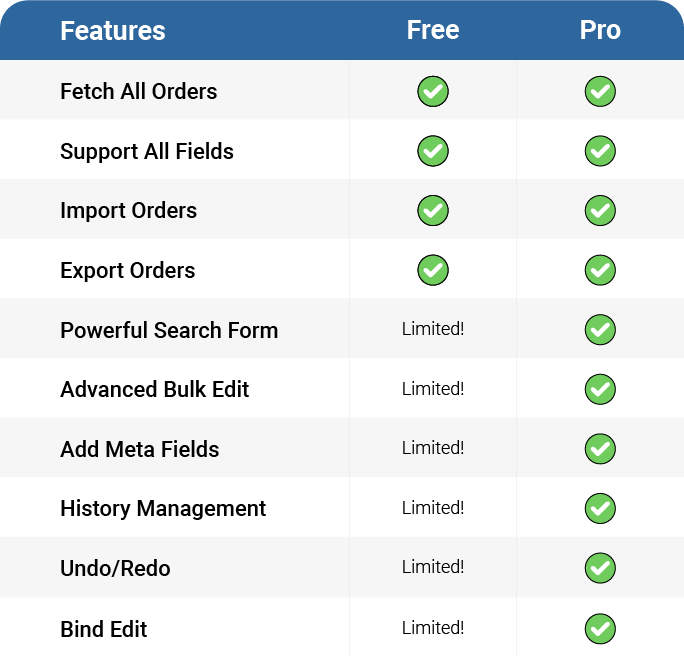
Compare Lite & Premium
Managing WooCommerce orders one by one is time-consuming and inefficient — especially when dealing with large stores, frequent updates, or automated workflows.
OBULKiT – Bulk Edit Orders for WooCommerce gives you a spreadsheet-style interface where you can filter, edit, and update multiple orders at once — eliminating repetitive manual work and saving valuable time.
With powerful features like advanced filtering, scheduled bulk updates, and background processing optimized for Big Data, OBULKiT is built to handle even the heaviest workloads without slowing down your site.
Whether you need to update order statuses, payment methods, shipping info, or custom fields, OBULKiT gives you full control — fast and efficiently.
🚀 Why Choose OBULKiT?
✔️ Edit multiple WooCommerce orders simultaneously
✔️ Spreadsheet-style order editor for fast changes
✔️ Robust filters to target specific order sets
✔️ Schedule bulk order edits for future execution
✔️ Background processing and Big Data support
Why is Bulk Orders Editing for WooCommerce plugin useful?
✅ Saving your time:
- Managing and editing a large number of orders easily
- Changing order status for several orders at same time
- Search and filter specific orders
- Bulk edit of values for billing and shipping fields One the important sections of each orders is the billing and shipping fields area. They allow your customers to set their billing and shipping details and help manager to control orders based on billing and shipping fields. For example, Billing First Name, Billing Last Name, Billing Phone, Billing Email, Shipping First Name, Shipping Last Name, Shipping Phone, Shipping Email and …
- Bind editing: With this option, you can set the same value of edited orders to all selected orders. This will help you edit several orders at once and will result in a faster editing and save a huge amount of your time!
- Delete multiple orders: You can also delete multiple orders simultaneously with just one click. You can delete any number of orders by order status, category of order item, order items, price fields, billing and shipping and etc… and basically any filter conditions.
- Duplicate orders: Some time you need to have a copy of one or group of orders, you have to add new orders and set fields as other order’s fields one by one, that is a boring task. With Duplicating Orders option, you can select desired orders and duplicate them, rather than duplicating each order one by one.
- Save search queries for later use: You can save the most used search queries for later use (or any search query you want). This way, you don’t have to choose the search options every time, and with just two clicks you can use your most used search queries to find the orders you need.
✅ Easily scale-up online store:
- Adding or editing orders in a short time For example, if you have orders specific details, it is a difficult task to update all details of orders. This Bulk Edit plugin helps to do the bulk editing job easier with a lot of bulk editing options and support for any order related properties and fields.
- Import and export any orders according to your requirements
- Make a customized column from your orders
- Use a spreadsheet to control, manage and edit numerous orders at the same time
✅ Support all of fields
- Support all of order status
- Support all of billing and shipping fields
- Managing the price fields
- Support all of order’s fields
Please check other videos in Bulk Orders Editing for WooCommerce channel
Key Features
- User friendly design
- Filtering by all order fields: title, category, taxonomy, …
- Advanced bulk editing form: Edit all WooCommerce order fields in specific operands:
- Append, prepend, replace for text fields :: title, sku and …
- Increase, Decrease for Pricing Fields :: regular and sale pricing
- Calculator for decimal values
- Use custom formula for pricing fields
- Date picker for date fields :: sale price date
- Multiple selection :: category, taxonomy, tag
- And …
- Show/Hide columns
- Column manager:
- Set Color and BG color for columns
- Set custom label for columns
- Create new order>
- Duplicate order
- Delete several orders with one click.
- Set Category and taxonomy for multiple product at once
- Inline Edit: Edit values in separate types: numeric, text, date, checkbox and …
- Save search form query
- Search orders by items
- Add custom fields / taxonomy as columns, search field and bulk edit field
- Import / Export
- Binded Editing : Edit several orders at once.
- History: Save all of change log beside of Undo / Redo :: you can revert your changes.
- Sticky Column: fix ID column
- Change billing information field by field
- Change shipping information field by field
- Change billing and shipping in quick mode
- Support all woocommerce orders fields
Free vs Pro
🆓 Free Version
✅ Fetch All Orders
✅ Support All Order Fields
✅ Import Orders
✅ Export Orders
⚠️ Powerful Search Form – Limited
⚠️ Advanced Bulk Edit – Limited
⚠️ Add Meta Fields – Limited
⚠️ History Management – Limited
⚠️ Undo / Redo – Limited
⚠️ Bind Edit – Limited
🟢 Suitable for small to medium stores and quick manual order edits
🚀 Pro Version
✅ Fetch All Orders
✅ Support All Order Fields
✅ Import Orders
✅ Export Orders
🟢 Powerful Search Form
🟢 Advanced Bulk Edit
🟢 Add Custom Meta Fields
🟢 History Management
🟢 Undo / Redo Changes
🟢 Bind Edit (Linked Editing)
⏱️ Scheduled Bulk Order Updates
⚙️ Background Processing for Heavy Operations
📊 Big Data Optimized for Large Order Volumes
🔵 Ideal for large WooCommerce stores with frequent order changes and automated workflows
Check demo version: Pro Version
External services
This plugin connects to a license server to activate the plugin and check for updates.
It sends the site admin’s email address and license key to iThemelandCo when the license is activated or when checking for updates. The server responds with activation status, update availability, or error messages.
This service is required to verify valid licenses and deliver updates.
This service is provided by “iThemelandCo”. http://ithemelandco.com/