
WBULKiT – Bulk Edit Posts & Pages
Compare Lite & Premium
Editing lots of WordPress posts one by one is slow and inefficient — especially when managing a large blog, content-heavy site, or editorial workflow.
WBULKiT – Bulk Edit WordPress Posts & Pages replaces the default post editor with a spreadsheet-style interface that lets you filter, edit, and update multiple posts at once.
With WBULKiT, you can quickly update titles, statuses, categories, tags, dates, and more — cutting hours of repetitive work down to just minutes.
Whether you’re managing posts, pages, or custom post types, WBULKiT improves your workflow and gives you full control over your content management.
Schedule and execute bulk post updates in the background — even on large content libraries — without slowing down your website.
🚀 Why Choose WBULKiT?
✔️ Edit multiple posts at the same time
✔️ Save hours of manual editing
✔️ Spreadsheet-style editor for fast content changes
✔️ Advanced filters to target exactly what you need
✔️ Works with posts, pages, and custom post types
Why do you need WordPress Bulk Posts Editing?
✅ Saving your time:
- Bulk editing everything in the posts at one time
- Filter, select and change specific posts
- Switch WordPress post types
- Bind editing: With this option, you can set the same value of edited posts to all selected posts. This will help you edit several posts at once and will result in a faster editing and save a huge amount of your time!
- Delete multiple post / custom post: You can select multiple posts and choose to either delete them permanently, or if you think you might need to use them later, it is possible to move them to the trash and access these posts later.
- Duplicate posts / custom posts: If you want to duplicate posts or custom posts, you can clone them and duplicate all of the selected posts with just one click.
- Save search queries for later use: You can save the most used search queries for later use (or any search query you want). This way, you don’t have to choose the search options every time, and with just two clicks you can use your most used search queries to find the posts you need.
✅ Easily scale-up your site:
- Import and export any posts according to your requirements
- Make a customized column from your posts
- Use a spreadsheet to control, manage and edit numerous posts at the same time:
- View all your posts, pages and custom psots simultaneously
- Edit posts and pages easily
- Create a lot of posts / products at once
- Copy information between posts quicker
- And more…
✅ Support all of fields
- Support all posts and custom posts fields and custom fields
- Support all of categories, tags, and taxonomies
Please check other videos in wordpress bulk posts editing channel
📊 Key Features
📋 Spreadsheet-Style Bulk Post Editor
* Edit posts, pages, or custom post types in a table view
* Update multiple post fields at once
* No need to open posts one by one
🔎 Advanced Content Filters
* Filter posts by category, tag, date range, author, status, and more
* Save time finding the exact content you want to update
* Ideal for large blogs and content libraries
⏱️ Scheduled Bulk Updates
* Schedule bulk post changes for a specific time
* Great for publishing plans, seasonal edits, or campaigns
* Automate content updates without manual timing
⚙️ Background Processing
* Run heavy bulk operations in the background
* Keeps your site responsive during big edits
* Safe and optimized for performance
📊 Big Data Ready
Handles large numbers of posts without slowing down your site
* Optimized for big catalogs of content
* Efficient for enterprise-level editing
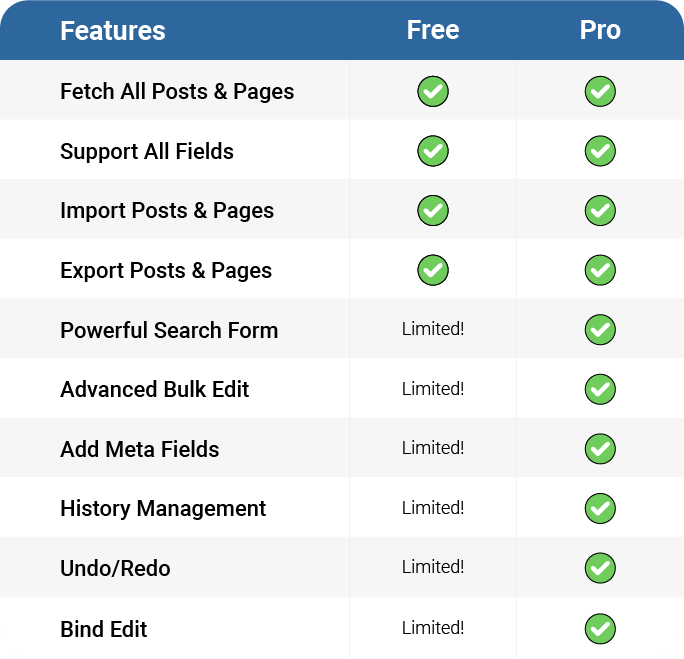
Free vs Pro
🆓 Free Version
✔️ Spreadsheet-style post editor
✔️ Edit multiple posts at once
✔️ Essential post fields (title, status, categories, tags)
✔️ Basic filters
⚠️ Powerful Search Form – Limited
⚠️ Advanced Bulk Edit – Limited
⚠️ Add Meta Fields – Limited
⚠️ History Management – Limited
⚠️ Undo / Redo – Limited
⚠️ Bind Edit – Limited
🟢 Best for small to medium blogs and quick manual post edits
🚀 Pro Version
✔️ All Free features
✔️ Advanced content filters & conditions
⏱️ Scheduled bulk updates
⚙️ Background processing for heavy operations
📊 Big Data support for large content libraries
↩️ Undo / redo changes
⭐ Priority support
🔵 Ideal for large blogs, editorial teams, and automated content workflows
Check demo version: Pro Version
External services
This plugin connects to a license server to activate the plugin and check for updates.
It sends the site admin’s email address and license key to iThemelandCo when the license is activated or when checking for updates. The server responds with activation status, update availability, or error messages.
This service is required to verify valid licenses and deliver updates.
This service is provided by “iThemelandCo”. http://ithemelandco.com/
This plugin, with the user’s consent (via a telemetry form), sends usage data and examples of how the plugin is used to our server (http://ithemelandco.com/). The data includes information on which plugin features are most frequently used, and is analyzed to improve performance and deliver updates aligned with user needs.