


IPGeolocation.io – Geo Redirects & Content Control
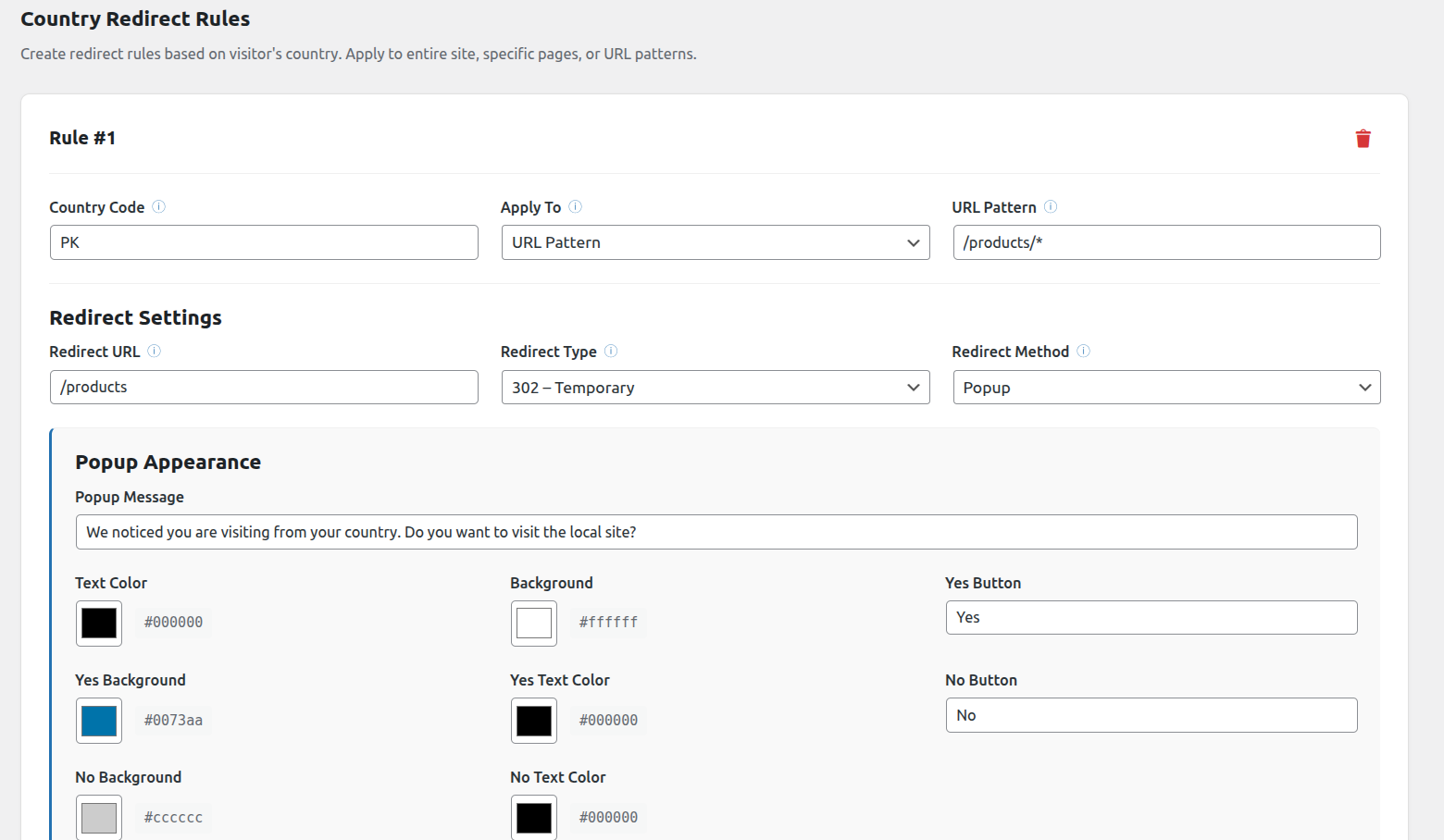
Country redirect rules settings
IPGeolocation.io – Geo Redirects & Content Control decides what each visitor sees based on where they are and what IP address they are using.
You can send people from one country to a different page, keep unwanted IP addresses away from your site or your login page, and show or hide parts of a page depending on the visitor’s location. Everything is set up from one settings screen, and you do not need to write any code.
The plugin uses the ipgeolocation.io API to work out a visitor’s country and other details. Results are stored for 24 hours per address, so your site stays fast.
Main Features
- Country-based redirects (entire site, specific pages, or URL patterns)
- Optional popup confirmation before redirect
- IP address blocking, with separate rules for your website and your login page
- Address lists that accept single addresses, ranges, wildcards, IPv4 and IPv6
- Safe list of addresses that are never blocked by any rule
- Protection against locking yourself out, with a recovery option
- Country-level access control (allow or block)
- Conditional content shortcodes
- Output visitor geolocation data via shortcode
- Page and query-string exclusions
- Redirect bypass and reset via URL parameters
- Bot detection (search engines and social crawlers excluded from redirects)
- Administrator-safe (admins are never redirected)
- IP response caching using WordPress transients
Blocking Visitors By IP Address
The IP section asks two questions, and you answer them separately:
- Who can visit your website
- Who can reach your login page
For each one, you can leave it open to everyone, block a list of addresses, or allow only a list of addresses. Locking the login page to your office address is a simple way to stop password guessing bots, and ordinary visitors are not affected at all.
IP rules are checked before any location lookup, so blocking somebody uses none of your API credits.
Configuration
The plugin supports the following API plans from ipgeolocation.io:
- Developer (Free)
- Paid
Additional security-related features are available for paid plans only.
Blocking by IP address does not need an API key. Everything based on country does.
Shortcodes
Display Single Geolocation Field
[ipgeo country]
[ipgeo city]
[ipgeo country_code]
Available fields include:
ip, city, state, country, country_code, zipcode, continent, latitude, longitude, currency, calling_code, languages, is_proxy, is_tor, is_anonymous, cloud_provider
Conditional Content (Show If Match)
[ipgeo_if country_code="US,CA" logic="OR"]Visible to visitors from the US or Canada.[/ipgeo_if]
Supported attributes: country, country_code, state, city, continent, is_proxy, is_tor, is_cloud_provider, is_anonymous, logic (AND / OR)
Conditional Content (Hide If Match)
[ipgeo_if_not country="Germany"]Hidden from visitors in Germany.[/ipgeo_if_not]
Both shortcodes accept the same attributes, so you can hide content from one country just as easily as showing it to another.
Redirect Bypass
For testing or user control, redirects can be bypassed:
?geo_bypass=1bypasses redirects for 30 days?geo_reset=1resets the bypass cookie
This does not affect IP rules.
External Services Used
This plugin connects to two outside services.
ipgeolocation.io
Used to find the country, region, city and security details for a visitor’s IP address. This powers country redirects, country access control and the shortcodes.
The visitor’s IP address and your API key are sent to https://api.ipgeolocation.io/v3/ipgeo when a page needs location data. Results are stored for 24 hours per address, so a returning visitor does not cause a second request. Nothing is sent if you have not entered an API key, and nothing is sent for a visitor already blocked by an IP rule.
An API key is required. You can get one by creating a free or paid account at ipgeolocation.io. Without it, the country-based features will not work.
Terms of service: https://ipgeolocation.io/tos.html
Privacy policy: https://ipgeolocation.io/privacy.html
Cloudflare
Used only to keep an up-to-date list of Cloudflare server addresses. The plugin needs this list to tell whether a Cloudflare header can be trusted. Without it, that header could be faked by anyone.
Once a day the plugin requests https://www.cloudflare.com/ips-v4 and https://www.cloudflare.com/ips-v6. No visitor information, site information or personal data is sent. If the request fails, a copy included with the plugin is used instead. This only happens when address detection is set to Automatic or Cloudflare.
Terms of service: https://www.cloudflare.com/website-terms/
Privacy policy: https://www.cloudflare.com/privacypolicy/
License
This plugin is licensed under the GPL v2 or later.