

Integrate Rybbit
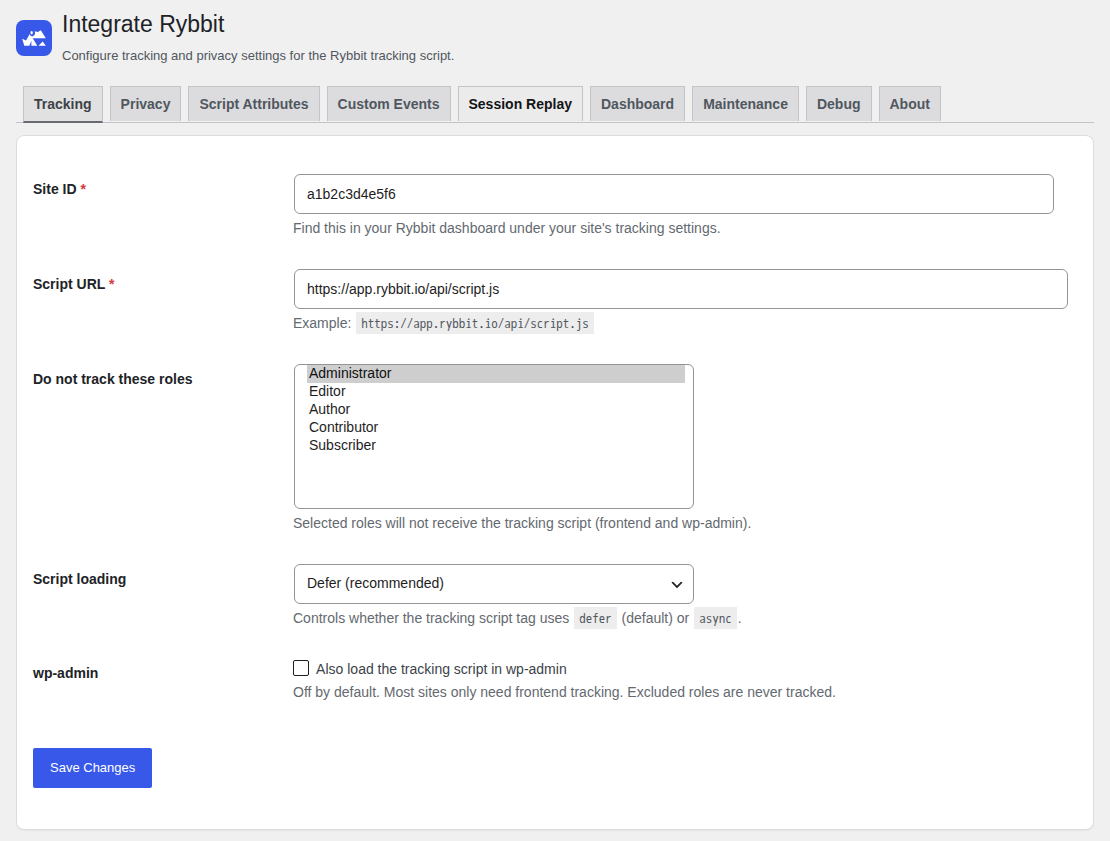
Tracking tab: Site ID, script URL, excluded roles and script loading.
Integrate Rybbit adds the Rybbit tracking script to your WordPress site.
Rybbit is an open source and privacy-focused web analytics platform.
Enter your Site ID and the plugin does the rest. All other settings are optional.
You can also see your analytics inside WordPress. For this, add an API key in the Dashboard tab.
Features
- Works with Rybbit Cloud and with self-hosted Rybbit instances.
- Analytics dashboard in wp-admin: a widget on the WordPress dashboard and a page at Dashboard > Rybbit Analytics.
- Visitors, pageviews, bounce rate, visit duration and visitors online now.
- Chart of the visitors and pageviews for the last 24 hours, 7, 30 or 90 days.
- Top pages, top referrers, countries, devices and browsers.
- The data is cached. The API key stays on the server and is never sent to a browser.
- Do not track selected user roles. Administrators are excluded by default.
- Optional tracking inside wp-admin. It is off by default.
- Load the script with
defer(recommended) orasync. - Skip patterns: do not track matching URL paths.
- Mask patterns: track matching URL paths, but replace the path with the pattern.
- Patterns support wildcards (
*and**) and regular expressions (re:prefix). - Add a custom tag to all events, for example to compare environments.
- Optional user identification for logged-in users. You choose how much data Rybbit receives:
- Pseudonymized mode: no cleartext email. Rybbit receives the user ID, roles, username, display name and a hash of the email.
- Full mode: Rybbit also receives the cleartext email.
- User ID strategies: WordPress scoped ID, keyed hash (HMAC), user ID, login, email or a user meta field.
- Session replay privacy settings: block, ignore and mask elements, mask inputs, sampling and DOM slimming.
- Custom events: send an event to Rybbit when a visitor clicks an element. You set a CSS selector, an event name and optional properties on the Custom Events tab. You do not need to write JavaScript.
- Opt-out for visitors: add the shortcode
[rybbit_optout]or the block “Rybbit Opt-out” to a page, for example your privacy policy. Visitors can turn the analytics off and on again. - Debug tab with the effective settings and the generated script attributes.
- Accessible settings page with keyboard support for the tabs.
- Translation: German (
de_DEandde_DE_formal) is included. - Developer filters to change the behavior from code.
Opt-out shortcode and block
Add the shortcode to any page or post:
[rybbit_optout]
In the block editor, you can also use the block “Rybbit Opt-out”. The block has a “Texts” panel in the sidebar.
The shortcode has these optional attributes:
optout_label: text of the button that turns the analytics off.optin_label: text of the button that turns the analytics on again.tracked_text: status text while the analytics is on.untracked_text: status text while the analytics is off.class: extra CSS classes for the wrapper element.
Example:
[rybbit_optout optout_label="Stop tracking me" tracked_text="We count your visit." class="my-style"]
Developer filters
integrate_rybbit_optout_html(string): Change the HTML of the opt-out shortcode and block. The second argument is the array of texts.integrate_rybbit_should_track(bool): Load the tracking script on the current request or not.integrate_rybbit_script_attributes(array): Change thedata-*attributes of the script tag. Use it for Rybbit options without a setting, for exampledata-namespace.integrate_rybbit_identify_user_id(string): Change the user ID that is sent to Rybbit.integrate_rybbit_identify_traits(array): Change the user traits that are sent to Rybbit.integrate_rybbit_custom_events(array): Change the custom event rules. Each rule is an array withselector(string),event(string) andprops(array of text values). The filter result is not saved. It does not appear in the settings.integrate_rybbit_dashboard_capability(string): Change the capability that is needed to see the analytics dashboard. The default ismanage_options.integrate_rybbit_api_http_args(array): Change the HTTP arguments of the requests to the Rybbit API, for example the timeout.
Example:
add_filter( 'integrate_rybbit_script_attributes', function ( $attributes ) {
    $attributes['data-namespace'] = 'myRybbit';
    return $attributes;
} );
External services
This plugin integrates with the Rybbit analytics service to provide tracking functionality.
The plugin loads the Rybbit tracking script from the configured Script URL. By default, this is https://app.rybbit.io/api/script.js.
The script sends tracking data to the Rybbit instance of the Script URL. This data includes, for example, page views, referrers, screen sizes, browser and device information, and custom events.
If session replay is active in Rybbit, the script also sends recordings of the page. If user identification is active, the plugin sends a user ID and optional user traits.
If you don’t host your own Rybbit instance, data collected by this plugin will be sent to the Rybbit servers for processing.
See the Rybbit Data Processing Agreement to find out more about how Rybbit handles the tracking data.
If you enter an API key on the Dashboard tab, the plugin also reads statistics from the Rybbit API.
The plugin sends the API key, the Site ID and the chosen time range from your server to the Rybbit instance (by default https://app.rybbit.io). It does not send visitor data.
The requests start when a user with the needed capability opens the WordPress dashboard or the analytics page, and when you test the connection.
The plugin keeps the answers in a cache. The address of the instance is the origin of your Script URL, unless you set a different API URL.
By using this plugin, you agree to Rybbit’s terms of service and privacy policy.
Third-party assets / trademarks
This is a free and open-source WordPress plugin developed independently for integration with Rybbit.
The use of the Rybbit name and logo in this plugin has been explicitly approved by the owner of Rybbit.
All Rybbit trademarks, logos, and brand assets remain the property of their respective owner.
This plugin is not an official Rybbit product and is not otherwise affiliated with or endorsed by Rybbit.
License
GPLv3 or later