


Indetpha Data Health
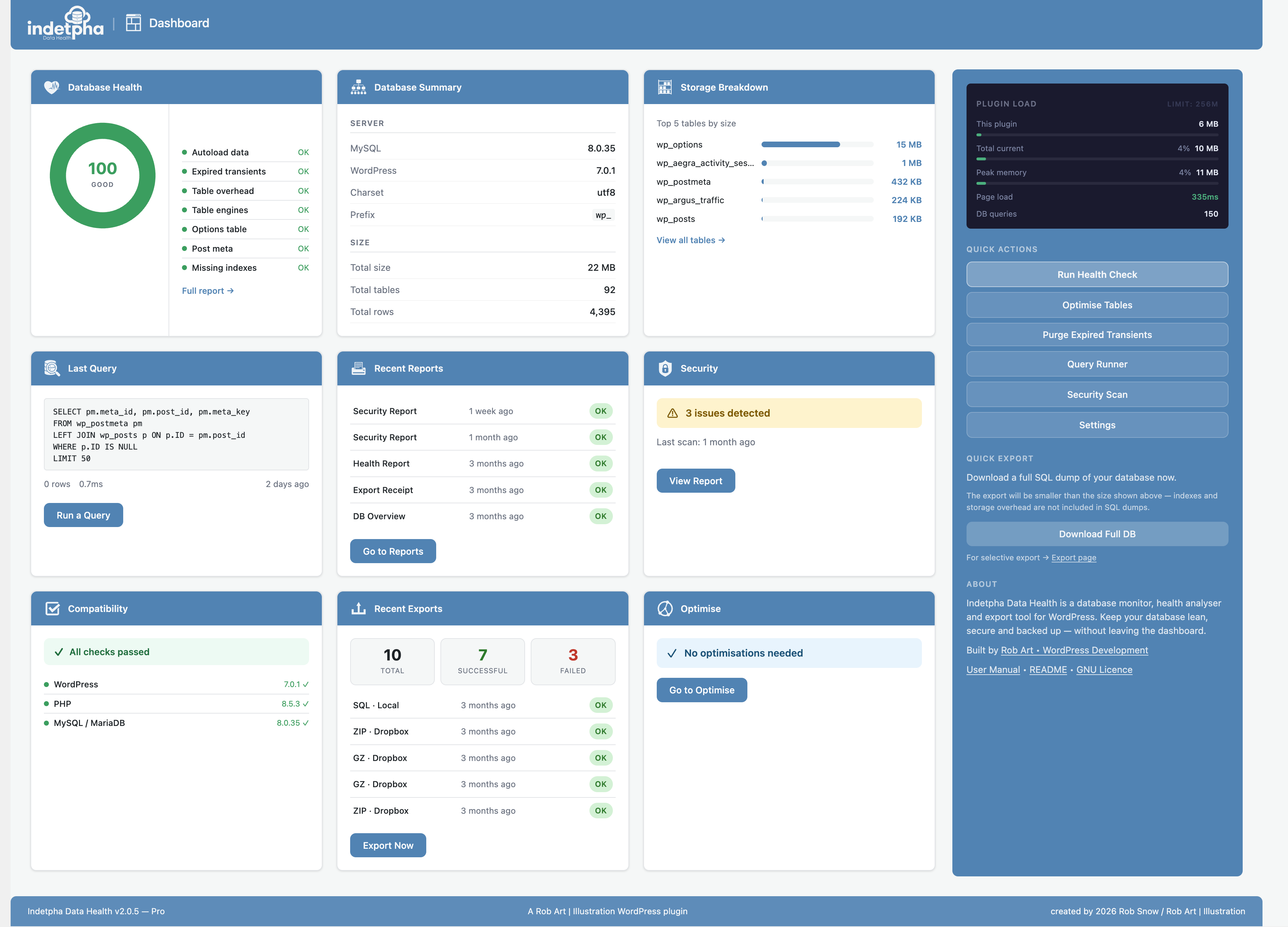
Dashboard — recent exports, health summary, security score, and table count at a glance.
Indetpha Data Health gives you everything you need to understand, maintain, and back up your WordPress database — all from a single, well-organised admin panel.
Whether you are a site owner wanting a simple way to keep your database healthy, or a developer who needs rapid access to exports, table structures, and performance data, Indetpha Data Health has you covered.
Database Export
Export your entire database or select individual tables. Choose from three formats — SQL, ZIP, or GZ — and download locally or send directly to Dropbox (Pro). Every export is logged in the history panel with its format, size, date, and destination.
Health Analysis
Indetpha Data Health runs a suite of automated health checks across your database and presents the results in a clear, colour-coded dashboard:
- Autoload data — flags large autoload values that slow every single page load
- Expired transients — identifies stale cache entries that should have been cleaned up
- Table overhead — reveals fragmented tables wasting disk space
- Post meta bloat — finds orphaned postmeta rows with no parent post
- MyISAM tables — highlights tables using the older engine that lacks crash recovery
- Missing indexes — detects tables that are likely slow due to missing indexes
Tables Panel
Browse your database tables in a categorised, visual layout. Filter by WordPress Core, Plugin, or Other tables. View engine badges, row counts, and size indicators. Drill into any table to browse its rows or inspect its full column structure.
Optimise Panel
Repair tables directly from the admin. View and purge expired transients. Use the wp_options viewer to inspect autoloaded data. Keep your database lean without touching the command line.
Security Environment Scan
Run a 10-point security scan of your WordPress environment. Each check explains what the issue is, why it matters, and provides a step-by-step fix guide. High-risk fixes (such as changing the table prefix or regenerating salts) include a prominent danger banner prompting you to back up first.
Settings
Configure health thresholds, default export formats, export history limits, browse row counts, and security scan parameters. A live threshold preview shows you how changes will affect your health results before you save.
Pro Features
- Selective table export
- Cloud export to Dropbox (active), Google Drive and Amazon S3 (coming soon)
- Scheduled exports — daily, weekly or monthly, with retention
- Full security scan details (exact strings, file paths, usernames)
- Bulk “Optimise All Tables” and orphaned post-meta cleanup
- PDF reports — Security, Database Overview and Export Receipt
- Email alerts on database health and security changes
Indetpha Data Health does not collect, store, or transmit any personal or site data externally unless you explicitly enable a cloud export feature. All analysis and database operations are performed locally within your WordPress environment.
Feature Summary
- Full database export — SQL, ZIP and GZ formats (free)
- Email a database export to yourself (free)
- Health analysis — autoload data, expired transients, table overhead, MyISAM tables, missing indexes, post meta bloat
- Tables panel — browse, structure view, categorised overview (WordPress Core / Plugins / Other)
- Optimise panel — repair tables, purge transients, wp_options viewer
- Security environment scan — 10+ checks with fix guides
- Settings — health thresholds, export defaults, security scan configuration
- Selective table export (Pro)
- Cloud export to Dropbox (Pro); Google Drive and Amazon S3 (Pro, coming soon)
- Scheduled exports, full security details, bulk optimise and PDF reports (Pro)
Uninstall
When you delete Indetpha Data Health from the Plugins screen, the uninstall script automatically removes all plugin data stored in your WordPress database, including:
- Licence key and validation data
- Export history log
- All plugin settings (health thresholds, export format, cloud destination settings)
- Dropbox access token and path
- Developer licence and authentication records (if present)
- Cached health check and authentication transients
The uninstall script does not delete:
- Export files you have already downloaded to your computer
- Any site content (posts, pages, users, WooCommerce data, etc.)
- Any files stored in Dropbox — remove these manually if needed
Indetpha Data Health does not create custom database tables; all plugin data is stored in wp_options and is fully cleaned up on uninstall.
Disclaimer
Indetpha Data Health exports your WordPress database only. It does not back up WordPress core files, themes, plugins, or uploaded media. A database export can be used to restore your data but cannot restore a full WordPress site on its own. Always maintain independent backups of your site files.
Indetpha Data Health is provided as-is, without warranty of any kind. Rob Snow / Rob Art | Illustration accepts no responsibility or liability for data loss, site downtime, failed exports, or any damage arising from the use of this plugin. You are solely responsible for maintaining adequate backups and verifying that any database operation is appropriate for your environment before executing it.
The Security panel performs a configuration check only. It is not a full security audit, penetration test, or malware scan.
External Services
The free version of Indetpha Data Health is fully self-contained: it performs all
database health checks, table inspection, cleanup, optimisation and export locally
on your own server and does not send your data anywhere.
The only outbound connection the free version can make is a link you click yourself:
Lemon Squeezy (checkout — link only)
The “Upgrade to Pro” / “Get Pro” buttons link to the plugin’s checkout page hosted
by Lemon Squeezy (rob-art-plugs-books.lemonsqueezy.com). Nothing is sent
automatically; the link opens in your browser only when you choose to click it.
Lemon Squeezy is the payment processor for the Pro upgrade.
Terms: https://www.lemonsqueezy.com/terms · Privacy: https://www.lemonsqueezy.com/privacy
The following services are used ONLY by the separate Pro add-on (not included in
this free download) and only when you configure or activate them:
Rob Art licence server (Pro only)
When you activate or deactivate a Pro licence, the Pro add-on contacts the Rob Art
licence server at https://robsnow.eu to verify your licence key. Only your licence
key, plugin slug and site URL are transmitted — no visitor data, site content or
database information. This happens only on manual activation/deactivation and a
periodic validity re-check.
Terms & Privacy: https://robsnow.eu/privacy-policy/
Dropbox (Pro only, optional)
If you connect Dropbox in the Pro add-on, your database exports are uploaded
directly to your own Dropbox account using your authenticated connection.
Privacy: https://www.dropbox.com/privacy · Terms: https://www.dropbox.com/terms
Support
For documentation, guides, and FAQs visit the Help & Documentation page.
For bug reports or feature requests, please use the support forum on the plugin page or contact us via the Indetpha Data Health plugin page.