

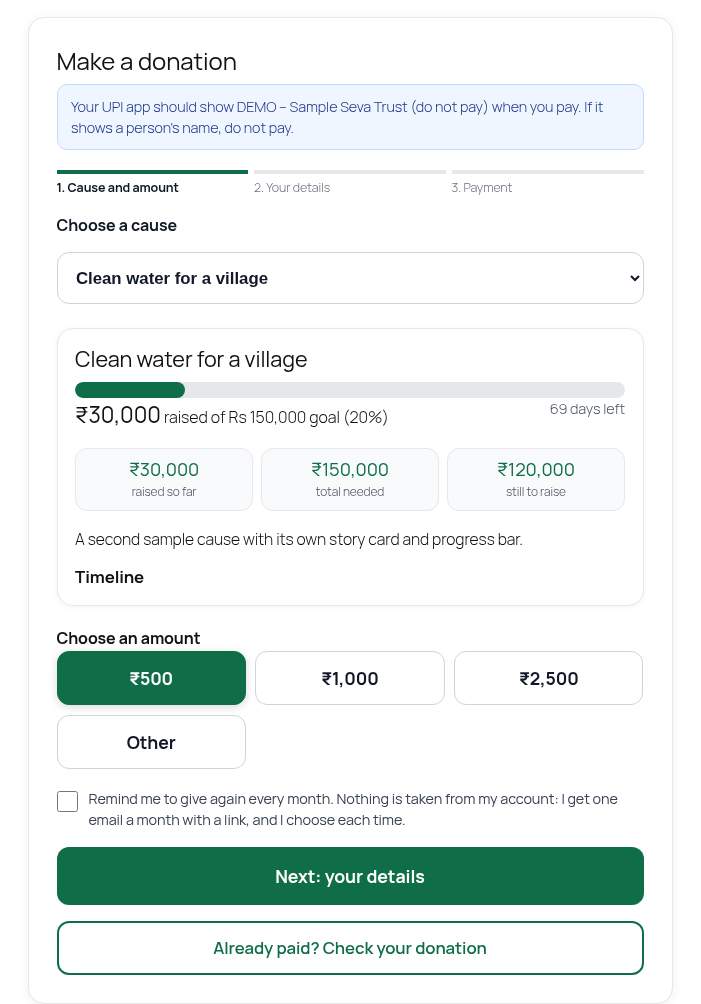
Choose a cause and an amount (sample cause and sample data).
A donation form for Indian nonprofits. Donors pay your own bank account by UPI, so there are no platform fees and no cut. You confirm each donation, then the donor gets a thank-you mail and a certificate of appreciation.
Features
- Donate block with preset amounts and an “other” amount
- UPI direct: the payment details appear only after your UPI ID is verified; intent link, QR and a short donation reference
- Donation status page for each donor, with an optional “Send screenshot as proof” step
- Optional automatic confirmation: a donation can be confirmed automatically only from an owner-uploaded bank statement after the existing learning, evidence and amount checks. Bank-email matches remain suggestions for manual review because raw email headers cannot prove their authentication results came from the receiving server. A donor’s picture alone never confirms. It is off by default. Every automatic step is logged and can be reversed.
- Duplicate-picture and edited-picture flags on donor proofs, for the owner to review
- Verify UPI screen for the owner, bank statement matching, record a payment received outside the site
- Editable mail templates for every mail the plugin sends
- Branded certificate of appreciation and an 80G receipt layout. The plugin does not claim 80G status for you. You enter your own registration details.
- Donor list, filters, CSV export, reports
- Phone-first. No trackers. No ads. No data goes to the plugin author.
How it confirms donations: UPI direct has no payment gateway. Bank-email matches and pasted text are suggestions for the owner to check against their bank and confirm manually. Automatic confirmation can use only a statement file the owner uploads, with the existing checks and relevant optional switch enabled. The file’s upload channel is recorded; the plugin does not prove the document was issued by a bank. Earlier matches without recorded provenance need manual review. Donor proofs alone do not confirm payment. Both automatic-confirm options are off by default.
A donor’s screenshot is kept as a private record and to speed up matching. A picture alone never confirms a donation. Pictures that look like one already sent, or that carry an editing-app tag, are flagged for you to check and are never confirmed automatically.
An instant receipt is not the statutory 80G certificate. Check the rules with your chartered accountant.
External services
The plugin contacts outside services only when you turn the matching feature on. Nothing is sent to the plugin author.
- Brevo (optional mail delivery over HTTPS). Only if you choose Brevo under Email setup, with your own API key. Data sent: the mail itself (recipient, subject, body) to https://api.brevo.com/v3/smtp/email. Terms: https://www.brevo.com/legal/termsofuse/ Privacy: https://www.brevo.com/legal/privacypolicy/
- Your own mailbox (IMAP) (optional bank alert reading). Only if you add a mailbox under Alert mailbox. The plugin connects from your server to the mail server you enter and reads bank alert mails. Nothing is forwarded.
- Income Tax Department search page (link only). A “Verify yourself” link to https://incometaxindia.gov.in/Pages/utilities/exempted-institutions.aspx is shown to donors. Nothing is sent unless they click it.
Third-party code
The screenshot reader runs inside the donor’s own browser. The picture is read on the phone and is sent to the organisation only when the donor taps Send.
Bundled in the ocr folder, all Apache-2.0 (compatible with GPLv2 or later through GPLv3). The .wasm.js files are the unmodified official builds. tesseract.min.js and worker.min.js are the official 5.1.1 builds with one change each: the default fallback web addresses (cdn.jsdelivr.net) are removed, because the plugin always passes local file paths and loads nothing from a CDN. Their source is public:
- tesseract.js 5.1.1: https://github.com/naptha/tesseract.js
- tesseract.js-core 5.1.1 (Tesseract OCR engine): https://github.com/naptha/tesseract.js-core
- tessdata_fast English model: https://github.com/tesseract-ocr/tessdata_fast
- QR code generator (qrcode.js), MIT licence
The plugin’s own scripts (icnd-parse.js, icnd-shot.js, donate.js) are not minified and are GPLv2 or later.
Bank-email and pasted-row matches need the owner’s manual bank check. If two differently hashed credit rows target an already matched donation, the first reservation is kept and the donation is flagged for manual review. Uploading a statement later does not automatically upgrade an earlier email match. The pending list shows the match channel and any credit conflict.
Proof automatic confirmation also needs Automatic confirming enabled, completed learning and the amount limit. It uses exact donor-typed reference, amount, email and uniqueness checks; it does not use the bank-row donor-name/date evidence tiers. A picture alone never confirms payment.