

HTML5 Audio Player – The Ultimate No-Code Podcast, MP3 & Audio Player
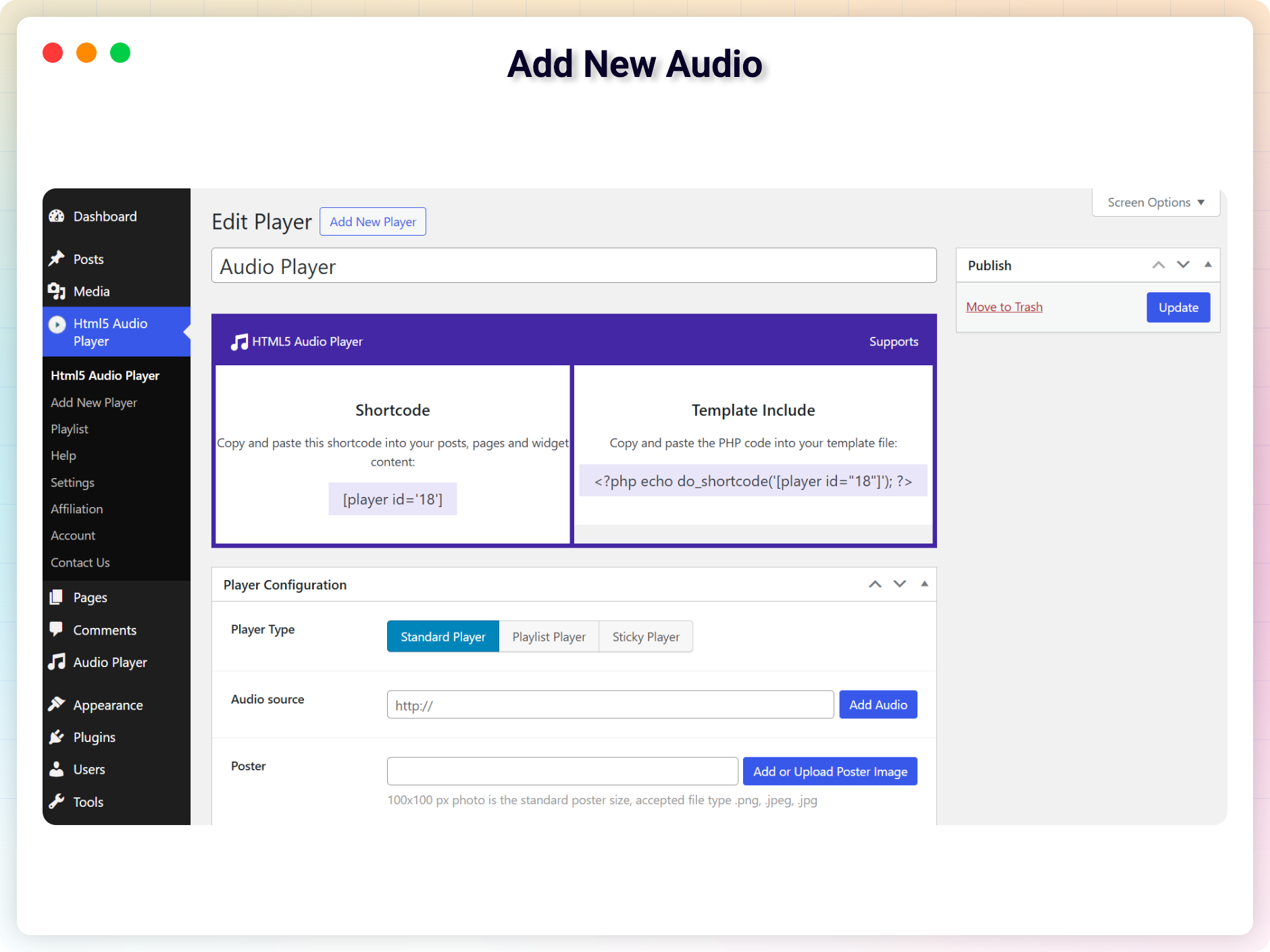
Add New Audio
The Ultimate No-Code Podcast, MP3 & Audio Player Plugin for WordPress
HTML5 Audio Player | Documentation | Pricing | Support | Demo
HTML5 Audio Player is a powerful, lightweight, and fully responsive audio player plugin for WordPress. It lets you embed MP3 and OGG audio files into posts, pages, widget areas, or template files using shortcodes, no coding required.
Built with modern HTML5 technology, this plugin works across all major browsers and iOS devices, ensuring reliable playback on any screen size. Its shortcode-based setup gives you full control over placement and player settings, making it suitable for podcasts, music tracks, audio previews, or online courses.
🎙️ Podcast Player & New Features Walkthrough
Watch our in-depth video walkthrough showcasing the latest podcast features, RSS feed import, podcast subscribe buttons (Spotify, Apple Podcasts, Amazon Music, YouTube, RSS), static waveform visualizer, and advanced audio controls:
Key Features – Free Version
- Advanced Player Layouts: Choose from Standard Player, Sticky Player (fixed bottom/top), and the newly unlocked Audio Playlist Player.
- Subscribe Links: Add customizable subscribe buttons to podcast playlists linking directly to Spotify, Apple Podcasts, Amazon Music, YouTube Podcasts, and custom RSS feeds.
- Podcast RSS Feed Import: Easily import podcast channels from any RSS feed URL (fetch and play unlimited episodes with custom fetch limits).
- Modern Player Skins: Select from Default, Fusion, Stamp, and Wave skins (Wave skin includes real-time jumping bars visualizer and SoundCloud-style static waveform).
- Google Drive & SoundCloud Support: Play shared files directly from Google Drive or stream tracks via SoundCloud URLs using our built-in proxy.
- Lossless & Standard Formats: Seamless playback of MP3, OGG, and FLAC audio files with native WordPress Media Library upload support.
- Gutenberg & Widget Ready: Embed players instantly using the custom Gutenberg block or versatile shortcodes on posts, pages, and sidebar widgets.
- Autoplay & Browser Compliance: Smart fallback rules to start streams muted if modern browsers block autoplay audio playback.
- HLS Live Streaming: Stream live audio broadcasts seamlessly using modern HLS (m3u8) protocol integrations.
- Interactive Status Indicators: Instant visual status updates including “Connecting…”, “Buffering…”, and “Offline” for live streams.
- Custom Styling & Metadata: Easily customize player width, border radius, poster thumbnails, audio titles, and artist details.
- Cross-Browser & Responsive: Fully responsive layout optimized for all modern browsers, smartphones, tablets, and iOS/Android devices.
Pro Version – Unlock Premium Audio Controls
Upgrade to the Pro version for full control over design, layouts, advanced podcast features, and unlimited streams.
What’s Included in Pro:
* Advanced Playlist Skins: Access premium Narrow and Extensive playlist layouts with collapsible track descriptions and customized styling.
* Playback Speed & Skip Controls: Full playback speed selector (0.5x, 0.75x, 1x, 1.25x, 1.5x, 1.75x, 2x) and fast-forward / rewind skip buttons across all playlist skins (Narrow & Extensive layouts).
* Podcast Episode Search & Filter: Real-time frontend keyword search to let users filter and find specific episodes inside playlist layers.
* Load More & Numbered Pagination: Configure custom per-page batch limits with standard numbered pagination (1, 2, 3…) or Load More buttons.
* 7 Premium Player Skins: Unlock Card 1, Card 2, Simple 1, Simple 2, Player 9, Player 10, and Player 11.
* Multiple Radio Stations (Playlists): Unified player interface allowing users to switch between multiple radio stations or channels.
* Recently Played Track History: Display live song timelines and titles fetched dynamically from Icecast/Shoutcast server metadata.
* Backup/Fallback Stream URL: Automatic failover switching to secondary audio streams if the primary server goes offline.
* Full Color Customization: Set custom primary, background, hover, active, and alternating track colors to match your brand.
* Track Title & Artist Typography: Fully customize typography (Google Fonts, size, weight, style, text transform, line height, letter spacing) for Narrow and Extensive playlist skins in Block Editor and Admin Settings.
* Download Button: Enable or disable direct download options for tracks and episodes.
* Advanced Navigation & Seeking: Add custom forward/rewind skip intervals, start/end time offsets, and disable pause locks.
* State Saving: Remember the user’s playback timeline and resume tracks from where they last left off.
* Single Button Player: A clean, single-action play button suitable for inline audio samples.
* Ad-Free Experience & Premium Support: Dedicated support channel with priority bug fixes and updates.
Try the HTML5 Audio Player PRO – Unlock all premium features now!
How to Use – Step-by-Step Setup
Getting started is quick and easy.
Step-by-Step Setup
-
Install and activate the plugin.
-
In the WordPress dashboard, go to the HTML5 Audio Player menu.
-
Add a new player and copy the generated shortcode.
-
Paste the shortcode into any post, page, or widget.
-
Done – enjoy seamless audio playback!
Gutenberg Block Support
Using the Block Editor? You’re covered.
-
Open a post/page editor.
-
Click the + icon, go to Common Blocks, and select HTML5 Audio Player.
-
Choose your audio player and hit the Publish button.
-
Enjoy crystal-clear audio in just a few clicks!
Source Code
You can find the source code, report bugs, and contribute to the development of this plugin on our GitHub repository:
HTML5 Audio Player on GitHub
Third-Party Libraries
This plugin bundles the following third-party JavaScript/PHP libraries.
Codestar Framework
- Source: http://codestarframework.com/
- GitHub: https://github.com/Codestar/codestar-framework
- License: GPLv2 or later – https://github.com/Codestar/codestar-framework/blob/master/LICENSE.md
- Purpose: Provides the options framework for the plugin’s settings and shortcode generator.
Freemius SDK
- Source: https://freemius.com/
- GitHub: https://github.com/Freemius/wordpress-sdk
- License: GPLv3 – https://github.com/Freemius/wordpress-sdk/blob/master/LICENSE.txt
- Purpose: Provides opt-in usage tracking and analytics to help improve the plugin.
bpl-tools
- Source / GitHub: https://github.com/bPlugins/bpl-tools
- License: GPL-2.0-or-later – https://www.gnu.org/licenses/gpl-2.0.html
- Purpose: Shared utility library providing admin dashboard components and common Gutenberg editor controls.
- External Services: The library may connect to bPlugins, WordPress.org, and Freemius services for product data and checkout functionality. See full details: https://github.com/bPlugins/bpl-tools#external-requests–why-they-are-made
User Feedback
❛❛I bought a second license for another site because this plugin satisfied all my needs. I had a small problem on this new site and support solved the problem within hours of my request. Thank you so much. You are awesome.❜❜
-pripyat51
❛❛Loving the player and the support they have provided. The new features are exactly what we need. Thank you!❜❜
-hoffmaw
Like that plugin? Hate it? Want a new feature? Send your feedback
Check out our other WordPress Plugins-
Html5 Video Player – Display videos as single and playlist in multiple skins.
PDF Poster – Display/Embed PDF files with different styles.
StreamCast – Customizable radio player with different skins.
3D Viewer – Embed 3D models and 3D products with interaction.
Advanced Post Block – Show posts and custom posts in different layouts.