


Hooray SourceSignal for Google Preferred Sources
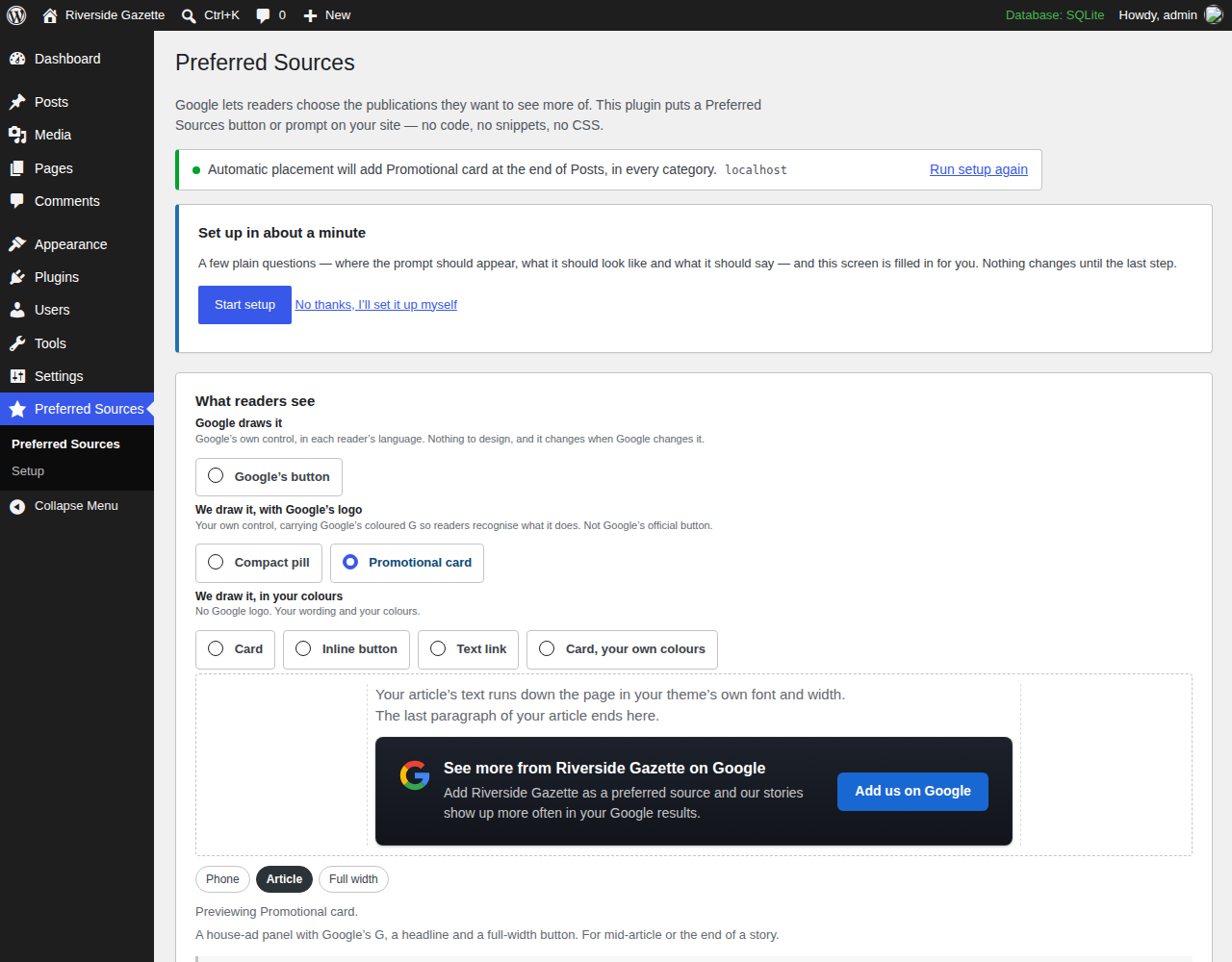
The settings screen: the seven presentations and the live preview, drawn at phone, article or full width.
Google Preferred Sources for WordPress — without the code
SourceSignal makes it easy to add Preferred Sources buttons and prompts to your WordPress site — without editing code or hiring a developer.
Install the plugin, choose what you want the button to look like and where you want it to appear, and turn it on.
That’s it.
Built by a publisher, for publishers
I run a small independent publishing company. We don’t have an in-house development team.
When Google launched Preferred Sources, I wanted it on our sites. The basic Google code looked simple enough. Making it work the way I wanted across WordPress, different placements, mobile devices, caching and our existing site setup was another story.
So I built SourceSignal.
The goal was simple: make Google Preferred Sources something a publisher can set up in a few minutes instead of another project to send to a developer.
We use it on our own publishing sites, and we’ve tested it on real WordPress sites and browsers.
What you can do with SourceSignal
- Add Google Preferred Sources without touching code. No snippets, no theme files, no CSS.
- Choose how it looks. Google’s official button; a compact pill or a promotional card drawn by the plugin and carrying Google’s G; a plain card, an inline button, a text link or a card in your own colours; or a button you already have.
- Choose where it appears. Automatically before or after articles, or place the Preferred Sources button block or the
[preferred_source]shortcode yourself. - Control where it shows. Limit automatic placement to the post types and categories you choose.
- Preview everything before turning it on. The wizard and the settings screen draw the real prompt at phone, article or full width. Nothing changes for readers until you press Turn it on.
- See what readers do. Day-by-day counts of how often each prompt was on screen, pressed, and opened Google’s flow — kept on your own site, with nothing about any reader in them. Optionally send the same counts to the Google Analytics tag your site already runs.
- Don’t nag your readers. Choose how long to hide it after someone uses or closes it.
- Works with page caching and CDNs. Every visitor gets the same HTML; the reader’s browser decides whether to show it.
- Still works if Google’s script doesn’t load. Readers get a link to Google’s Source Preferences page instead.
A note about Google
SourceSignal helps you promote Google’s Preferred Sources feature. Google controls the feature and the final selection happens on Google’s side.
Google does not provide publishers with confirmation that an individual reader completed the selection, so SourceSignal does not report clicks as confirmed Preferred Source adds. The counts on the Analytics tab are of what happened on your own pages — on screen, pressed, Google’s flow opened — and nothing more.
SourceSignal is an independent publisher tool and is not affiliated with or endorsed by Google. The compact pill and the promotional card carry Google’s G so readers recognise what the button does; they are drawn by the plugin and are not Google’s official button.
Want to promote Preferred Sources beyond your website?
We’re also building SourceSignal Pro for publishers who want to promote Preferred Sources through newsletters, social media and print.
Pro adds campaign links, printable QR codes, campaign management, and reporting on what can be measured: views, clicks and Google-flow launches.
Pro is coming soon.
External services
To open Google’s Preferred Sources screen, this plugin loads Google’s publisher library from https://news.google.com/swg/js/v1/publisher.js.
When it loads: on pages that carry a Preferred Sources button or prompt — or, if you switch on “Let buttons added outside the block editor open the card too”, on every page of your site. That setting is off unless you turn it on, and the settings screen tells you which state your site is in.
What Google receives: loading that file is a request to Google, so Google receives what any web request carries — the reader’s IP address, their browser, and the address of the page they are on. If you use Google’s own rendered button, Google also draws it inside a frame served from Google, and that frame receives the address of the article the reader is on. Google’s library also records, on Google’s side, that it was loaded and that its button was shown or pressed, against the address of the page; this plugin does not see those records and cannot switch them off.
The fallback: when Google’s library cannot load, or JavaScript is switched off, the prompt becomes a plain link to Google’s Source Preferences page, https://www.google.com/preferences/source?q=yourdomain.com. It is written into the page but only requested if a reader follows it.
Google’s handling of any of this is governed by Google’s own terms and privacy policy, not by this plugin:
- Terms: https://policies.google.com/terms
- Privacy: https://policies.google.com/privacy
Google Analytics (optional, off by default). If you tick “Also send these as events to Google Analytics” on the Analytics tab, the reader’s browser also sends one event per count — psfp_view, psfp_click, psfp_invoke, psfp_fallback, psfp_dismiss — through whatever Google tag your site already runs. Each event carries which prompt it was, where on the page it sat, its position, the content type and a schema number, and nothing about the reader. This plugin loads no analytics script of its own: if your site has no Google tag, nothing is sent. What Google does with those events is governed by Google’s privacy policy (https://policies.google.com/privacy).
Privacy
Nothing about any individual reader is stored on your server. There is no reader table, no event log, no visitor identifier, no IP address and no user-agent string, and nothing is ever sent to the plugin’s author.
Counting, which you can switch off. While counting is on, the plugin keeps day-by-day totals in one table on your own site: a date, which prompt it was, where on the page it sat, and how many times it was on screen, pressed, opened Google’s flow, fell back to the plain link, or was closed. A row is a day, not a person, and rows older than 400 days are deleted automatically. Your own visits as a logged-in editor are not counted. Switch counting off on the Analytics tab and the table is never written to and the counting script is never loaded.
In the reader’s own browser, when they press or close a Preferred Sources button or prompt, the plugin saves a date stamp — in local storage and in a first-party cookie of the same name:
psfp_used_at— the reader pressed it.psfp_closed_at— the reader closed it.
Each holds a date and nothing else: no name, no account, no identifier. The cookie is set with path=/ and SameSite=Lax, and expires by itself after the window you chose. Nothing is written merely because a reader was shown the prompt, and nothing at all is written if both windows are set to “Keep showing it”. Your server never reads either copy, which is what keeps page caching working — though the cookies travel with ordinary page requests the way every cookie does.
It is per browser, not per person: the same reader on a phone and a laptop counts twice, and clearing site data resets it.
WordPress’s Settings Privacy screen carries a suggested paragraph for your own privacy policy, generated from your site’s own settings, including the counting and Google Analytics paragraphs only when those are switched on. It is a starting point, not legal advice.
The plugin stores its own settings in psfp_settings and psfp_setup, a note of what the 1.1 upgrade changed in psfp_migration, a 60-second marker after activation, and — while counting is on — the table of day-by-day totals, psfp_analytics_daily, with a daily job that deletes rows older than 400 days. Uninstalling removes all of it — the options, the table and the job — from every site on a network, and leaves your posts alone.