

Hierarchical HTML Sitemap
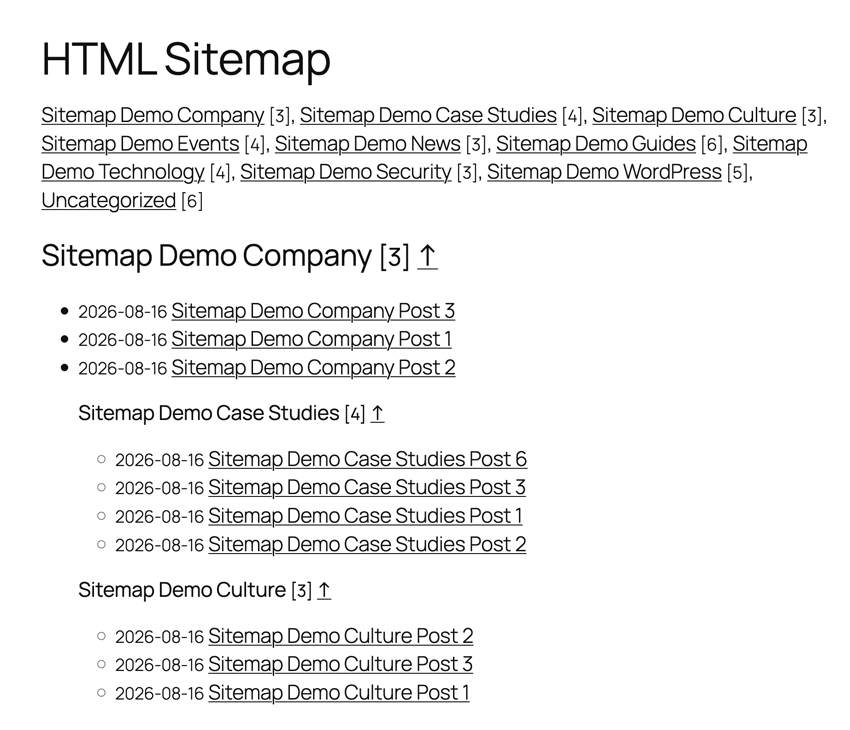
Example of a sitemap.
Hierarchical HTML Sitemap offers visitors an easy and intuitive way to navigate your blog.
This plugin generates an HTML sitemap of your WordPress blog. It displays a list of posts grouped by hierarchically sorted categories. By using a shortcode, you can display it on a page or anywhere else that supports shortcodes, such as a widget.
The output does not include CSS or JavaScript files. It is pure HTML, ready to inherit or receive your theme’s styles.
Features
- Short and easy shortcode:
[htmlmap]. - Categories sorted hierarchically.
- Displays posts and/or pages.
- Can exclude specified posts, pages, or categories.
- Displays category navigation above the posts list.
- Displays post publication dates.
- Clean HTML without scripts.
- Does not enqueue unnecessary JavaScript or CSS files.
- No ads or author links in the output.
Usage and options
The [htmlmap] shortcode accepts these optional attributes:
exclude: post or page IDs to omit, for example[htmlmap exclude="445,446"].exclude_cat: category IDs to omit, for example[htmlmap exclude_cat="1,34"].showpages: display the list of pages, for example[htmlmap showpages].hidecloud: hide category navigation, for example[htmlmap hidecloud].showdescription: display category descriptions, for example[htmlmap showdescription].hidedate: hide post publication dates, for example[htmlmap hidedate].hidecount: hide post counts in category headings, for example[htmlmap hidecount].
You can combine attributes, for example:
[htmlmap exclude="3546,7398" exclude_cat="1,34" showpages hidecloud]
HTML structure and CSS classes
The shortcode preserves existing category heading IDs (cat_<term-id>), the
category navigation class (cat), and the empty-category class (null).
Additional classes are available for theme customisation:
htmlmap-post-list: each category’s post list.htmlmap-post: each post list item.htmlmap-children: the list item containing child categories.htmlmap-empty-category: added alongside the legacynullclass.htmlmap-category-description: a displayed category description.htmlmap-page-list: the optional pages list.htmlmap-page: each page list item.
Child categories are rendered after their parent category’s posts inside a
dedicated list item, rather than inside the final post item.
Extra
- GitHub repository for issues and contributions.