

Gutenslider – Image & Video Slider Block
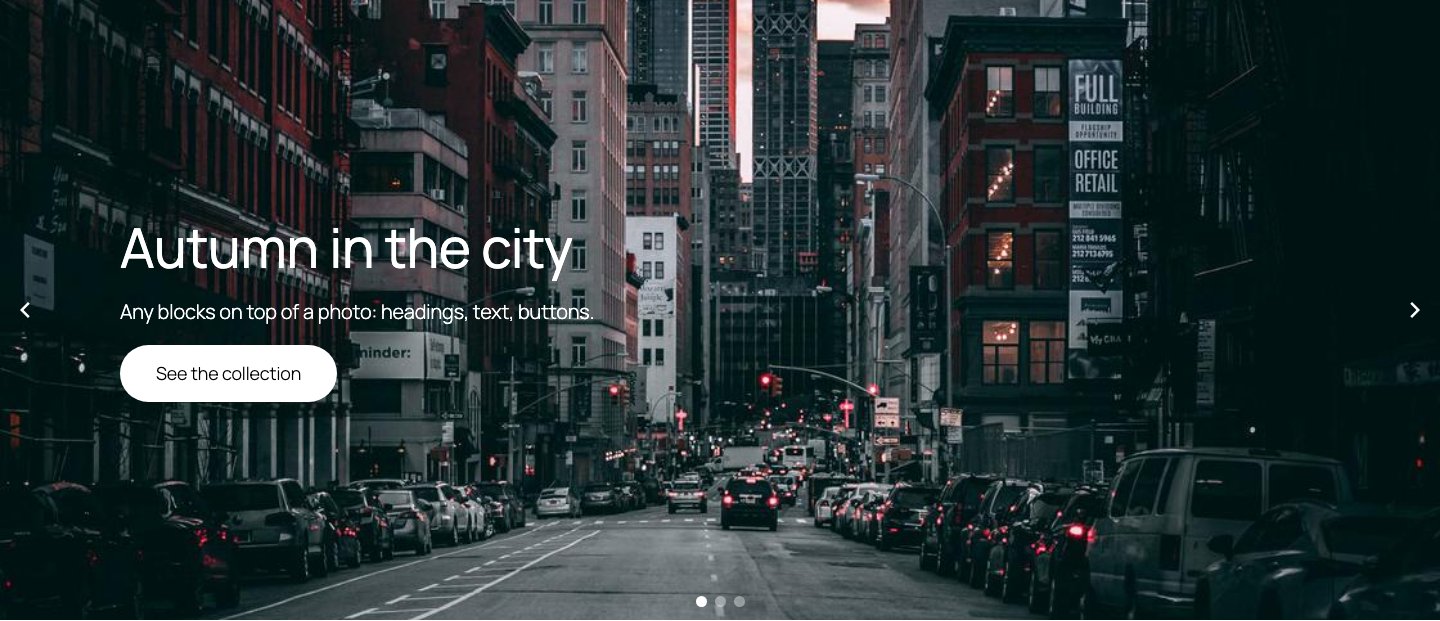
A full-width slider with a heading, text and a button on each slide.
Gutenslider adds a slider block to the block editor. Each slide has a background (image, video, color or gradient) and holds any blocks you like on top: headings, paragraphs, buttons, columns. You build and style the slider where you write your content, and the editor shows it the way visitors will see it.
Show one slide at a time for a hero or a fullscreen background, or several side by side as a carousel: for photos, videos, testimonials or team members, laid out with blocks.
How to use it
- In the block editor, add a Gutenslider block.
- Pick images or videos from the Media Library. Each one becomes a slide.
- Select a slide and add blocks on top of it, or keep one set of content fixed above all slides.
- Choose the transition, arrows, dots, height and autoplay in the block settings, per device (desktop, tablet, mobile).
- Publish.
Features
- Unlimited slides with an image, a video from the Media Library or from a link, a color or a gradient as background, a focal point for each image and video, and a color or gradient overlay.
- Video sliders from links: paste YouTube video or playlist links, or links to video files (.mp4, .webm, .mov, .ogv), and every video becomes a slide. For playlists (the newest 15 videos, from the playlist’s feed): how many, in which order, with or without YouTube Shorts. The slide on screen plays (muted, or with sound after a click), the others pause and show their thumbnail; each slide keeps its video’s shape (16:9, or upright for Shorts). Works with several slides per view and centered slides.
- Videos play when their slide shows (a slider setting, and per slide), the slider’s autoplay waits for a playing video, and the videos of a slider share their sound: mute or turn up one, and the others follow.
- On small screens the arrows and dots fade while a video plays, so they don’t cover the player’s controls, and come back on any touch, pointer movement or keyboard focus.
- Any blocks on top of a slide.
- Two content modes: content per slide, or the same content on all slides while the backgrounds change.
- Transitions: slide, fade and flip, with transition time and time per slide.
- Up to eight slides per view (or automatic width), slides per step, space between slides, loop, centered slides, random order, autoplay with pause on hover.
- Arrows in eleven styles or as text (“Previous”, “Next” in the site’s font), and dots, with size and colors; on or off per device.
- Arrow positions (sides, next to the blocks below or above the image, top and bottom, corners), offsets, spacing and blend mode; dot positions (bottom, top, left, right) and an offset.
- Settings per device (desktop, tablet, mobile): slides per view, height, arrows, dots and visibility.
- Slider height in px or vh, height that grows with the content, wide and full alignment, and a full-screen mode.
- Content position (top, center, bottom, left, right), and the slide’s blocks on the image, below it or above it.
- Shape dividers at the top and bottom, in fifteen shapes, with color, height, flip and invert.
- Linked slides, keyboard navigation and hash navigation (a link can open a specific slide).
- Image slides can link to their image file, for lightbox plugins that open linked images (one gallery per slider with Lightbox with PhotoSwipe).
- A lightbox for the slide images and videos, and for Image and Video blocks on the slides: it opens out of the image (or fades in), pages with arrows, keyboard and swipe, shows a counter, thumbnails and a heading and text from the image’s title, caption or description, and comes in light, dark or your own colors.
- Blend modes and opacity for the content on the slides.
- Automatic captions from the Media Library; slides can be hidden.
- A Preview button in the editor that runs the slider as visitors see it.
Speed and accessibility
The front end uses the Interactivity API. The slider’s layout is rendered on the server, so the page does not shift when the script starts. Swiper and the modules a slider needs load only when the slider comes near the viewport. Images get responsive srcset and sizes; the first visible image loads with high priority, the others lazily. Arrows and dots are buttons with labels, slides are announced as slides, and autoplay respects “reduced motion”.
Gutenslider Pro
Pro adds more ways to design the same block: see what Pro adds
- 3D transitions: coverflow, cards and cube.
- Six shaped effects (morph, parallax, tilt, fan, stack, reveal) and twenty WebGL transitions (liquid, ripple, swirl, fluted glass and more).
- Scroll parallax for the backgrounds.
- Arrows that follow the pointer.
- Pagination as a few dots at a time, numbers or a progress bar, in the corners too; animated dot styles (pill, lines with progress).
- A lightbox zoom button: a full view where the photo fills the window, then zooms in where you click.
- YouTube playlists up to 100 videos (from the playlist page), and Shorts recognized from any link.
- More video sources for “Add videos”: YouTube channels (@handle, up to 100 of the latest uploads), Vimeo (videos, unlisted ones too, users, channels, showcases), Dailymotion (videos, users, playlists) and TikTok (video links, several at once; TikTok profiles cannot be read), with their players.
Source code
The JavaScript and CSS in build/ are compiled from the human-readable sources in src/, which ship with the plugin, together with the build setup (package.json, package-lock.json, webpack.config.js). To rebuild them: npm ci && npm run build (uses @wordpress/scripts).
Open source libraries
- Swiper 14.3.0 (MIT) for the slide transitions, bundled from npm; source: github.com/nolimits4web/swiper.
- Freemius SDK (GPL) for Pro licenses.
External services
The free plugin makes no requests to other servers on its own: no tracking, no remote fonts or scripts, and nothing is sent from your site unless you allow it on the opt-in screen (see Freemius below). Slide images and videos come from your own Media Library; only video slides from links, which you add yourself, contact the video’s platform (see below). On the page, a platform’s player loads only when its slide is shown or its play button is clicked; from then on that platform receives the visitor’s IP address and browser data, as with any embedded video. Pages without such slides contact nothing.
Freemius (opt-in, and licensing for Gutenslider Pro). Gutenslider includes the Freemius SDK. After you activate the plugin, it asks once whether you want to opt in. Only if you click “Allow & Continue”, your WordPress user’s name and email address, the site’s address and title, the WordPress, PHP and plugin versions, the site language, and whether the plugin is active or uninstalled are sent to Freemius, so we can tell you about security and feature updates; the list of your plugins and themes and the newsletter are separate choices on that screen. “Skip” sends nothing, and you can opt in or out later with the link in the plugin’s row on the Plugins screen. If you buy Gutenslider Pro or activate a Pro license, your license key, site address, and the WordPress, PHP and plugin versions are sent to Freemius to check the license and deliver updates. Terms, Privacy
YouTube (only for YouTube slides). When you add YouTube links in the editor, your site asks YouTube for the video titles and sizes (youtube.com/oembed), reads the newest videos of a playlist from its public feed (youtube.com/feeds/videos.xml), and saves the video thumbnails (i.ytimg.com) to your Media Library. With Pro, playlists and channels are read from their pages (youtube.com/playlist, the channel page), and youtube.com/shorts/… tells which videos are Shorts. On the page, a YouTube slide without a saved thumbnail shows YouTube’s thumbnail from i.ytimg.com, and the player is loaded from youtube-nocookie.com when the slide is shown or played. Terms, Privacy
Vimeo (only for Vimeo slides). When you add Vimeo links in the editor (Pro), your site asks Vimeo for the video titles, sizes and thumbnails (vimeo.com/api/oembed.json), reads the video list of a user, channel or showcase from its public feed (vimeo.com/…/rss), and saves the thumbnails (i.vimeocdn.com) to your Media Library. On the page, the Vimeo player is loaded from player.vimeo.com, with “do not track” (dnt=1). Terms, Privacy
Dailymotion (only for Dailymotion slides). When you add Dailymotion links in the editor (Pro), your site asks Dailymotion’s public API (api.dailymotion.com) for the videos’ titles, sizes and thumbnails, and the video list of a user or playlist, and saves the thumbnails (dmcdn.net) to your Media Library. On the page, the Dailymotion player is loaded from geo.dailymotion.com. Terms, Privacy
TikTok (only for TikTok slides). When you add TikTok video links in the editor (Pro), your site asks TikTok for the video’s title and thumbnail (tiktok.com/oembed) and saves the thumbnail (tiktokcdn.com) to your Media Library. On the page, TikTok’s embed player is loaded from tiktok.com/player. Terms, Privacy
Video files from links. A slide can play a video file from another site; your site checks the link’s type once (a HEAD request) when you add it, and visitors’ browsers load the file from that site.