

GS WooCommerce Product Slider, Product Carousel, Grid, Ticker, List & Masonry
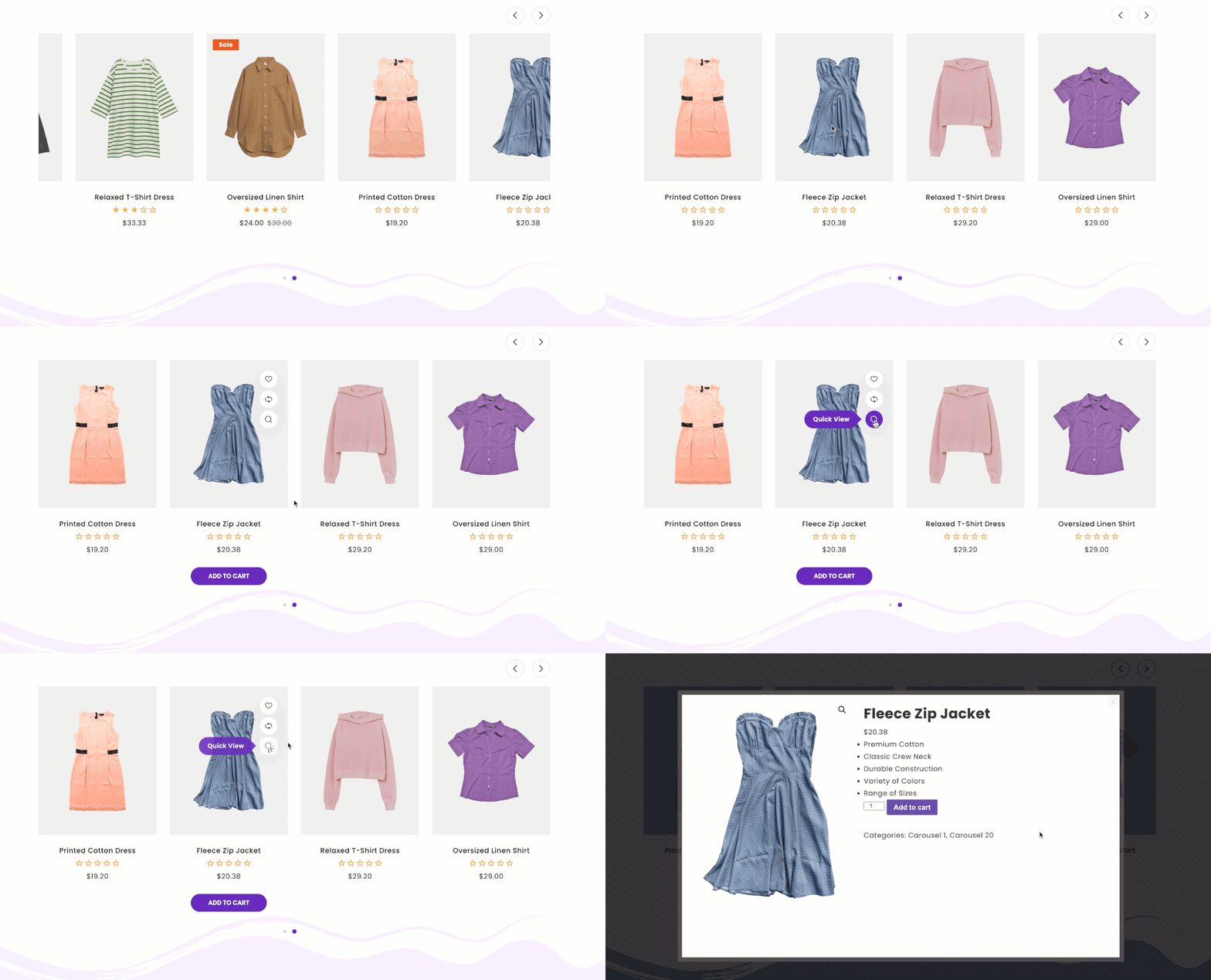
Product Slider with Popup.
Enhance Your Product Displays for Better Sales! Utilize Carousel, Grid, Ticker, List, and Masonry layouts to maximize conversions. Display products anywhere using shortcodes like [gswoo id=#].
Whether you’re selling digital or physical products via WooCommerce, presentation is crucial. GS WooCommerce Product Slider enhances your online store’s appearance, allowing you to engage customers effectively.
With this plugin, create dynamic “Digital Signage” for new product introductions, brand awareness, increased exposure, and sales. No coding knowledge required. It’s the Best WooCommerce Product Slider plugin, offering simplicity, flexibility, and power.
Boost your online business with the Best WooCommerce Product Slider Plugin!
🎬 Live Demo ⬆️ Upgrade to PRO 📚 Documentation 🙋♂️ Support
Why WooCommerce Product Slider plugin is crucial for your business?
In today’s competitive online market, captivating product displays are essential for attracting customers and boosting sales. The WooCommerce Product Slider plugin plays a crucial role in enhancing your business by offering dynamic and visually appealing product showcases. With various layout options like Carousel, Grid, Ticker, List, and Masonry, this plugin allows you to create engaging displays that capture attention and encourage conversions.
By showcasing your products in an attractive and organized manner, the WooCommerce Product Slider plugin helps you stand out from the competition and provides a better shopping experience for your customers. With the ability to display products anywhere on your site using shortcodes, this plugin ensures that your products are always front and center, increasing visibility and sales opportunities.
What makes GS WooCommerce Product Slider plugin stand out?
The GS WooCommerce Product Slider plugin stands out for several reasons, making it a must-have tool for any WooCommerce store owner.
- Versatility: With multiple layout options including Carousel, Grid, Ticker, List, and Masonry, this plugin offers versatility to suit various product display needs.
- Ease of Use: The plugin is user-friendly, allowing you to create stunning product displays without any coding knowledge.
- Customization: It offers extensive customization options, including control over colors, styles, and display settings.
- Compatibility: GS WooCommerce Product Slider plugin seamlessly integrates with popular page builders and is compatible with any standard WordPress theme.
- Performance: It ensures optimized performance with swift loading times, enhancing user experience.
- Responsive Design: The plugin is fully responsive, ensuring that your product displays look great on all devices.
- Support and Updates: With priority email support and continuous updates, you can rely on GS WooCommerce Product Slider plugin for ongoing assistance and improvements.
Comprehensive Plugin Features
Unlock the Full Potential of WooCommerce Product Slider with an Impressive Set of Features:
- 40+ Designs: Choose from Carousel, Grid, Masonry, List, or Ticker layouts for your product display.
- Theme Flexibility: Easily switch between Grid, Slider, Masonry, List, or Ticker themes.
- Advanced Templating: Utilize Archive Templates and Shortcode Generator with Preview for enhanced customization.
- Page Builder Compatibility: Seamlessly integrate with popular page builders for effortless design.
- Category-wise Products: Include or exclude products based on categories.
- Tag-wise Products: Include or exclude products based on tags.
- Type-wise Products: Include or exclude products by type – Featured, In Stock, Free.
- Specific Products: Include or exclude specific products by name.
- Display Control: Show or hide various product elements like Title, Description, Ratings, Countdown, Price, Add to Cart, Wishlist, Compare, Quick View, Hot Badge, Out Of Stock Badge, Sale Badge, etc.
- Description Length: Control the character length of product descriptions.
- Product QuickView, Wishlist, and Compare Options: Enhance user experience with quick actions.
- WooCommerce Quick View, Wishlist, Compare Plugin Supported: Seamless integration with essential plugins.
- Optimized Performance: Enjoy swift loading times for improved user experience.
- Conditional Script Loading: Load scripts only where necessary, optimizing site performance.
- Localization Input Fields: Easily replace preferred texts for localization.
- Responsive Design: Ensure compatibility across various devices with responsive design.
- Theme Compatibility: Works seamlessly with any standard WordPress theme.
- Developer-Friendly: Easily customizable for developers according to specific needs.
- Browser Compatibility: Supported across all modern browsers.
- SEO Boost: Enhance SEO with schema.org markup for better visibility.
- W3C Valid Markup: Adheres to W3C standards for valid markup.
- Flexible Output: Display products anywhere using generated shortcodes.
- User-Friendly Setup: Easy to set up with a user-friendly interface.
- RTL Support: Compatible with languages that read from right to left.
- Translation Ready: Translatable with included POT files for multilingual sites.
- Priority Email Support: Access dedicated support for any assistance needed.
- Free Installation: Receive free installation assistance if required.
- Robust Documentation: Well-documented with comprehensive support for queries.
- Continuous Updates: Stay updated with new features and improvements.
- Live Demos: 🎬 View live Demos »
- Upgrade to PRO: ⬆️ Upgrade to PRO »
General Settings (WooCommerce Product Slider)
Start by navigating to Product Views > Shortcode. Here, you can either create a new shortcode or edit an existing one. Once inside, you’ll land on the General Settings page.
- General Settings Fields:
- Shortcode Name: Give your shortcode a unique name.
- View Type: Choose from Carousel, Grid, Masonry, List, or Ticker layouts.
- Image Type: Select between Solid or Transparent.
- Columns Control: Adjust the number of columns for Desktop, Tablet, Mobile & Small Mobile (1 to 6 columns).
- Columns Gap: Increase or decrease the gap between each item. Default is 30.
- Display Title: Show or Hide Product Title.
- Display Ratings: Show or Hide Product Ratings.
- Display Count Down: Show or Hide Product Count Down Timer. Make sure WPC Countdown Timer plugin is active.
- Display Price: Show or Hide Product Price.
- Display Description: Show or Hide Product Description.
- Description Length: Control the Description Character Length. Set to 0 for displaying all characters.
- Display Add to Cart: Show or Hide Product Add to Cart button.
- Display Wishlist: Show or Hide the Wishlist button. Make sure YITH WooCommerce Wishlist plugin is activated.
- Display Compare: Show or Hide the Compare button. Make sure YITH WooCommerce Compare plugin is activated.
- Display Quick View: Show or Hide the Quick View button. Make sure YITH WooCommerce Quick View plugin is activated.
- Display Hot Badge: Show or Hide the Hot badge.
- Display Out Of Stock Badge: Show or Hide the Out Of Stock badge.
- Display Sale Badge: Show or Hide the Sale badge.
- Sale Badge Type: Choose between Text or Numeric.
- Carousel Settings (When View Type is Carousel):
- Move Items: Set the number of items to move (1 to 6).
- Slides Speed: Duration of transition between slides (in milliseconds).
- Infinite Loop: Enable/Disable looping through slides.
- Reverse Direction: Reverse the direction of carousel navigation.
- Autoplay: Enable/Disable automatic slide change.
- Delay: Set the autoplay delay in milliseconds. Default is 2000 ms.
- Stop On Hover: Pause autoplay on hover. Default is Off.
Style Settings
Easily Customize Your Products Display:
To get started, navigate to Product Views > Shortcode. Create a new shortcode or edit an existing one. Then, proceed to the 2nd tab labeled Style.
- Rating Color: Personalize the color of the rating.
- Price Color: Define the color of the price.
- Old Price Color: Set the color of the old price.
- Title Color: Customize the color of the title.
- Title Hover Color: Personalize the color of the title on hover.
- Description Color: Define the color of the description.
- Description Hover Color: Set the color of the description on hover.
- Badges Color: Customize the color of badges.
- Badges BG Color: Personalize the background color of badges.
- Discount Badge BG Color: Define the background color of discount badges.
- Out of Stock Badge BG Color: Set the background color of out of stock badges.
- Button Text: Customize the text of the buttons.
- Button Text Hover: Personalize the text of the buttons on hover.
- Button Background: Define the background of the buttons.
- Button Background Hover: Set the background of the buttons on hover.
- For Carousel View Type:
- Enable Carousel Navs: Toggle carousel navigation.
- Enable Carousel Dots: Toggle carousel dots.
- Enable Dynamic Dots: Toggle dynamic carousel dots.
- Navs Style: Choose from 11 different navigation styles.
- Navs Position: Choose the position of carousel navigation.
- Bottom
- Center
- Center Outside
- Center Inside
- Top Right
- Top Left
- Dots Style: Choose from 4 different dot styles.
Query Settings
Begin by navigating to Product Views > Shortcode. Create a new shortcode or edit an existing one. Then proceed to the 3rd tab labeled Query.
- Display Limit: Set the total number of products to display. Use -1 to show all products.
- Order By:
- Product ID: Sort products by their ID.
- Product Name: Arrange products alphabetically by name.
- Latest: Display the latest products.
- Random: Display products in a random order.
- Best Sellers / Popularity: Arrange products based on popularity.
- Average Rating: Sort products by average rating.
- Price: Arrange products by price.
- Order:
- DESC (Descending): Arrange products in descending order.
- ASC (Ascending): Arrange products in ascending order.
- Include Category: Choose a specific category to showcase products from. Select from the available list of created categories.
- Exclude Category: Hide products associated with a particular category.
- Include By Tags: Include items by tag name.
- Exclude By Tags: Exclude items by tag name.
- Include By Type: Include product types – Featured, In Stock, Free.
- Exclude By Type: Exclude product types – Featured, In Stock, Free.
- Display Specific Products: Choose specific products to display.
- Exclude Specific Products: Exclude specific products from being displayed.
Preference ( Global Settings )
Navigate to Product Views > Shortcode and click on Preferences.
-
Replace Preferred Text for:
Customize specific text elements by replacing them with preferred alternatives. Here’s a list of elements you can customize:- Sale Badge Text: Change the text displayed on sale badges.
- Out Of Stock Badge Text: Change the text displayed on out of stock badges.
- Wishlist Popup Text: Customize the text displayed in the wishlist popup.
- Compare Popup Text: Customize the text displayed in the compare popup.
- Quick View Popup Text: Customize the text displayed in the quick view popup.
- Disable Lazy Load: Toggle lazy loading for product images.
- Custom CSS: Add your custom CSS for additional styling options.
GS WooCommerce Product Slider’s shortcode usage
Select a theme, view type & other parameters. Shortcode will generate with id like [gswoo id=1]
[gswoo id=1]
Shortcode PHP Usage
<?php echo do_shortcode( '[gswoo id=3]' ); ?>
Documentation
If you have any questions regarding the Product Views for WooCommerce ( known as GS WooCommerce Product Slider ) plugin and how to work with it, We recommend referring to our comprehensive online documentation. It provides detailed information and instructions to assist you in navigating and utilizing the plugin effectively. You can find the Documentation here.
Quick Support & Bug Reporting
If you encounter any problems or discover bugs, please post them in our Support channel. We aim to respond as soon as possible (excluding holidays).
Pro users are requested to contact our support channel for dedicated assistance.
🙋♂️ Alternatively, you can reach out to us through our Support or WordPress.org support forum.
Development Team
Crafted and Developed with Passion by GS Plugins
Confused?
🎬 View live Demos »
📚 Documentation »
🔥 More Essential Plugins You Want To Get From GS Plugins
⭐ Solid Testimonials – Showcase client reviews, recommendations, and quotes creatively across pages and widgets for maximum impact.
️ Logo Slider – Quick & easily manageable logo slideshow plugin to display partner, client, brand & sponsor’s Logos in appealing views.
💼 Filterable Portfolio – Showcase your work with clean, responsive layouts, including Grid, Slider, Filter, Masonry, and Popup.
👥 Team Members – Create attractive team sections highlighting members, roles, expertise, and professional strengths.
🎁 Project Showcase – Display projects as a portfolio with complete details, including URL, client reviews & ratings, gallery & videos.
📚 Books Showcase – Display books with authors, dates, reviews, ratings, galleries, and helpful details with 35+ designs.
👨🏫 Coaches – Showcase coaches’ skills, experience, certifications, reviews, ratings, and professional expertise clearly.
⊞ Posts Grid – Display recent WordPress posts in elegant 50+ styles for faster browsing and seamless navigation.
🎯 WooCommerce Plugins
🛍️ WooCommerce Variation Swatches – Replace product dropdowns with attractive swatches for easier and faster variation selection.
💎 WooCommerce Brands – Add brand taxonomy for organizing, displaying, and filtering WooCommerce products efficiently.
📣 Social Plugins
📌 Pinterest Portfolio – Showcase Pinterest pins on WordPress, increasing engagement, visibility, and profile traffic.
▶️ YouTube Gallery – Feature YouTube channel or playlist videos in attractive galleries for easier visitor viewing.
🏆 Branding Plugin
⚡ PowerUp – Improve WordPress security and convenience with redirects, restrictions, admin controls and many more.