


Grey Rock Block Synchroniser for Wordfence and Cloudflare
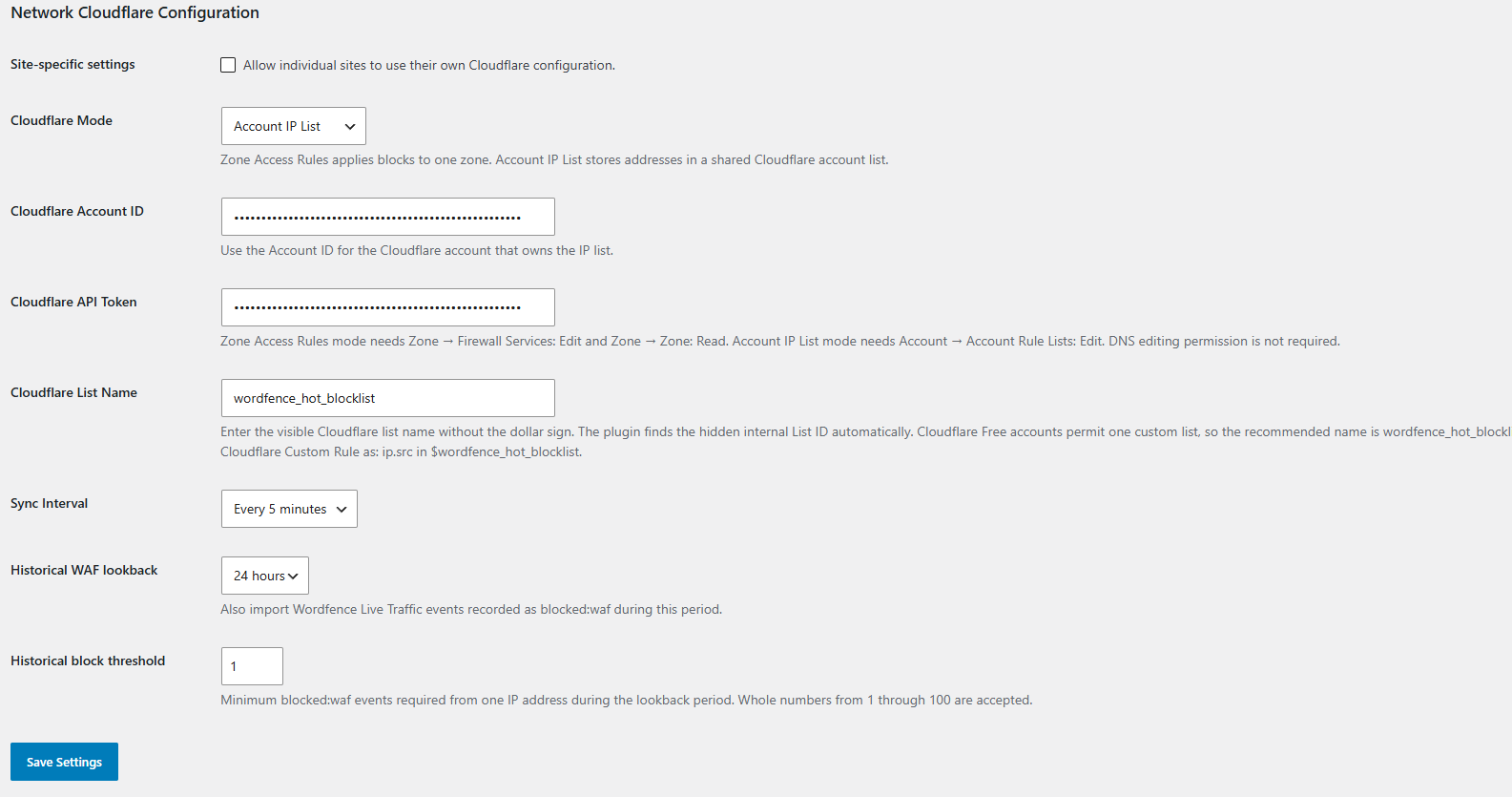
Configure Cloudflare Account IP List mode, synchronisation interval, historical WAF lookback, and block threshold from Network Admin.
Grey Rock Block Synchroniser for Wordfence and Cloudflare sends qualifying Wordfence firewall blocks to Cloudflare so hostile traffic can be stopped at Cloudflare’s network edge before it reaches the WordPress server.
Why Grey Rock?
The name Grey Rock is inspired by the grey rock method: becoming uninteresting and unrewarding to someone seeking attention or a reaction.
Grey Rock applies that concept to hostile website traffic. Wordfence identifies qualifying blocked IP addresses, and Grey Rock synchronises them with Cloudflare. Cloudflare can then stop those addresses at the network edge before their requests reach WordPress.
The objective is simple: make your website boring to repeat attackers. Instead of allowing the same hostile traffic to keep reaching the server, Grey Rock helps the site respond with less exposure, less interaction and fewer consumed server resources.
Grey Rock does not replace Wordfence, Cloudflare or a layered security program. It connects them so qualifying Wordfence blocks can be enforced earlier, closer to the source of the traffic.
The plugin supports two Cloudflare destinations.
Zone Access Rules
Creates Cloudflare IP block rules for one zone.
Use this mode when Wordfence blocks should protect one Cloudflare zone.
Account IP List
Adds IP addresses to a reusable Cloudflare account-level IP list.
Use this mode when several domains or Cloudflare zones should share the same list.
An Account IP List does not block traffic by itself. You must create a Cloudflare Custom Rule with the Block action in every zone that should use the list.
Example rule:
ip.src in $wordfence_hot_blocklist
The recommended list name is:
wordfence_hot_blocklist
Current and historical Wordfence blocks
The plugin can synchronise:
- Current Wordfence IP blocks through
wfBlock::ipBlocks(true). - Historical Wordfence Web Application Firewall events recorded as
blocked:waf.
Historical synchronisation is configurable:
- Lookback period: 1, 3, 6, 12 or 24 hours.
- Minimum blocked events per IP address: 1 through 100.
- Default lookback: 24 hours.
- Default threshold: 1 event.
Repeated events from the same address are deduplicated before synchronisation.
Invalid, private and reserved IP addresses are rejected during historical-event processing.
DDNS-resolved administrator allow list
The optional administrator allow list is intended for administrators
whose public address changes and is already maintained by a DDNS
provider.
Enter a hostname only, for example:
admin.example.com
Do not enter a URL, path or port.
Grey Rock does not create or update DNS records. It also does not provide a DDNS service or require DNS editing permission.
If Cloudflare hosts the DDNS record, configure the dedicated hostname
as DNS only. A proxied hostname returns Cloudflare proxy addresses
instead of the administrator’s actual public address.
Grey Rock resolves public A and AAAA records. Private, loopback,
link-local, reserved and invalid addresses are rejected. Multiple valid
public results are displayed and handled separately.
Configuration procedure:
- Confirm that the DDNS hostname returns the administrator’s current
public address. - Enter the hostname in DDNS domain.
- Select Save settings and resolve now.
- Confirm the read-only Resolved addresses values.
- Select Administrator allow list.
- Save the settings.
- Run synchronisation or wait for the next scheduled run.
When enabled, the resolved addresses are excluded from current and
historical Wordfence candidates.
During synchronisation, Grey Rock removes those addresses from the
configured Cloudflare Account IP List or Zone Access Rules destination.
Related local synchronisation records are cleared only after
Cloudflare confirms the required final state.
A failed Cloudflare removal causes the synchronisation to fail so a
later run can retry.
Grey Rock refreshes the lookup when settings are saved and before
synchronisation when the previous attempt is at least five minutes old.
A temporary DNS failure retains the last successful addresses for up
to 24 hours. After that period, no stored address remains effective
until resolution succeeds.
A successful lookup replaces the old address set. Previous addresses
are no longer trusted after DNS returns a different set.
IPv4 and IPv6 addresses remain exact individual addresses. Grey Rock
does not expand IPv6 addresses to /64 and does not create inferred
CIDR allow-list entries.
In multisite, Network Admin may provide one shared DDNS hostname for
all inheriting sites. Site-specific configurations may use a separate
hostname.
A DNS-only DDNS hostname exposes its current public address through
DNS. Use a dedicated non-web hostname and consider that disclosure
before enabling the feature.
Scheduling
Grey Rock supports three scheduling methods:
- WordPress WP-Cron schedules synchronization inside WordPress.
- External scheduler removes Grey Rock’s synchronization WP-Cron event and permits a system scheduler to invoke WP-CLI.
- Manual synchronization only disables automatic synchronization while retaining the GUI buttons and forced WP-CLI commands.
Available intervals are every minute, every 5 minutes, every 15 minutes and hourly.
WP-Cron is request-driven. Selecting every minute makes synchronization eligible every minute but does not guarantee execution at an exact minute boundary.
External scheduling does not require Docker. An ordinary WordPress installation can use:
wp --path=/var/www/html grey-rock-block-synchroniser-for-wordfence-and-cloudflare sync-site --due
A multisite network can use:
wp --path=/var/www/html grey-rock-block-synchroniser-for-wordfence-and-cloudflare sync-network --due

sync-network processes only sites inheriting Network Admin settings. A selected multisite site can use `sync-site` with WP-CLI's `--url` parameter.
An external scheduler may check every minute. The --due command reads the GUI interval and exits successfully without synchronizing when the interval has not elapsed or External scheduler is not selected.
The GUI buttons and --force commands run immediately regardless of scheduling method or interval. Every attempt, including a manual or failed attempt, resets the due interval.
A site-level atomic lock prevents overlapping synchronization. An abandoned lock becomes stale after 15 minutes.
Selecting External scheduler or Manual synchronization only removes only Grey Rock’s synchronization event. It does not disable WordPress cron globally.
Cleanup is separate maintenance and remains scheduled hourly in all three modes.
Complete systemd, traditional cron, hosting control-panel and optional Docker Compose examples are provided in the GitHub README.
Multisite support
When network activated:
- Network Admin can provide shared Cloudflare settings.
- Individual sites may inherit the network configuration.
- Site-specific overrides can be permitted by Network Admin.
- Network Admin provides a Synchronise Network Now action.
- Each site has a Synchronisation Log containing only that site’s records, including when it inherits Network Admin configuration.
- Network Admin provides a combined Synchronisation Log containing recent records from every site.
- Individual sites retain their own synchronisation logs and manual IP block pages.
- Sites using independent settings retain their own site-level controls.
Manual management and diagnostics
The plugin provides:
- Cloudflare configuration validation.
- A diagnostic add-and-remove test.
- Manual account-list add and remove controls.
- A required reason for manually added account-list entries.
- Manual site-level IP blocking.
- Synchronisation logs.
- Cleanup and reconciliation where Cloudflare-entry ownership is isolated to one site.
Wordfence compatibility
Grey Rock supports only the current Wordfence release. Older Wordfence releases are intentionally unsupported.
At the time of this compatibility update, the supported Wordfence release is 9.0.0.
Active IP blocks are read through wfBlock::ipBlocks(true). Historical WAF events are read from the table returned by wfDB::networkTable('wfHits'), allowing Wordfence to resolve the correct network prefix and table-name case.
Removed Wordfence interfaces such as wfBlock::getBlocks() are not used.
If a required current Wordfence interface is unavailable, Grey Rock reports synchronization failure instead of silently continuing with partial Wordfence data.
A future Wordfence release may change these interfaces. Grey Rock will be updated for the then-current Wordfence release rather than maintaining compatibility branches for older Wordfence versions.
Independence and trademarks
Grey Rock Block Synchroniser for Wordfence and Cloudflare is developed independently by Greyscale Zone.
This plugin is not affiliated with, endorsed by or sponsored by Wordfence or Cloudflare. Wordfence and Cloudflare are trademarks of their respective owners.
External services
This plugin connects to the Cloudflare API when an administrator:
- Validates saved Cloudflare settings.
- Runs a diagnostic block test.
- Manually adds or removes an IP address.
- Runs synchronisation, cleanup or reconciliation.
- Allows a WP-Cron or external-scheduler synchronization, or an hourly cleanup event, to run.
- Resolves a configured DDNS hostname through the WordPress server’s DNS resolver.
The Cloudflare API is required because the plugin’s purpose is to create and remove Cloudflare firewall entries.
Depending on the configured mode and operation, the plugin sends some or all of the following data to Cloudflare:
- The Cloudflare API token in an HTTPS Authorization header.
- Cloudflare Account ID.
- Cloudflare Zone ID.
- Cloudflare account-list name or internal list identifier.
- Public IPv4 or IPv6 addresses blocked by Wordfence.
- A short comment describing the Wordfence or manual block reason.
- Cloudflare list-item or firewall-rule identifiers when removing entries.
The plugin retrieves Cloudflare account lists, list items and firewall access rules so it can validate settings, avoid duplicates, reconcile state and remove entries.
Communication is sent directly from the WordPress server to Cloudflare over HTTPS using the WordPress HTTP API.
DDNS lookups use the DNS resolver configured for the WordPress server. The resolver operator may receive the queried hostname and ordinary DNS request metadata. The DNS lookup does not include the Cloudflare API token and does not update the DNS record.
The plugin does not send WordPress post content, user passwords, email addresses or the Cloudflare token to Greyscale Zone. It does not provide Greyscale Zone with telemetry or usage analytics.
By configuring and using Cloudflare functions in this plugin, the administrator directs the plugin to transmit the described information to Cloudflare.
Cloudflare Terms of Service:
https://www.cloudflare.com/terms/
Cloudflare Privacy Policy:
https://www.cloudflare.com/privacypolicy/
Cloudflare API documentation:
https://developers.cloudflare.com/api/
Privacy
The plugin stores its configuration in the WordPress database. This includes the Cloudflare API token and Cloudflare identifiers entered by an administrator.
The plugin stores synchronised public IP addresses, block reasons, timestamps, expiration information and retry state in a site-specific WordPress database table.
When DDNS lookup is configured, the plugin also stores the hostname, the most recently accepted public addresses, lookup timestamps, lookup status and a safe error message in WordPress options.
IP addresses may constitute personal data under some privacy laws. Site administrators are responsible for establishing a lawful basis, retention policy and appropriate disclosure for their use of Wordfence, Cloudflare and this plugin.
Historical entries receive an expiration based on the configured lookback period. Temporary active Wordfence blocks may use the Wordfence expiration time.
Manually added Cloudflare account-list entries remain until an authorised administrator or another authorised Cloudflare operation removes them.
Uninstalling the plugin removes its local plugin options and tables according to the included uninstall routine. It does not automatically remove every entry previously sent to Cloudflare. Administrators should review the Cloudflare destination when permanently discontinuing the plugin.