

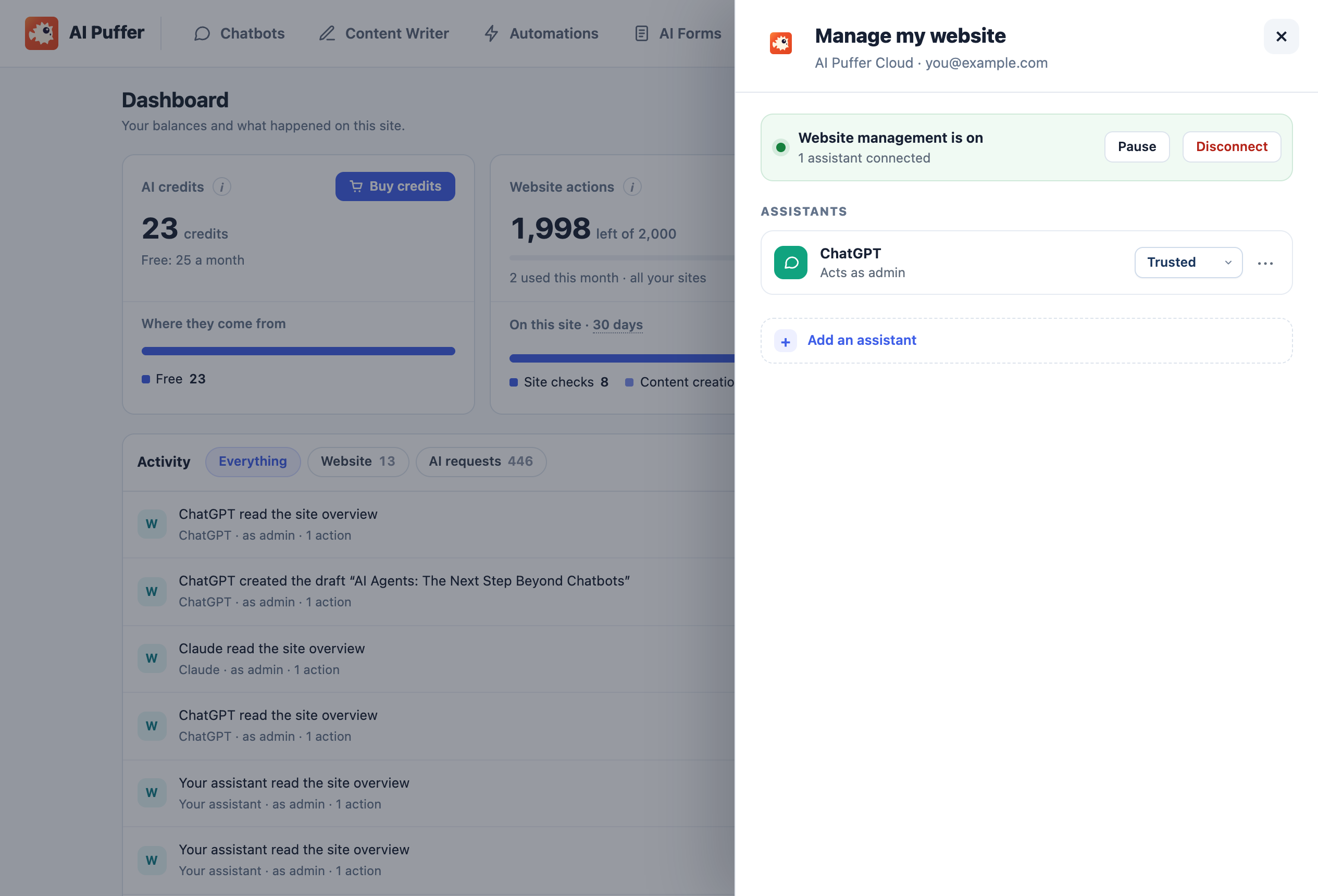
Website management: connect assistants such as ChatGPT or Claude, manage their access, and pause or disconnect website management.
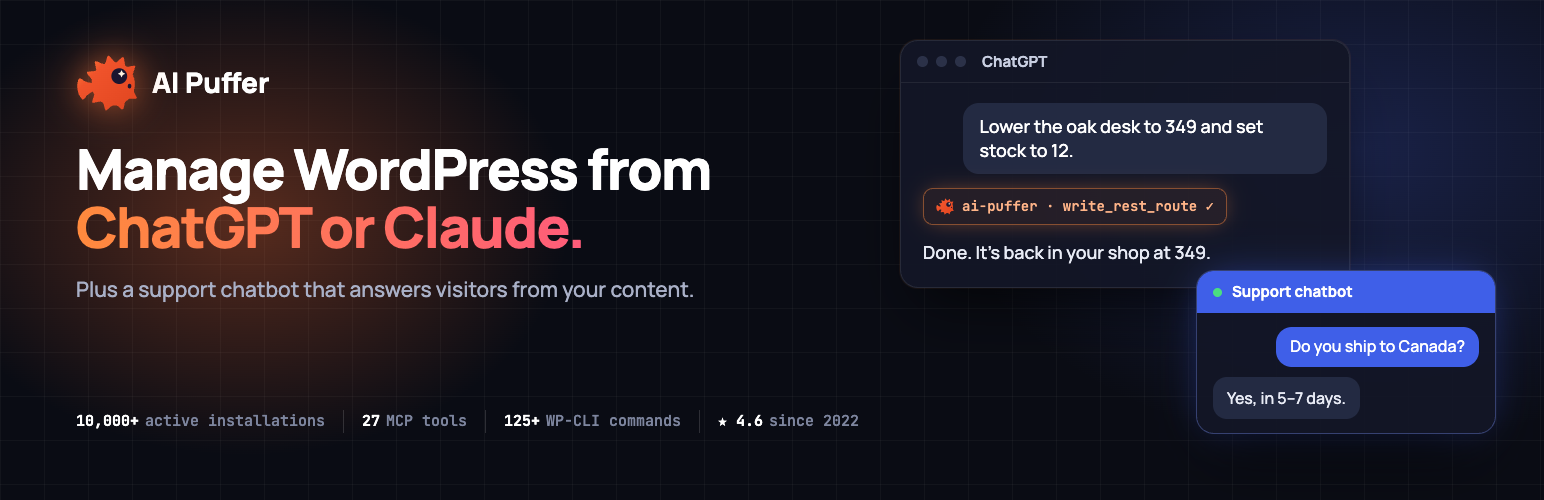
AI Puffer (formerly AI Power) is an MCP server for WordPress. Connect Claude or ChatGPT to your site, then ask for what you need in plain language: write and publish posts, update WooCommerce products, fix SEO titles, edit Elementor pages or review your search traffic. The same plugin adds an AI chatbot, content writer, automations, AI forms and image generation to your dashboard.
Free to start. The free plugin includes 2,000 website actions every month for Claude and ChatGPT, with no API key, SSH or WP-CLI installation. Eligible accounts with a verified email also get 25 free AI credits monthly for the chatbot, writer and other AI tools, or you can use your own OpenAI, Anthropic Claude, Google Gemini, xAI Grok, DeepSeek, OpenRouter or Azure OpenAI key.
Documentation · How Cloud works · Pricing · User reviews
Connect Claude or ChatGPT to WordPress through MCP
- Install AI Puffer and choose Manage my website in the setup wizard, or open Settings Connections Manage my website.
- Pick ChatGPT or Claude and approve the connection in WordPress. You can also start from Claude’s directory. Cursor, Claude Code and other MCP clients connect the same way.
- Ask your assistant to do something on your site. The hosted MCP server handles sign-in and routing, so there is nothing to configure on your server.
What you can ask
- “Draft a post about our spring sale and schedule it for Monday morning.”
- “Find images that are missing alt text and fill it in.”
- “Which of my recent posts have a poor SEO or readability score?”
- “Which pages have high impressions but a low click-through rate?”
- “Mark order 1042 completed and add the tracking number for the customer.”
- “Check my Wordfence security status. What needs attention?”
Assistants can read and search content, create drafts, edit and publish posts and pages, and manage images in your media library. The available actions depend on the site’s installed plugins and the permissions you grant.
Works with the plugins you already use
These MCP integrations are tested by us in both ChatGPT and Claude:
- Page builders and design: Elementor, Blocksy, Greenshift and Advanced Custom Fields (ACF).
- SEO: Yoast SEO, Rank Math, All in One SEO, SureRank SEO, Redirection, and read-only Search Console and GA4 reports through Google Site Kit.
- Stores: WooCommerce products, stock, coupons and orders, and Easy Digital Downloads.
- Forms: Contact Form 7, WPForms and Fluent Forms.
- Courses and fundraising: LifterLMS and Charitable.
- Maintenance: cache plugins such as WP Rocket, UpdraftPlus, Duplicator, WP Mail SMTP and read-only Wordfence status.
Other plugins that share WordPress abilities or a REST API can be reached too. What each integration supports depends on the plugin and its version.
WP-CLI-compatible commands without SSH
Supported WP-CLI-compatible commands let assistants inspect the site and manage posts, images, categories, tags, comments, classic navigation menus, settings, users, roles, cache and scheduled events without SSH or a WP-CLI installation. Official plugin/theme/core administration and bounded database inspection/search-replace commands are included. Ask your assistant for wp help to see the supported subset and flags. Commands use the same permissions, approval settings and website-action allowance as other website tools; shell scripts and full WP-CLI compatibility are not included.
You stay in control of the MCP connection
- Off until you connect it. Nothing is shared with an assistant until you explicitly connect one.
- Your WordPress permissions are the limit. Access follows the connecting WordPress user’s permissions.
- Choose a safety level for each connection. Standard asks for WordPress approval before publishing or supported plugin changes. Trusted is the default for new connections and runs supported changes directly, including publication, plugin changes and deletion. Existing Trusted connections keep their previous approvals until you select Trusted again in Settings.
- Pause or disconnect anytime from Settings Connections.
- Separate allowances. Website actions are counted separately from AI credits; your assistant’s own subscription or model charges are separate.
Cloud or your own API keys
AI Puffer Cloud: connect in the setup wizard or Settings AI. Supported models cover text, image generation and analysis, speech, transcription and embeddings. Credit use varies by model and request size, with a minimum per text request. One credit is not always one message, article or image. Image editing, video, realtime voice and web search currently require your own supported provider key.
Your own API keys: your site sends requests to the provider you choose, which bills your provider account. OpenAI-compatible endpoints are supported too. Use Cloud and your own keys side by side, with a model picker for each chatbot, form, task or tool.
Included in the free plugin
This edition includes the following core modules without a paid license. AI requests use your own provider account or AI Puffer Cloud credits. Website management is optional and includes 2,000 monthly website actions on the Free allowance, shared across your connected sites and assistants.
AI chatbot that answers from your content
Create unlimited chatbots with their own models, instructions, colors, welcome messages and conversation starters. Use posts, pages, products and FAQs as knowledge. Show a bot as a popup, site-wide, or with a block or shortcode. Voice input, read-aloud replies and image input work with supported models. Web search and Google Search grounding require your own supported provider key.
AI content writer and Content Assistant
Draft posts from topics and keywords, one at a time or from a batch or CSV list. Use reusable prompt templates, choose draft or publish status, and add featured or inline images from AI providers or stock photos. Start from Posts Generate New Post.
Write Gutenberg-ready content, with meta descriptions and focus keywords where supported by Yoast SEO, Rank Math, All in One SEO or The SEO Framework. The Content Assistant improves titles, excerpts, content and tags in the block editor, classic editor and post lists.
Automations: scheduled content and auto blogging
Create recurring or one-time automation tasks from topics or CSV, with draft, schedule or publish options. Reply to comments with replies held for approval by default, or add new posts to your knowledge base using category filters. Review item status in the queue. Server cron is supported when WP-Cron is disabled.
AI forms
Build forms with a drag-and-drop editor, templates and prompts that use visitors’ field values. Choose a model and knowledge base for each form, and enable web search with your own supported key. Embed with a block or shortcode, and import or export forms.
AI image generator
Enable Images in Settings Modules. Generate images with OpenAI GPT Image, Gemini image models, Grok Imagine, Replicate, OpenRouter, Azure or Cloud. Image editing works with supported providers and models. Google Veo video needs your own Google key. Search stock photos from Pexels and Pixabay, or embed a visitor image generator with a block or shortcode. These tools are included in the free plugin; provider accounts or Cloud credits cover AI usage.
Knowledge base and semantic search
AI Puffer splits content into passages and retrieves relevant passages for a question. It does not train a new AI model.
Index posts, pages, products, custom post types, Q&A pairs and pasted text, including page-builder content. Use “Add to knowledge base” from post lists or embed semantic search on your site. Choose Local storage in your WordPress database, OpenAI vector stores, Google File Search, Pinecone, Qdrant or Chroma. External stores and embeddings require compatible provider connections.
WooCommerce product tools and visitor credits
Improve product titles, descriptions, short descriptions and tags with the Content Assistant; answer questions from product pages; and sell visitor credit packages for your chatbots, forms and image generator. Visitor credits are balances managed on your site, separate from AI Puffer Cloud credits. WooCommerce is optional.
Usage, permissions and integrations
Set guest, user and role limits with daily, weekly, monthly or no reset. Review conversation and usage logs, credit balances and access through the Role Manager. Word and IP blocklists, IP anonymization and optional moderation help manage requests.
Use the REST API, signed event webhooks, three blocks and five shortcodes. WordPress AI Connectors are opt-in and let compatible built-in AI features use your configured providers.
Optional upgrades
The free plugin works on its own. Paid subscriptions add:
- File sources and uploads for knowledge bases, chatbots and forms.
- RSS, URL and Google Sheets content sources, scheduled post improvements and Smart SEO tools.
- Realtime voice, advanced chatbot triggers, external chatbot embeds, multi-step forms and PDF exports.
- Additional app integrations, Ollama, automatic log retention and higher monthly Cloud allowances.
See the feature comparison and current plans for the full list. All subscription tiers unlock the same additional plugin features; their monthly allowances differ.
Supported providers
- AI Puffer Cloud: available models from OpenAI, Anthropic, Google and others, using AI credits.
- OpenAI: GPT text models, GPT Image, speech, transcription and embeddings.
- Anthropic: Claude Sonnet, Opus and Haiku.
- Google: Gemini text and image models, Veo, speech and embeddings.
- xAI: Grok text and image models.
- DeepSeek, OpenRouter (including Mistral models), Azure OpenAI and OpenAI-compatible endpoints.
- Media services: ElevenLabs voices, Replicate images, and Pexels and Pixabay stock photos.
Models and capabilities depend on the selected provider and its current catalog.
Privacy and data flow
AI requests are sent when you use a connected provider. Visitor messages go to the provider selected for that chatbot. Chat logs, usage records and Local knowledge are stored in your WordPress database. Text you index is processed by the chosen embedding provider and, with an external store, stored there. The External services section below explains connection, licensing and diagnostic requests and links each service’s terms and privacy policy.
External services
The plugin contacts external services when you connect or use them, manage licensing or checkout, or submit optional deactivation feedback. Cloud setup and connection diagnostics are sent after you accept the Cloud connection terms and click Connect. An AI request contains what the feature needs: the prompt and instructions, chat or form input with recent conversation history, the content being written or improved, text you add to a knowledge base, images or audio you submit, and model settings. Each API key goes only to its own provider.
AI Puffer Cloud (puffercloud.dev, about Cloud), the optional hosted AI service run by the AI Puffer team.
- Connecting happens only after an administrator accepts the connection terms and clicks Connect. It sends the site’s Freemius install ID, the site address, a signed proof of the installation and the attempt’s support reference.
- Using its models sends the request content and model settings. Cloud passes each request to the AI service behind the chosen model (such as OpenAI, Anthropic or Google), through service providers such as OpenRouter where applicable, and returns the result and the credits used. Balance, model, checkout and disconnect requests send the site address and its Cloud credential; deleting the plugin also disconnects the site. While connected, the setup wizard sends your setup choices and completed steps.
- Connection diagnostics: each Connect attempt, including one that fails before account registration, sends its outcome, the step reached, error codes, safe network failure details, HTTP status, timing, software versions and a random support reference. Once an installation identity is available, the report also includes its site address and installation ID as unverified troubleshooting context. Your browser sends the report, so Cloud also sees the browser’s IP address and the site’s domain. Cloud keeps diagnostic reports for 30 days. The plugin keeps at most 10 local reports, removes those older than 30 days on the next attempt, and never reports on ordinary page loads.
- Terms · Privacy
Freemius (freemius.com): account registration, email verification, licensing, and checkout for subscriptions and credits. Registration happens only when you choose it, for example by connecting Cloud or signing up for product updates in the setup wizard. It sends your name, email address and site address, plus basic plugin details such as the version. General usage tracking is turned off in the setup flow, and marketing emails are optional. The in-plugin pricing page, checkout and license activation also contact Freemius. An answer to the optional deactivation feedback form is sent to Freemius when the plugin is deleted and, unless you tick “Anonymous feedback”, registers the site. Terms · Privacy
The AI providers and stores below are used only when you select one for a feature, or turn on a feature that uses it.
OpenAI (api.openai.com): text, images, embeddings, vector stores, speech, transcription, web search, and moderation if you turn it on. A custom OpenAI-compatible base URL receives these requests instead. Terms · Privacy
Google Gemini API (generativelanguage.googleapis.com): text, images, Veo video, speech, transcription, embeddings, File Search stores and Search grounding. Terms · Privacy
Anthropic (api.anthropic.com): Claude text, image input and web search. Terms · Privacy
xAI (api.x.ai): text, image input, web search and images. Terms · Privacy
DeepSeek (api.deepseek.com): text. Terms · Privacy
OpenRouter (openrouter.ai): text, images and web search, through the model vendor you pick. Terms · Privacy
Microsoft Azure OpenAI (your Azure endpoint): text, images, embeddings and transcription. Terms · Privacy
ElevenLabs (api.elevenlabs.io): reply text, when a bot reads replies aloud with ElevenLabs. Terms · Privacy
Replicate (api.replicate.com): image prompts and settings. Terms · Privacy
Pexels (api.pexels.com) and Pixabay (pixabay.com): your stock photo search terms. Pexels Terms · Privacy; Pixabay Terms · Privacy
Openverse (api.openverse.org): when you ask a connected assistant to search stock images, your search terms and image filters go from your website to Openverse. No API key is needed. Results include creator, source and licence links; check the original source and retain required attribution. Searches are cached locally for one hour. Downloading a chosen image uses the existing media upload tool and contacts its image host. Terms · Privacy
Pinecone (api.pinecone.io and your index host), Qdrant and Chroma (the address you enter), if chosen as your knowledge store: passages and embeddings of content you index, and search vectors for lookups. Pinecone Terms · Privacy; Qdrant Terms · Privacy; Chroma Terms · Privacy
Hosted website management (mcp.aipuffer.org): starting from Claude’s directory sends the website address you enter to the bridge so you can continue in WordPress. Only after you enable Manage my website and accept its disclosure, the bridge receives your site address, WordPress/plugin versions, Cloud account/site identifiers and public signing key to register the site. Assistant connections include the WordPress user identifier and permitted actions. Assistant requests and website results, including requested post text, pass through the bridge to your chosen assistant; draft content is sent to your WordPress site. Operational records contain identifiers, action names, status and usage, without post bodies or credentials. Recent operational history is searchable for 30 days; archives and completed admin command records are retained for 24 months, and unresolved cases are held until resolved. WordPress keeps its local operation records for recovery. Standard access requires WordPress approval for post publication; Trusted access can publish posts directly. At …