

GoldT WebMCP Bridge
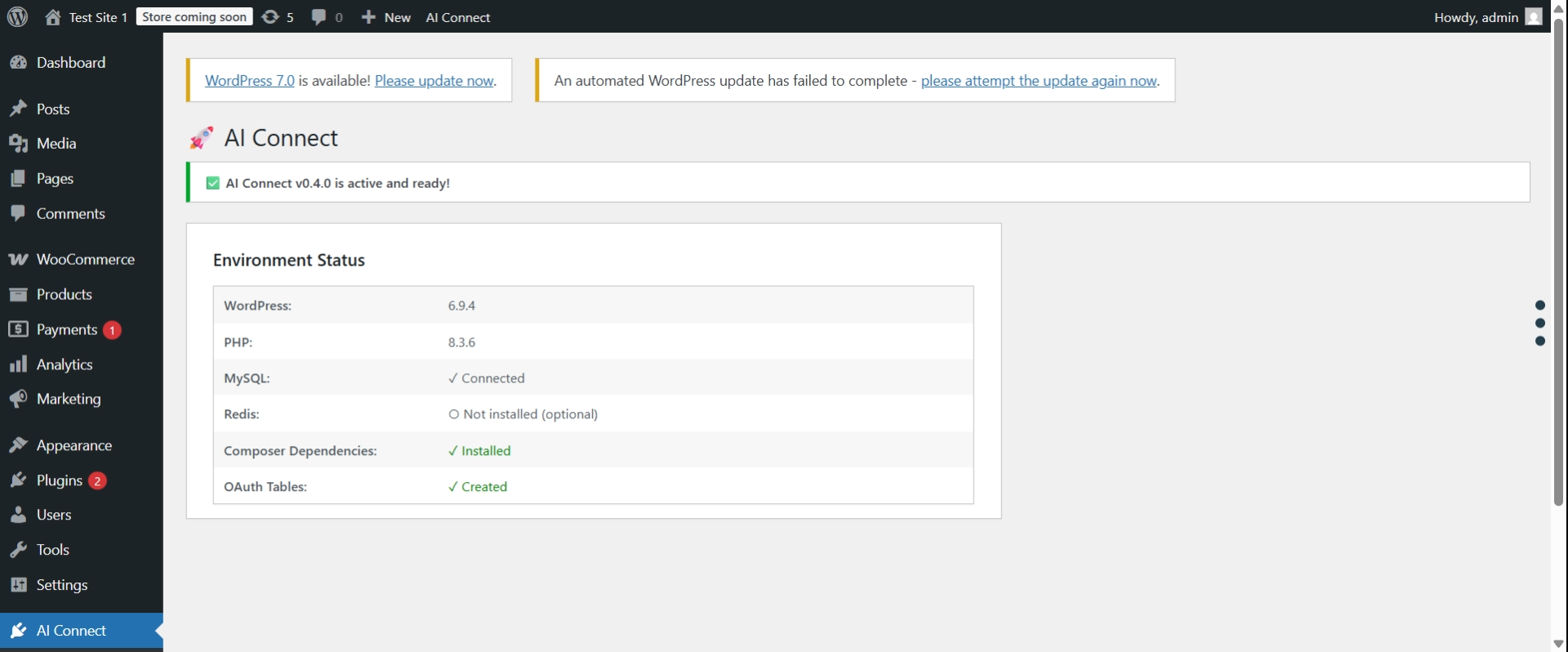
Dashboard - System status and quick access to settings
GoldT WebMCP Bridge enables AI agents to interact with your WordPress content through secure OAuth 2.0 authentication using the WebMCP protocol.
Perfect for AI-powered customer support, automated content analysis, intelligent search, and custom AI integrations.
✨ Features
- WebMCP Protocol Support – Industry-standard AI integration
- Secure OAuth 2.0 – Same security standard as Google, Facebook, GitHub – your passwords stay safe
- 8 Pre-registered AI Clients – Claude, ChatGPT, Gemini, Grok, Perplexity, Copilot, Meta AI, DeepSeek
- 7 Tools – WordPress content tools plus optional translation via MyMemory API
- Translation Provider – Choose AI self-translate, MyMemory API, or disabled
- Dynamic Manifest – Instructions adapt to your settings so AI agents don’t invent capabilities
- Rate Limiting – Prevent abuse (50 req/min default)
- Security Controls – Token management, block specific users
- Zero Configuration – Works out of the box
- Extensible – Add custom tools via developer hooks
🎯 Quick Start for AI Users
Using ChatGPT or Claude?
Tell your AI agent:
“I want to connect you to my WordPress site at https://mysite.com using GoldT WebMCP Bridge plugin. The manifest is at /wp-json/goldt-webmcp-bridge/v1/manifest. Use OAuth 2.0 with client_id: claude-ai”
The AI will guide you through OAuth authorization – you’ll approve access in your browser.
🤖 Supported AI Agents
Pre-registered and ready to connect:
- Claude AI – Use
client_id: claude-ai(Anthropic) - ChatGPT – Use
client_id: chatgpt(OpenAI) - Gemini – Use
client_id: gemini(Google) - Grok – Use
client_id: grok(xAI) - Perplexity AI – Use
client_id: perplexity - Microsoft Copilot – Use
client_id: copilot - Meta AI – Use
client_id: meta-ai(Facebook) - DeepSeek – Use
client_id: deepseek
All clients use OAuth 2.0 with PKCE and redirect_uri: urn:ietf:wg:oauth:2.0:oob (out-of-band).
🛠️ Available Tools
- wordpress.searchPosts – Search posts with filters
- wordpress.getPost – Get single post by ID or slug
- wordpress.searchPages – Search pages
- wordpress.getPage – Get single page by ID or slug
- wordpress.getCurrentUser – Get authenticated user info
- translation.translate – Translate text via MyMemory API (when Translation Provider = mymemory)
- translation.getSupportedLanguages – List supported language codes (when Translation Provider = mymemory)
🔒 How Authentication Works
Secure OAuth 2.0 Authentication:
Uses the same security standard trusted by Google, Facebook, and GitHub:
- AI agent initiates OAuth flow with code challenge (PKCE)
- User approves in browser (consent screen)
- Agent receives one-time authorization code
- Agent exchanges code for access token using code verifier
- Agent uses token for API calls
The AI agent operates as the user who authorized:
* The agent receives an OAuth token linked to that user’s ID
* All API requests run with that user’s permissions
* The agent respects WordPress user capabilities
Examples:
If Administrator authorizes:
* ✅ Sees all posts (including drafts, private)
* ✅ Full access based on admin capabilities
If Subscriber authorizes:
* ✅ Sees only published content
* ❌ Cannot see drafts or private content
Security: Authorization codes are one-time use (10 min expiry). Access tokens expire after 1 hour. Refresh tokens valid for 30 days. PKCE ensures tokens can’t be stolen.
⚙️ Admin Settings
Configure the plugin at GoldT WebMCP Settings:
Translation Provider:
- AI Self-Translate (default) – The AI agent handles translation on its own; no translation tools appear in the manifest
- MyMemory API – Plugin calls MyMemory and returns translated text;
translation.translateandtranslation.getSupportedLanguagestools are added to the manifest - Disabled – Translation tools are hidden from the manifest entirely
Rate Limiting:
- Default: 50 requests per minute, 1,000 per hour (per user)
- Adjust both values in GoldT WebMCP Settings
🔐 Admin Controls
For Site Administrators:
Manage security from the WordPress admin panel:
- Revoke OAuth Tokens – Go to GoldT WebMCP OAuth Tokens to view and revoke active tokens
- Block Users – Go to GoldT WebMCP Settings scroll to “Manage User Access” section
- Rate Limits – Configure request limits in GoldT WebMCP Settings (default: 50/min, 1000/hour)
💬 We Need Your Feedback!
Help us build what YOU need:
- 💡 What tools would be most useful? Tell us which WordPress features you’d like AI agents to access
- 🐛 Found a bug? Report it so we can fix it quickly
- ⭐ Feature requests – We prioritize based on community feedback
How to provide feedback:
* GitHub: https://github.com/chgold/goldt-wp-webmcp-bridge/issues
* WordPress.org: Support forum
Your feedback directly shapes the future of this plugin!
Troubleshooting
Missing Dependencies Error
Symptoms:
* Red error notice in WordPress admin
* Plugin appears active but doesn’t work
* REST API endpoints return 404
Solutions:
-
Download complete plugin (Recommended)
- Get the full ZIP with dependencies from GitHub Releases
- Delete the incomplete plugin folder
- Upload and activate the complete version
-
Manual composer install (Advanced)
- SSH into your server
- Run:
cd /path/to/wp-content/plugins/goldt-webmcp-bridge && composer install --no-dev
Common causes:
* exec() function disabled on server
* Composer not available on shared hosting
* Plugin directory not writable
How to diagnose:
* Go to AI Connect Settings in WordPress admin
* Check the “Environment Status” table
* Look for red ✗ marks showing the exact issue
Database Tables Missing Error
Symptoms:
* Red error notice: “OAuth database tables were not created”
* OAuth authorization fails
Solution:
1. Deactivate the plugin
2. Reactivate the plugin
3. Check AI Connect Settings to verify “OAuth Tables: ✓ Created”
If problem persists:
* Your database user may not have CREATE TABLE permissions
* Contact your hosting provider or check wp-config.php
OAuth Authorization Fails
Symptoms:
* Clicking “Authorize” button does nothing
* Redirect loop during OAuth flow
* “invalid_client” or “invalid_request” errors
Solutions:
-
Clear WordPress rewrite rules:
- Go to Settings Permalinks
- Click “Save Changes” (flushes rewrite rules)
-
Verify OAuth tables exist:
- Go to AI Connect Settings
- Check “OAuth Tables: ✓ Created”
-
Verify client exists:
- Default clients (claude-ai, chatgpt, etc.) are auto-created
- If missing, deactivate and reactivate plugin
REST API Returns 404
Symptoms:
* /wp-json/goldt-webmcp-bridge/v1/manifest returns 404
* Tools API calls fail with 404
Solutions:
-
Flush permalinks:
- Go to Settings Permalinks
- Click “Save Changes”
-
Reactivate plugin:
- Go to Plugins page
- Deactivate and reactivate “GoldT WebMCP Bridge”
-
Check WordPress REST API:
- Visit:
http://yoursite.com/wp-json/ - If this also returns 404, your REST API is disabled or blocked
- Check for conflicting security plugins
- Review .htaccess rules
- Visit:
Still Having Issues?
Before asking for help, gather this information:
- Go to AI Connect Settings
- Take screenshot of “Environment Status” table
- Check browser console for errors (F12 Console)
- Check WordPress debug log (if enabled)
Get support:
* GitHub: https://github.com/chgold/goldt-wp-webmcp-bridge/issues
* WordPress.org: Support forum
External Services
This plugin optionally uses the MyMemory Translation API when the “Translation Provider” setting is set to “MyMemory API” in the plugin settings.
MyMemory API
- What it is: A free machine translation service
- When it is used: Only when an AI agent calls the
translation.translatetool AND the plugin settings have “MyMemory API” selected as the translation provider - What data is sent: The text to be translated and the target/source language codes
- Default: Disabled by default. The default provider is “AI Self-Translate” (no external requests)
- Terms of Service: https://mymemory.translated.net/terms-and-conditions
- Privacy Policy: https://mymemory.translated.net/terms-and-conditions
If “MyMemory API” is not selected, no data is sent to any external service.
Privacy Policy
GoldT WebMCP Bridge does not collect, store, or transmit any personal data to external services. All API requests are handled locally on your WordPress installation.
Data stored locally:
* OAuth clients (pre-registered: claude-ai, chatgpt, gemini)
* OAuth authorization codes (temporary, 10 min expiry, one-time use)
* OAuth access tokens (temporary, 1 hour expiry)
* Rate limiting counters
* User blacklist (WordPress user IDs only)
No data leaves your WordPress installation. This applies when using the default settings. If you enable the MyMemory API translation provider, text content will be sent to mymemory.translated.net. See “External Services” section for details.
Requirements
Component
Required
Notes
WordPress
✅ 6.0+
Core requirement
PHP
✅ 7.4+
With json, openssl
Composer
✅ Yes
For dependencies
HTTPS
⚠️ Production
Required for security
Redis
⭕ Optional
For high traffic
Credits
- Optional predis/predis support for rate limiting
- Compliant with WebMCP protocol specification
Made with ❤️ for the WordPress & AI community