


Gloty – AI Translation & Multilingual
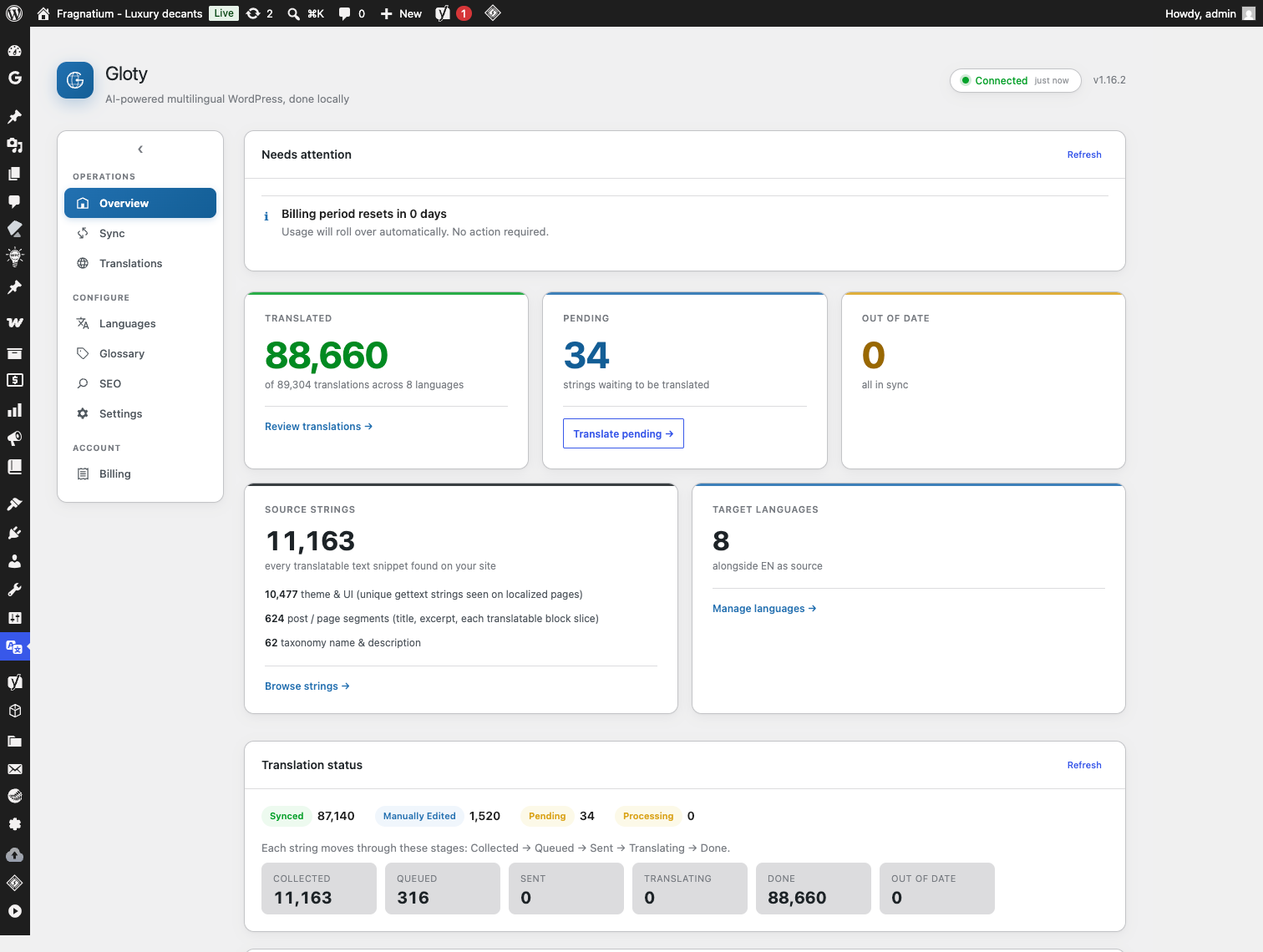
Dashboard showing translation statistics across languages
Gloty translates your WordPress site with AI machine translation, then stores every translation in your own database and serves it from there. Rendering a translated page never calls a remote service — page delivery stays local and deterministic even if the translation service is slow or unreachable.
Serving those pages is built to be cheap. Gloty compiles your translations into a PHP cache file that your server’s OPcache holds in shared memory, so once it is warm a translated page view costs no database queries for translation at all, and the translations take almost no memory in the request. That is aimed squarely at ordinary shared hosting with no object cache, which is where a translation plugin normally slows a site down most. Where the technique is unavailable, Gloty serves from the database instead and the page is still correct.
The picker offers 38 languages, each with the right hreflang code emitted for it. That list is deliberately shorter than it could be: it is the set both AI engines’ vendors say their models support, rather than every language code in existence. A translation you cannot judge the quality of is worth less than one you can, so Gloty offers the ones where the engines are known to be strong, and every translation it produces is editable by hand.
Producing a translation does require an external service, because machine translation is not something WordPress can do locally. Gloty sends the text that needs translating to the hosted Gloty translator service, which translates it and returns the result to your site in the background. The results land in your WordPress database, are editable by hand, and keep serving with no further external calls.
Key Features:
- 38 languages — the set both AI engines’ vendors list as supported, each with the right hreflang code
- Your database, your translations — stored locally in WordPress, never fetched remotely at render time
- Fast on slow hosting — translations compile into a cache your server holds in memory, so serving a translated page costs no database queries once warm; it falls back to the database safely if your host cannot do that
- Automatic page translation — captures page output, extracts translatable text, queues it for translation
- Entity-aware — posts, pages, taxonomies, and template strings are tracked as distinct sources with stale detection
- Edit any translation — review and correct translations from Gloty Translations
- Manual edits are protected — machine sync never silently overwrites a human correction
- Glossary — terms that must never be translated, or that must always render a specific way per language
- SEO-friendly — hreflang tags, translated meta, clean /fr/page/ URLs
- Language switcher — floating widget, footer list, shortcode, or sidebar widget
- Optional browser-language redirect — off by default, crawler-safe, remembered per visitor
- WooCommerce compatible — products, cart, checkout, and store AJAX fragments
- Gettext integration — translates WordPress, theme, and plugin UI strings
- AI translation engine — OpenAI or Google Gemini, selected for you by the service on every plan
- Background processing — queued dispatch with webhook delivery and a polling fallback
- Developer extensible — filters and a REST API
How it works:
- Install Gloty and connect your site to the Gloty translator service
- Add your target languages
- Gloty discovers translatable content from your posts, taxonomies, and template strings
- Translation runs in the background and the results are written to your database
- Visitors get translated pages under language-prefixed URLs (/fr/, /de/, …) and can switch languages from the switcher
Translation requires an external machine-translation service. See External services below for exactly what is sent and to whom.
Documentation: https://wp-shelf.com/gloty/docs/
External services
Gloty cannot produce translations without an external machine-translation service, because machine translation is not something WordPress can do locally. This section describes every external request the plugin makes, what it sends, and when.
Nothing is sent anywhere until you have connected your site and translation has been triggered (by a scan, a Translate action, or scheduled background dispatch). Serving an already-translated page makes no external request at all.
1. The Gloty translator service
All translation work is performed by the hosted Gloty translator service. The plugin does not contact machine-translation providers directly; it sends work to the Gloty service, which selects and calls the translation engine on your behalf and delivers the results back to your site.
- Service host:
https://gloty-api.wp-shelf.com(overridable by defining theGLOTY_SERVICE_URLconstant, for example to point at a self-hosted instance of the service). - What is sent: the source text to be translated (page, post, taxonomy, and template strings from your site), the source and target language codes, your site URL, and a per-site API token and license key used to identify and authenticate your site.
- When: on connection verification, while dispatching queued translation batches, when polling for results, and when the service delivers results back to your site over a signed webhook.
- Who: the Gloty translator service, operated by WP Shelf.
- Terms of service: https://wp-shelf.com/terms
- Privacy policy: https://wp-shelf.com/privacy
The Gloty service in turn passes your text to the AI translation engine it selects for the batch — OpenAI or Google Gemini. Their terms apply to that processing:
- OpenAI — https://openai.com/policies/terms-of-use / https://openai.com/policies/privacy-policy
- Google Gemini — https://ai.google.dev/terms / https://policies.google.com/privacy
2. WordPress.org translation packs
When you enable a language, Gloty asks WordPress.org to install the official WordPress and plugin language packs for that locale, using WordPress core’s own updater. This is the same request WordPress itself makes and sends no site content.
Gloty does not send analytics, telemetry, or usage tracking anywhere.
Filters
gloty_compiled_map_enabled
Whether Gloty may compile your translations into a PHP cache file for OPcache to hold in memory. The value passed in is Gloty’s own verdict on whether the server can benefit — return false to switch the feature off entirely, in which case translations are served from the object cache, a transient, or the database, exactly as in earlier versions.
add_filter( 'gloty_compiled_map_enabled', '__return_false' );
Returning true forces it on where Gloty could not confirm OPcache is active — useful when opcache.restrict_api hides the OPcache status from plugin code. Do not force it on where OPcache is genuinely off: every request would then compile the cache file from source, which is slower than the database read it replaces.
Defining GLOTY_DISABLE_COMPILED_MAP as true in wp-config.php disables it before any filter can run, and Gloty honours WordPress’s own DISALLOW_FILE_MODS constant without any configuration.
gloty_compiled_map_max_bytes
The largest cache file Gloty will write, in bytes. Default 8 MB. A translation set that would exceed it keeps using the database.
Source code
The admin interface is compiled from JavaScript sources before release. The uncompiled, human-readable sources for everything in build/ ship inside the plugin under src/, together with the build configuration in webpack.config.js and package.json. The bundles are produced by @wordpress/scripts (webpack) via the build script in package.json; no minified or obfuscated code is included without its source.