


GAinWP Google Analytics Integration for WP
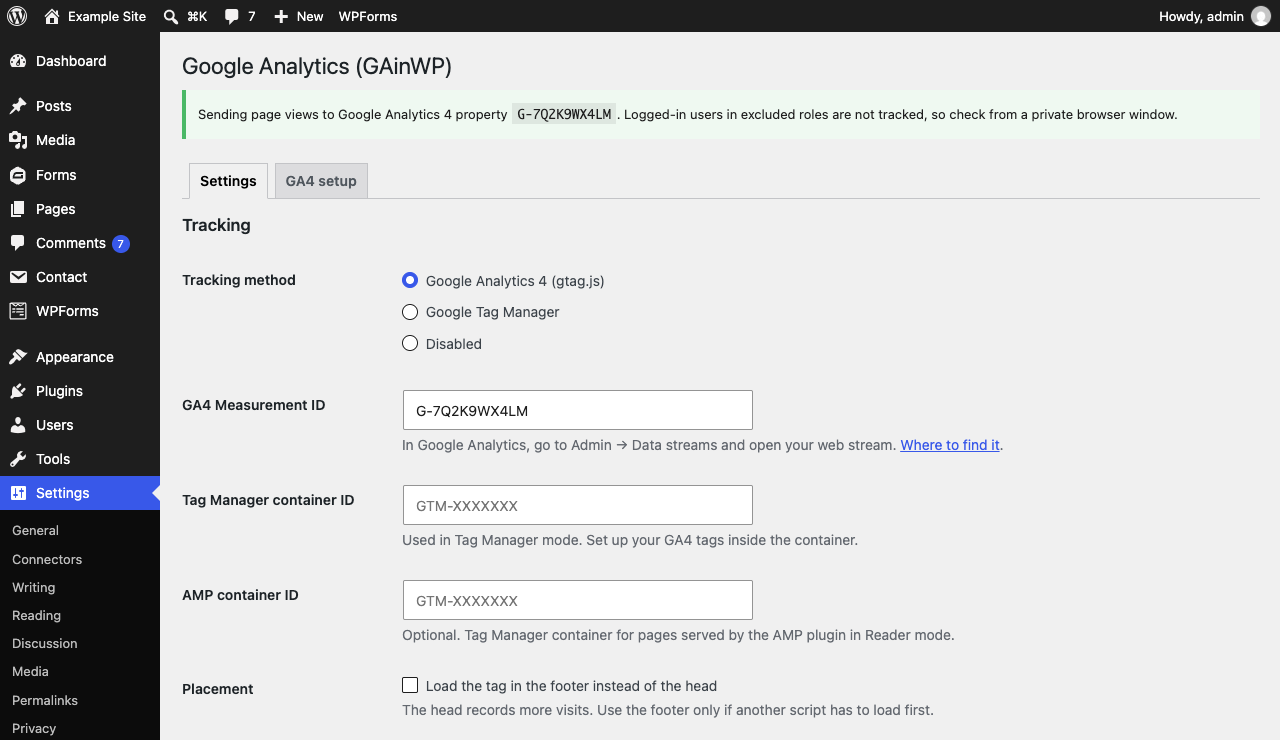
Choose Google Analytics 4 or Google Tag Manager and paste your ID. The status line shows what GAinWP is sending.
GAinWP adds Google Analytics 4 (or a Google Tag Manager container) to your site and sends the events and dimensions that show what your site achieves, not just how many people visit. It uses GA4’s own event names, so results work in GA4 reports, Google Ads and anything else that reads GA4. It has no dashboards or upsells, and your data goes straight to Google.
Track results, not just traffic
- Form leads: an event for every successful submission in Gravity Forms, Contact Form 7 and WPForms, whether the form uses AJAX, reloads the page or redirects to a thank-you page. Failed validation and spam don’t count. Set the forms that bring you business to Lead and they send GA4’s
generate_lead; a sign-up form can sendsign_up. Other forms sendform_complete, so a newsletter or search form never counts as a lead. Field values are never sent. - Goals with values: mark the results that matter as goals and say what each is worth, for example $100 for a lead. Goals send their value to GA4 and, through it, Google Ads; per-form values override the default.
- WordPress events: logins and registrations as GA4’s
loginandsign_up, and comments ascomment_submit. - Engagement events that GA4 enhanced measurement doesn’t cover: email and phone link clicks, affiliate link clicks (including
rel="sponsored"links), same-page anchor clicks, and scroll depth at 25, 50 and 75%.
Page attributes
Sent with every event, under GA4-style names: content type and ID (built into GA4), author, primary category (Yoast SEO and Rank Math’s primary category supported), tags, publication month, content group, and whether the visitor is logged in.
GA4 setup checklist
A GA4 setup tab lists exactly what to do in Google Analytics for your settings: which custom dimensions to register, which events to mark as key events, and which GA4 settings to change (currency, data retention, enhanced measurement, data redaction). It also warns when Site Kit by Google adds the same tag or events, which would count them twice.
Google Analytics 4 and Tag Manager
- Paste your Measurement ID (G-XXXXXXXXXX), or your Tag Manager container ID.
- In Tag Manager mode, page attributes go to the data layer (under their GA4 names and GAinWP 5.x’s
gainwp*names) and events are pushed as{ event, intelligence: { ... } }. - Cross-domain measurement, cookie domain and cookie lifetime settings, and an optional AMP container for AMP plugin Reader mode pages.
Privacy
- Google Consent Mode v2 defaults: leave them to your consent banner, deny in the EEA, UK and Switzerland only, or deny everywhere.
- Optionally skip tracking for visitors who send Do Not Track or Global Privacy Control.
- Visitor opt-out link or button with the
[gainwp_useroptout]shortcode. A visitor’s opt-out is honored even if the site later turns the shortcode off. - No personal data in events: email addresses and phone numbers are removed from link text and URLs, and authors are sent by display name only.
- Exclude logged-in user roles (and network super admins) from tracking. Post previews and the Customizer are never tracked.
Bug reports and feature requests: GAinWP on GitHub.
Upgrading from 6.0
- Form tracking starts on. Successful submissions send
form_complete, which nothing else sends, so leads your site already tracks another way aren’t counted twice. Set the forms that bring you business to Lead under Settings Google Analytics Forms, and remove any other lead tracking for them. Logins, sign-ups and comments are off until you turn them on. A notice lists what’s new. - Page attribute parameters have new names, matching GA4’s style:
post_authoris nowcontent_author,post_categoryiscontent_category,post_tagsiscontent_tags,publish_monthiscontent_publish_monthanduser_typeisuser_status.publish_yearwas removed: the month starts with the year. If you registered the old names as custom dimensions, register the new ones (the GA4 setup tab lists them). Tag Manager’sgainwp*data layer names are unchanged. - Page attributes are now sent with
gtag('config'), as Google recommends, and apply to every event. - The “Username” author format was removed; authors are sent by display name.
- Scroll depth stops at 75%: GA4’s own scroll event covers 90%.
- Engagement events now work in Tag Manager mode too.
Upgrading from 5.x
Version 6.0 is a rewrite for Google Analytics 4. Google stopped processing Universal Analytics data in July 2023, so 5.x has not been collecting anything since then.
After updating, go to Settings Google Analytics and enter your GA4 Measurement ID. Until you do, GAinWP adds no tag and shows a reminder on the Dashboard and Plugins screens.
Carried over automatically:
- Tracking method, including Tag Manager containers. Tag Manager sites keep working with no changes; data layer variable names are the same as before.
- Custom dimension and data layer choices, which become page attributes.
- Email, phone, anchor, affiliate and scroll tracking, Do Not Track, opt-out, excluded roles, cross-domain domains, cookie domain and lifetime.
- Affiliate links are now matched by plain URL fragments such as
/out/instead of a regular expression. Simple patterns convert automatically; if yours can’t, the settings screen tells you and affiliate events stay off until you update it.
Removed:
- Dashboard reports, real-time stats, post reports and the front-end widget. They relied on Google APIs that were shut down. Use Google Analytics, or Site Kit by Google if you want reports in WordPress.
- Download, outbound link and form submit events: GA4 enhanced measurement records these itself.
- Google Optimize (discontinued by Google), Analytics on AMP pages, Universal Analytics ecommerce, sample rates, enhanced link attribution and the custom cookie name.
- IP anonymization (GA4 never stores IP addresses) and the remarketing switch (manage Google signals in Google Analytics instead).
- Custom event categories, actions and labels set with
data-vars-ga-*attributes. GA4 has no categories or labels, so tracked links send the standard event names. - Your stored Google sign-in and cached report data are deleted.
Opt-outs recorded by 5.x are still honored.
External services
GAinWP connects your site to Google so you can measure visits. It contacts no other service.
- Google Analytics 4 mode loads the Google tag (gtag.js) from googletagmanager.com on every page. The visitor’s browser then sends page views, the page attributes and events you enable, and standard browser data (such as page URL, referrer, screen size and language) to Google Analytics, under the Measurement ID you enter.
- Google Tag Manager mode loads your container from googletagmanager.com on every page. What it sends, and to whom, depends on the tags you configure in Tag Manager.
Nothing is sent to Google from your server, and nothing is sent before you enter an ID. Events that happen on the server (a login, a form submission) are passed to the visitor’s browser in a short-lived first-party cookie, gainwp_events_ followed by random characters, which holds only the pending event and is deleted when the event is sent or after a day. Visitors who opt out get a gainwp_optout cookie. Google’s Terms of Service, Privacy Policy and Google Analytics Terms apply.