

g-FFL Checkout
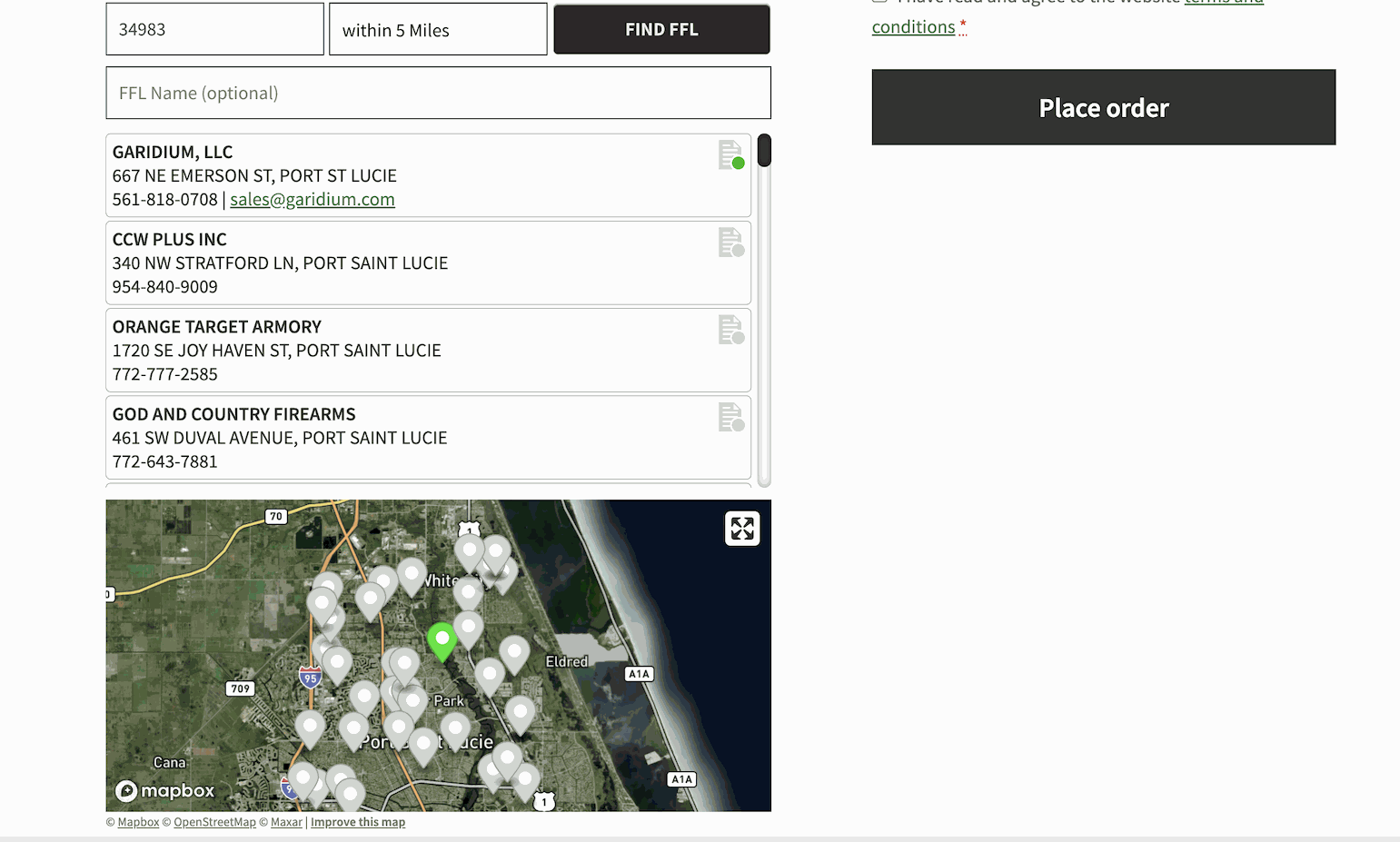
Here is what the plugin looks like on the checkout page. You will have the option to place the component in different locations. After the user enters in a zip code, a distance to search in miles, and an optional Name search, a list and map appear. The list will show FFL's in the zip code provided, along with any nearby zip codes within the distance selected. There is an indicator in the list as to whether or not we have the signed copy of the FFL on file. If it's green, we do... otherwise it's red. The customer will then select a FFL from either the list or the map, and the shipping details will be auto-populated. The shipping address fields non-editable, except by selecting a FFL via the plugin component.
Built by a FFL, for FFL’s. This plugin will add a FFL search & selection widget to your checkout page for products requiring FFL Shipment.
FFL Checkout was originally built to meet the operational needs of my own FFL business. Over time, it has grown into the most complete FFL Checkout solution for WooCommerce — refined through input from hundreds of licensed dealers. The plugin empowers FFLs to stay compliant by capturing required information, enforcing shipping restrictions, and guiding customers through the purchasing process for firearms and ammunition. See the plugin in-action on garidium.com, and make sure to look at the FAQ section. Thank You, Gary (FFL Cockpit/Checkout Founder)
Feature Highlights:
- Advanced FFL Search & Selection – Easy-to-use FFL searching by zip code, distance, and name with intelligent list view on checkout page
- Interactive Mapping – Optional map view with no Google Maps API key required, reducing costs and complexity
- Mixed Cart Intelligence – Seamlessly handle orders with both FFL and non-FFL items, automatically managing shipping addresses
- State Compliance Management – Configurable ammunition compliance with automatic FFL routing for restricted states
- Document Management System – Secure customer upload portal for state licenses (FID/FOID/FSC cards) with state-specific requirements
- C&R License Integration – Direct API validation and document management for Curio & Relic licenses
- FFL Dealer Controls – Blacklist problematic dealers and prioritize customer favorite FFLs in search results
- Address Validation & Security – PO Box blocking, billing/shipping address matching enforcement, and name verification
- State Shipping Restrictions – Block firearms, ammunition, or all products by state with custom error messaging
- Enhanced Order Management – One-click ATF ezCheck integration, FFL document upload/download, and comprehensive order details
- Secure eFile System – Crowd-sourced FFL document storage with protected access for streamlined fulfillment
- Real-Time Compliance – Automatic detection of document requirements based on shipping state and cart contents
Subscription Required
While the plugin is free to download and install, it does require you to purchase a subscription. The plugin will not be useful without the subscription allows the plugin to connect to the required data services, providing the following features:
- Access to a database we manage that synchronizes weekly to the ATF FFL database
- Access to the eFile system to download and upload FFL documentation
- Access to Mapping and Geocoding features for displaying FFL locations on a map