

Tracking and Consent Manager – WP Full Picture
Install tracking and marketing tools
WP Full Picture will help you set up consent management and tracking tools in minutes instead of days.
With WP Full Picture you will:
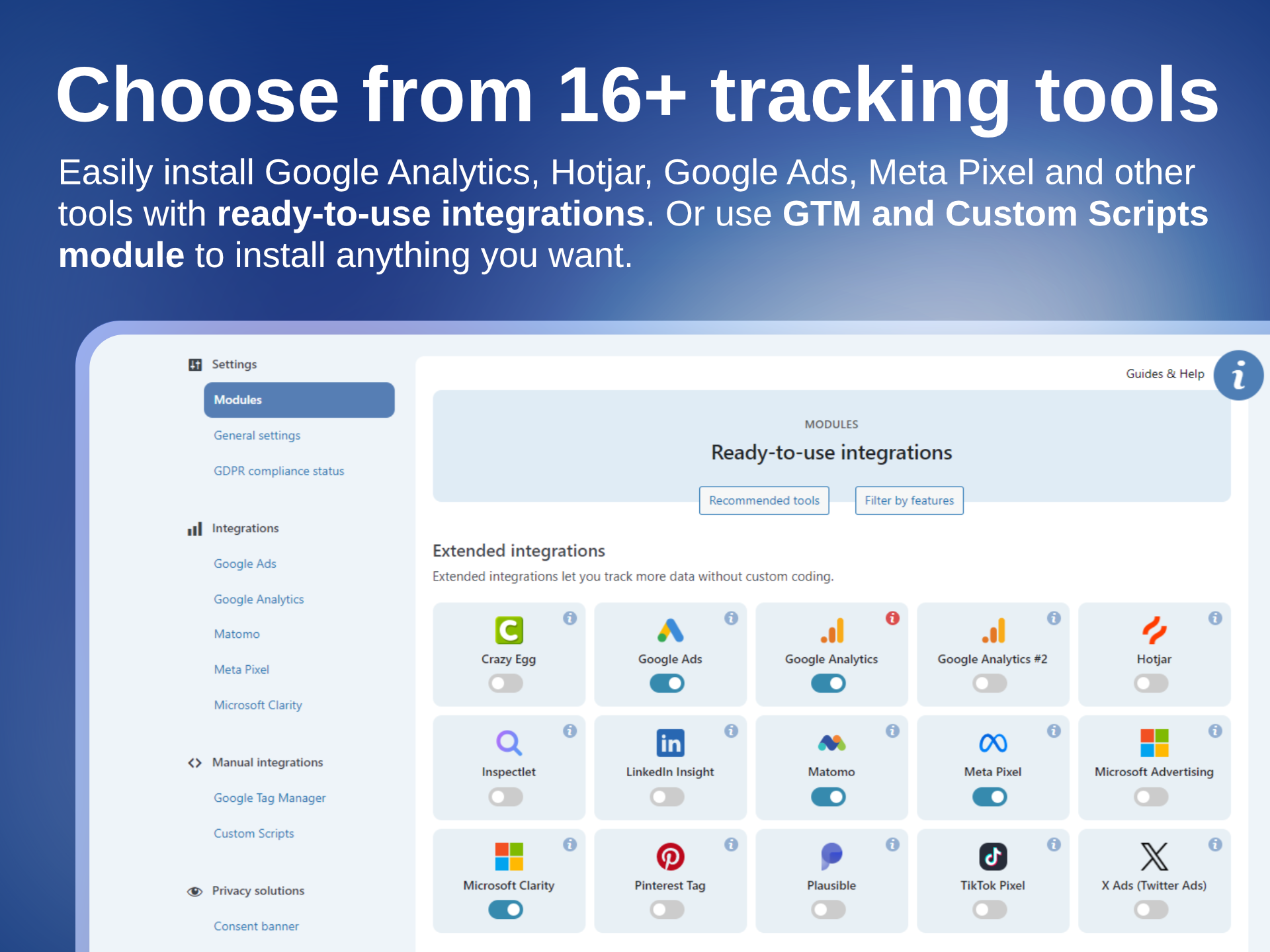
- Install tracking tools, like Google Analytics, Google Ads, Google Tag Manager, Meta Pixel and others, through ready-to-use, no-code integrations.
- Track user actions and WooCommerce events.
- Track your visitors in compliance with GDPR, PIPEDA, CPRA, etc, thanks to a built-in, pre-configured and full-featured consent management solution.
It replaces:
- Consent management platforms like CookieBot, CookieYes, Complianz, and others.
- Tracking plugins like PixelYourSite, Pixel Manager for WooCommerce, or Google Site Kit.
- Google Tag Manager plugins like GTM4WP.
🍪 FREE CONSENT MANAGEMENT
WP FP comes with a powerful, free consent management solution.
It automatically manages all tracking tools that you install with WP FP’s integrations and lets you block other tracking scripts and HTML elements (built-in page scanner available).
It includes:
– Highly customizable consent banner
– Three modes: opt-in, opt-out, and notification-only
– Support for Google Consent Mode v2 Advanced and Microsoft UET Consent Mode
– Recording proof of consent (required by GDPR)
– Blocking third-party scripts (until consent)
– Replacing tracking iframes with placeholders (until consent)
– GDPR setup helper
– Scanner of tracking scripts and HTML elements
No complicated setup. No subscriptions for cookie scanning.
🚫 What it doesn’t do
WP Full Picture doesn’t scan for cookies – it scans for tracking scripts.
WP Full Picture automatically manages all tracking tools that you install with its integrations. To find and block other tracking tools you should:
- Use the WP FP page scanner — it generates a report of potential tracking scripts and HTML elements.
- Upload the report to an AI tool
- The AI will check which of these scripts are trackers and tell you how to block them with WP Full Picture.
WP Full Picture doesn’t display cookie lists
WP Full Picture doesn’t display cookie lists and their descriptions on privacy policy pages – it’s not required by law and it’s technically impossible. You can read more about it here.
🧩 INTEGRATIONS WITH TRACKING TOOLS
WP Full Picture comes with ready-to-use, no-code integrations with:
- Google Analytics integration
- Google Ads integration
- Meta Pixel integration
- Pinterest Ads tag integration
- Hotjar integration
- Twitter / X integration
- Microsoft Advertising integration
- Microsoft Clarity integration
- TikTok Pixel integration
- LinkedIn Insights Tag integration
- Plausible Analytics integration
- Matomo integration
- Inspectlet integration
- Crazy Egg integration
- PostHog (installation only)
- Simple Analytics (installation only)
Need something else?
⚙️ Tag managers and addons
If you need to install other tracking tools, WP FP gives you three options.
Option 1. Custom Integrations module
To quickly install tracking tools, you can use Custom Integrations module. All tools installed with this module are automatically managed by the consent management system—with no extra setup!
Option 2. Google Tag Manager
For more advanced users, WP Full Picture comes with Google Tag Manager integration.
As with GTM4WP, it automatically sends WooCommerce events to the dataLayer, but it doesn’t stop there. You can also use our pre-configured functions to track (and send to the DL) user actions and page data.
Option 3. Build your own integrations
WP Full Picture is extendable. Download an example addon and turn it into a new integration with any tool you want. Then use it yourself, share or start selling.
👁️ WHAT YOU CAN TRACK
WP Full Picture lets you track extra information about your users’ actions. You can track:
- WooCommerce events (see below)
- Clicks in affiliate links, contact links, buttons and other page elements
- Form submissions
- Views of popups, ads and pricing tables
- User roles and statuses
- and more
🛒 WooCommerce tracking
WP Full Picture tracks all major WooCommerce events in 14 tracking tools, including Google Analytics, Google Ads, Meta Pixel, and Google Tag Manager.
It tracks key actions like:
- Product views and list views
- Additions to cart
- Starting checkout
- Completed purchases
- Coupon usage and more
Every event includes detailed product information for accurate conversion tracking and smarter ad targeting.
✨ UNIQUE FEATURES
📈 Embedable analytics dashboards
With WP Full Picture, you can embed analytics dashboards from BI tools, like Google Looker Studio, Databox, and other BI platforms directly in your WP admin.
🔗 Tracking exclusion link
The first rule of good data – do not track yourself.
With WP Full Picture, you can do it more easily than ever, and you don’t even need to log into your site. WP FP gives you a special link that automatically disables all tracking (even one that doesn’t wait for consent) for anyone who uses it. Use it yourself and give it to your employees so they don’t pollute statistics.
👀 Page scanner (different from others)
WP Full Picture’s page scanner lets you scan your website for potential tracking scripts and HTML elements. It generates a report (with personal data removed) that you should send to your AI. In return, it will give you a list of tracking elements that you should block in WP FP.
🛡️ GDPR Setup helper
GDPR Setup helper — an admin panel with always-current information about whether your setup is GDPR-compliant and clear guidance on what to update.
✅ Setup helper
The Setup helper is a special mode that lets you:
- See in your browser’s developer tools console whether your tracking tools work correctly – without using Chrome extensions like Facebook Pixel Helper, Tag Assistant, or similar tools.
- Set up tracking for custom post metadata and user data without a developer’s help
- Enable debug/test modes for Google Analytics and Meta Pixel
- Enable the page scanner (see above)
🏁 Engagement tracking (PRO)
Note: This is not engagement-time tracking. It tracks the user interactions that you configure on the page.
With engagement tracking you can:
- see which traffic sources bring you visitors who are the most interested in your products and content
- see how many of them are likely to make a purchase
- send them ads
🧲 Reactions (PRO)
This is a behavioral targeting function. It lets you trigger JavaScript functions and change the CSS classes of HTML elements in response to user behavior, session, page, and traffic source information.
💎 WP FULL PICTURE FREE vs PRO
WP Full Picture PRO gives you:
- server-side tracking
- status-based order tracking
- Engagement tracking
- Reactions
- Custom event builder
- Geolocation
and many more.
For the full list of PRO features, please check out the Free vs Pro comparison