

Flipset – PDF Viewer, PDF Embed, 3D Flipbook & Document Library
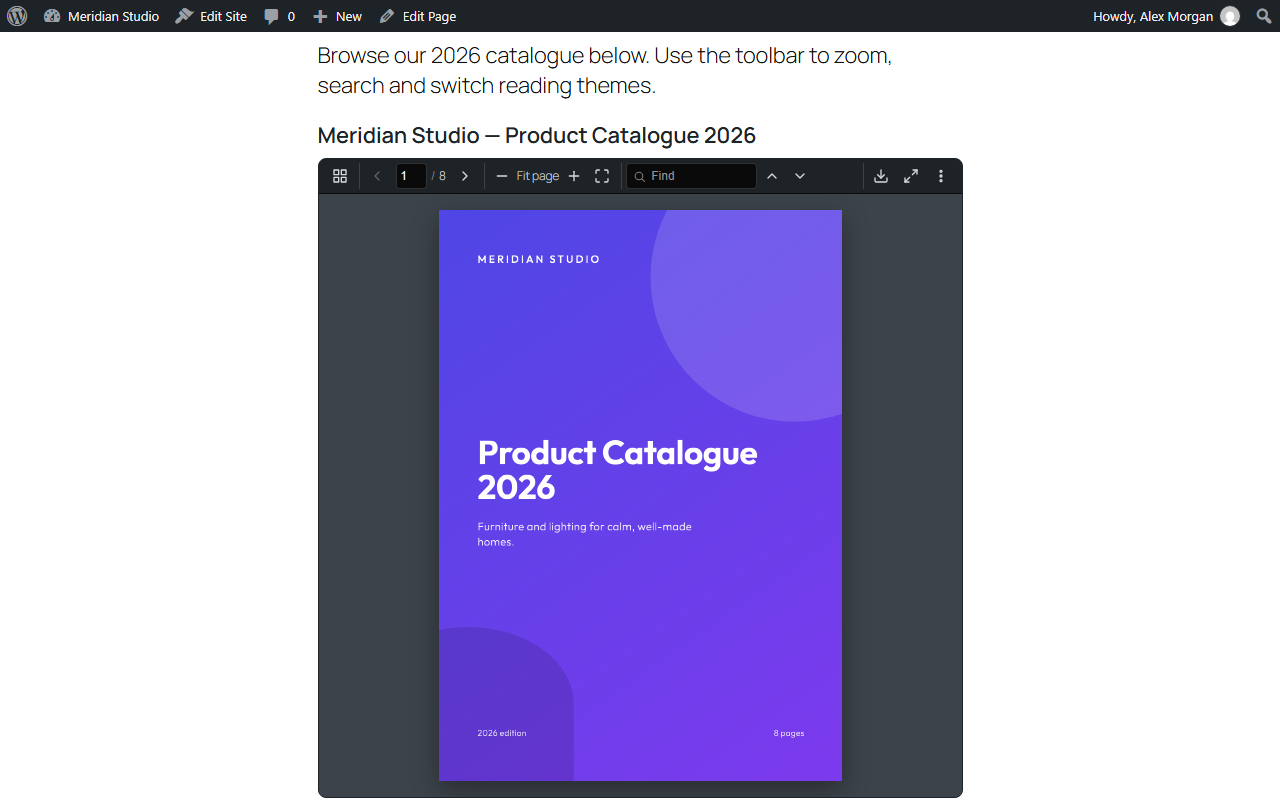
Front-end viewer with the compact toolbar (page, zoom, find, theme, share, fullscreen).
Flipset embeds PDF documents in posts, pages and widgets with a PDF.js build that ships inside the plugin. Use a shortcode, a Gutenberg block, a page-builder widget, or paste a PDF link on its own line. There is no CDN, no external service and no API key: rendering happens in the visitor’s browser, from files on your own site.
👉 Live demo · Documentation · Quick start · Shortcodes · Developer hooks · Support · GitHub
At a glance
- What it is: a free WordPress PDF viewer, PDF embed plugin, 3D flipbook and PDF document library.
- How to add a PDF: shortcode
[flipset file="https://example.com/document.pdf"], the “Flipset Viewer” block, a page-builder widget, or a PDF link pasted on its own line. - View modes: single page, continuous scroll, two-page spread, 3D flipbook (
view="page|scroll|spread|flip"). - Document library:
[flipset_library]– a grid or list of your Media Library PDFs with search, sort and pagination. - Works with: Gutenberg, Elementor, Divi, Beaver Builder, WPML, Polylang, WP Rocket, W3 Total Cache, Autoptimize, LiteSpeed Cache, SiteGround Optimizer.
- Privacy: no CDN, no external requests, no cookies, no tracking. PDF.js is bundled.
- SEO: PDF text is searchable in WordPress search; Open Graph / Twitter cover image; Schema.org
DigitalDocument; plain PDF link when JavaScript is off. - Accessibility: full keyboard control, screen reader page announcements, reduced-motion support, untagged-PDF check.
- Requirements: WordPress 6.0+, PHP 7.4+.
Quick start
- Install and activate Flipset.
- Embed one PDF:
[flipset file="https://example.com/document.pdf"] - Open it as a 3D flipbook:
[flipset file="https://example.com/document.pdf" view="flip"] - Show every PDF in your Media Library:
[flipset_library] - Prefer clicks to code? Use the “Flipset Viewer” or “Flipset Library” block, or Flipset Shortcode Builder with its live preview.
Common use cases
- Brochures, catalogues and menus – a 3D flipbook that opens on the first page.
- Reports, white papers and e-books – a searchable PDF reader with a document outline and last-page resume.
- Manuals, forms and price lists – a PDF document library visitors can search and sort.
- Course material and handouts – an accessible PDF viewer with download and print switched on or off per embed.
- Magazines and newsletters – a flipbook in spread view with a share dialog.
Why Flipset?
- Fast and local – bundled PDF.js, nothing loaded from a CDN, optional lazy loading.
- Accessible – keyboard controls, screen reader page announcements, and a check that flags PDFs without accessibility tags.
- 3D flipbook – page, scroll, spread and flipbook views, all in the free plugin.
- Searchable PDF text – WordPress site search can find words inside your embedded PDFs.
- Works where you build – Gutenberg, Elementor, Divi and Beaver Builder.
- Translation-ready – WPML and Polylang support; translations come from translate.wordpress.org.
Features
Viewer
- Shortcode
[flipset file="https://example.com/document.pdf"]and a “Flipset Viewer” Gutenberg block with a Media Library picker and first-page preview. - Paste a direct
.pdflink on its own line to embed it. PDF attachment pages can show the viewer too (a setting). - Zoom, fit page or width, rotate, find with match count, page thumbnails, document outline, hand tool, fullscreen, presentation mode, print and download.
- Selectable text and working links inside the PDF; password-protected PDFs ask for the password.
- Light, dark and sepia reading themes.
- Start page,
#page=4deep links and last-page resume on the visitor’s device. - Show or hide download, print, search, share and other controls per embed or site-wide.
- Share dialog with X, Facebook, LinkedIn, WhatsApp, email and copy link.
- Clear message with a direct link when a PDF on another domain blocks cross-origin access (CORS).
Flipbook and view modes
- Single page, continuous scroll, two-page spread and 3D flipbook (
view="flip"). - Realistic page curl with a short page-turn sound generated in the browser, no audio files.
- Spread and flipbook fall back to a single page on narrow screens.
- Touch support: pinch to zoom and swipe to turn pages.
Document library
[flipset_library]shortcode and “Flipset Library” block: a grid or list of your Media Library PDFs with first-page thumbnails, search, an optional sort menu and pagination; a document opens in place.- Flipset Docs & Features lists your PDFs with preview, search-index status and accessibility status, and copies shortcodes.
- Shortcode Builder with live preview and one-click presets; save an embed once and reuse it as
[flipset id="1"]or with the block.
SEO and search
- PDF text is extracted in your browser from Flipset Docs & Features and stored on your site, so posts and pages that embed a PDF match in WordPress search.
- Open Graph and Twitter image from the PDF’s first page, unless an SEO plugin already provides one.
- Schema.org DigitalDocument structured data.
- A plain link to the PDF is shown when JavaScript is off.
Accessibility
- Labelled toolbar buttons, visible keyboard focus and full keyboard control.
- Page changes are announced to screen readers; reduced-motion preference is respected.
- Flipset Docs & Features marks PDFs that are not tagged for accessibility.
Builders and integrations
- Native Elementor, Divi and Beaver Builder widgets for the viewer and the library.
- WPML and Polylang: a translated Media Library PDF is swapped in for the current language.
- Script exclusions for WP Rocket, W3 Total Cache, Autoptimize, LiteSpeed Cache and SiteGround Optimizer, so PDF.js is not minified, combined or delayed.
Developer friendly
- Public filters and actions, and DOM events such as
flipset:readyandflipset:pagechange, documented indocs/HOOKS.md. - WP-CLI:
wp flipset status,wp flipset reindex,wp flipset clear_cache. - Clean uninstall: settings and Flipset data are removed, your media is kept.
Shortcode reference
[flipset] – PDF viewer. Only file (or id) is required.
file– URL of the PDF.id– ID of an embed saved in Flipset Shortcode Builder.view–page(default),scroll,spreadorflip(3D flipbook).page– start page (default1).title– caption for the viewer, also used as its accessible name.width,height– a number with a CSS unit, for example100%or700px(defaults come from Flipset Settings).theme–light,darkorsepia.download,print,search,share,fullscreen,presentation,shortcuts,theme_btn–trueorfalse; leave out to use the site setting.hide– comma-separated controls to hide, for examplehide="share,fullscreen".loading–lazyoreager.hash–trueorfalsefor#page=deep links.resume–trueorfalseto remember the last page read.
Example: [flipset file="https://example.com/catalogue.pdf" view="flip" theme="dark" height="700px" download="false"]
[flipset_library] – PDF document library. No attributes are required.
columns– number of grid columns (default3).per_page– documents per page (default12).orderby–date(default),titleormodified.order–DESC(default) orASC.search–true(default) orfalsefor the search field.sort_control–trueshows a Newest / Oldest / Title A–Z / Title Z–A menu (defaultfalse).layout–grid(default) orlist.layout_toggle–trueshows a grid / list switch (defaultfalse).
Example: [flipset_library columns="4" per_page="8" sort_control="true" layout_toggle="true"]
Full reference with every value: https://flipset.thereadscope.com/flipset-docs/shortcode/
Extending Flipset
Flipset exposes public WordPress filters and actions (see Developer Hooks below) so add-ons and themes can extend the viewer without modifying core code. No paid features are sold or locked in this plugin.
External services
Flipset does not contact any server on its own. It has no analytics, no licence check, no update ping and no remote scripts, fonts or images. The visitor’s browser opens an outside address only when the visitor clicks one of these links:
- Share dialog (X, Facebook, LinkedIn, WhatsApp) – the “Share” button in the viewer builds share links. Nothing is sent until the visitor clicks one; then the address of the current page (optionally with the page number) and, for X and WhatsApp, the document title are passed to that network in the link:
- Email share uses a
mailto:link and opens the visitor’s own email program; no server is involved. - “Powered by Flipset” credit – off by default. If an administrator turns it on under Flipset Settings Credit link, a normal link to https://flipset.thereadscope.com is shown under each viewer. The plugin sends nothing there; the visitor’s browser makes an ordinary page request only if the link is clicked.
- PDFs hosted on another domain – if you embed a PDF from another website, the visitor’s browser downloads it directly from that host, which receives the visitor’s IP address. PDFs in your own Media Library are served by your own site.
Third-party libraries
- PDF.js 3.11.174 by Mozilla – Apache License 2.0. Bundled in
assets/vendor/pdfjs/aspdf.min.jsandpdf.worker.min.js, the official minified build from thepdfjs-dist3.11.174 release. Upstream project: https://github.com/mozilla/pdf.js – the human-readable source for this version is at https://github.com/mozilla/pdf.js/tree/v3.11.174. Licence text: https://www.apache.org/licenses/LICENSE-2.0 - Inter by The Inter Project Authors – SIL Open Font License 1.1. Bundled in
assets/fonts/inter/(a Latin-subset, weight-axis-only variablewoff2made from the official font withsubset-font, plusOFL.txt) and used only on the Flipset screens in wp-admin. Upstream project: https://github.com/rsms/inter – licence text: https://openfontlicense.org - No other third-party library or font is bundled. The plugin’s own JavaScript and CSS are shipped unminified.
Developer Hooks
Add-ons can extend the viewer through public WordPress filters and actions. The full list, parameters and copy-paste examples are in docs/HOOKS.md in the GitHub repository: https://github.com/itsmanzur/flipset/blob/main/docs/HOOKS.md – also online at https://flipset.thereadscope.com/flipset-docs/hooks/ (DOM events: https://flipset.thereadscope.com/flipset-docs/dom-events-js/).
Privacy
Flipset does not collect any visitor data, sets no cookies, and has no analytics or tracking. The plugin has no remote requests of its own (see “External services”).
What the plugin stores on your site:
- Settings – one option,
flipset_settings. - Saved embeds – a private custom post type,
flipset_embed, with the embed’s configuration in post meta. - PDF data – post meta on your PDF attachments (extracted text, page count, indexed flag, accessibility flag, thumbnail ID) and a combined search index on posts and pages that embed a PDF.
- Thumbnails – first-page PNG images generated in your browser and saved in the Media Library.
- Admin notice state – one user meta value per administrator who dismisses the welcome notice, and a short-lived transient used for the redirect after activation.
In the visitor’s own browser, Flipset uses localStorage (not cookies) to remember the last page read (flipset:page:<file URL>), the chosen reading theme (flipset_theme) and the chosen library layout, grid or list (flipset-library-layout). These values never leave the browser, and the visitor can clear them at any time.
The share feature only builds links; it contacts no one until the visitor clicks a link.
Deleting the plugin from the Plugins screen removes the settings, saved embeds, Flipset post and user meta, the transient and the thumbnails it generated. Your uploaded PDFs and other media are kept.
Credits
Flipset is developed and maintained by itsmanzur.
- Website and live demo: https://flipset.thereadscope.com
- Documentation: https://flipset.thereadscope.com/flipset-docs/
- Source code: https://github.com/itsmanzur/flipset
- Support forum: https://wordpress.org/support/plugin/flipset/
- Bug reports: https://github.com/itsmanzur/flipset/issues
- Help translate: https://translate.wordpress.org/projects/wp-plugins/flipset/
- PDF.js by Mozilla (Apache-2.0).