

Shipping Live Rates and Access Points for UPS for WooCommerce
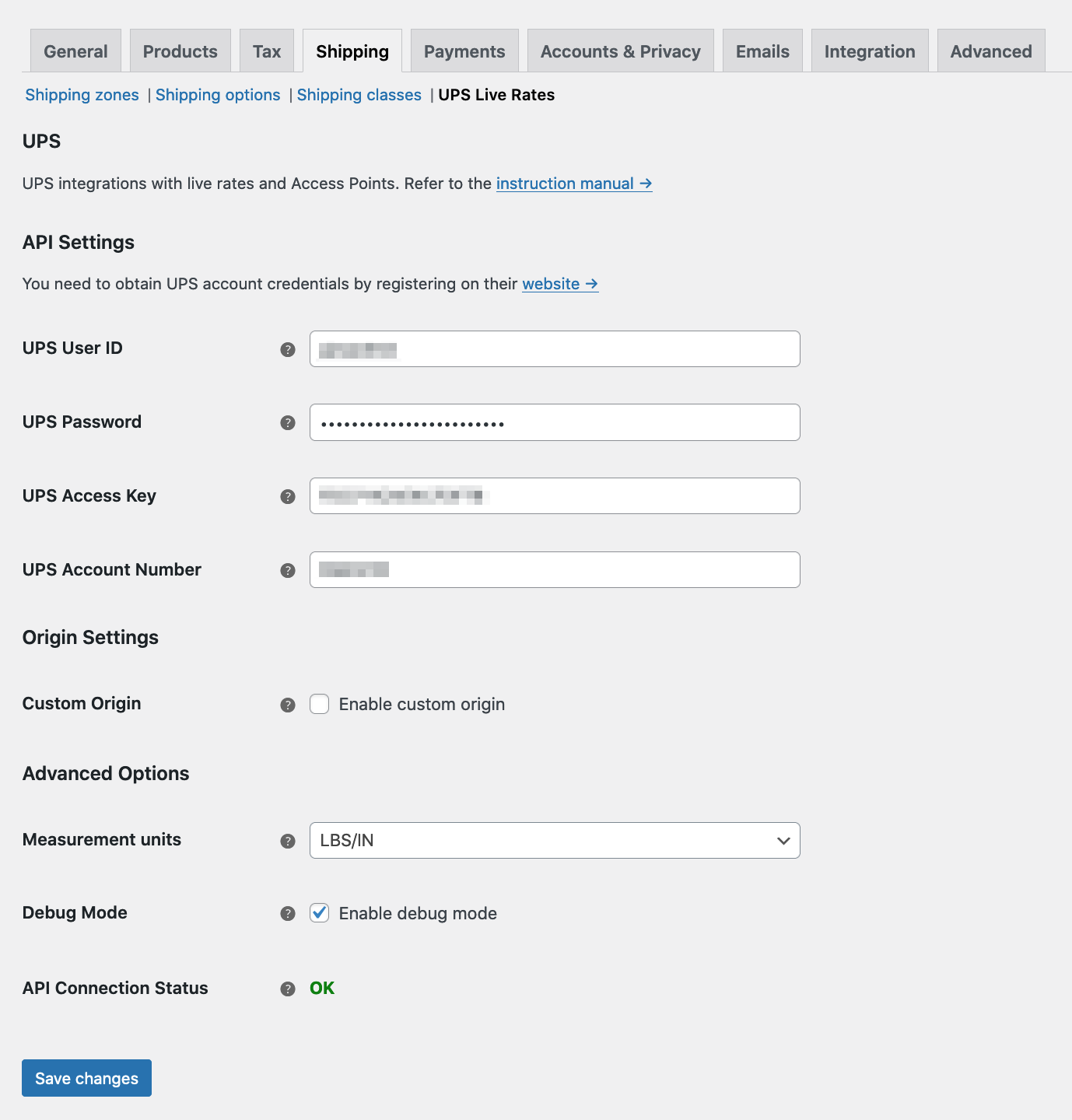
UPS general settings
The best free plugin to display UPS live rates in your WooCommerce store
Provide your customers with automatically calculated shipping rates for numerous UPS services and let them choose their preferred Access Points. You’ll integrate the plugin in just 5 minutes.
How does it work?
The shipping cost is calculated automatically online via UPS API connection, so your clients will see every UPS shipping option in the checkout with its real price. There’s no need to “create an application” on the UPS website.
You can offer delivery to a UPS Access Point, too. Allow your customers to pick up packages when and where it’s best for them. Enable Access Points support to let the plugin suggest the nearest points for the customer’s address and save the point to the customer’s order.
Upgrade to UPS PRO
Get priority e-mail support and access all PRO features, upgrade to Flexible Shipping UPS PRO now
or
Extend the default UPS functionalities with UPS Labels
Get the Flexible Shipping UPS Labels and create shipments, generate printable UPS shipping labels for placed orders and track parcels directly from your WooCommerce store!
Features
- Automatic shipping costs calculator for UPS live rates
- Pickup types selection
- Shipping cost for UPS services based on cart weight and shipping address
- OAuth one-click authorization with your UPS account (REST API)
- Alternative connection via UPS Access Key (XML API)
- UPS negotiated rates
- Nearest UPS Access Point
- Limiting services only to those available for the customer’s address
- Manual UPS services limiting
- UPS SurePost services available for United States shipments
- Ability to add insurance
- Fallback cost in case of connection problems with the UPS API
- All currencies supported by UPS
- Debug mode
- Compatible with WooCommerce Shipping Zones
- Free shipping threshold
- UPS Labels extension compatibility
PRO Features
- Automatic box packing for multiple products based on weight and volume
- UPS Access Points selection and search
- Fixed value and percentage handling fees/discounts for UPS rates
- Flat rate for UPS Access Points
- Estimated delivery date displayed at checkout
- Advanced estimated delivery date with maximum time in transit, cutoff and lead time
- Excluding certain days of the week from the estimated delivery date
- Destination address types
- Custom boxes with box weight and padding
- Various box packing methods
- Multi-currency support using WooCommerce currency switcher plugins
- Delivery Confirmation
Available UPS services
- UPS Express
- UPS Standard
- UPS Worldwide Expedited
- UPS Worldwide Express Plus
- UPS Worldwide Saver
- UPS Worldwide Express Freight
- UPS Worldwide Express Freight Midday
- UPS 2nd Day Air
- UPS 2nd Day Air A.M.
- UPS 3 Day Select
- UPS Ground
- UPS Next Day Air
- UPS Next Day Air Early
- UPS Next Day Air Saver
- UPS Simple Rate
- SurePost Less than 1 lb
- SurePost 1 lb or Greater
- SurePost BPM
- SurePost Media Mail
Actively developed and supported
Over 250.000 WooCommerce stores worldwide use our plugins. We constantly develop them, earning the reputation of authors of stable and high-quality solutions. We are also praised for providing excellent technical support. Join the community of our satisfied plugin users: bet on quality, and let our plugins do the rest.
The power of Table Rate
The UPS Live Rates plugin for WooCommerce is now compatible with Flexible Shipping – the most powerful Table Rate shipping plugin for WooCommerce. This provides greater control over delivery costs and allows you to take advantage of both live rates and condition-based shipping costs.
You can now combine the prices from the UPS Live Rates plugin with costs calculated based on price and weight. Moreover, when using Flexible Shipping PRO, you get access to 15+ conditions, such as shipping class or product categories. Try for free with Flexible Shipping!
Conditional Shipping Methods
Extend the default functionalities and conditionally display or hide the UPS shipping methods in your WooCommerce store with the Conditional Shipping Methods plugin. Define the rules when the specific shipping methods should be available to pick by your customers and when not to.
Hide the UPS shipping methods based on:
- Product (Product, Product tag, Product category, Shipping class)
- Cart (Cart total weight, Cart total value)
- Destination & Time (Day of the week, Time of the day, Location)
- Other shipping methods and shipping methods with zero cost.
Buy Conditional Shipping Methods now
Docs
View the dedicated Flexible Shipping UPS WooCommerce documentation
Support Policy
We provide limited support for the free version in the plugin Support Forum. Please upgrade to the PRO version to get priority e-mail support, as well as all PRO features. Upgrade Now
Why should you choose our UPS Live Rates plugin for WooCommerce as a shipping integration in your shop?
UPS is a well-known and trusted brand – one of the leaders in its category. It delivers 18 million parcels and letters worldwide every day.
- Integrate UPS services with your WooCommerce store via the UPS API.
- Provide your clients with a choice of the brand they trust.
- Integrate UPS services with your store within a few moments and offer dynamic UPS rates to your customers.
- Allow your customers to choose the Access Points service.
- Give your customers access to more than 27,000 locations across Europe and North America to pick up their online purchases.
This plugin fully integrates with WooCommerce. It lets you add UPS shipping methods to your store’s shipping zones in the WooCommerce shipping settings.
Interested in plugin translations?
We are actively looking for contributors to translate this and other Octolize plugins. Each supported language tremendously helps store owners to conveniently manage shipping operations.
Your translations contribute to the WordPress community at large. Moreover, we’re glad to offer you discounts for our PRO plugins and establish long-term collaboration. If you have any translation-related questions, please email us at [email protected].
Head over here and help us translate this plugin:
https://translate.wordpress.org/projects/wp-plugins/flexible-shipping-ups/