


Flexible Product Fields (WooCommerce Product Addons) – WooCommerce Product Page Editor
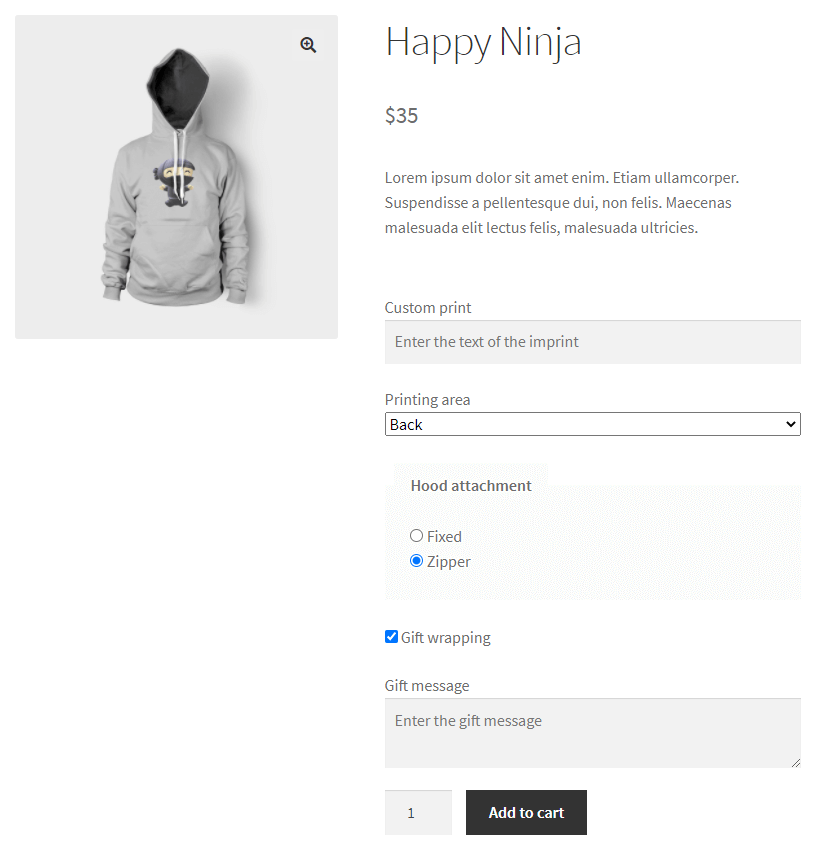
Advanced product fields for WooCommerce products
The Flexible Product Fields plugin extends WooCommerce product options with WooCommerce extra product addons. It is a product page configurator that allows users to set a product tailored to their needs. Creating additional WooCommerce product fields in the management panel is very simple and gives a lot of options when making changes.
See how to customize your WooCommerce products with extra fields, configurable options, and product add-ons 🚀!
Customize WooCommerce product pages
You may use the plugin to add custom fields, extra options, and edit the WooCommerce product pages easily!
- Add options and custom fields for WooCommerce products quickly 🔘
- Sell more with the WooCommerce configurable product pages 🎚️
- Increase the cart value thanks to the WooCommerce product addons, bundles, and extra options 🛒
- Use the plugin as your WooCommerce product customizer, configurator, and product page designer 🎨
- Add custom product fields with or as a faster alternative to WooCommerce variations 🪁
- Define groups of custom fields to WooCommerce products 🗂️
- Set optional or required fields in seconds 🛑
- See the customer choices for product addons directly in WooCommerce orders ⭐
- Manage product options with the easy-to-use plugin interface 🎚️
- Set advanced product fields for WooCommerce products 🎛️
- Give customers a better WooCommerce shopping experience with the frontend product configurator ⭐
- Offer products with options, color swatches, and add-ons 🔥
- Set additional product variation images in WooCommerce 🖼️
- Change the product page layout for all or selected WooCommerce products 🎨
- Enable product personalization in WooCommerce ⭐
- Set custom products in WooCommerce ⚙️
- Add color picker, input, text, select, and more custom fields for free 🍭
- Sell products with input text or images, for example, t-shirts 🐾
- Add warranty, insurance, or product options 🛡️
- Charge for extra product options and add-ons (PRO) 💰
- Let users upload files or pick a date (PRO) 📅
- Compatible with new units of measure with Flexible Quantity – Measurement Price Calculator for WooCommerce
Have you heard about our new plugin? It’s an add-on for Flexible Product Fields PRO that lets you easily sell accommodations, hourly services, and day-based bookings using standard WooCommerce products — no complex booking system needed. Check out Flexible Booking for WooCommerce!
Some examples of using WooCommerce extra product fields
- Text fields for entering prints on T-shirts or engraving
- Text fields with number and email/URL validation
- Select and Radio fields with predefined text options – e.g. for selecting sizes or components
- Color swatches and a color picker for selecting the color of the product
- Date product option
- Checkbox with an additional service such as gift wrapping or insurance
- Other fields that enrich the product page with text (Headings and Paragraphs) or images
- and other extra product fields…
Areas where WooCommerce extra product options are shown
WooCommerce custom product fields are visible on the product page in the area above or below the Add to Cart button (depending on the settings).
WooCommerce product add-on will also appear on the Cart and Checkout page (as a summary – the extra product fields cannot be edited there) and in the dashboard in the Order Details.
>>> Go to the FPF admin demo <<< – here you can test the admin panel of all WP Desk plugins including Flexible Product Fields
FREE
Main features of the FREE version of this WooCommerce product page configurator
- Adding WooCommerce extra product options on the product page
- Showing labels and field values in cart summary and checkout page (read more)
- Marking custom product fields as required or not (read more)
- Editing options for each placeholder and tooltip
- Assigning CSS classes for field targeting and styling
- Saving product configuration (read more)
Fields available in the FREE version
Read more to find out which WooCommerce Product Addons are there in the FREE version of Flexible Product Fields:
- Text
- Textarea
- Number
- E-mail (New feature)
- URL (New feature)
- Checkbox
- Multi-checkbox (New feature)
- Select
- Multi-select
- Radio
- Radio with images
- Radio with colors (New feature)
- Time (New feature)
- Color (New feature)
- Heading (New feature)
- Paragraph (New feature)
- Image (New feature)
- HTML (New feature)
Assigning additional product fields in the FREE version
It is possible to assign a group of custom fields to a specific product.
PRO
Main features of the PRO version
Read more to find out what you can get in the PRO version of this WooCommerce product configurator:
- Variable product support
It’s possible to add custom product fields for specific variations independently. The plugin allows searching products and each variation. On the product page, the custom fields will appear based on variation without reloading the page (AJAX). - Order Group
Arranging field groups in order (read more) - WooCommerce custom price fields
Assigning a fixed or percentage price (of on an initial price) to a field (read more) - Conditional logic for fields
Setting rules for conditional logic based on the values of other preset FPF fields (read more) - Quick Support
Providing fast and priority Helpdesk Support via email - Duplication
Duplicating field groups (read more)
Extra product fields available in the PRO version
- Date with advanced date exclusion options
- File Upload (New feature)
Assigning WooCommerce product extra fields in the PRO version:
You may also choose to customize the custom fields for more WooCommerce products:
- Categories
- Tags
- All products
- Specific variations
Upgrade to Flexible Product Fields PRO Now →
Data use policy
Learn about Use of Data Policy by WP Desk Plugins