

Fine MCP – WordPress MCP Server & AI Builder for Claude, ChatGPT & Elementor
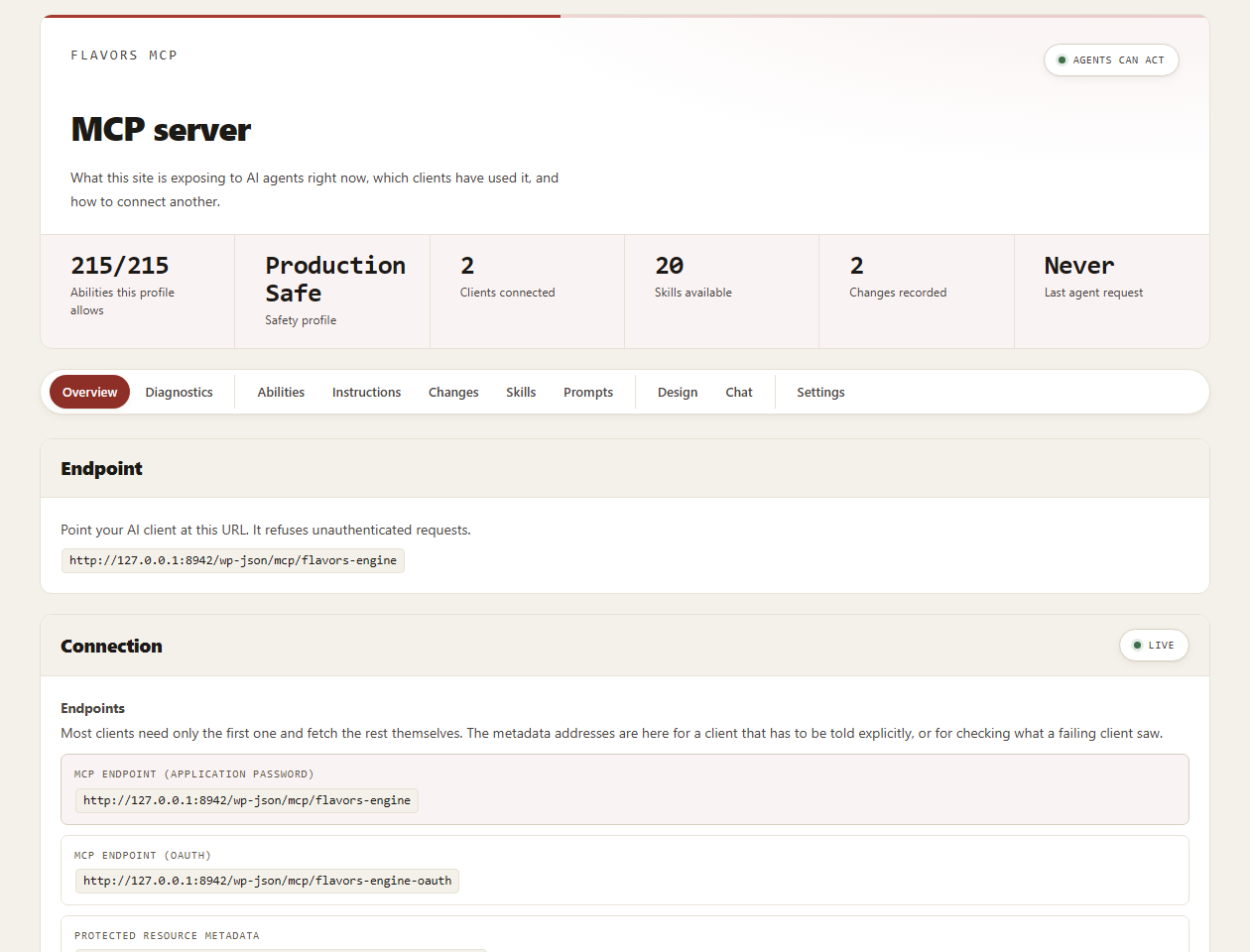
Free MCP server overview with the site's endpoint and active safety profile. Actual plugin UI from a local environment with synthetic demo data; client and ability counts depend on the installation.
Fine MCP is a WordPress MCP server. It connects Claude, ChatGPT, Cursor, VS Code and other AI agents to your own WordPress site through the Model Context Protocol (MCP), so your AI assistant can write posts, edit Elementor pages, update SEO fields and inspect page speed in conversation instead of handing you code to paste. It is also an Elementor addon with 151 free widgets, including 50 theme-builder widgets, and it handles basic WooCommerce tasks.
Built for Elementor: your AI reads and edits the real Elementor element tree, not only the post content. Elementor is optional, and the MCP server works on any WordPress site.
Start Free on WordPress.org. Elementor widgets work in the editor; an external MCP client supplies its model. Optional admin Chat needs a supported WordPress AI client and configured provider. No model subscription is included.
Connect Claude to WordPress
Fine MCP works with Claude Desktop, Claude.ai and Claude Code. Open Fine MCP > Connect, choose your Claude client and follow the OAuth sign-in, or create an Application Password for clients that cannot open a browser. Then ask Claude to draft a post, restructure an Elementor page or tidy your menus, and the change happens on your site. Claude.ai connects from Anthropic’s servers, so the site must be reachable on the public internet.
Connect ChatGPT to WordPress
Choose ChatGPT on the Connect screen and follow the steps shown there to add your site’s MCP server URL as a connector. ChatGPT reaches your site from OpenAI’s servers, so it can connect to a site on the public internet, not one that runs only on your local machine.
Cursor, VS Code, Codex and other AI agents
The Connect screen has ready-made setup for Claude Code, Codex, Cursor, VS Code, GitHub Copilot, Windsurf, Cline, Roo Code, Antigravity, Gemini CLI, Zed, OpenCode, Amazon Q / Kiro, Mistral Le Chat, Perplexity, Manus and other MCP clients. Every client uses the same endpoint on your own site, and every call runs under that user’s WordPress permissions and the site’s safety profile.
Elementor MCP: let AI build and edit Elementor pages
Your AI client can build an Elementor page from an outline (with a dry run first), move, duplicate and reorder sections and widgets, edit widget settings and discover each widget’s parameters. It can also create header, footer, single, archive, search and 404 templates with display conditions in the free Theme Builder. Requires Elementor.
What Free includes
- WordPress posts, pages, terms, menus and media tools, including supported page duplication with builder data.
- Structured Elementor reading and editing: build a page from an outline (dry run first), move, duplicate and reorder elements, and discover widget parameters. Requires Elementor.
- 151 Elementor widgets, including the 50 dedicated theme-builder widgets. Enable the items you use.
- Supported header, footer, single, archive, search, 404 and WooCommerce templates with display conditions. Placements depend on template type and installed plugins.
- Content and HTML accessibility checks; basic per-post SEO titles, descriptions and robots through supported installed providers including Yoast, Rank Math, AIOSEO and SEOPress.
- Requested PageSpeed inspection: Lighthouse metrics, opportunities and available Core Web Vitals. Public URL/API prerequisites apply; inspection alone does not improve speed.
- 16 WooCommerce basics tools: inspection, supported product-field edits, simple-product creation, basic coupons and order notes. Requires WooCommerce 9.0+.
- Supported site-health, recent PHP-error and configured backup-provider information.
- Security tools: file and database scans with quarantine and undo, login protection, two-factor sign-in, database cleanup previews, a 404 log and short-lived restore points before file changes.
Pro adds
Fine MCP Pro is a separate installed and licensed add-on:
- 110 additional Elementor widgets and Forms Suite.
- Resumable plans for pages, templates and navigation. Your connected agent performs the tasks; creating a plan creates no page content.
- Advanced supported builder, custom-field, SEO, forms, multilingual and WooCommerce integrations, with vendor dependencies.
- Configured held approvals, working copies, agent memory, bulk SEO, cache fixes, backups and reviewed plugin/theme updates, with prerequisites and recovery limits.
Compare Free and Pro. A licence does not include model access or unlock another FlavorsWP product.
Practical requests
Try: “Move this Elementor testimonial section above the FAQ”; “Update this post’s SEO title”; “Create a draft simple WooCommerce product”; “Inspect this public page with PageSpeed”. These are example prompts, not recorded client executions. Review results before publishing.
Connect and review
Open Fine MCP > Connect and follow your client’s OAuth or Application Password setup. Compatible transport, authentication, account/plan, plugin dependencies and user permissions determine available tools. Connection guide.
Safety profiles restrict actions; content writes can be allowed. Destructive, critical and administrator-level operations (settings, plugins and themes, security, scheduled jobs) wait until a signed-in administrator approves that exact call in wp-admin; an AI client cannot confirm them itself. Recorded undo has operation-specific snapshot, conflict and recovery limits. Permanent deletions, customer emails and external transactions are not universally reversible.
Optional Cloud service
No Cloud account is required for local MCP. Hosted access remains unverified. Pairing starts only when an administrator chooses Connect and confirms workspace, token scope and safety ceiling. Then hub.flavorswp.com receives site address/name, approved access token, public signing key, WordPress/PHP/plugin versions, safety profile, tool descriptions, pending updates, backup health, compact redacted issues and an inventory of installed plugins, themes, mu-plugins, drop-ins and core with their versions and available updates, plus live security status and events. The site stores the Cloud’s public key from its check-in answer and rejects any Cloud request not signed with it. Signed hourly check-ins and debounced notifications continue while paired. Fine MCP Cloud never acts on this site by itself and never changes its safety settings: it relays requests only from AI clients you connected to your own workspace, each through this site’s safety profile and change log. Every change it relays, content included, runs only after a signed-in administrator approves that exact change in wp-admin; the Cloud cannot approve them. Content and changes are sent for requested tools. PageSpeed may send the public URL to Google, and to the Cloud only for a connected site. Private keys remain in WordPress. Disconnect revokes the managed token and stops future check-ins. Cloud allowances and paid Pro runners/updates are separate.
Cloud requirements | Privacy | Terms
External-service recipients, triggers, data, privacy/terms and source/build information follow below.
External Services
This plugin contacts no external service on its own. Every service below is reached only when you act: by pressing a button, by connecting an AI client, or by adding a widget and entering your own API key for it. A default install, with nothing configured, makes no outbound request at all. An explicitly paired Cloud connection continues its signed status and event check-ins until you disconnect it, as described in the optional Cloud service section.
Google Fonts – On the Design screen, when a saved design names a font your browser lacks, a Preview with Google Fonts button appears. Pressing it loads a stylesheet from https://fonts.googleapis.com so the preview can render the font. Nothing is requested before you press it or on your site’s front end; the request contains the font name and, as with any browser request, your IP address and user agent. Google’s terms: https://policies.google.com/terms – Google’s privacy policy: https://policies.google.com/privacy
The WordPress.org plugin directory – The search-extensions and get-extension abilities query https://api.wordpress.org for plugin and theme information, exactly as your WordPress dashboard does. Security scans, fixes and status checks fetch checksums and plugin or theme information from api.wordpress.org and downloads.wordpress.org, and original copies of changed files from core.svn, plugins.svn and themes.svn.wordpress.org; only versions, slugs and file paths are sent. These run only when an administrator or a connected AI client calls them. WordPress.org’s privacy policy: https://wordpress.org/about/privacy/
Openverse – The search-images ability queries https://api.openverse.org for openly licensed photographs. It runs only when an AI client you have connected calls it, sends only your search terms and filters, and needs no account or API key. It returns links; a file is fetched into your Media Library only if you then call import-media-url with that URL. Openverse is a WordPress.org project. Openverse terms of service: https://docs.openverse.org/terms_of_service.html – Openverse privacy policy: https://openverse.org/privacy
The remaining services are reached only by widgets you place on a page, and only after you enter your own API key or access token for them. None of them is contacted on a default install, because without your credential the request is never made.
Mailchimp – The Mailchimp Form widget sends a subscription to https://<dc>.api.mailchimp.com when a visitor submits the form, where <dc> is the data-centre suffix of your own API key. This one sends visitor data: the email address the visitor typed, and any merge fields your form collects, together with your API key. It runs only on a form you added and configured with your key. Mailchimp’s terms: https://mailchimp.com/legal/terms/ – Mailchimp’s privacy policy: https://mailchimp.com/legal/privacy/
YouTube Data API – The YouTube TV widget and the YouTube mode of the Social Feed widget request channel and video listings from https://www.googleapis.com/youtube/v3/, using a Google API key you supply. The request contains your key and the channel or playlist you configured. Responses are cached, and no visitor data is sent. Google’s terms: https://policies.google.com/terms – Google’s privacy policy: https://policies.google.com/privacy – YouTube API Services terms: https://developers.google.com/youtube/terms/api-services-terms-of-service
The YouTube player (loaded in the visitor’s browser) – A page containing the YouTube TV widget loads YouTube’s iframe player API from https://www.youtube.com/iframe_api and embeds the player itself from youtube.com. This is the only script this plugin loads from another domain, and it has to be: YouTube’s terms require the player API to be served from their domain rather than bundled. It happens in the visitor’s browser, on pages where you placed the widget, and it gives YouTube the visitor’s IP address and user agent as any embed does – nothing is sent from your server. Google’s terms: https://policies.google.com/terms – privacy policy: https://policies.google.com/privacy – YouTube API Services terms: https://developers.google.com/youtube/terms/api-services-terms-of-service
Instagram – The Instagram mode of the Social Feed widget uses the Instagram API with Instagram Login (Business or Creator accounts). It requests your own recent media from https://graph.instagram.com, using an Instagram access token you supply, and about once a week refreshes that token through https://graph.instagram.com/refresh_access_token so it does not expire. The requests contain your token and a post count. Responses are cached, and no visitor data is sent. Meta Platform Terms: https://developers.facebook.com/terms – Meta Privacy Policy: https://privacycenter.instagram.com/policy
OpenWeatherMap – The plugin registers a weather proxy endpoint that requests current conditions from https://api.openweathermap.org for a location you configure, using an OpenWeatherMap API key you supply. The widget that uses it is part of Fine MCP Pro, so on this plugin alone the endpoint exists but nothing calls it; it is listed here because the code ships. Responses are cached and no visitor data is sent. OpenWeatherMap’s terms: https://openweathermap.org/terms – privacy policy: https://openweather.co.uk/privacy-policy
The AI client’s own domain, during sign-in (OAuth Client ID Metadata) – When an AI client identifies itself with an https URL as its client id, the plugin fetches that URL once (a plain GET with no site data) to read and cache the client’s name and redirect addresses. The host is the client’s, so it depends on which client you connect. Redirects are validated per hop; private and loopback addresses are refused. For Claude, that host is claude.ai or claude.com – Anthropic’s terms: https://www.anthropic.com/legal/consumer-terms – privacy policy: https://www.anthropic.com/legal/privacy
Your own site (self-diagnostics) – The Troubleshoot screen requests this site’s MCP endpoint, OAuth discovery and REST API, some with AI-client user agents to detect a hosting bot filter. No third party is involved.
AI model providers – No AI model is bundled. An external MCP client supplies its own model access. Optional admin Chat can make model-discovery and generation requests through the WordPress AI Client to the provider/model configured by your administrator. Those requests can include conversation history, system/site context, tool descriptions, requested tool results and attachments included in the conversation. A remote provider therefore receives the requested data; a self-hosted MCP endpoint does not mean Chat generation stays on this server. Review the configured provider plugin’s service disclosures, terms and privacy policy before enabling Chat. Provider credentials and billing are configured separately from this Free plugin.
Data kept on your own site (not an external service) – When Fine MCP Chat is used, the plugin counts the AI tokens each person used per day (prompt tokens, completion tokens and calls) and keeps that count in the person’s WordPress user meta for 62 days, so the Chat screen can show a usage meter. Nothing about it is sent anywhere, and it is deleted with the plugin’s other data on uninstall.
AI client sign-in addresses (no request is made) – The Connect screen shows the sign-in address of the AI client you choose, and the OAuth flow lists that client’s callback address as an allowed redirect target. For Claude those addresses are on the claude.ai and claude.com domains; other clients have their own. Your browser is sent there when you press “connect”, and the plugin checks returning requests against them. The plugin never opens a connection to them or sends them data. Anthropic’s terms: https://www.anthropic.com/legal/consumer-terms – privacy policy: https://www.anthropic.com/legal/privacy
Google PageSpeed Insights – When a connected agent calls pagespeed-check, the plugin sends the requested public page URL and mobile/desktop strategy to Google at https://www.googleapis.com/pagespeedonline/v5/runPagespeed. It uses Site Kit by Google when that plugin is configured and permits the user to read its data, otherwise the optional API key saved by the administrator or Google’s keyless quota. Results are cached for 15 minutes. No checks run on activation or on a schedule. Google terms: https://policies.google.com/terms – privacy: https://policies.google.com/privacy – API terms: https://developers.google.com/terms
Records kept on this site (not an external service) – A bounded log of PHP fatal errors (time, message, source, request path; secrets redacted). A log of up to 200 paths that returned 404, with hit count, last seen and the referring host only, never a visitor’s IP or full referrer (turn off with the flavors_kit_not_found_log_enabled filter). Encrypted restore points taken before an agent changes a plugin, theme or file, kept 24 hours and never including wp-config.php. Files a security fix quarantined, kept in a protected wp-content folder. None of these is uploaded; uninstall removes restore points, and the data-deletion option removes the rest.
Source Code
Everything is readable source except the third-party libraries below.
This plugin’s own code. All PHP is source. Under assets/, every minified file ships beside its unminified source (x.min.js next to x.js); SCRIPT_DEBUG loads the readable one. Nine inherited single-line scripts had no build step, so they ship reformatted in place, each with a header saying so. In assets/js/library/, aos, gradient-bg, shape-divider, tabs and list-actions are this plugin’s own code, with readable source beside the minified file.
The chat interface. includes/assets/chat/index.js is compiled from src/chat/index.tsx, which ships inside this plugin. Build it with the @wordpress/scripts toolchain that package.json declares:
npm install && npm run build:chat
Third-party libraries. Each ships minified as its project distributes it; readable source is at the address below.
- …