

Findit Order Sync for Bol.com
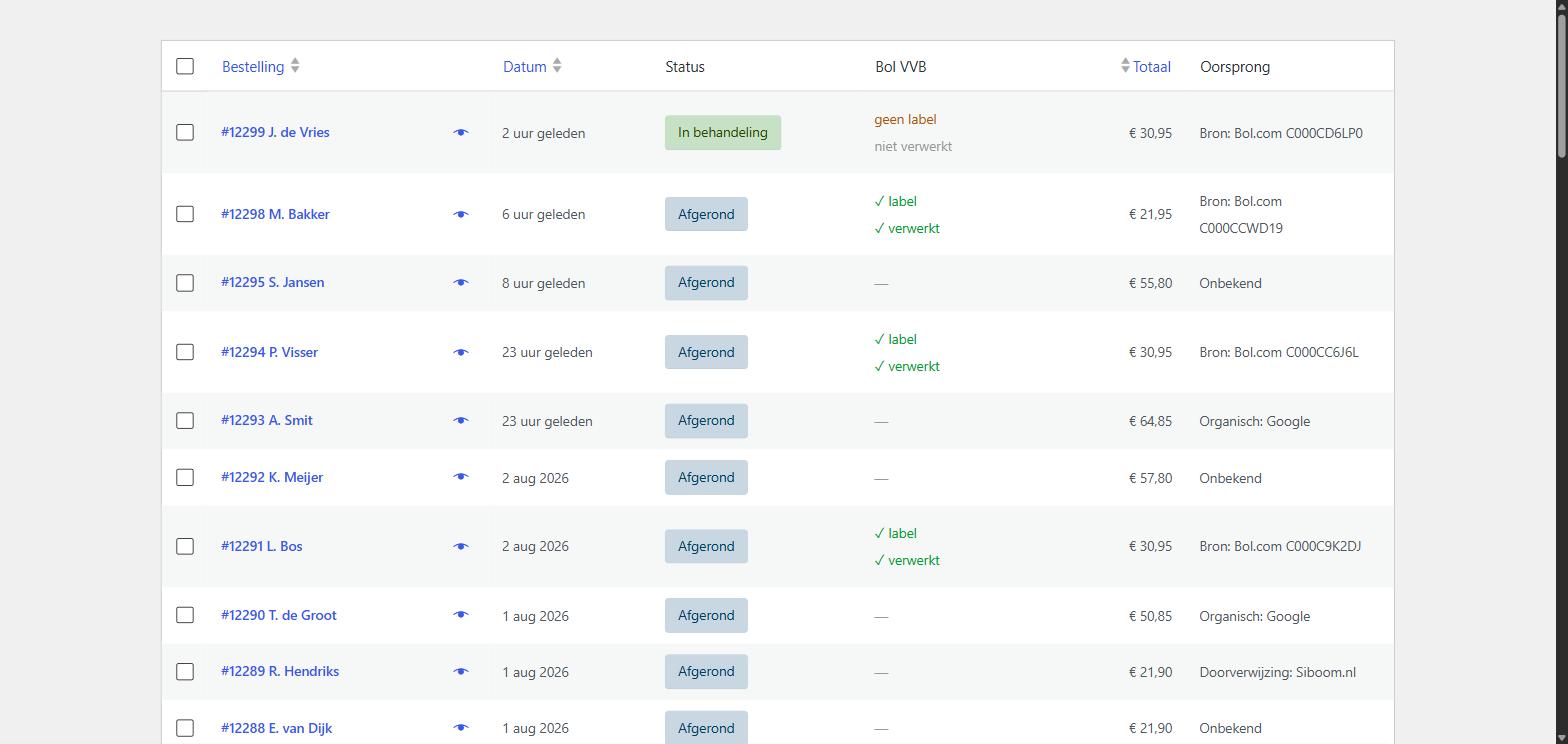
Bol.com orders arrive as regular WooCommerce orders. The "Origin" column shows which ones came from Bol.com, including the Bol order number, alongside your own orders. (The "Bol VVB" column in this screenshot comes from the separate Pro extension.)
Do you sell on Bol.com as well as in your own WooCommerce shop? Then you are probably working in two systems at once: copying orders by hand, tracking stock separately, and switching back and forth between your Bol seller account and your own dashboard.
This plugin is a Bol.com integration for WooCommerce: every five minutes it syncs your open Bol.com orders and imports them as real WooCommerce orders. From that moment on you handle them exactly like your own: the same order list, the same packing slips, the same reports. No separate connector or subscription service needed — the plugin talks directly to the Bol.com Retailer API.
What the plugin does
- Fetches orders. Every five minutes the plugin checks whether new open orders are waiting at Bol.com. New orders are created as WooCommerce orders with the status “Processing”.
- Matches products. Order lines are matched to your own products by EAN, so your WooCommerce stock follows along. For variable products the correct variation is selected.
- Complete customer details. Name, shipping address and billing address are included, along with the VAT number for business orders.
- Visible origin. Your order list shows which orders came from Bol.com, including the Bol order number.
- No duplicate orders. Every Bol order is imported only once, even if you previously used a different Bol connector.
- No unwanted emails. By default WooCommerce sends no order confirmation for Bol orders, because Bol.com already informs those customers.
- Insight when something goes wrong. A log shows what was fetched and what failed, including the literal message from Bol.com.
What you need
A Bol.com seller account and an API key. You create that yourself at partner.bol.com under Settings, API. Enter the Client ID and Client Secret in the plugin and click “Test connection”.
External service
This plugin communicates with the Bol.com Retailer API (api.bol.com) to fetch your orders. This happens only with the API key you enter yourself, and only to retrieve your own order data. No data is sent to any other party and nothing about your website is collected.
Authentication runs through login.bol.com, which issues the access token needed for each request.
- Bol.com Retailer API documentation: https://api.bol.com/retailer/public/redoc/v10/retailer.html
- Bol.com terms of use: https://www.bol.com/nl/nl/tc/gebruikersvoorwaarden-zakelijke-verkopen-via-bol-com/
Extension
A separate Pro extension is available with shipping labels, automatic shipment reporting, product synchronisation and review requests. It is not required to use this plugin: everything described above works without limits and without restrictions.