


Fieldom
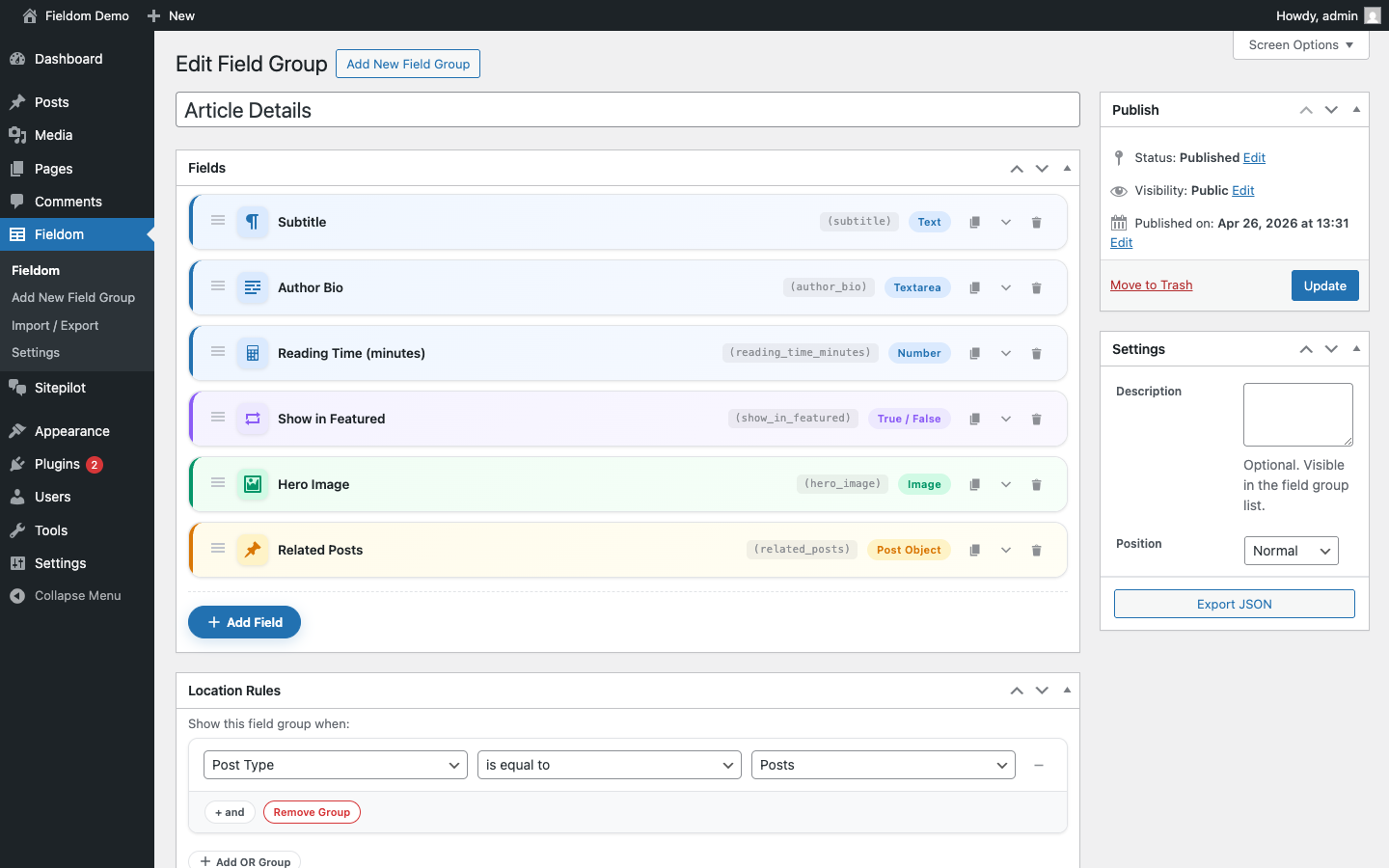
<strong>Field Group Editor — fields overview.</strong> Six fields in the "Article Details" group, each row showing a colour-coded type icon, field name slug, and category badge (Text, Textarea, Number, True/False, Image, Post Object). Drag handles let you reorder by dragging. Action icons on the right duplicate, expand, or delete a field.
Fieldom gives agencies and developers a community-governed, feature-rich custom fields plugin for WordPress.
Every feature is built and maintained in the open. No freemium gates, no SaaS backend, no phone-home. Just a solid custom-fields plugin that runs entirely inside WordPress.
Key Features
- 26 field types — text, textarea, number, select, checkbox, radio, true/false, date picker, time picker, color picker, URL, email, password, file, image, gallery, post object, taxonomy, user, link, WYSIWYG, message, tab, accordion, Repeater, and Flexible Content.
- Native Repeater field — supports drag-to-reorder rows, configurable sub-fields, and min/max row limits.
- Flexible Content field — multiple layouts each with their own sub-fields, drag-to-reorder blocks.
- Options Pages — register custom admin pages and store global settings outside of post meta.
- JSON import / export — export field groups as JSON and import them on any site. Field types, choices, location rules, Repeater sub-fields, and Flexible Content layouts are all mapped automatically.
- Standard postmeta storage — values are stored in standard
wp_postmetausing established key conventions, compatible with any plugin that reads WordPress post meta. - Template helpers —
fieldforge_get(),fieldforge_the(),fieldforge_have_rows(),fieldforge_the_row(),fieldforge_sub_field(),fieldforge_the_sub_field(),fieldforge_update_field(),fieldforge_get_option(),fieldforge_update_option(). - Location rules — show field groups by post type, post status, user role, page parent, or page template. OR groups and AND rules.
- Conditional logic — show or hide individual fields based on the values of other fields.
- REST API — field values exposed via the WordPress REST API with location-rule filtering.
- Local JSON sync — field groups saved as JSON files alongside your theme for version control.
- 100% GPL, no SaaS — runs entirely inside WordPress. No external services.
Basic Usage
- Go to Fieldom Add New to create a field group.
- Click + Add Field, choose a field type, give it a name and label.
- Set a location rule (e.g. “Post Type is equal to Post”).
- Publish the field group.
- Edit any matching post — your fields appear as a meta box.
In your theme templates:
<?php echo esc_html( fieldforge_get( 'subtitle' ) ); ?>
Or simply:
<?php fieldforge_the( 'subtitle' ); ?>
Repeater Usage
<?php while ( fieldforge_have_rows( 'team_members' ) ) : fieldforge_the_row(); ?>
    <h3><?php fieldforge_the_sub_field( 'name' ); ?></h3>
    <p><?php fieldforge_the_sub_field( 'role' ); ?></p>
<?php endwhile; ?>
JSON Import
Go to Fieldom Import / Export, paste your field group JSON, and click Import. All supported field types and location rules are mapped automatically.
See docs/json-import.md in the plugin folder for the full import guide.
Roadmap
- v0.2 — Gutenberg / block editor field meta boxes
- v0.3 — Clone field
- v0.4 — Improved conditional logic UI builder